
Left-handed mouse users know the small frustrations that add up, a wrist angle that feels off, a button layout that slows you down, or a shape that never quite settles into your hand. This roundup focuses on vertical mice, wireless models, and one wrist rest, so you can match the setup to your desk, commute, or long work session without guessing.
You’ll see simple plug-and-play picks, rechargeable options, and a few more polished business or gaming-leaning choices. The goal is straightforward, help you find a shape and feature set that feels natural during real day-to-day use, not just in a spec list.
Quick Look At The Shortlist

SUNGI Left-Handed Mouse 2.4GHz Ergonomic Vertical Mouse

Ergonomic Left-Handed Wireless Vertical Mouse 2.4G
KUNSI Left Handed Mouse 2.4G Wireless Vertical Mouse
Logitech G PRO X2 SUPERSTRIKE Wireless Gaming Mouse

Perixx PERIMICE-713LR Cordless Rechargeable Vertical Mouse
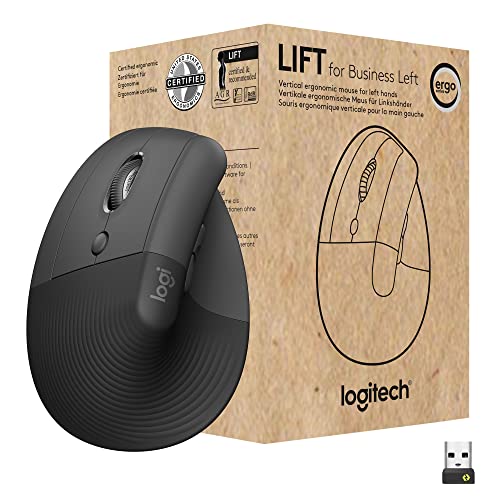
Logitech Lift for Business Vertical Ergonomic Mouse Left Handed

MEETION Left-Handed Ergonomic Vertical Wireless RGB Mouse

DELTAHUB Carpio 2.0 Left-Handed Wrist Rest for Mouse
More Details On Our Top Picks
The SUNGI keeps the setup simple, which matters more than flashy extras for a desk mouse you’ll use every day. Its 2.4GHz wireless connection uses a USB receiver, and the receiver stores in the bottom of the mouse, so you’re not hunting for a loose dongle.
The vertical shape is the main draw here, since it puts your hand in a more natural handshake posture than a flat mouse. The trade-off is that a first-time vertical mouse user may need a short adjustment period, but that’s normal with this shape.
Strong Points
- USB receiver setup stays straightforward for a home office or shared workstation.
- Three DPI steps, 800, 1200, and 1600, let you tune pointer speed to spreadsheets or casual browsing.
- The vertical body supports a more upright hand position, which can feel less cramped during long sessions.
- Storing the receiver inside the mouse makes travel or drawer storage less messy.
Things To Consider
- It uses a USB receiver rather than Bluetooth, so it suits computers with open USB ports.
- The vertical layout can feel unfamiliar for the first few days.
- Black is practical, but it also shows lint and fingerprints more easily than some matte finishes.
Feature Snapshot
Who It Suits Best
Desk workers who want a straightforward left-handed vertical mouse without extra setup will get the most from it.
A Better Fit Elsewhere
Perixx PERIMICE-713LR is the smarter choice for you if rechargeable use matters more than a basic wireless setup.
This BeWishes mouse follows the same vertical-left-handed idea as the SUNGI, but it leans into a more budget-minded profile. The 2.4G wireless connection and the three DPI levels give you the basics you need for daily work, email, and general browsing.
You may find it especially sensible in a simple home setup where you want the left-handed shape without paying for features you won’t use. The honest read is that it’s more about getting the essentials right than chasing a polished premium feel.
Positives
- Three DPI steps make pointer speed easy to adjust for documents or web use.
- Wireless operation keeps your desk clear of cable clutter.
- The left-handed vertical body is purpose-built, not a generic ambidextrous shape.
Minor Gripes
- The design is plain, which suits some desks and feels bare on others.
- It asks you to rely on the USB receiver, so it’s less flexible for devices with tight port access.
Core Details
Who Should Grab It
It suits left-handed office users who want a no-frills vertical mouse for light to moderate desktop work.
Swap It Out When
KUNSI Left Handed Mouse is the better match for you if extra buttons matter more than keeping the setup minimal.
The KUNSI stands out because it adds six buttons, which can make a busy desktop feel a little less fussy. That extra control is handy for back and forward browsing, shortcuts, or routine office work where small time savings add up.
It still keeps the familiar 2.4G wireless setup and the same 800, 1200, 1600 DPI range as several others here, so you’re not giving up the basics. In a laptop-and-monitor setup, that balance makes more sense than a mouse packed with features you’ll rarely touch.
Highlights
- Six-button layout gives you more control than the simpler vertical mice in this list.
- Three DPI settings help you shift between pointer precision and faster motion.
- Wireless design keeps the desk surface clean, which helps in shared or compact spaces.
- It works across MacBook, laptop, PC, and desktop use cases from the source listing.
Room For Improvement
- Six buttons can feel unnecessary for people who only want basic point-and-click use.
- The vertical form takes a little getting used to, especially after years with a flat mouse.
- Black finishes usually need occasional wiping to stay tidy.
Feature Rundown
Perfect Match For
It fits left-handed multitaskers who want a wireless mouse with a few useful shortcut-style controls.
Where A Sibling Pick Shines
SUNGI Left-Handed Mouse is the easier fit for you if you want a simpler vertical mouse without the extra buttons.
This one is in a different lane from the vertical left-handed options above, because it focuses on gaming movement, click feel, and light weight. The listed rapid-trigger magnetic analog switches and adjustable click haptics point to a mouse built for responsiveness, not relaxed office ergonomics.
At 61g, it should feel nimble in long gaming sessions or quick desktop motions, and the USB-C connection keeps charging and cable management familiar. It’s a sharper fit for PC or Mac users who want a gaming-first mouse and don’t mind that it isn’t a left-handed vertical shape.
Reasons To Buy
- Rapid-trigger magnetic analog switches are aimed at fast, deliberate input.
- Adjustable click haptics let you tailor how the mouse feels under your fingers.
- The 61g weight supports quick movement across a mouse pad.
- USB-C is a practical connection standard for modern desks.
Softer Spots
- It is not a left-handed ergonomic vertical mouse, so the shape serves a different need.
- Gaming-focused features can be more than casual office work requires.
- Black and white styling is clean, but it may not suit a low-key workspace.
Technical Sheet
Whose Shelf It Belongs On
It belongs with gamers who want a light, responsive mouse and do not need a left-handed vertical profile.
Look Elsewhere When
Logitech Lift for Business Vertical Ergonomic Mouse Left Handed suits you better when the priority is desk comfort rather than gaming speed.
The Perixx feels like a more thoughtful desk mouse than the simpler wireless picks, mostly because it combines cordless use with rechargeable behavior and a six-button layout. That mix matters for people who sit at a desk all day and don’t want to keep swapping batteries or dealing with a basic control set.
The charging flexibility is the part that stands out most, since the source details point to both wired and wireless charging support. For a home office or a shared work corner, that gives you a little more insurance against a dead mouse interrupting the day.
Upsides
- Rechargeable design reduces the need to keep spare batteries around.
- Six-button layout supports shortcuts and quicker navigation.
- Wireless operation keeps the desk uncluttered.
- Dual charging support adds flexibility during busy workdays.
Points To Note
- The charging system adds a little more setup thought than a simple USB receiver mouse.
- Six buttons may be more control than you need for very light browsing.
- Rechargeable gear benefits from regular charging habits, which matters in shared offices.
Details At A Glance
The Right Fit
It suits left-handed desk users who want a rechargeable vertical mouse with a fuller feature set.
Another Choice May Suit
BeWishes Ergonomic Left-Handed Wireless Vertical Mouse is the simpler path for you if you want fewer charging concerns and a more basic setup.
The Logitech Lift for Business reads like the most office-ready option in the group, especially for people who split time between laptops, docks, and multiple operating systems. It supports Bluetooth or Logi Bolt USB, and the quiet-click design suits a shared room where loud mouse taps get old fast.
That broad compatibility makes it easier to move between Windows, Mac, Chrome, and Linux workstations without changing your whole setup. One thing worth considering is that the premium polish shows up in the details more than in flashy extras, which is exactly what some office desks need.
What We Like
- Bluetooth and Logi Bolt USB give you two connection paths.
- Quiet clicks fit shared offices, meetings, and late-night work.
- Cross-platform support covers Windows, Mac, Chrome, and Linux.
- The left-handed vertical shape is purpose-built for desk comfort.
Small Caveats
- It is geared toward workstations, so gamers will likely want a different shape.
- Wireless flexibility is excellent, but it also asks you to manage one more connection choice.
- The cleaner office look may feel understated beside more stylized picks.
Core Details
Made For
It suits office users who want a left-handed vertical mouse with calmer clicks and broad platform support.
A Better Fit Elsewhere
MEETION Left-Handed Ergonomic Vertical Wireless RGB Mouse suits you better if you want more style and connection variety for a mixed home desk.
MEETION takes the left-handed vertical idea and adds a little more flexibility, including Bluetooth 5.2, Bluetooth 3.0, USB-A, and a USB-C adapter. That makes it a useful pick for mixed-device workstations, especially where one laptop needs Bluetooth and another still leans on a USB receiver.
The RGB lighting is the obvious visual difference from the quieter office picks like the Logitech Lift, so you get a mouse with more personality. You may find that balance useful on a gaming desk or a home setup where you want one device to do both work and casual play.
Best Bits
- Bluetooth 5.2 and 3.0 give you connection flexibility.
- USB-A support with a USB-C adapter broadens compatibility.
- Four DPI levels let you tune sensitivity more precisely than the simpler three-step mice here.
- RGB lighting gives the mouse a more visual presence on the desk.
Areas To Watch
- The extra lighting can feel unnecessary in a very plain office.
- More connection options mean more setup choices to keep track of.
- Styling matters here, so minimalists may prefer the Logitech Lift for Business instead.
Feature Card
Built With In Mind
It suits left-handed desktop users who want a vertical mouse with stronger connection flexibility and a more expressive look.
Where Another Pick Suits Better
SUNGI Left-Handed Mouse is the calmer match for you if you want a simpler wireless setup without RGB lighting.
The Carpio 2.0 sits in a different category from the other picks, because it supports your hand rather than replacing your mouse. That matters in a long office day, since a wrist rest can make a basic pointer setup feel much more settled without forcing you to relearn the controls.
The large, black left-handed design is aimed at desk comfort, gaming desks, and laptop stations where your mouse hand needs a little more structure. The trade-off is simple, this helps posture at the desk, but it does not solve the need for a left-handed mouse on its own.
What We Like
- Left-handed shaping is specifically tailored to your mouse hand.
- The easy-glide surface supports smoother pointer movement at the desk.
- Its role is simple, add comfort without changing your software setup.
- The large size gives your hand more room than a compact rest would.
Honest Caveats
- It is a wrist rest, so you still need a separate mouse.
- Desk space matters, since a large rest needs room beside the keyboard.
- People who prefer a more minimal desk may want a mouse-only solution instead.
Quick Facts
Right Fit
It suits left-handed office or laptop users who want more resting support for long pointer sessions.
Skip It When
Logitech Lift for Business Vertical Ergonomic Mouse Left Handed is the better match for you if you want a complete mouse replacement instead of a support accessory.
How To Choose The Right Left Handed Ergonomic Mouses
Shape Comes First
The biggest decision is whether you want a full vertical mouse or a more familiar flat shape. Vertical designs, like the SUNGI, BeWishes, KUNSI, and Logitech Lift, put your hand in a handshake-style position, which can feel more natural during a long desktop stretch. Gaming-first options like the Logitech G PRO X2 SUPERSTRIKE are built around speed and click response instead, so they serve a different purpose.
That shape choice affects how quickly you adapt and how comfortable the mouse feels after an hour at the desk. A left-handed ergonomic mouse should feel like it matches your hand, not like you’re forcing your hand to match the mouse.
Connection Style Matters More Than It Looks
Wireless 2.4G receivers suit simple desktop setups and work well for people who want low fuss. Bluetooth and multi-mode options, like the Logitech Lift for Business and MEETION, help when you move between laptops or don’t want to give up a USB port. Rechargeable models, such as the Perixx, also change the ownership rhythm because charging becomes part of the routine.
For a busy desk, that choice can matter as much as button count. The right connection style keeps your workspace tidy without making daily use feel fiddly.
DPI And Buttons Shape Daily Speed
DPI, which means dots per inch and describes pointer sensitivity, controls how far the cursor moves with your hand. Lower steps often feel steadier for detailed work, while higher steps help you cross a large monitor faster. Several of these picks offer 800, 1200, and 1600 DPI, while the MEETION gives you four steps for a little more flexibility.
Button count matters too. Basic two-button layouts stay simple, while six-button designs like the KUNSI and Perixx give you extra controls for browsing or routine shortcuts.
Match The Mouse To Your Workday
Office users usually benefit from quiet clicks, broad system compatibility, and a shape that disappears into the background. Gamers may care more about weight, switch feel, and quick motion than about a vertical profile. A wrist rest like the DELTAHUB Carpio 2.0 helps a different part of the setup, so it makes sense beside a mouse rather than instead of one.
Think about your desk habits, not just the product page. A good fit saves small bits of effort all day, and that’s where comfort starts to matter.
Things Worth Knowing First
Common Shopping Slip Ups
One common mistake is assuming every left-handed mouse has the same shape. Vertical mice and gaming mice solve different problems, so the right choice depends on whether your priority is comfort, speed, or a mix of both.
Another easy miss is connection planning. A USB receiver works well on a desktop, while Bluetooth or multi-mode support feels better on laptops and travel setups with fewer open ports.
What The Higher Tier Buys
Higher-tier models usually add better materials, quieter clicks, extra connection options, or more refined button behavior. That shows up in office-friendly mice like the Logitech Lift for Business, where the value is less about raw features and more about smoother daily use.
You’re also paying for convenience details such as rechargeable power, broader compatibility, or a more polished hand feel. Those extras matter most when the mouse lives on your desk for hours at a time.
Closing Thoughts
Your best match depends on how you use your desk, not just on the fact that you need a left-handed mouse. Simple wireless options make sense for everyday browsing, rechargeable models suit longer office schedules, and the Logitech Lift for Business stands out for quiet, flexible work setups. If your hand wants more support than a mouse can provide, the DELTAHUB Carpio 2.0 deserves a look too. The right shape should make the day feel less awkward, one small movement at a time.
