
Low-profile mice make sense when your desk is crowded, your laptop bag is already full, or your wrist gets tired of bulky shapes. You get a flatter profile that travels well, slips beside a keyboard more easily, and usually feels less fussy in everyday use. The trade-off is clear, though, because some slim designs favor style or portability over deep hand support. This roundup keeps the focus on what actually matters: comfort, connection options, quiet clicks, and which pick fits your routine.
Quick Look At The Shortlist
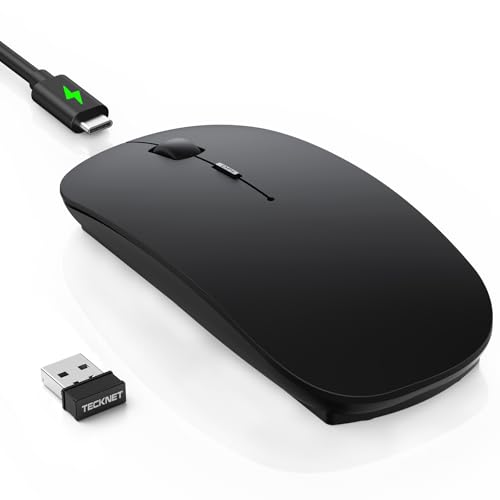
TECKNET Ultra-Thin Rechargeable Mouse

Logitech Slim Wireless Bluetooth Mouse for Mac

SABLUTE Wireless Mouse M41

Satechi Slim EX Wireless Mouse Citrus

Satechi Slim LX Wired Mouse Space Black

Logitech M350s Pebble 2 Bluetooth Wireless Mouse
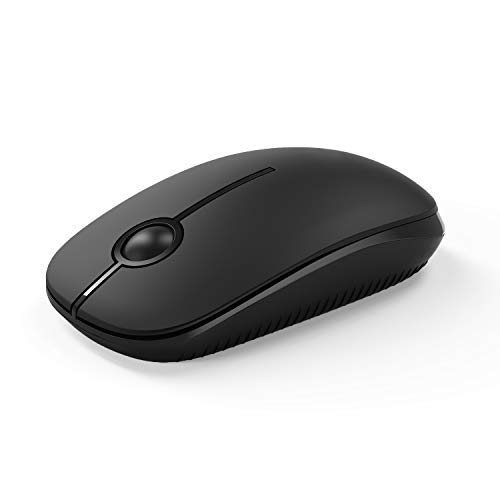
VssoPlor 2.4G Slim Computer Laptop Mouse

INPHIC Slim Wireless Mouse Rechargeable
More Details On Our Top Picks
TECKNET gives you a slim body with Bluetooth 5.2, Bluetooth 3.0, and 2.4G wireless support, so it fits people who move between a laptop, tablet, and desktop without wanting to keep re-pairing. The 6-level DPI setup matters because DPI, or dots per inch, changes how fast the pointer moves, and that makes the mouse feel calmer on one desk or quicker on another.
The rechargeable design keeps the shape tidy, and that usually suits commuters and hybrid workers who want one less thing to stock in a drawer. The honest trade-off is that a thin shell often feels less filling in the hand than a larger office mouse, so you are choosing portability first.
Strong Points
- Bluetooth 5.2, Bluetooth 3.0, and 2.4G support give you flexible pairing choices.
- Six DPI levels help you tune pointer speed for different surfaces and tasks.
- Rechargeable design cuts down on spare-battery clutter in a work bag.
- Ultra-thin shape tucks neatly beside a laptop sleeve or keyboard tray.
Things To Consider
- The low profile favors portability more than full palm support.
- Frequent switchers may still prefer a larger mouse for long spreadsheet sessions.
Feature Snapshot
Who It Suits Best
People who split time between home, office, and travel usually get the most out of this kind of connectivity mix.
Where A Sibling Pick Shines
Logitech M350s Pebble 2 Bluetooth Wireless Mouse suits a minimalist setup better, especially for you when quiet clicks and a smaller travel shape matter more than extra connection modes.
This Logitech model leans hard into portability, and that makes sense for anyone carrying a MacBook or iPad between meetings, cafes, and flights. The rounded corners and clean lines keep the look calm, while the slim body slips into a sleeve or bag pocket with little fuss.
It also tracks on multiple surfaces, which helps in the kind of day that moves from a kitchen table to a hotel desk. The catch is that an extra-slim body can feel petite during longer desk sessions, so it suits mobile work better than all-day, hand-filling comfort.
What We Like
- Compact shape makes daily carry easier.
- Multi-surface tracking helps in changing work spots.
- Rounded styling pairs neatly with a Mac setup.
- Low weight keeps bag load light.
Small Caveats
- The slim body may feel too petite for very long desk work.
- White finishes usually ask for a bit more cleaning care.
Core Details
Right Fit For
Mac and iPad users who value a tidy desk and frequent travel usually fit this mouse best.
A Better Fit Elsewhere
Satechi Slim EX Wireless Mouse Citrus suits you better when you want a more premium shell and broader device switching for mixed-platform work.
The SABLUTE M41 stays focused on the essentials: slim shape, quiet clicks, a USB-C adapter, and three DPI levels. USB-C, the newer oval-style connector used on many laptops and tablets, helps it line up well with current charging and accessory habits, which matters in a work bag that already carries too much gear.
Sleep mode is the other practical touch, because it helps the mouse sit quietly between sessions without you thinking about it. You may find the small size less relaxing for long edits or heavy spreadsheet work, but for study, travel, and casual office use it keeps things simple.
Reasons To Buy
- Quiet clicking keeps noise down in shared spaces.
- USB-C adapter support fits newer laptop setups.
- Three DPI levels offer usable pointer control.
- Sleep mode helps reduce day-to-day fuss.
- Portable build works well in a backpack or tote.
Areas To Watch
- The slim body may feel light for prolonged desk sessions.
- Smaller mice can take a little getting used to.
Feature Rundown
Built With In Mind
Students, commuters, and hybrid workers usually get the most from its compact shape and quiet action.
Swap It Out When
Logitech M350s Pebble 2 Bluetooth Wireless Mouse is the better fit when you want broader cross-device support and a more polished travel companion.
Satechi gives this mouse a more finished feel than the soft-plastic crowd, thanks to an anodized aluminum shell. Anodized means the metal has been treated for color and surface durability, and that matters because it usually helps a slim mouse feel sturdier in daily carry.
The three-way connection story is also strong, with two Bluetooth channels and a 2.4GHz USB-C receiver that let you move between devices without re-pairing every time. The trade-off is simple: the premium shell and switching flexibility tend to suit people who want a cleaner desk and a more deliberate setup.
Highlights
- Anodized aluminum shell gives the mouse a more substantial feel.
- Two Bluetooth channels plus 2.4GHz support make switching smoother.
- Quiet clicks suit shared desks and late-night work.
- Rechargeable design keeps the shape clean and modern.
Points To Note
- Premium materials usually ask for a higher budget.
- Aluminum can show scuffs more plainly than soft matte plastic.
Details At A Glance
Whose Shelf It Belongs On
People who split time between a laptop, tablet, and desktop often appreciate the flexible pairing more than casual users do.
Not Your Match When
VssoPlor 2.4G Slim Computer Laptop Mouse makes more sense for basic, low-cost use where a simple USB receiver is all you need.
The wired Slim LX is for people who want a low-profile mouse without worrying about pairing, charging, or dongles. That makes it appealing on a fixed desk, especially beside a desktop tower or a docked laptop where a cable is no trouble at all.
Quiet click performance and the aluminum USB-C design give it a cleaner, more desk-forward feel than the plastic wireless picks above it. The trade-off is obvious, though, because a wired mouse gives up bag-and-go flexibility in exchange for straightforward reliability.
Upsides
- USB-C wired design keeps setup simple.
- Quiet clicks suit shared offices and home workspaces.
- Aluminum build adds a more substantial feel on the desk.
- No charging routine means less day-to-day attention.
Room For Improvement
- The cable limits how cleanly it packs for travel.
- Wired use works best near a desktop or docked laptop.
Key Specs
The Right Fit
Desk-based users who prefer a neat, no-charging routine tend to get the most value from this model.
Reach For A Different Pick When
TECKNET Ultra-Thin Rechargeable Mouse fits better for commuters and mixed-device users who need wireless freedom more than a cable.
The Pebble 2 stays true to its name, with a small, smooth profile that disappears into a bag or a crowded desk drawer. It suits people who want a mouse that feels quiet and restrained, especially in shared spaces where click noise can get annoying fast.
The customizable button and Easy-Switch support make it more flexible than the most basic travel mice, though the shape still prioritizes portability over a full hand feel. That balance works well for short work sessions, laptop life, and mixed device use across Windows, macOS, iPadOS, Android, and Chrome OS.
Best Bits
- Very slim body travels well.
- Quiet clicks suit libraries, offices, and late work sessions.
- Customizable button adds a useful shortcut option.
- Easy-Switch support helps with multiple devices.
- Broad platform support keeps it versatile.
Honest Caveats
- The small footprint may feel cramped for larger hands.
- Travel-first design gives up some palm support.
Core Details
Best Suited To
Travel-minded users and small-desk setups fit this mouse especially well.
Look Elsewhere When
Satechi Slim LX Wired Mouse suits you better when a cable and desktop stability matter more than Bluetooth mobility.
VssoPlor keeps the formula simple: a slim shell, a USB nano receiver, and quiet optical clicking for daily laptop or desktop use. That makes it a sensible spare mouse or a starter pick for someone who wants a straightforward setup without extra pairing steps.
The plug-and-play angle is the main attraction here, because you just connect the receiver and get moving. The honest trade-off is that basic simplicity usually comes with less polish than the Logitech and Satechi models above it, so the fit is best for uncomplicated use rather than premium feel.
Plus Points
- USB nano receiver keeps setup easy.
- Quiet optical operation suits shared work areas.
- Slim shape stores neatly beside a laptop.
- Good as a spare mouse for travel or backup use.
Minor Gripes
- The basic build feel is simpler than higher-priced picks.
- USB receiver use means you need to keep track of the dongle.
Feature Card
Who Should Grab It
Shoppers who want a simple backup mouse or an affordable everyday spare usually fit this model well.
Where A Sibling Pick Shines
INPHIC Slim Wireless Mouse Rechargeable works better for you when a rechargeable setup and a visible battery indicator matter more than the simplest possible receiver-based design.
INPHIC stands out for the battery visibility feature, which gives you a quick read on power status instead of leaving you to guess. That is handy on a work desk or in a study setup where you want fewer interruptions and less routine checking.
The 2400 DPI setting gives you a fixed middle ground for everyday pointing, and the wireless receiver keeps the setup easy. Compared with the travel-first Logitech Pebble 2, this one feels more focused on practical desk use than pocket-sized minimalism.
Positives
- Visible battery information helps you stay ahead of charging.
- 2400 DPI suits everyday pointer movement.
- Silent cordless design works well in shared rooms.
- USB receiver setup stays straightforward.
Things To Consider
- Receiver-based wireless use means one more small piece to keep track of.
- The design leans more functional than fashion-forward.
Technical Sheet
Who Will Love This
Desk users who want a clear battery readout and a simple wireless setup will get the most out of this model.
Another Choice May Suit
Logitech Slim Wireless Bluetooth Mouse for Mac fits better for mobile Mac and iPad use, especially when Bluetooth pairing matters more than a receiver.
How To Choose The Right Low Profile Computer Mouses
Shape, Grip, And Daily Carry
Low-profile mice save space, but the shape still decides whether your hand feels relaxed after an hour or restless after twenty minutes. A flatter body helps in a laptop bag, yet it can feel shallow for larger hands that want more side support. For commuting, shared workstations, and small desks, that trade-off is usually worth it.
Pay attention to width, side contour, and button height. A mouse that looks neat on paper can still feel too narrow once your palm settles on it. The quiet, flat style works best when portability matters more than full hand fill.
Connection Type And Device Mix
Bluetooth suits a cleaner desk and travel-friendly setups, especially for tablets and laptops that already juggle ports. A 2.4G receiver, the small USB dongle used for a direct wireless link, often feels more immediate and simple on older computers or shared desks. Wired USB-C models remove pairing altogether, which helps in fixed office spaces.
Your device mix should guide the choice. Mac and iPad users may lean toward Bluetooth-first picks, while mixed Windows and desktop setups often benefit from receiver support or multi-mode switching. The right connection style keeps the mouse useful instead of adding friction.
Noise, Power, And Maintenance
Quiet clicks matter in open offices, libraries, and late-night home setups. Rechargeable models reduce battery swaps, while visible battery indicators or sleep mode help you stay ahead of interruptions. That kind of upkeep sounds small, but it changes how often the mouse asks for attention.
Materials matter too. Aluminum shells feel more solid, though they can show marks more readily than soft matte plastic, and lighter travel mice often need a gentler cleaning routine. For most people, the best choice is the one that fits your desk habits without creating extra work.
A Quick Reality Check
Mistakes Worth Dodging
Shoppers often focus on how slim a mouse looks and forget to check the shape of the grip area. That is where disappointment starts, because a tiny shell can be fine for a short commute yet tiring for longer editing work. It also helps to confirm the connection type before you order, since Bluetooth, USB receivers, and wired USB-C each fit different routines.
Another common miss is ignoring the click sound and power routine. A quiet mouse is a better match for shared spaces, while a rechargeable one makes more sense for people who dislike battery swaps.
The Upgrade Payoff
Higher-tier low-profile mice usually cost more because of the materials and the connection flexibility. Aluminum shells, multi-device pairing, better switching systems, and rechargeable builds all add polish and convenience. Those touches matter most on a daily desk, where small annoyances add up fast.
Spending more makes sense when the mouse is part of your workday, not just an occasional accessory. A travel-only backup can stay simple, while a primary mouse deserves better comfort, cleaner switching, and fewer maintenance chores.
Final Thoughts
Your best low-profile mouse depends on how you work, not just how small the shell looks. TECKNET and Satechi suit people who want more connection flexibility, Logitech Pebble 2 is a strong travel companion, and the wired Satechi LX keeps a desk setup easy. For a simpler budget path, VssoPlor gets the job done, while INPHIC gives you a useful battery readout. Pick the shape that fits your hand and your routine, and the rest gets easier.
