
Mac setups run smoother with the right mouse, especially when you spend long hours at a desk, commute between workspaces, or split time between a MacBook and iPad. The picks below focus on Bluetooth-only models, quiet clicks, compact travel shapes, and more ergonomic designs, so you can match the mouse to your hand, your desk space, and your daily routine. Some are made for pocket carry, others for heavier editing work, and a few lean into comfort in a way that makes long sessions feel less cramped. You’ll see where each one fits, and where a different pick makes more sense.
Quick Look At The Shortlist
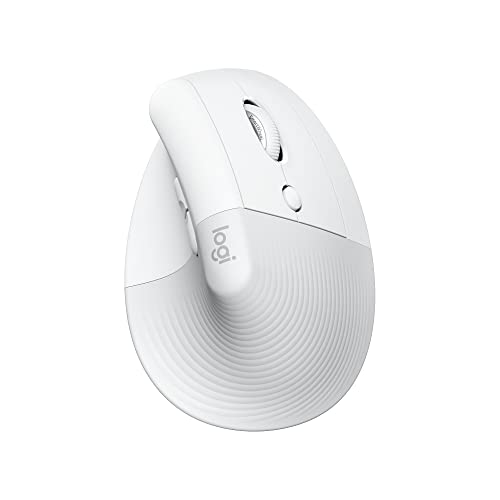
Logitech Lift for Mac Vertical Ergonomic Wireless Mouse Off White

Logitech MX Anywhere 3S Mac Compact Wireless Mouse Space Grey

Logitech MX Master 3S Bluetooth Wireless Mouse No Receiver Graphite

WL300 Bluetooth Mouse Silent Wireless Mice Grey

Logitech M240 Compact Silent Bluetooth Wireless Mouse Graphite

Apple Magic Mouse White Multi-Touch Surface

Bluetooth Wireless Mouse for Laptop mac MacBook ipad MacBook air MacBook pro pc Desktop Computer Windows Chromebook Notebook Silver

Logitech M240 Compact Silent Bluetooth Wireless Mouse Off White
More Details On Our Top Picks
The Lift leans into a vertical grip, so your hand stays in a more natural handshake position during long desk sessions. Quiet clicks and four customizable buttons make it useful for day-to-day Mac work, especially for people who like a mouse that disappears into the routine instead of calling attention to itself.
Bluetooth-only design keeps the setup clean, and macOS plus iPadOS support makes it easy to move between an iMac, MacBook, or tablet desk setup. The trade-off is shape, because the vertical profile takes a short adjustment period and won’t suit every grip style, but once that angle feels normal, it can feel steady in a way flatter mice rarely do.
Strong Points
- Vertical angle helps reduce wrist twist during long editing, browsing, or office sessions.
- Bluetooth-only setup keeps your desk free of a receiver and extra dongle clutter.
- Quiet clicks suit shared spaces, from open offices to evening laptop use at home.
- Four customizable buttons can speed up common shortcuts in Mac apps.
- Works across macOS and iPadOS, so it fits a mixed Apple setup.
Things To Consider
- The vertical stance feels unusual at first, especially for people used to slim office mice.
- Bluetooth-only operation means there’s no receiver option tucked in for backup use.
- The off-white finish may show grime sooner than darker shell colors, so regular wiping helps.
Feature Snapshot
Who It Suits Best
You’ll get the most from this mouse if your desk time is long and you want a more upright hand position instead of a flat, traditional shell.
Where A Sibling Pick Shines
Logitech MX Master 3S Bluetooth Wireless Mouse No Receiver Graphite suits you better for heavier multitasking, since its full-size body and advanced controls feel more tool-like than the Lift.
This one feels built for people who carry a MacBook often and still want a mouse with serious control. The compact shell travels easily, yet the MagSpeed scroll wheel and 8K DPI sensor bring a more capable feel than a basic travel mouse.
Compared with the Lift, this is less about hand posture and more about speed, precision, and flexible use on the move. Quiet clicks help in libraries, trains, or meeting rooms, while the programmable buttons give you room to tailor the mouse to your workflow, though the smaller body may feel a little tight for larger hands over long stretches.
Upsides
- Compact shape slips into a laptop bag without hogging space.
- MagSpeed scrolling is well suited to long documents, spreadsheets, and web research.
- 8K DPI tracking gives you more precise pointer movement on busy screens.
- Quiet clicks make it friendlier for shared workspaces and travel.
- Programmable buttons let you streamline repeat actions in Mac apps.
Minor Gripes
- The smaller body may feel cramped during all-day desktop work for larger hands.
- Travel-friendly size can also mean less palm support than the MX Master 3S.
- Advanced controls can take a bit of setup before the mouse feels truly yours.
Quick Facts
Made For
Frequent travelers, laptop commuters, and Mac users who want a compact mouse with more control than a simple office model will get the most from it.
Swap It Out When
Logitech MX Master 3S Bluetooth Wireless Mouse No Receiver Graphite suits you better for a desk-first setup, since its larger body gives your hand more room to rest.
The MX Master 3S is the most desk-ready shape in this group, with a fuller body that suits long stretches of pointer work, editing, and app switching. The 8K DPI sensor and MagSpeed wheel give it a fast, controlled feel, and the quiet clicks help keep it from sounding busy even when your workday is.
Unlike the lighter Lift or the smaller MX Anywhere 3S, this one is made to feel like a main workstation tool rather than a travel companion. It’s Bluetooth-only and does not include a USB receiver or charging cable, so you’re getting a cleaner package but a little less flexibility out of the box, and the larger shape rewards a real desktop setup more than cramped lap use.
Highlights
- Full-size shape supports a more relaxed hand position during long desktop sessions.
- MagSpeed scrolling is handy for timelines, spreadsheets, and dense web pages.
- 8K DPI tracking gives you precise cursor placement for detailed Mac work.
- Quiet clicks keep the mouse from sounding harsh in shared spaces.
- Bluetooth-only design keeps the setup simple on a Mac desk.
- Works across several desktop and laptop systems, which helps multi-device households.
Areas To Watch
- The larger shape is excellent at a desk, but it takes more bag space than compact options.
- No USB receiver or charging cable comes in the box, so your setup needs to match that.
- Its fuller body may feel like more mouse than some casual users want for simple browsing.
Details At A Glance
Built With In Mind
You’ll appreciate this most if your Mac mouse stays on a desk and you spend real time in spreadsheets, design apps, or layered workspaces.
Another Choice May Suit
Logitech MX Anywhere 3S Mac Compact Wireless Mouse Space Grey fits better for frequent travelers who want nearly the same level of control in a smaller shell.
The WL300 keeps things simple, with a sculpted grip, six buttons, and adjustable DPI for people who want a little more control than a bare-bones office mouse. It also leans quiet, which matters in small rooms, shared apartments, or late-night laptop use.
Compared with the Logitech models above, this one is less refined but easier to approach as a straightforward everyday tool. The 18-month battery claim is useful for travel or backup duty, though the brand name won’t carry the same confidence for everyone, and the larger button count makes sense only when you plan to use those extra controls.
Reasons To Buy
- Sculpted grip gives your hand a more guided resting shape.
- Six buttons create room for shortcuts without moving into premium territory.
- Adjustable DPI helps you tune cursor speed to your screen and habits.
- Quiet click behavior suits shared desks and evening laptop sessions.
- Long battery claim is useful for work trips and backup storage.
Small Caveats
- The brand is less established than Logitech or Apple in this category.
- More buttons can mean more setup, especially for casual Mac use.
- The shell looks practical rather than polished, so style-first desks may prefer another pick.
Core Details
Whose Shelf It Belongs On
You’ll get good value from this mouse if you want quiet Bluetooth control without stretching into the higher-priced Mac specialty models.
Look Elsewhere When
Logitech M240 Compact Silent Bluetooth Wireless Mouse Graphite is the cleaner choice for minimal setups that only need basic navigation and fewer buttons.
The M240 is the easygoing option in this lineup, a compact mouse that keeps to the basics and does them without fuss. Three buttons, quiet clicks, and Bluetooth-only connectivity make it a straightforward match for casual Mac work, school use, or a tidy home desk.
It’s less ambitious than the MX series, and that’s exactly the appeal for plenty of people. The small size is handy in a laptop bag or drawer, though the non-customizable button layout means you should expect simple behavior rather than shortcut-heavy control, and long work sessions may make you wish for a fuller grip.
Positives
- Compact shape stores easily and travels without taking much room.
- Quiet clicks suit libraries, shared offices, and evening home use.
- Bluetooth-only setup keeps your Mac desk free of a receiver.
- Three-button layout is easy to understand and quick to start using.
- 18-month battery claim is handy for low-maintenance everyday ownership.
Worth Noting
- The button layout is fixed, so shortcut customization is off the table.
- Small size is convenient, but it gives your palm less to hold on to.
- Minimal design means it’s better for routine tasks than power-user workflows.
Core Details
Best Suited To
Students, home-office users, and anyone who wants a small, calm mouse for ordinary Mac tasks will feel at home here.
Reach For A Different Pick When
Logitech MX Anywhere 3S Mac Compact Wireless Mouse Space Grey is the smarter step up for people who want compact size but also more advanced scrolling and pointer control.
Apple keeps this mouse focused on gesture-style control, and the smooth top surface is the whole point. For Mac users who like moving around the interface with swipes and touches instead of lots of side buttons, it feels tidy and familiar very quickly.
The trade-off is comfort and convention, because the shape is flatter and less traditional than the ergonomic picks above. That makes it a sharper fit for a Mac-heavy desk than for long workdays full of hand movement, but the low-profile look and touch surface have a clean appeal that some setups really want.
Best Bits
- Multi-touch surface supports gesture-based navigation on a Mac-friendly desk.
- Low-profile shape keeps the setup visually clean and uncluttered.
- Works well for people who prefer touch gestures over many physical buttons.
- Small footprint leaves room for a keyboard, trackpad, or notebook beside it.
Rooms For Improvement
- Flatter shape may feel less supportive during long mouse-heavy work sessions.
- Gesture-first control asks you to adapt your habits more than a standard mouse does.
- White finish can demand more regular cleaning than darker finishes.
Feature Card
The Right Fit
You’ll like this most if your Mac desk already leans toward Apple gear and you prefer a gesture-first workflow.
A Better Fit Elsewhere
Logitech Lift for Mac Vertical Ergonomic Wireless Mouse Off White is the better comfort play for people who want a more natural hand angle during longer sessions.
This silver mouse is the broad-compatibility option in the group, which matters in homes where MacBooks, Windows notebooks, and a Chromebook may all sit on the same table. The source details are light, but the auto sleep behavior gives it a more thoughtful daily rhythm than a truly bare-minimum mouse.
That sleep mode helps stretch battery use in a real household setting, especially when a mouse sits in a bag or on a side desk between sessions. The honest read is that it feels less polished than the Logitech and Apple options, yet its cross-device scope can make it a sensible backup or shared-family choice.
What We Like
- Wide device compatibility suits mixed computer setups.
- Auto sleep behavior helps reduce wasted battery use between sessions.
- Silver finish keeps it visually neutral beside most laptops and desks.
- Useful as a shared household mouse or a spare for travel bags.
Points To Note
- Source details are sparse, so you get less information up front than with bigger-name picks.
- Compatibility breadth helps, but it doesn’t tell you much about comfort or button feel.
- It makes more sense as a utility mouse than as a feature-rich daily driver.
Technical Sheet
Whose Shelf It Belongs On
You’ll get the best value from this mouse when one simple device needs to work across several computers in the house.
Skip It When
Logitech MX Master 3S Bluetooth Wireless Mouse No Receiver Graphite is the better match for people who care more about advanced ergonomics and scrolling control.
The Off White M240 keeps the same small, quiet formula as the graphite version, just with a lighter finish that looks neat beside pale Mac hardware. It’s a no-drama mouse for travel, light office tasks, and backup use when you don’t want to think about extras.
Compared with the WL300, this one is simpler and easier to trust for routine use, though it gives up custom buttons and the extra grip shaping that more involved users may want. The compact shell works well in a sleeve or laptop pocket, and that’s the point, because this is the kind of mouse that quietly fits into the day instead of trying to reshape it.
Bright Spots
- Small body packs easily for commuting or travel.
- Quiet clicks help in dorms, offices, and shared rooms.
- Bluetooth-only pairing keeps the desk free from a dongle.
- Simple three-button layout makes it easy to hand off or share.
- Off White finish suits lighter Apple setups nicely.
Trade Offs
- Three-button layout stays basic, so advanced shortcuts are not the focus.
- Compact shape is handy, but it gives less palm support than fuller mice.
- Light finish can need a bit more care to stay looking tidy.
Core Details
Who Should Grab It
You’ll like this most if you want a neat, compact mouse for travel, backup use, or very simple Mac navigation.
Where A Sibling Pick Shines
Logitech M240 Compact Silent Bluetooth Wireless Mouse Graphite is the better match for a darker desk setup, while the graphite finish can hide daily wear a little more easily.
How To Choose The Right Mac Bluetooth Mouses
Comfort Comes First
Hand shape matters more than most spec sheets admit. A vertical design like the Logitech Lift for Mac reduces wrist twist, while a low-profile mouse like the Apple Magic Mouse asks you to accept a flatter hand position for the sake of gestures and a clean desk. For long workdays, that shape decision often matters more than a long feature list.
Size Should Match Your Routine
Compact mice suit commuting, coffee-shop work, and tight laptop sleeves. Bigger models, especially the Logitech MX Master 3S, feel better when the mouse stays on a desk most of the time and your hand wants more support. The small trade-off is obvious, portability usually means less palm room, while a fuller body usually means a bigger footprint in your bag.
Buttons And Scrolling Change Daily Use
Extra buttons matter most when you live in apps with repeat actions, like email, design tools, or spreadsheets. A MagSpeed wheel, as seen on the MX models, makes long documents and web pages move faster without feeling clumsy. Basic three-button mice are easier to use right away, but they also stay more limited.
Bluetooth-Only Setup Is A Real Filter
Many of these options skip the USB receiver entirely, which keeps your Mac desk cleaner and avoids using a port. That suits modern laptops well, though it also means you want dependable pairing and a setup that lives comfortably with Bluetooth. For mixed-device homes, a mouse with broad compatibility can be the safer everyday choice.
Things Worth Knowing First
Common Shopping Slip Ups
A lot of people focus on looks and forget the shape. A mouse that feels elegant on a product page can still feel cramped after an hour, especially a compact travel model. Another common miss is assuming every mouse has programmable buttons, which is not true here, so check how much control you actually want.
What The Higher Tier Buys
More expensive mice usually spend the extra money on sensor quality, scrolling hardware, better ergonomics, and more thoughtful button placement. That shows up in real use as smoother navigation, less hand fatigue, and faster movement through long work sessions. Paying more makes sense when your mouse stays in use all day, not just for light browsing.
Final Thoughts
You’ve got a solid spread here, from the ergonomic Logitech Lift for Mac to the polished MX Master 3S and the simple M240 pair. For most Mac setups, the right choice comes down to comfort, desk space, and how much control you want under your thumb. The compact models keep life easy, while the larger Logitech options reward longer sessions and heavier work. Match the mouse to the way you actually work, and the choice gets a lot clearer.
