
Small hands need a mouse that feels settled, not stretched. The wrong shape can make a long workday feel awkward fast, especially on a laptop tray, a crowded desk, or during travel. These eight picks focus on compact bodies, vertical shapes, quiet clicks, and connection styles that suit different setups. You’ll find straightforward options for office work, commuting, and home use without sorting through oversized shells that never quite sit right.
Quick Look At The Shortlist
Logitech M187 Wireless Mini Mouse

SABLUTE Wireless Mouse for Laptop M21

J-Tech Digital Wireless Ergonomic Vertical Mouse V628M
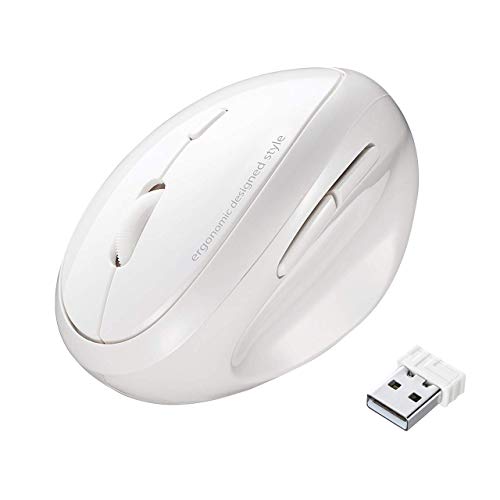
SANWA 2.4G Wireless Ergonomic Mouse White

SABLUTE MAM3 Ergonomic Mouse Black

hunart H6 49g Wireless Mouse Green

SHARE SUNSHINE Wireless Mouse Mini Blue
Lekvey Ergonomic Mouse Black
More Details On Our Top Picks
The M187 keeps things plain and portable, which matters more than flashy extras for a small-hand mouse. Its mini body fits neatly beside a laptop, and the wireless setup suits commutes, shared desks, and travel bags where space runs tight.
You get a straightforward shape that should feel familiar fast, especially for everyday browsing and light office work. The trade-off is simple: a tiny shell can feel a little spare in larger hands, but that same size is the point for this roundup.
Strong Points
- Mini footprint is easy to pack with a laptop.
- Wireless setup keeps desk clutter down.
- Plain shape makes it easy to move between home and travel use.
- Good fit for quick tasks, email, and web work.
Things To Consider
- The smaller shell can feel cramped during long sessions.
- You get a basic feature set, so power users may want more control options.
Feature Snapshot
Who It Suits Best
Travelers, students, and laptop users who want a very compact mouse will get the most from it.
A Better Fit Elsewhere
Lekvey Ergonomic Mouse Black suits you better when long desk sessions matter more than pocketable size.
The M21 stands out because it’s built for mixed-device life, not just a single laptop at a desk. The USB-A port and USB-C adapter make it easier to move between older and newer hardware, which helps in offices, classrooms, or a home setup with more than one machine.
Six buttons and three DPI steps give you more control than the bare-bones mini mouse above, though that extra hardware also means a busier layout. For small to medium hands, the shape should feel more accommodating than a flat travel mouse, even though button learning curves vary a bit.
Highlights
- USB-A and USB-C support broadens device compatibility.
- Six-button layout adds useful shortcuts for work.
- Three DPI levels help you tune pointer speed.
- Good middle ground for laptop, desktop, and tablet use.
Small Caveats
- More buttons can take a little getting used to.
- The busier control layout may feel unnecessary for simple browsing.
- Small hands fit well, but very tiny hands may still prefer a slimmer shell.
Core Details
Made For
You’ll like it most if you jump between a laptop, desktop, and tablet during a normal workweek.
Another Choice May Suit
Logitech M187 Wireless Mini Mouse makes more sense for you when travel size matters more than extra controls.
This vertical mouse changes the grip angle, so your hand rests more like it would on a handshake than on a flat shell. That shape can feel unusual at first, yet for daily desk use it often makes the mouse feel less tiring than the slimmer travel styles above.
The included USB nano transceiver keeps setup simple, and the AA battery means you do not have to think about charging. The honest read is that a vertical shape isn’t for everyone, but small-hand users who want a steadier wrist position may find it worth the adjustment.
Reasons To Buy
- Vertical angle encourages a more relaxed hand posture.
- USB nano transceiver keeps the connection tidy.
- AA power source avoids charging downtime.
- Three DPI settings give you basic pointer control.
Worth Noting
- Vertical shapes can take time to feel natural.
- Battery swaps add a little maintenance over rechargeable models.
- Pink finish is a style choice, not a fit advantage.
Details At A Glance
Best Suited To
Desk workers with small hands who want a vertical shape and simple wireless setup will get the clearest fit here.
Swap It Out When
SANWA 2.4G Wireless Ergonomic Mouse White suits you better if you want a similar upright grip with a slightly broader feature spread.
SANWA leans into the upright mouse idea with a shape that places your hand in a more neutral position. The rounded shell is a little more sculpted than the J-Tech pick, so it may feel more planted for long desk stretches, especially in a home office or work-from-desk setup.
Three DPI steps and five buttons give it more versatility than the basic mini mice in this list. The trade-off is that ergonomic mice are always a matter of fit, and you may need a short adjustment period before the shape feels second nature.
Upsides
- Vertical design supports a more natural hand angle.
- Five buttons add a little more function for productivity.
- Three DPI settings let you slow down or speed up pointer movement.
- White finish gives it a clean desk look.
Areas To Watch
- Vertical mice can feel odd during the first few days.
- The shape works best on a desk, not in a tight travel pouch.
- White surfaces usually need a bit more regular wiping.
Quick Facts
The Right Fit
Desk-first users with small hands who want an upright, wired-free mouse will find this one easy to justify.
Where A Sibling Pick Shines
J-Tech Digital Wireless Ergonomic Vertical Mouse V628M makes more sense if you prefer a simpler upright mouse with AA power.
The MAM3 is built for people who bounce between devices and want the mouse to keep up. Three-device Bluetooth support is a meaningful step up from the simpler wireless models above, especially on a desk with a laptop, tablet, and second computer in rotation.
Rechargeable power and four DPI settings make it feel more adaptable than the AA-powered J-Tech option. The trade-off is that more functions usually mean a little more setup attention, but for small to medium hands the vertical form still keeps the shape focused rather than bulky.
Plus Points
- Bluetooth for three devices keeps multi-device work organized.
- Rechargeable battery reduces the need for spare cells.
- Four DPI levels let you fine-tune pointer speed.
- Vertical body suits users who prefer a more upright grip.
Room For Improvement
- Bluetooth pairing can take a little setup time across several devices.
- Extra functions may feel unnecessary for very simple use.
- Vertical styling is a fit preference, not a universal one.
Spec Overview
Whose Shelf It Belongs On
Frequent switchers who keep more than one device on the desk will get the most value from this one.
A Better Fit Elsewhere
SABLUTE Wireless Mouse for Laptop M21 fits you better if USB-A and USB-C flexibility matters more than Bluetooth device switching.
At 49 grams, this mouse is built for a very light feel in hand and in a bag. That makes it especially useful for commuters, hybrid workers, and anyone who keeps moving between a desk, a café, and a carry case.
Bluetooth plus 2.4 GHz gives you two connection paths, and USB-C charging keeps the maintenance routine cleaner than swap-in batteries. The right-hand ergonomic shape narrows the fit a bit, so left-handed use is off the table, but the silent clicks are a real plus in shared spaces.
Best Bits
- 49-gram weight keeps the mouse easy to carry.
- Bluetooth and 2.4 GHz offer flexible pairing options.
- USB-C charging fits a modern desk setup.
- Quiet clicks suit offices, libraries, and shared rooms.
Softer Spots
- Right-hand shaping limits who it suits.
- Very light mice can feel different from more solid desk models.
- Two connection modes add a little choice, which some users may not need.
Core Details
Who Should Grab It
Commuters and hybrid workers who want a light, quiet mouse for a small hand will get the most out of it.
Look Elsewhere When
Logitech M187 Wireless Mini Mouse fits you better if you want a simpler travel mouse without the ergonomic right-hand shape.
This is the pocketable option in the group, and that’s exactly where it earns its place. The small shell, three-button layout, and 1000 DPI rating keep the experience simple, which suits short laptop sessions, school bags, and take-along work kits.
The cute styling is a matter of taste, but the compact form has a practical upside for tight carry spaces. The trade-off is that tiny mice often feel less anchored during long desk sessions, so this one makes more sense as a travel companion than a main office piece.
Positives
- Very small body slips into compact pouches easily.
- Three-button design keeps operation uncomplicated.
- 1000 DPI is enough for light office and browsing tasks.
- Silent behavior suits classrooms and shared rooms.
Minor Gripes
- The tiny shell may feel too minimal for all-day desk use.
- Three-button simplicity leaves out shortcut-heavy workflows.
- Blue styling is personal taste, not a functional feature.
At A Glance
Perfect Match For
Students, occasional travelers, and small-hand users who want the tiniest possible carry mouse will appreciate it most.
Reach For A Different Pick When
hunart H6 49g Wireless Mouse Green is the better fit if you still want portability but prefer rechargeable convenience and two connection paths.
Lekvey aims at the middle ground between compact travel mice and taller ergonomic shapes. That balance works well for small and medium hands that still want a fuller body under the palm, especially during long office sessions where a tiny shell starts to feel skimpy.
The 150-hour charge claim points to a setup that can sit through a lot of work between plugs, and the 2.4G wireless connection keeps the desk uncluttered. The honest trade-off is that a fuller ergonomic body takes more space than a mini mouse, but the extra support is exactly why many small-hand users look at this style.
Best Suited To
- Rechargeable design reduces routine upkeep.
- 150-hour figure suggests long stretches between charges.
- Three DPI levels help you adapt to different tasks.
- Fits small and medium hands without feeling ultra-tiny.
Trade Offs
- It takes up more desk space than a mini travel mouse.
- Ergonomic shaping is a matter of personal fit.
- 2.4G wireless means it’s geared more to desk use than loose pocket carry.
Feature Rundown
Built With In Mind
Small-hand office users who want more support than a mini mouse but less bulk than a large ergonomic shell should start here.
Where Shoppers Go Wrong
SHARE SUNSHINE Wireless Mouse Mini Blue suits you better when true pocket size matters more than palm support.
How To Choose The Right Mices For Small Hands
Shape Comes First
Hand size matters more than style points here. A compact shell like Logitech M187 or SHARE SUNSHINE Wireless Mouse Mini Blue suits small palms, while vertical bodies from J-Tech Digital, SANWA, SABLUTE MAM3, and Lekvey trade pocket size for a fuller grip.
That trade-off shapes the whole experience. A flatter mouse slips into a bag more easily, but an upright shell can feel steadier during long desk work.
Match The Connection To Your Routine
Connection type affects daily friction. 2.4G USB mice are simple for laptops and desktops, Bluetooth helps when you want fewer dongles, and dual-mode models like hunart H6 give you both paths.
USB-A and USB-C compatibility matters too, especially in mixed-device homes. The M21 is useful there because it bridges older and newer ports without forcing you into one hardware lane.
Pick The Controls You’ll Actually Use
More buttons sound helpful, but only to a point. A six-button mouse such as the M21 or a five-button model like SANWA makes sense for shortcuts, while a three-button pocket mouse is easier for basic browsing.
DPI, which means dots per inch and is the usual sensitivity measure, also changes feel a lot. Lower steps help with careful pointer work, while higher ranges suit faster screens and larger monitors.
Think About Daily Wear And Carry
Charging style changes maintenance. Rechargeable mice reduce battery swaps, while AA-powered options such as the J-Tech Digital model stay easy to keep going with a spare cell in the drawer.
Weight and finish matter too. A 49-gram shell like hunart H6 is easy to carry, but a white ergonomic mouse can ask for a bit more wiping in busy home-office use.
What To Weigh Before You Commit
Mistakes Worth Dodging
Many small-hand shoppers chase tiny size alone and forget grip shape. A mouse can be short and still feel awkward if the side curve pushes your thumb into an odd spot.
Another common miss is overbuying controls. A basic home laptop often needs less than a multi-button model with several input options.
What The Higher Tier Buys
Higher-tier mice usually pay for flexibility, comfort shaping, and battery convenience. Bluetooth switching, rechargeable power, extra DPI steps, and ergonomic molding all add engineering and usually make the mouse feel more tailored.
That extra spend makes the most sense for long desk days, mixed-device routines, or hands that get tired with flatter shapes. For quick browsing and light schoolwork, a simpler compact model often makes more sense.
Final Thoughts
The best mouse for small hands depends on how you work, not just how the shell looks in a photo. Logitech M187 and SHARE SUNSHINE keep things tiny, the J-Tech Digital and SANWA models lean into comfort, and hunart H6 plus Lekvey add modern convenience for busier desks. SABLUTE’s two mice sit in the middle with more switching flexibility, which helps a lot in mixed setups. Pick the shape that matches your day, and the rest gets easier fast.
