
Shopping for a mouse under 50 means balancing shape, sensor behavior, button layout, and connection style without paying for extras you may never use. That matters just as much on a long workday as it does in a late-night game session, because a light shell or a stiff cable can change how a desk setup feels in real use.
The eight picks below cover ultralight wired options, tri-mode wireless models, and a few more polished everyday choices. You’ll see where each one fits, where it asks for a trade-off, and which hand size or routine makes the most sense for it.
Quick Look At The Shortlist

Redragon M617 Ultralight Honeycomb Shell Wired Gaming Mouse 41g

Redragon M725 Honeycomb Shell Gaming Mouse Wireless 49g

ATK VXE Dragonfly R1 SE+ Wireless Gaming Mouse 55g

hunart H6 49g Wireless Mouse Green
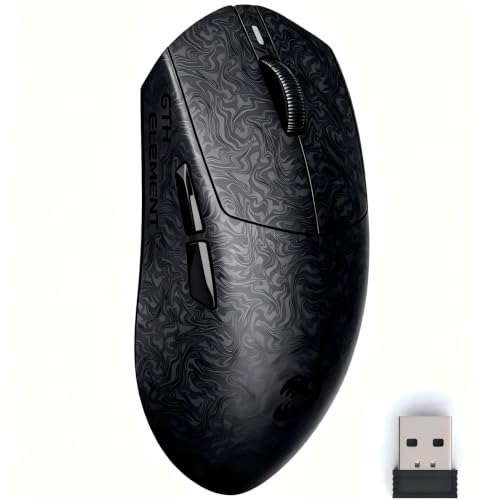
ZORNHER X Mloong MX301 PRO Lightweight Gaming Mouse 60g

TMKB Falcon M1SE White Gaming Mouse 75g

Redragon M612 Wired RGB Optical Gaming Mouse 8000 DPI

Logitech G305 Lightspeed Wireless Gaming Mouse White
More Details On Our Top Picks
That 41g shell is the big story here, and it changes how the mouse moves across a desk more than a glossy spec sheet suggests. The honeycomb cutouts keep weight down, while the Type-C wired setup and paracord-style cable aim to stay out of the way during fast swipes or long office sessions.
For most small or medium hands, the shape should feel easy to settle into, especially during daily browsing, shooters, or spreadsheet work. The honest trade-off is simple: you get a lighter, more agile wired feel, but you still live with a cable and a shell that some people will want to wipe down more often than a solid-body mouse.
Strong Points
- 41g weight keeps movement quick and low effort.
- Honeycomb body helps reduce hand strain on longer sessions.
- 10,000 DPI ceiling gives you room for sensitivity tuning.
- Six programmable buttons support macros and shortcut use.
- Type-C wired connection suits desk setups that stay put.
Areas To Watch
- Open-shell styling can collect dust more easily than closed designs.
- Wired use keeps you tethered to the desk.
- The medium-size shape may feel less natural in very large hands.
Feature Snapshot
Who It Suits Best
You’ll get the most from this one if you want a light wired mouse for gaming and everyday desk work without spending much energy adapting to a bulky shape.
A Better Fit Elsewhere
ATK VXE Dragonfly R1 SE+ Wireless Gaming Mouse 55g makes more sense for you if you want a wireless setup with a more premium sensor path and multi-device flexibility.
Compared with the wired M617, this one gives you more freedom right away because it can run over Bluetooth, 2.4GHz wireless, or Type-C wired. That matters in a dorm, shared office, or laptop bag setup, since you can move between machines without thinking too hard about adapter drama.
The 49g shell keeps it light enough for daily use, and the five DPI stages let you tone it down for office tasks or push it higher for games. The trade-off is that tri-mode convenience can be less hands-off than a simple wired model, especially once you start managing charging and switching between devices.
Upsides
- Three connection modes suit desks, laptops, and travel days.
- 49g weight keeps the mouse nimble without feeling heavy.
- 8,000 DPI ceiling covers casual play and general work.
- Five programmable buttons help with shortcuts and macros.
- Type-C wired mode adds a fallback for low-battery days.
Worth Noting
- Wireless convenience usually means more charging attention.
- Switching modes adds a little more setup thinking than a wired-only model.
- The open shell can feel less enclosed in dusty environments.
Details At A Glance
Right Fit For
You’ll like this most if you move between a laptop, a desktop, and a work bag, and you want one mouse that can handle all three without feeling bulky.
Look Elsewhere When
Redragon M617 Ultralight Honeycomb Shell Wired Gaming Mouse 41g fits better for you if you prefer a simpler wired setup and want to skip battery management entirely.
This one shifts the shortlist toward a more tuned, performance-first feel, thanks to the PAW3395 SE sensor and the fine 10-DPI steps. For competitive play or careful cursor work, that kind of control matters more than flashy extras, and it puts this mouse in a different lane from the Redragon pair.
The 55g body is still light, but not so bare-bones that it disappears in your hand, which some people may find easier during long sessions. The trade-off is that the feature set leans more toward serious use, so casual shoppers who only need basic navigation may not need this much mouse.
Bright Spots
- PAW3395 SE sensor gives you a more refined tracking base.
- 10-DPI step tuning allows very fine sensitivity changes.
- 55g frame stays light without feeling too hollow.
- Wired, 2.4G, and Bluetooth modes support different desk setups.
- Programmable buttons and driver support add real control flexibility.
Small Caveats
- The more advanced feature set may be more than casual users need.
- Wireless and driver features add setup steps compared with basic mice.
- The size leans toward medium and small hands.
Core Details
Whose Shelf It Belongs On
You’ll appreciate this most if you want a lighter wireless mouse for gaming sessions, long work blocks, and multi-device desk use without settling for a bare-minimum sensor.
Swap It Out When
hunart H6 49g Wireless Mouse Green makes more sense for you if quieter clicks and a softer everyday office feel matter more than the sharper gaming lean of the Dragonfly.
Compared with the more gaming-leaning Dragonfly R1 SE+, this one points harder toward quiet everyday work. The silent clicks, right-hand ergonomic shape, and 49g weight make sense on a shared table, in a bedroom office, or beside a laptop during calls and note-taking.
The two connection modes cover most basic setups, so you’re not paying for a pile of extras you may never use. The trade-off is straightforward, it’s a simpler mouse, which is good for many people but less exciting for anyone chasing deep gaming tuning or a long list of buttons.
What We Like
- Silent clicking helps keep desk noise down.
- 49g weight makes the mouse easy to move.
- Bluetooth and 2.4GHz modes cover common laptop use.
- USB-C charging keeps the cable side uncomplicated.
- Right-hand ergonomics suit steady daily browsing and office tasks.
Room For Improvement
- Quiet focus means fewer gaming-specific extras.
- Two connection modes are enough, but not as flexible as tri-mode models.
- The green finish may not match every desk setup.
Key Specs
Made For
You’ll get the most from this mouse in a home office, dorm room, or shared desk where quiet clicks and a light hand feel matter more than gaming extras.
Consider Something Else When
Redragon M725 Honeycomb Shell Gaming Mouse Wireless 49g suits you better if you want tri-mode connectivity and a more game-friendly control layout.
The textured shell is the first thing worth noticing here, because it changes how the mouse feels in hand before sensor talk even enters the picture. Compared with the smoother Redragon and hunart options, this one leans into grip, balance, and a more premium tactile finish that can matter on sweaty FPS nights or long work stretches.
At around 60g, it sits in a middle zone that many people may find easier to control than extreme featherweight designs. The catch is that this is still a small mouse, so larger hands or palm-grip users may want to think twice before treating it like a universal fit.
Best Bits
- Carbon fiber-style texture improves grip and hand feel.
- 60g weight balances speed with steadier control.
- PAW3315 sensor supports accurate everyday and gaming tracking.
- TTC switches give clicks a clean, crisp response.
- Web-based driver keeps customization lighter than bulky software.
Points To Note
- Small body size may feel tight for larger hands.
- Some people will still prefer a more basic shell shape.
- Wireless use means you’ll keep an eye on battery habits.
Spec Overview
Best Suited To
You’ll like this most if grip texture matters to you and you want a light mouse that still feels stable enough for daily work and FPS play.
Where A Sibling Pick Shines
Logitech G305 Lightspeed Wireless Gaming Mouse White makes more sense for you if you want a simpler, more established wireless path with on-board memory and a cleaner all-round feel.
More than the average wired mouse, this one leans into adjustment and visual flair at the same time. The 12800 DPI ceiling, 125 to 1000Hz polling range, and six programmable buttons make it useful for people who like a mouse to do more than point and click, especially at a fixed desk.
Compared with the lighter Redragon M617, the 75g body feels less featherlike but a bit more anchored in the hand. That can help during office work or slower, controlled game movement, though you may notice the extra mass more on fast swipe-heavy play.
Highlights
- Six programmable buttons support layered shortcuts and macros.
- Polling range from 125 to 1000Hz gives you control over response feel.
- PTFE skates help the mouse slide more smoothly.
- Adjustable RGB strip adds a visible desk accent.
- Honeycomb shell reduces overall weight compared with solid-body designs.
Minor Gripes
- 75g is still light, but not as airy as the featherweight options above.
- RGB styling may feel busy on a minimal desk.
- Wired use keeps cable management in the picture.
Feature Card
Who Should Grab It
You’ll get the best use from this if you want a wired mouse with lots of assignable controls and some visual personality on the desk.
Another Choice May Suit
Redragon M612 Wired RGB Optical Gaming Mouse 8000 DPI fits better for you if you want a similar wired idea with a simpler, more straightforward setup.
This Redragon keeps things simple in a way that many desk setups still need. You get a wired optical mouse with remappable keys, an 8000 DPI ceiling, and an ergonomic body, so it works well for schoolwork, office tasks, and entry-level gaming without asking for extra setup time.
It sits below the TMKB Falcon M1SE in raw feature count, but that can be a plus for people who want less fuss and fewer extras to manage. The only real caution is that the simpler feature set may feel plain beside the more adjustable picks above, especially for someone who likes fine-grained customization.
Positives
- Wired connection keeps latency concerns out of the picture.
- 8000 DPI ceiling covers common gaming and work needs.
- Remapping support lets you tailor keys to your routine.
- Ergonomic body shape supports steadier everyday use.
Softer Spots
- No wireless option means cable routing still matters.
- The design is practical, but not especially feature-packed.
- RGB styling may be more than you need for plain office use.
Technical Sheet
Built With In Mind
You’ll appreciate this most if you want a no-drama wired mouse for school, office use, or low-stakes gaming where remapping matters more than wireless extras.
Reach For A Different Pick When
TMKB Falcon M1SE White Gaming Mouse 75g is the better match for you if you want more programmable controls and a stronger RGB focus.
Compared with the newer lightweight options, this Logitech feels like the steadier, more established wireless choice in the group. The 12,000 DPI ceiling, six programmable buttons, and on-board memory make it a smart fit for people who move between systems and want their settings to travel with them.
The battery figure stands out for practical reasons, especially for commuters, students, or anyone who would rather think about charging less often. The trade-off is that the shape and feature set are more familiar than flashy, so it suits dependable everyday use better than showy customization.
Reasons To Buy
- Wireless setup keeps the desk uncluttered.
- 12,000 DPI gives plenty of sensitivity range.
- Six programmable buttons help with daily shortcuts.
- On-board memory keeps saved settings with the mouse.
- Long battery life supports low-maintenance use.
Honest Caveats
- The design is dependable, but less adventurous than newer ultralight models.
- On-board memory helps, yet setup still takes a little planning at first.
- White finishes can show wear marks more readily than darker shells.
Core Details
Perfect Match For
You’ll like this best if you want a wireless mouse that feels dependable for school, office work, travel, and everyday gaming without a lot of maintenance.
Where Shoppers Go Wrong
ATK VXE Dragonfly R1 SE+ Wireless Gaming Mouse 55g is the smarter move for you if you care more about lighter weight and a more advanced sensor feel than long battery life alone.
How To Choose The Right Mices Under 50
Shape, Weight, And Hand Fit
Mouse comfort starts with shape before anything else. A 41g honeycomb shell like the Redragon M617 feels very different from a 75g body like the TMKB Falcon M1SE, and that gap matters during long sessions.
Smaller and medium hands usually adapt faster to compact or ultralight frames. Larger hands often do better with a slightly fuller shell, even when the spec sheet looks less exciting.
Connection Style Changes Daily Use
Wired models keep setup simple and steady, which helps on a fixed desk. That approach works well for school desks, shared workstations, and gaming rigs where cable management doesn’t bother you much.
Wireless mice add freedom, but they also add charging habits and pairing decisions. Tri-mode designs such as the Redragon M725 or ATK VXE Dragonfly R1 SE+ make more sense when you move between devices often.
Buttons And Sensor Range Matter More Than Flash
Programmable buttons are useful when you want macros, shortcuts, or faster in-game actions. Six buttons can be enough for many people, while five keeps things cleaner for simple office work.
DPI, or dots per inch, measures pointer sensitivity. Higher numbers can help with quick movement, but the real win comes from having a range that matches your desk size, grip style, and whether you prefer slower control or faster sweeps.
Finish, Noise, And Maintenance Fit The Room
Open honeycomb bodies keep weight down, yet they can pick up dust faster than sealed shells. Quiet-click designs like the hunart H6 suit shared rooms better, while RGB-heavy picks fit gaming setups with a little more personality.
Think about the room as much as the mouse. A neat, low-noise office asks for different traits than a desk built for FPS sessions and macro-heavy routines.
A Quick Reality Check Before You Choose
Common Shopping Slip Ups
Many shoppers chase DPI alone and ignore shape. A high number means little when the body feels awkward after an hour at the desk.
Another easy miss is connection style. A wireless mouse is handy, but a wired model still makes more sense for some desk setups and avoids charging chores.
What The Higher Tier Buys
Extra cost in this category usually goes toward better sensors, finer tuning, stronger wireless systems, and more polished materials. That’s why the ATK VXE Dragonfly R1 SE+ and Logitech G305 feel more refined than bare-bones wired options.
You also tend to get more thoughtful software support, memory storage, or better balance between weight and control. Paying up makes sense when you use the mouse all day, switch devices often, or care about consistent feel in games.
Closing Thoughts
The right mouse under 50 depends less on the sticker and more on how you work and play. A featherweight wired pick makes sense for fast desk motion, while a wireless model with memory or tri-mode support suits travel and mixed-device use. Choose the shape and connection style that fits your routine, and the rest gets easier fast.
