
Mac users tend to want the same thing from a mouse, a shape that feels natural, a connection that stays steady, and controls that do not get in your way. That matters most on a long workday, a shared desk, or a commute where your trackpad starts feeling cramped. The eight picks below lean toward portability, quiet use, and broad compatibility, so you can match the mouse to the way you actually work.
Quick Look At The Shortlist

Logitech Slim Wireless Bluetooth Mouse for Mac White

Wireless Mouse for MacBook Air iPad Pro Mac PC Grey
Logitech M185 Compact Ambidextrous 2.4 GHz Wireless Mouse Swift Grey

WL300 Bluetooth Mouse Silent Wireless Mice Grey

Wireless Bluetooth Mouse for Mac Pro MacBook Air Black

KLO Rechargeable Bluetooth Mouse for MacBook MacBook Air Pro Black

Wireless Bluetooth Mouse for MacBook Air Mac Pro Silver

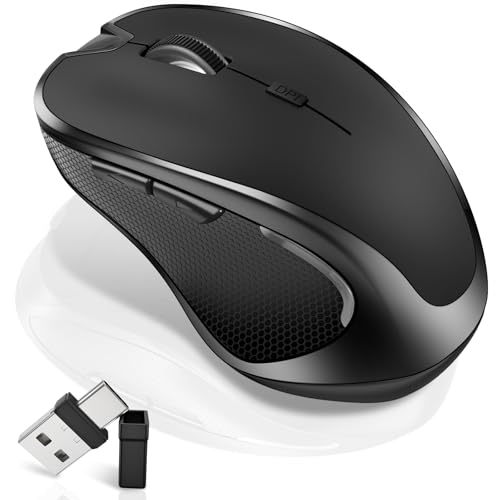
TECKNET Wireless Mouse Bluetooth Mouse Black
More Details On Our Top Picks
Trackpad converts often want something that disappears into the bag until work starts, and this slim Logitech shape fits that brief well. Its small footprint suits coffee shop tables, airplane trays, and side pockets, while the rounded sides make it feel less boxy than many travel mice.
The real appeal is how little space it asks for without feeling flimsy in use. The trade-off is obvious, though, because an ultra-slim body gives you less palm fill than a fuller mouse, so larger hands may want a different shape.
What We Like
- Thin body travels easily in a laptop sleeve.
- Bluetooth use keeps a USB port open.
- Rounded edges soften the hand feel for longer sessions.
- Tracks on more than one surface, which helps on uneven desks.
Things To Consider
- Very compact sizing leaves less support for bigger hands.
- Slim styling favors portability over a fuller grip.
- Minimal shape suits travel more than all-day desk comfort.
Feature Card
Who It Suits Best
You fit this best when you move between desks, carry a laptop daily, and want a simple mouse that stays out of the way until needed.
A Better Fit Elsewhere
TECKNET Wireless Mouse Bluetooth Mouse Black suits you better for extended desktop work, since its 7-button layout and side scroll give you more direct control.
This FYBC mouse leans into flexibility, which makes sense for anyone shifting between a Mac, an iPad, and a second computer. The USB-C charging setup is the headliner here, and that matters because many desks now revolve around one cable type instead of a drawer full of spares.
You also get the practical benefit of a rechargeable design that skips disposable batteries entirely. The catch is that a feature-dense mouse can feel busier than a simpler travel model, so you may prefer it most in a multi-device setup rather than a bare-bones carry bag.
Highlights
- USB-C charging fits modern laptop routines.
- Rechargeable setup keeps battery swaps out of the picture.
- Built for several Apple and PC use cases.
- Slim shape works well on a crowded desk.
Room For Improvement
- Feature-heavy layout can feel more complex than basic mice.
- The slim body gives less palm support than fuller designs.
- Rechargeable gear still needs regular top-ups in heavy use.
Core Details
Made For
You fit this best when your day moves between laptop, tablet, and desktop, and you want one mouse that follows along without battery drawer clutter.
Another Choice May Suit
Logitech Slim Wireless Bluetooth Mouse for Mac White suits you better when portability matters more than extra features, especially for commuting with a lighter kit.
Where the first two picks lean on slim styling, this Logitech M185 keeps things straightforward with a 2.4 GHz USB-A nano receiver. A nano receiver is the tiny wireless plug that stays in your laptop, and that setup still appeals to people who want a stable mouse without pairing steps.
Its ambidextrous shape also makes it easy to share between right-handed and left-handed use, which matters in a family office or rotating work setup. The honest read is that it looks more utilitarian than the slimmer Bluetooth models, but that plainness is part of its charm.
Positives
- USB-A nano receiver keeps setup quick on older and newer laptops.
- Ambidextrous shape works for either hand.
- Compact size slips easily into a laptop sleeve.
- Good fit for desk, dorm, or basic office use.
Minor Gripes
- USB-A receiver is less convenient on port-light Macs without an adapter.
- The simple shell favors practicality over a more sculpted feel.
- Minimal styling may feel plain beside the sleeker Logitech Slim model.
Details At A Glance
Right Fit For
You fit this best when you want a plain, familiar mouse for general office work and do not want to fuss with extra modes or layered controls.
Where A Sibling Pick Shines
FYBC Wireless Mouse for MacBook Air iPad Pro Mac PC Grey is the better fit for you when USB-C charging and broader device pairing matter more than a simple receiver setup.
Quiet clicks and a sculpted grip put the wegear WL300 in a different lane from the cleaner, slimmer picks above. That combination tends to suit shared spaces, late-night work, and anyone who wants a little more hand contour without jumping to a bulky office mouse.
The 6-button layout and adjustable DPI, which means pointer sensitivity, give you more room to tune the feel for spreadsheets or browsing. The trade-off is that more controls can add a little learning time, so this one suits you best when you want function first and styling second.
Bright Spots
- Quiet clicks are well suited to open desks and quiet rooms.
- Sculpted grip adds comfort over a flat travel mouse.
- Six buttons give you more direct control than basic models.
- Adjustable DPI helps you tune cursor speed for different tasks.
Areas To Watch
- More buttons mean a slightly busier learning curve.
- The shaped body takes more desk space than the thinnest models.
- Quiet-click parts can feel softer than a crisp mechanical click.
Technical Sheet
Best Suited To
You fit this best when you spend long stretches at a laptop or desktop and want a mouse that stays quiet without feeling stripped down.
A Better Fit Elsewhere
Logitech Slim Wireless Bluetooth Mouse for Mac White suits you better for travel-heavy days, since its lighter profile is easier to toss into a bag.
This FYBC model stands out because it stretches across three connection modes, which is handy when your desk includes a Mac, an iPad, and a second machine. A jiggler mouse is a mouse that can simulate movement to keep a computer awake, and that extra function may matter in work setups that pause screens often.
That broader toolset makes it less stripped down than the Logitech Slim, and more adaptable than a basic travel mouse. The honest trade-off is that extra modes usually make a device feel more feature-packed than elegant, so it suits people who value function over minimalism.
Upsides
- Three connection modes widen compatibility across desks.
- Jiggler function adds a specific productivity use case.
- Silent design fits office and shared-room use.
- Rechargeable build helps you skip disposable batteries.
Small Caveats
- Extra features make it feel busier than a plain Bluetooth mouse.
- Multiple modes can take a little setup attention.
- Rechargeable gear still needs occasional charging between work sessions.
Quick Facts
Who Should Grab It
You fit this best when your workspace changes often and you want one mouse that can follow along without forcing you into a single connection style.
Look Elsewhere When
Logitech M185 Compact Ambidextrous 2.4 GHz Wireless Mouse Swift Grey is the cleaner fit for you when a simple USB receiver and minimal setup beat extra modes.
KLO takes a broad compatibility approach, and that can help you settle one mouse across a MacBook, Chromebook, or tablet desk. The spread of connection types, including Type-C and 2.4G, means you have room to match different machines without hunting for a different accessory every time.
It feels more practical than polished, which is not a flaw so much as a cue about the kind of setup it serves. You may find it especially useful in a shared household or student desk where device variety matters more than a refined shell.
Reasons To Buy
- Wide connection support makes it easy to move across devices.
- Rechargeable format cuts down on battery swaps.
- Works across laptops, notebooks, tablets, and Chromebooks.
- Simple black finish keeps the look understated.
Softer Spots
- Utility-first styling is less polished than the sleeker Logitech and TECKNET options.
- Feature breadth may be more than you need for a single-device desk.
- Rechargeable use still asks for periodic charging.
Spec Overview
Whose Shelf It Belongs On
You fit this best when you want one low-fuss mouse for mixed devices and do not mind a more practical feel than a polished one.
Reach For A Different Pick When
TECKNET Wireless Mouse Bluetooth Mouse Black is the better choice for you when side scroll and seven buttons matter more than wide compatibility.
This silver Qullqian mouse sits in the middle of the pack nicely, especially for desks that move between a laptop and a desktop. Dual-mode switching gives it a more flexible rhythm than the single-connection Logitech M185, yet it still feels less crowded than the most feature-heavy picks.
That balance makes it a sensible choice for mixed-use work, from browser tabs to spreadsheet days. One thing worth considering is that a dual-mode mouse is most useful when you actually switch between devices, because a single-laptop setup does not squeeze as much value from it.
Best Bits
- Dual-mode switching gives you more setup flexibility.
- Works across MacBook, laptop, computer, and PC environments.
- Rechargeable design reduces battery chores.
- Silver finish looks clean without trying too hard.
Worth Noting
- Dual-mode support matters most in a multi-device workflow.
- The modest shape is practical, but not especially plush.
- Rechargeable gear asks for the occasional recharge.
Feature Rundown
Built With In Mind
You fit this best when you split your time between two machines and want a mouse that keeps the transition simple.
Swap It Out When
Logitech Slim Wireless Bluetooth Mouse for Mac White is the better match for you when portability and lighter carrying weight matter more than switching between devices.
The TECKNET lands on the more capable end of this roundup, with 7 buttons, side scroll, and a shaped body that makes sense for longer desk sessions. That kind of layout pays off in spreadsheets, editing, and general multitasking, where extra controls save you repeated pointer travel.
Compared with the simpler Logitech M185, this one asks a little more from your attention but gives you a lot more control in return. The honest read is that it suits power use more than pocket carry, so your day-to-day workflow should justify the extra features.
Plus Points
- Seven buttons give you broader control at your fingertips.
- Side scroll helps in wide documents and long timelines.
- Quiet clicks make it easier to use in shared rooms.
- Adjustable DPI supports different pointer speeds across tasks.
- Ergonomic shape suits longer periods at a desk.
Trade Offs
- More controls make it less simple than basic travel mice.
- Ergonomic shaping takes up more room than slim models.
- Extra features are most useful in heavier work routines.
Core Details
The Right Fit
You fit this best when your Mac mouse needs go beyond basic pointing and clicking, especially for office work or long sessions at a desk.
Where A Sibling Pick Shines
Logitech Slim Wireless Bluetooth Mouse for Mac White is the better fit for you when a lighter, more compact shape matters more than extra controls.
How To Choose The Right Mouses For Mac
Connection And Compatibility Matter Most
Mac-friendly mice usually fall into two camps, Bluetooth models and receiver-based models. Bluetooth saves a port and keeps your bag lighter, while a 2.4 GHz USB receiver can feel more straightforward on older laptops or shared desks.
That choice matters more than many shoppers expect, because the wrong connection style adds friction every day. A USB-A receiver like the one on the Logitech M185 suits older accessories and adapter-heavy setups, while USB-C charging or USB-C receiver support fits newer, cleaner desk layouts.
Shape Should Match Your Workday
Thin mice are great for commuting, but a slim body can leave bigger hands wanting more support. A sculpted shell, like the wegear WL300 or TECKNET, spreads the contact better during long spreadsheet sessions or editing work.
Think about how long your hand stays on the mouse at once. A travel mouse can feel perfect for an hour in a coffee shop, then feel too small during a whole afternoon at your desk.
Controls Decide How Fast You Move
Basic mice keep things easy, while extra buttons and side scroll controls help once your workflow gets heavier. That matters for horizontal spreadsheets, browser-heavy research, and repeated app switching, where every extra control saves a little effort.
The TECKNET is the clearest example of that step up, but it also asks more from you in terms of learning and desk space. For lighter use, the Logitech Slim or M185 can feel calmer and less busy.
Power And Maintenance Deserve A Look
Rechargeable mice cut down on battery swaps, which is handy in a home office or student setup. They also ask you to remember charging, so a model with quick USB-C top-ups feels easier to live with than one that lingers on a charger.
Long battery claims are useful, but they matter most when the mouse is part of a full work routine. If you use a mouse every day, the less often you think about power, the better the fit usually feels.
Things Worth Knowing First
Hidden Buying Traps
A common mistake is chasing extra modes without needing them. A three-mode mouse sounds versatile, yet a single-laptop setup may never use the added switching enough to justify the extra complexity.
Another easy miss is ignoring port type. A USB-A dongle can still work well, but a port-light Mac often needs an adapter, and that changes how tidy the setup feels on your desk or in your bag.
The Upgrade Payoff
Higher-tier mice usually cost more because they add controls, better shaped bodies, multi-mode pairing, or a richer set of buttons. Those features matter most when your desk work is long, repetitive, or spread across several devices.
Spending up makes sense for spreadsheet users, editors, and anyone juggling a Mac, tablet, and secondary laptop. For lighter use, simpler models often give you a calmer experience with fewer things to manage.
Closing Thoughts
You do not need the flashiest mouse to get a better Mac setup, you need one that matches how you move through the day. For carry-everywhere use, the Logitech Slim keeps things tidy. For heavier desk work, TECKNET brings the most control. The rest of the list fills the middle ground well, so your best choice is the one that fits your desk, your bag, and your patience for extra features.
