
You spend enough time pointing, dragging, scrolling, and switching windows that a basic mouse can start to feel like a dull tool. The right shape, button layout, and connection style can shave friction off a long coding day, especially on a cramped desk or during travel.
This roundup focuses on office-friendly picks with different strengths, from vertical designs to high-end productivity models. You’ll also see a few trade-offs, because a mouse that feels great in a quiet studio may not suit a shared workspace or a laptop-heavy setup.
Quick Look At Our Shortlist

Logitech MX Master 3S Bluetooth Edition
Logitech MX Master 4 for Mac


WL300 Bluetooth Mouse Silent Wireless Mice Grey

ProtoArc EM11 NL Wireless Ergonomic Vertical Mouse Black

Logitech MX Master 4 Ergonomic Wireless Mouse Graphite

TECKNET Ergonomic Mouse 4800 DPI Wireless Bluetooth Vertical

Logitech MX Vertical Wireless Mouse Graphite
More Details On Our Top Picks
This is the kind of mouse that suits a long coding stretch, especially on a desk where you bounce between code, docs, and chat windows. The Bluetooth-only setup keeps the desk tidy, though you’ll want to remember that it ships without a USB receiver or charging cable.
Its 8K DPI sensor means the pointer can stay responsive across typical work surfaces, and the quiet switches help in shared spaces where click noise gets old fast. Compared with the lighter WL300, this one feels far more geared toward all-day desktop work than casual laptop hopping.
Strong Points
- 8K DPI tracking helps the cursor stay precise across a wide range of desk surfaces.
- Quiet clicks keep noise down in open offices or late-night home sessions.
- The thumb controls and familiar sculpted shape suit multitasking across apps.
- Bluetooth-only pairing keeps the setup simple, with one less dongle to manage.
Things To Consider
- No receiver or charging cable comes in the box, so your workspace setup needs to account for that.
- The larger productivity shape takes more room than compact travel-focused mice.
- That quiet click feel is different from louder mechanical buttons, which some people still prefer.
Core Details
Who It Suits Best
Desk-based programmers who want quiet operation and a full-size productivity shape will get the most out of this one.
Where Another Pick Shines
Logitech MX Vertical Wireless Mouse Graphite suits you better when wrist angle matters more than scrolling polish or button density.
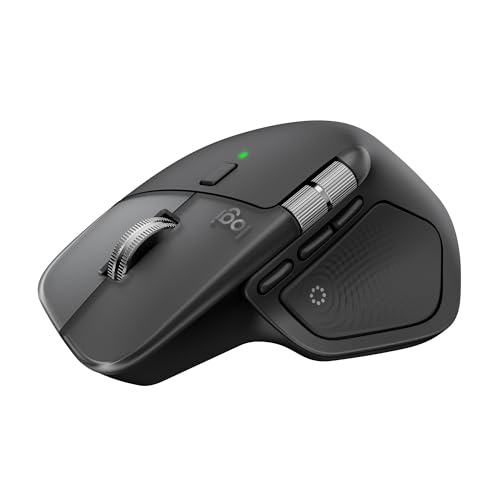
You can think of this one as the Mac-first cousin in the MX family, tuned for people who live in macOS or iPadOS and still expect smooth desktop control. Haptic feedback means the mouse gives tactile response through vibration-style cues, which can make certain actions feel more deliberate, though that’s a very personal preference.
USB-C charging is a practical fit for modern desks, since one cable type already tends to cover a lot of your gear. Compared with the MX Master 3S Bluetooth Edition, this version leans harder into the Apple ecosystem and feels better suited to a polished workstation than a grab-and-go setup.
What We Like
- Mac and iPad compatibility make it a natural fit for Apple-heavy workstations.
- Haptic feedback adds tactile cues that can help actions feel more intentional.
- Ultra-fast scrolling suits long documents, code review, and timeline work.
- USB-C charging keeps cable management simpler on a modern desk.
- The ergonomic shape supports long sessions without feeling overly small.
Worth Noting
- The more premium control layout can feel like overkill for basic browsing.
- Mac-focused design may matter less if your day jumps between many operating systems.
- Its feature set asks for a little setup time before everything feels dialed in.
Feature Snapshot
Built With In Mind
Apple-focused programmers and hybrid desk workers who care about tactile control will get the most out of this model.
Where A Sibling Pick Shines
Logitech MX Master 3S Bluetooth Edition makes more sense for you if you want a similar productivity shape without the Mac-first emphasis.
This version sits close to the top of the productivity pile because it combines fast scrolling, quiet buttons, and a shape that supports long desk sessions. The MagSpeed wheel, a high-speed scrolling system, is the sort of detail you notice most during research sweeps or log review, where long pages add up.
Its ergonomics are more about steady comfort than flashy form, and that matters when your hand lives on the mouse for hours. Against the Bluetooth-only 3S above, this one reads as the broader platform-agnostic pick, especially for Linux or Chrome-heavy workflows.
Highlights
- MagSpeed scrolling gives fast, controlled movement through long files and pages.
- 8K DPI tracking supports precise cursor placement on many desk surfaces.
- Quiet clicks help reduce distraction in shared spaces.
- The sculpted body and thumb rest suit extended desktop sessions.
- It works well for programmers who move constantly between windows and documents.
Areas To Watch
- The productivity shape is excellent for desks, but it feels bulky in a packed travel bag.
- Quiet switches can feel different from clickier office mice, depending on your preference.
- Advanced controls reward a short setup period before the mouse feels fully personal.
Core Details
Who Will Love This
Power users who spend most of the day at a desk and want speed without giving up precision will appreciate this mouse.
Look Elsewhere When
TECKNET Ergonomic Mouse 4800 DPI Wireless Bluetooth Vertical fits better for a simpler vertical grip and a lower-commitment setup.
The WL300 is the flexible one in the group, because it gives you wired, 2.4 GHz wireless, and dual Bluetooth options in a single shell. That kind of tri-mode setup suits a desk that changes often, or a commute bag that needs one mouse for a laptop, tablet, and home machine.
Six buttons and adjustable DPI, which is pointer sensitivity, add practical control without making the shape feel overly serious. Compared with the Logitech MX models above, this is less about luxury feel and more about useful versatility for everyday programming chores.
Reasons To Buy
- Tri-mode connectivity gives you more ways to stay connected across devices.
- The silent click design keeps the mouse calmer in quiet rooms.
- Six buttons add shortcuts without crowding the shell.
- Adjustable DPI lets you tune pointer speed to your screen setup.
Small Caveats
- The feature mix is broad, but the overall feel is more practical than premium.
- Switching between modes takes a little attention during the first few days.
- The sculpted body may suit many hands, though very large hands could want more room.
Feature Rundown
Who Should Grab It
Programmers who split time between several devices and want one mouse that stays adaptable should find this a sensible fit.
Another Choice May Suit
Logitech MX Master 3S Bluetooth Edition makes more sense for you if a more polished productivity shell matters more than connection variety.
The 58-degree vertical angle is the headline here, because it shifts your hand into a more handshake-like position than a flat mouse. For long desk sessions, that can feel less tiring, although the shape does ask for a short adjustment period before it feels natural.
It also supports three devices through Bluetooth or the included 2.4G USB-A connection, so it suits a setup that hops between laptop and desktop. Compared with the WL300, this one feels more focused on hand position than on connection variety, and that distinction matters more than the extra flashing around the spec sheet.
Upsides
- Vertical posture support changes the angle of your hand in a noticeable way.
- Three-device connection support helps you move between machines without rethinking your desk.
- USB-C rechargeability is handy for a daily workstation.
- The black finish keeps the design understated and easy to pair with other gear.
Room For Improvement
- The vertical angle can feel unusual at first, especially during the first workday or two.
- It is more about comfort than speed-focused control, so heavy spreadsheet users may want a flatter shape.
- The right-handed form narrows the fit for left-handed setups.
Spec Overview
The Right Fit
Office workers and programmers who care more about vertical comfort than ultra-fast scrolling will feel at home with this model.
Swap It Out When
Logitech MX Master 4 Ergonomic Wireless Mouse Graphite is the better fit for you when premium desktop controls matter more than a vertical grip.
This one is clearly aimed at people who want a more polished desktop tool, not just a pointing device. Haptic feedback is the headliner again, but here the broader point is how the mouse tries to make repeated actions feel more structured while you move through code, files, and browser tabs.
USB-C charging and ultra-fast scrolling make it feel tuned for a modern desk, and that matters more than flashy styling. Compared with the MX Master 3S models, this one leans a bit more premium in feel, though that extra refinement will matter most to people who spend whole days at the workstation.
Best Bits
- Haptic feedback adds tactile cues that can make repeated actions feel clearer.
- Ultra-fast scrolling helps with long docs and dense development dashboards.
- USB-C charging aligns well with modern desktop accessories.
- The ergonomic body suits long sessions at a fixed workstation.
Softer Spots
- The premium feature set is more useful for heavy desk work than casual use.
- It asks for a bit of setup time before the controls feel fully tuned.
- The upgraded feel comes with expectations, so simple-use shoppers may not need everything here.
Details At A Glance
Whose Shelf It Belongs On
It suits programmers and creative multitaskers who want a premium desktop mouse and spend most of the day at one setup.
Reach For A Different Pick When
ProtoArc EM11 NL Wireless Ergonomic Vertical Mouse Black makes more sense for you if wrist angle matters more than haptic extras.
This TECKNET model lands in a very practical spot, because it gives you a vertical shape, 4800 DPI sensitivity, and support for three devices without trying to feel luxurious. That mix is handy for programmers who keep a work laptop, home desktop, and side machine in rotation.
Quiet clicks help keep the desk less distracting, and the battery-powered design keeps the setup uncomplicated. Compared with the ProtoArc EM11 NL, this one looks more like a straightforward utility mouse, which is exactly what some people want from a secondary or travel-friendly pick.
Bright Spots
- 4800 DPI gives you a solid sensitivity ceiling for general productivity work.
- Three-device support makes switching between systems easier.
- Quiet clicks suit shared offices and late-night sessions.
- Six buttons add useful shortcuts without making the shell crowded.
Minor Gripes
- The battery-powered format means you’ll want to keep an eye on power over time.
- Its vertical shape is helpful, though some hands prefer a flatter mouse for faster side-to-side motion.
- The feature list is sensible, but it stays firmly in utility territory.
Feature Card
Made For
Budget-conscious programmers and hybrid office workers who want a vertical mouse with basic multi-device convenience should take a close look.
Where A Sibling Pick Shines
Logitech MX Master 3S suits you better when you want smoother scrolling and a more premium productivity shell.
The vertical shape makes this one impossible to ignore, and that’s the point. It’s built for people who want a more upright hand position and also move content between multiple Windows and Apple computers, so it’s a strong fit for a mixed-platform desk.
Rechargeability keeps the routine cleaner than battery-swapping models, and the overall design feels more like a posture-first tool than a speed-first one. Compared with the TECKNET vertical mouse, this Logitech version lands in a more polished category for people who are willing to trade simplicity for a more refined ergonomic shape.
Positives
- The vertical stance supports a more upright hand position.
- Cross-computer content movement suits mixed Windows and Apple setups.
- Rechargeable power simplifies daily desk use.
- The graphite finish keeps the look restrained and professional.
Honest Caveats
- The vertical angle can feel unfamiliar at first, especially for flat-mouse regulars.
- Its shape is purpose-built, so it won’t feel as nimble as a slimmer travel mouse.
- People who care more about scrolling speed than hand posture may prefer the MX Master series.
Technical Sheet
Best Suited To
Programmers, designers, and office workers who want a distinct vertical mouse for a mostly stationary workstation will appreciate this shape.
Where Shoppers Go Wrong
Logitech MX Master 4 Ergonomic Wireless Mouse Graphite is the better fit for you if premium scrolling and haptic cues matter more than an upright grip.
How To Choose The Right Mouses For Programmers
Shape Comes First
The mouse shape should match how long your hand stays on it. A vertical design like the MX Vertical or ProtoArc EM11 NL changes wrist angle, while the MX Master line keeps a more traditional sculpted posture with a thumb rest and a fuller body.
People who spend hours in IDEs, terminal windows, or browser tabs usually notice comfort before anything else. A mouse that feels slightly large on the first day can still be the right call for a desk-bound workflow, but a travel-heavy setup usually wants something simpler.
Scrolling And Shortcut Control
Fast scrolling matters more than many shoppers expect. Logitech’s MagSpeed wheel is built for long documents, code review, and timelines, while extra buttons matter when you constantly jump between apps, tabs, or tool panes.
That extra control helps only when you plan to use it, though. A simpler mouse like the WL300 or TECKNET vertical can make more sense for programmers who want core navigation without a lot of extras to configure.
Connection Style And Device Count
Bluetooth-only models suit cleaner desks, but they are less forgiving if you like to move a mouse between several systems. Multi-mode choices, such as the WL300 or TECKNET, give you more flexibility by mixing Bluetooth, 2.4G wireless, and in one case even a wired option.
Three-device switching matters most in homes where one mouse serves a laptop, a desktop, and a backup machine. That convenience can feel like a small luxury until you spend a week swapping hardware between work and personal setups.
Where Value Really Shows Up
Higher-priced models usually spend the extra money on better scroll wheels, more polished materials, more refined button feel, and richer software control. Those details are hard to care about on day one, then they start to matter every time you sit down for a long work block.
Shoppers who only need pointer movement can stay with a simpler pick. Programmers who live in front of the screen for most of the day usually feel the upgrade in comfort, speed, and desk organization.
What To Weigh Before You Choose
Common Shopping Slip Ups
One common miss is buying for features instead of posture. A programmer who works eight hours a day may regret a small travel mouse more quickly than a modest-looking vertical design.
Another easy mistake is ignoring connection needs. A Bluetooth-only model suits some desks beautifully, but a multi-device workflow often benefits from a mouse that can switch paths without fuss.
Where The Extra Money Goes
Premium money usually buys smoother wheels, quieter switches, better contouring, and stronger multi-device handling. Those upgrades do not matter equally to everyone, but they do make a long desk day feel less clumsy.
Spending more also tends to make sense for people who use the mouse as a daily tool, not an occasional accessory. For that group, the extra refinement can be worth it simply because the hand meets the mouse all day long.
Final Thoughts
The best mouse for your programming setup depends on what irritates you most: wrist angle, noisy clicks, clumsy scrolling, or too many device swaps. The MX Master models serve heavy desk work well, the vertical designs favor posture, and the WL300 and TECKNET picks keep things more practical. For a small but meaningful upgrade to your daily setup, the right one can make your workday feel smoother without asking for much drama.
