
Long hours at a workstation make mouse shape, button layout, and tracking feel a lot more important than they look on a product page. For radiology work, you want a pointer that stays steady, reduces hand strain, and fits the way you move between PACS, reports, and reference tools. These eight picks cover everything from vertical designs and trackballs to premium ergonomic models, so you can match the mouse to your desk habits instead of forcing your hand to adapt.
Quick Look At Our Top Picks
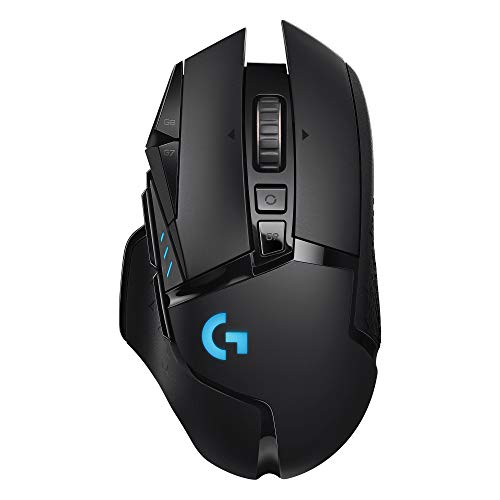
Logitech G502 Lightspeed Wireless Mouse, Renewed

Ergodriven Om Vertical Ergonomic Mouse

ProtoArc EM02 Wireless Trackball Mouse

3Dconnexion SpaceMouse Wireless, Bluetooth Edition

Logitech Signature Comfort Plus M850 L Wireless Mouse

WL300 Bluetooth Mouse Silent Wireless Mice, Grey

Logitech MX Master 4 Ergonomic Wireless Mouse

Logitech Lift Vertical Ergonomic Wireless Mouse
More Details On Our Top Picks
For radiology work that lives on precision clicks and fast pointer changes, this G502-shaped layout feels more like a control tool than a plain office mouse. The tunable weights and extra buttons make sense for a workstation where you keep repeating the same moves through imaging software, though the gaming styling may feel a little loud on a clinical desk.
The wireless setup and HERO 16K sensor point to steady tracking, and PowerPlay compatibility matters only for a desk setup built around that system. The honest read is that this is strongest for power users who want custom control, not for someone who wants a light, minimal mouse for quick charting.
Strong Points
- Tunable weights help you shape the feel to your hand.
- Extra controls can shorten repeat actions in imaging workflows.
- Wireless use keeps the desk less cluttered.
- The sensor spec suggests smooth pointer control for detailed work.
Minor Gripes
- The gaming look may not suit a restrained workstation.
- Tunables and extra buttons ask for a little setup time.
- Renewed condition means the finish can vary.
Feature Snapshot
Who It Suits Best
You get the most from this pick in a busy imaging station where button mapping and pointer precision matter more than a plain, simple shell.
Skip It When
Logitech Lift Vertical Ergonomic Wireless Mouse is a better match for radiologists who want a softer hand angle and less desk presence.
The vertical grip changes the hand angle in a way that can feel more natural during long reporting sessions, especially for your main hand on a crowded desk. Bluetooth and 2.4G support give you easy switching across laptop and desktop setups, and the rechargeable design keeps this one aligned with everyday office use.
The four DPI levels and five custom buttons add useful control, while the silent click design should suit shared workspaces or a late-night reading room. You may find the taller stance takes a little getting used to, but that trade-off is common with vertical mice and often worth it for comfort-minded users.
What We Like
- Vertical shape shifts wrist posture away from a flat grip.
- Two connection modes make it easy to move between devices.
- Five custom buttons support shortcuts you use over and over.
- Silent clicks help keep noise down in shared rooms.
- Rechargeable power suits a desk that stays active all day.
Small Caveats
- The upright body may feel unfamiliar at first.
- A vertical profile can take more desk adaptation than a standard mouse.
- Button setup takes a little time before the shape pays off.
Core Details
Made For
You suit this mouse best when you want a vertical angle and easy switching between a clinic computer, a laptop, or a home setup.
A Better Fit Elsewhere
Logitech Lift Vertical Ergonomic Wireless Mouse is the gentler pick for someone who wants the same upright idea with a more established ergonomic shape.
A trackball makes a lot of sense in a radiology space where the desk stays tight and the cursor work is constant. With thumb-ball control, you move the pointer while your hand stays mostly still, which can feel calmer during long review blocks, though the thumb-based motion is a different habit from a regular mouse.
The adjustable 0 to 15 degree angle adds a small but meaningful comfort range, and multi-device support is handy for people who split time between systems. One thing worth considering is that trackballs usually ask for more cleaning than a standard mouse, because the ball and housing collect dust over time.
Bright Spots
- Thumb-ball control keeps hand movement low.
- Angle adjustment helps you find a more relaxed wrist position.
- Three-device connectivity suits a mixed-device desk.
- Rechargeable power avoids constant battery swapping.
Areas To Watch
- Trackball use feels different from a standard mouse.
- Regular cleaning matters more than with a plain pointer.
- Thumb control can take a short adjustment period.
Details At A Glance
Perfect Match For
You fit this pick best when you want low desk movement and a control style that can feel steadier during long screen sessions.
Another Choice May Suit
Logitech MX Master 4 Ergonomic Wireless Mouse is a stronger match for someone who wants a more traditional shape with richer pointer controls.
This pick sits in a different lane from the others, because it’s built for spatial control rather than plain cursor work. In a radiology environment, that makes sense only for specialized workflows, but for 3D imaging or other advanced workstation tasks, the wireless Bluetooth design can feel very deliberate and tidy.
The trade-off is obvious: this is not the casual all-purpose mouse shape most desks expect. You’re paying for a very specific control style, so the best fit is a workstation that really needs that kind of input rather than a general reporting station.
Reasons To Buy
- Built for spatial control instead of ordinary pointer work.
- Wireless Bluetooth setup keeps the desk clean.
- Specialized input can suit advanced imaging tasks.
Points To Note
- The shape is specialized, not universal.
- General office use may not justify the learning curve.
- It makes more sense in a niche workflow than in a plain desk setup.
Core Details
Who Should Grab It
You suit this model best when your work calls for spatial navigation and you already know that kind of control feels natural.
Look Elsewhere When
ProtoArc EM02 Wireless Trackball Mouse is easier to justify for radiologists who want low-motion control without moving into a specialty device.
This one leans into comfort instead of experimentation, and that tends to fit a radiologist who wants a reliable hand rest through long charting blocks. The palm cushion and customizable buttons make everyday movement feel less bare-bones, and the Bluetooth connection keeps it simple for mixed-device desks.
The 24-month battery claim is a real convenience point for a workstation that should stay predictable, though the mouse still stays fairly conventional in shape. The honest read is that it’s not the most specialized pick here, but that also makes it easy to live with.
Upsides
- Palm cushioning supports longer desk sessions.
- Customizable buttons can shorten repeated actions.
- Bluetooth connection keeps the setup uncluttered.
- Long battery spec reduces routine charging attention.
Worth Noting
- The shape is familiar rather than adventurous.
- Comfort helps most when your grip matches the size well.
- Less specialized than the vertical or trackball picks.
Feature Card
The Right Fit
You fit this mouse well when you want a dependable, comfort-first shape for ordinary reporting and charting work.
Where A Sibling Pick Shines
Logitech Lift Vertical Ergonomic Wireless Mouse is better for someone who wants a more upright hand position than this conventional shell provides.
Quiet clicks and a sculpted grip make this one feel well suited to shared offices, libraries, or travel days where you do not want extra noise from the desk. Tri-mode connectivity is the main draw here, because wired, 2.4G wireless, and dual Bluetooth give you more room to adapt than the simpler connection choices on several other picks.
The adjustable DPI and six-button layout add usable control without pushing the mouse into specialist territory. You may find the brand and listing details a little less polished than Logitech’s models, but the feature set still makes sense for a practical, no-fuss setup.
Best Bits
- Quiet clicks suit shared or quiet work areas.
- Tri-mode connectivity gives you real setup flexibility.
- Sculpted grip helps the mouse sit naturally in hand.
- Six buttons support more than bare-minimum use.
- Adjustable DPI helps pointer speed feel more tunable.
Softer Spots
- The listing looks less polished than some named-brand options.
- More connection modes also mean more setup choices to sort through.
- The shape is useful, but not especially distinctive.
Feature Rundown
Whose Shelf It Belongs On
You suit this mouse best when you move between office, home, and travel setups and want one device that can keep up.
Reach For A Different Pick When
Logitech Signature Comfort Plus M850 L Wireless Mouse is the calmer choice for someone who values a more polished, comfort-first shell.
The MX Master line usually makes sense for people who spend serious time in front of a computer, and this one leans even harder into that idea with haptics and ultra-fast scrolling. For radiology tasks that involve moving through long lists, reports, and imaging panes, that kind of control can feel efficient, though the bulkier ergonomic shape will not suit every hand.
USB-C charging keeps the modern workflow tidy, and the Windows plus macOS support broadens the usefulness across different workstations. The trade-off is simple: this costs attention and desk space, but it gives back control and comfort in a way lighter mice usually do not.
Highlights
- Haptic feedback adds a more tactile control feel.
- Ultra-fast scrolling helps with long documents and image lists.
- USB-C charging fits current desk habits.
- Works across Windows and macOS setups.
- Ergonomic shape supports heavier daily use.
Trade Offs
- The larger body may feel too substantial for smaller hands.
- Premium controls make sense most when you use them often.
- It is more mouse than a basic workstation needs.
Technical Sheet
Built With In Mind
You suit this pick best when your mouse spends most of the day in active use and you want a more advanced control surface.
Swap It Out When
Logitech Signature Comfort Plus M850 L Wireless Mouse is the easier fit for someone who wants comfort without the premium-size feel.
The Lift keeps things calm and sensible, which is exactly why it fits so naturally into a long workday. Its vertical shape, quiet clicks, and customizable buttons line up well with radiology desks where you want comfort without learning a completely new control style.
Bluetooth plus the included Logi Bolt USB-A receiver give you two connection paths, and that flexibility helps in mixed office setups. Compared with the Ergodriven Om, this one feels easier to recommend to someone who wants upright ergonomics with a more familiar shape.
Positives
- Vertical posture supports a more neutral hand angle.
- Quiet clicks fit shared or quiet rooms.
- Customizable buttons help with repeating work habits.
- Bluetooth and USB receiver support flexible setup choices.
Honest Caveats
- Vertical mice still need a little adaptation time.
- The shape is comfort-first, not flashy or highly specialized.
- Smaller hands may want to check the grip feel carefully.
Spec Overview
The Right Fit
You suit this mouse best when you want an ergonomic shape that feels approachable on day one and still makes sense months later.
Where A Sibling Pick Shines
Ergodriven Om Vertical Ergonomic Mouse is the better match for someone who wants a more pronounced vertical stance and extra button count.
What To Weigh Before Choosing Your Mouse
Common Shopping Slip Ups
Radiology work rewards precision, but plenty of shoppers focus only on shape and forget the rest. Button layout, connection type, and pointer feel matter just as much, because you may spend hours moving between images, reports, and notes. A mouse that looks ergonomic but feels awkward after 20 minutes rarely earns its place on a busy desk.
Trackballs and vertical mice solve different problems, so the shape has to match the way you actually work. A trackball can save desk space, while a vertical mouse changes wrist angle, and a standard ergonomic shell stays closer to what most hands already know. Shortlist the style that matches your own habits, not just the label.
What The Higher Tier Buys
Higher-end mice usually put money into smoother sensors, richer button control, better scroll behavior, and more careful shaping. That matters in a clinical workflow where small delays add up and the hand stays on the device for long stretches. Premium models often feel less like a tool you notice and more like a tool that disappears into the task, which is the point.
You usually pay more for extra customization, better materials, or more advanced input features such as haptics or specialized control layouts. That upgrade makes the most sense for heavy daily use, especially in a workstation that handles imaging, long forms, and frequent switching between windows. For lighter charting, a simpler ergonomic mouse often does the job without the extra cost or complexity.
Final Thoughts
For radiology desks, the right mouse is the one that fits your hand, your work style, and the amount of time you spend making small movements all day. The Logitech Lift and Ergodriven Om make the strongest case for comfort-first ergonomics, while the ProtoArc EM02 and WL300 add useful alternatives for trackball or tri-mode setups. If you want a more advanced control surface, the MX Master 4 and G502 bring extra depth, and the SpaceMouse serves a very specific workflow. Pick the shape that matches your routine, and the rest gets easier.
