
Extra buttons sound minor until your day fills up with macros, app switches, and back-and-forth scrolling. For MMO sessions, office multitasking, or travel work on a laptop, the right mouse can cut down on small annoyances that stack up fast. You’ll see a mix of wired, wireless, and tri-mode options here, along with models that lean toward gaming control, quiet office use, or broader device compatibility.
Quick Look At The Shortlist

Redragon M811 Wired RGB MMO Gaming Mouse 10000 DPI
Acer Wireless Mouse for Laptop, Computer Mouse Ergonomic for 4 Devices
Logitech G305 Lightspeed Wireless Gaming Mouse – Black

WL300 Bluetooth Mouse Silent Wireless Mice, Cordless Computer Mouse-Grey

Wireless Gaming Mouse, RGB Dual Mode Bluetooth Mouse Up 24,000 DPI

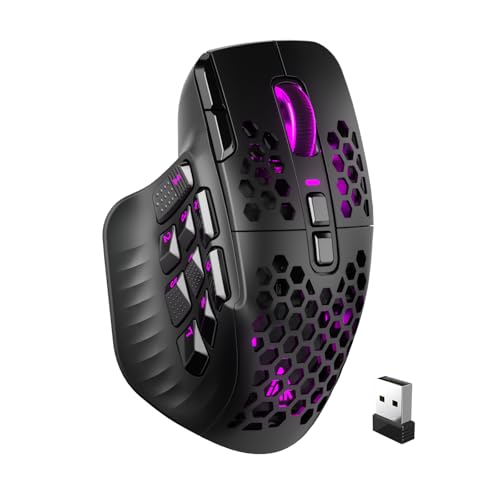
LTC MKM071 Wireless MMO Gaming Mouse with RGB Charging Dock

Razer Basilisk V3 X HyperSpeed Customizable Wireless Gaming Mouse, Black

Redragon M908 Wired MMO RGB Gaming Mouse 12400 DPI
More Details On Our Top Picks
Button-heavy MMO work is where the Redragon M811 earns attention. Its 15 programmable buttons, including eight side buttons, give you room for macros, skill chains, and repeated office shortcuts without reaching for the keyboard every few seconds.
The wired connection keeps the feel steady for long sessions, and the ergonomic shell is shaped around a natural hand position. You do give up wireless freedom, though, so this makes the most sense at a fixed desk or a gaming station that stays put.
Strong Points
- 15 programmable buttons suit MMO layouts and workflow shortcuts.
- Five default DPI steps make sensitivity changes fast.
- The software-adjustable range reaches higher than the listed presets.
- Wired connection avoids battery upkeep and pairing hassles.
- The hand-shaped body helps during longer desk sessions.
Things To Consider
- The cable keeps the desk tidy only to a point, since it still occupies space.
- Very dense button layouts take time to learn.
- The focused gaming shape may feel larger than a plain office mouse.
Feature Snapshot
Who It Suits Best
You get the most from this mouse in MMO games, crowded shortcut workflows, or any desk setup where extra controls matter more than wireless freedom.
Where A Sibling Pick Shines
Redragon M908 Wired MMO RGB Gaming Mouse 12400 DPI suits you better when you want a similar wired feel with a different control layout and a slightly more traditional MMO profile.
Multi-device mice can save you a lot of small friction, and this Acer model leans hard into that use case. It supports 2.4GHz wireless, Bluetooth, and wired use, with a note that the USB-A and USB-C receivers are not used at the same time.
You can pair it with up to four devices, which makes it handy for a laptop, desktop, tablet, and even a second work machine. The OLED screen adds at-a-glance status, though the trade-off is a busier shell than a plain travel mouse.
What We Like
- Three connection modes cover a wide range of desk setups.
- Four-device pairing helps you move between screens with less fuss.
- USB-A and USB-C receiver support broadens compatibility.
- The OLED display gives you a clear status readout.
- Five programmable buttons help with common shortcuts.
Worth Noting
- The two receiver types cannot be used together.
- The feature set is more layered than a basic office mouse, so setup takes a little more attention.
- The fuller body may feel less minimal in a carry bag.
Core Details
Who Will Love This
You’ll get the most value from this mouse in a mixed-device home office where one pointer needs to handle several screens and connection types.
Another Choice May Suit
WL300 Bluetooth Mouse Silent Wireless Mice, Cordless Computer Mouse-Grey fits you better for quieter everyday work and a simpler, less layered setup.
Wireless gaming mice live or die on how much clutter they remove without feeling fussy, and the G305 keeps its pitch simple. Six programmable buttons, 12,000 DPI, and onboard memory give you the core controls you want without turning the shell into a button maze.
The 250-hour battery claim points to a mouse built for long stretches away from the charger, which is useful for dorm desks, shared setups, or travel bags. On the other hand, the six-button layout is more restrained than the MMO-heavy picks above, so it suits general gaming better than macro-heavy play.
Positives
- HERO sensor support is aimed at consistent pointer tracking.
- The six-button layout stays approachable for everyday gaming.
- Onboard memory helps preserve your button setup across systems.
- The stated battery span reduces charging interruptions.
Minor Gripes
- You get fewer inputs than the MMO-oriented models in this list.
- The shape is more straightforward than highly sculpted alternatives.
At A Glance
Best Suited To
You’ll like this most for wireless PC gaming, especially in setups where you want a clean desk and a moderate button count.
Swap It Out When
Redragon M811 Wired RGB MMO Gaming Mouse 10000 DPI makes more sense for heavy macro use and a far denser control layout.
Quiet-click designs make a real difference in shared offices, late-night work, and library-style spaces. The WL300 keeps the focus on calm operation, with six buttons, sculpted grip shaping, and adjustable DPI for a lighter daily workload.
Its tri-mode setup adds wired, 2.4G wireless, and dual Bluetooth options, which is useful when you move between a laptop, tablet, and desktop. The honest trade-off is that it’s more of a practical work mouse than a control-packed gaming tool, so motion-heavy play won’t be its main lane.
Highlights
- Quiet clicks suit shared spaces and evening work.
- Tri-mode connectivity fits a desk, couch, or travel bag.
- Six buttons cover the basics without clutter.
- The sculpted body supports a steadier hand position.
- The 18-month battery claim points to fewer maintenance pauses.
Areas To Watch
- The simpler button count keeps it away from advanced macro work.
- Travel users may want to confirm their preferred connection path before packing it.
Details At A Glance
Made For
This one suits you best for office tasks, travel work, and quiet shared environments where low noise matters more than extra macros.
Reach For A Different Pick When
Attoe Wireless Gaming Mouse, RGB Dual Mode Bluetooth Mouse Up 24,000 DPI fits you better for gaming-focused control and a higher button count.
This Attoe model leans toward people who want a lot of control under one hand. Thirteen macro-programmable buttons, 24,000 DPI, and a 4000Hz polling rate create a busy spec sheet that suits fast input, while the PMW-3311 sensor keeps the pitch centered on gaming control.
The dual-mode setup adds flexibility for a PC or laptop desk, and the grip shape should help during longer sessions. The trade-off is that the high button count asks for a bit of learning, so it feels more specialized than the simpler Logitech G305 or WL300 picks.
Best Bits
- Thirteen programmable buttons support complex commands.
- 24,000 DPI leaves plenty of sensitivity room.
- The 4000Hz polling rate is aimed at responsive movement.
- Dual-mode connectivity helps across desk setups.
- The PMW-3311 sensor backs up the gaming focus.
Softer Spots
- The dense control layout may take practice.
- The gaming-first design makes it less plain than an office mouse.
- More functions also mean more setup time for your preferred bindings.
Spec Overview
Right Fit For
You should look at this pick for MMO, MOBA, or shortcut-heavy gaming where a dense button map matters more than simplicity.
A Better Fit Elsewhere
Logitech G305 Lightspeed Wireless Gaming Mouse – Black is the calmer choice for you if you want wireless gaming control without the heavier macro learning curve.
The LTC MKM071 feels like a step up for desk users who want both flexibility and a proper charging base. Tri-mode connectivity, a PAW3311 sensor, 11 programmable buttons, and seven side buttons make it a strong fit for busy setups where you switch between devices but still want MMO-style control.
The RGB charging dock is the practical twist, since it gives the mouse a home instead of another loose cable. That said, the fuller feature set and dock footprint make this less minimal than the simpler WL300 or G305 options.
Upsides
- The charging dock helps keep the mouse in a set place.
- Tri-mode connectivity adds real desk flexibility.
- Eleven programmable buttons support shortcuts and game actions.
- Seven side buttons place many commands within reach.
- 1000Hz polling suits everyday gaming responsiveness.
Room For Improvement
- The dock takes up more room than a plain cable or a bare wireless mouse.
- The many side buttons can take time to memorize.
- It feels tuned for a serious desk setup, not a stripped-down travel bag.
Technical Sheet
The Right Fit
You’ll appreciate this most in a desk setup that mixes gaming, daily work, and regular device switching.
Where A Sibling Pick Shines
Razer Basilisk V3 X HyperSpeed Customizable Wireless Gaming Mouse, Black suits you better when you want a cleaner wireless feel and fewer dock-related concerns.
The Basilisk V3 X HyperSpeed sits in a more polished lane than the budget-friendly Redragon models. Mechanical switches Gen-2, a 5G Advanced 18K optical sensor, nine programmable controls, and Chroma RGB make it feel tailored for wireless gaming with a more refined touch.
Its 285-hour battery claim stands out for long desk stretches, and the HyperSpeed wireless plus Bluetooth pairing gives you two useful ways to connect. The trade-off is straightforward, though, because this is still a focused gaming mouse rather than a broad office tool like the Acer or WL300.
Bright Spots
- Mechanical switches give each click a more deliberate feel.
- The 18K optical sensor supports fine pointer control.
- Nine programmable controls cover a solid command range.
- HyperSpeed wireless and Bluetooth widen connection options.
- The battery claim is well suited to long work or game weeks.
Small Caveats
- The styling and feature mix lean toward gaming first.
- Nine buttons are useful, but they still sit below the MMO-heavy picks in this roundup.
Core Details
Whose Shelf It Belongs On
This mouse makes the most sense for gaming-focused shoppers who want a cleaner wireless setup and a more polished control feel.
Look Elsewhere When
Acer Wireless Mouse for Laptop, Computer Mouse Ergonomic for 4 Devices is the better fit for you if your day leans more toward mixed-device work than gaming.
The Redragon M908 lands as the more traditional wired MMO choice in this list. With 12400 DPI, remapping keys, and the same family’s steady desk-first approach, it’s built for you if you want lots of button access without giving up a simple cable connection.
It overlaps with the M811 in purpose, but the older M908 keeps the classic MMO pattern and a slightly more straightforward pitch. That makes it a sensible fit for long desktop sessions, though it still asks for a little time to learn the layout.
Reasons To Buy
- 12400 DPI gives you a wide sensitivity ceiling.
- Remapping support helps with macros and repeated tasks.
- The wired design keeps power management simple.
- RGB lighting adds a visual touch without changing the core layout.
- It suits long MMO or desktop sessions well.
Points To Note
- Wired use means the cable stays part of the setup.
- The MMO layout works best after some button memorization.
- It overlaps in purpose with the M811, so your choice may come down to layout preference.
Feature Rundown
Built With In Mind
You’ll get the most out of this mouse in MMO play or a button-heavy desktop routine where wired stability feels reassuring.
Where A Sibling Pick Shines
Redragon M811 Wired RGB MMO Gaming Mouse 10000 DPI suits you better if you want a newer-feeling control layout with more programmable input.
How To Choose The Right Mouses With Multiple Buttons
Button Count And Layout Matter More Than The Marketing
Extra buttons only help when you can reach them without changing your grip. MMO mice like the Redragon M811 and LTC MKM071 pack side inputs for skills and macros, while the Logitech G305 keeps things simpler with six programmable controls.
Think about how often you use the keyboard for repeated actions. A denser layout can speed up work or gaming, but it also takes longer to learn and can feel crowded in smaller hands.
Connection Type Changes Daily Use
Wired mice remove charging from the routine and usually feel straightforward at a fixed desk. Wireless models, such as the Logitech G305 or Razer Basilisk V3 X HyperSpeed, keep the desk cleaner and suit couch setups or travel bags better.
Tri-mode options add even more flexibility, especially for someone moving between a laptop, desktop, and tablet. The trade-off is setup complexity, since you now manage connection modes and, in some cases, receiver choices.
Sensor, DPI, And Polling Rate Need To Match The Task
DPI is cursor sensitivity, so a higher number can feel faster, but it is not automatically better. A 24,000 DPI mouse like the Attoe model gives you a wider ceiling, while 12,000 DPI on the G305 or LTC MKM071 still covers plenty of regular gaming and work.
Polling rate describes how often the mouse reports its position, and that matters most in fast games or very precise pointer work. Higher numbers can sound impressive, yet a steady shape and comfortable grip matter just as much for long sessions.
Comfort, Desk Space, And Maintenance Should Not Be Ignored
A sculpted body helps during long sessions, especially for office use or evening gaming. The WL300 leans into quiet comfort, while the Redragon MMO models favor more aggressive control layouts that may feel better at a dedicated desk.
Also think about upkeep. A charging dock adds convenience but takes space, a cable stays present on wired picks, and dense button arrays need a little cleaning around seams and side clusters.
Things Worth Knowing First
Mistakes Worth Dodging
It’s easy to chase button count alone and overlook shape, weight, or connection style. A mouse with 13 or 15 inputs helps only when your hand can actually reach them comfortably.
Many people also ignore device switching until they need it. A multi-device mouse like the Acer model solves a real desk problem, while a simpler wireless pick can feel less fussy for single-machine use.
When The Upgrade Pays Off
Higher-tier models usually spend money on more refined sensors, better switches, extra connection modes, or a charging dock. That matters most for long gaming sessions, multi-device work, or desks where you want fewer small interruptions.
You do not need the priciest option for every setup. A straightforward wired mouse with programmable buttons can be the smarter choice when you mainly want reliability and direct control.
Final Thoughts
You have a lot of room here to match the mouse to the job instead of settling for a generic shape. MMO players will likely gravitate toward the Redragon M811, mixed-device desk setups point toward the Acer, and quieter office work fits the WL300 well. The best result comes from choosing the button layout you can actually live with every day, not the one that looks busiest on paper.
