
Portable Bluetooth mouses matter most when your desk moves with you, from café tables to airport lounges to a cluttered home office. A good one keeps pairing simple, slips into a laptop sleeve without drama, and stays comfortable after a day of spreadsheets, messages, and tabs. The list below focuses on compact builds, quiet clicks, travel-friendly power options, and cross-device flexibility.
The Shortlist At A Glance

Logitech MX Anywhere 2S Bluetooth Edition Compact Wireless Mouse
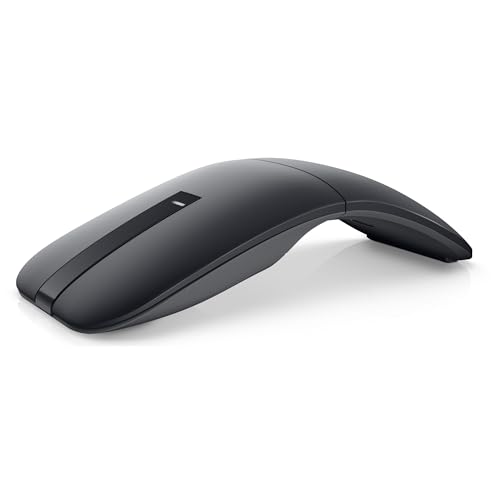
Dell Bluetooth Travel Mouse MS700

WL300 Bluetooth Mouse Silent Wireless Mice
Bluetooth Arc Mouse Foldable Slim and Portable Mini Wireless Computer Travel Mouse

WL300 Bluetooth Mouse Silent Wireless Mice

DELUX Wireless Bluetooth Pocket Mouse

Logitech M240 Compact Silent Bluetooth Wireless Mouse – Graphite
More Details On Our Top Picks
For laptop switchers, this one stands out because it’s built around multi-device control rather than a bare-bones travel shell. The compact body, 4K DPI sensor, and surface-agnostic tracking language point to a mouse meant for hotel desks, kitchen counters, and other uneven setups.
The trade-off is that this kind of flexibility usually costs you a little in pocket simplicity, so it suits a carry bag better than a shirt pocket. Compared with the Logitech M240, you get a more advanced feature set, which matters more for heavier mouse use than for occasional browsing.
Strong Points
- Pairs well with a travel workflow that moves between Windows and Mac machines.
- High pointer sensitivity helps on smaller screens and dense spreadsheets.
- Compact shape makes it easier to keep in a laptop sleeve.
- No receiver keeps the setup cleaner when you already live on Bluetooth.
Things To Consider
- Advanced features add complexity you may not need for casual use.
- The compact body can feel less relaxed during very long sessions.
- Surface versatility is useful, but a proper mouse pad still gives steadier control in many offices.
Feature Snapshot
Who It Suits Best
Frequent travelers and multitaskers who move between several computers will get the most from it.
A Better Fit Elsewhere
Logitech M240 Compact Silent Bluetooth Wireless Mouse – Graphite suits you better when you want a simpler daily carry mouse with less to manage.
This Dell leans into travel-first design, and the touch-scroll surface gives it a cleaner feel than a standard wheel. In airports or meeting rooms, that flatter interaction suits people who like a minimalist setup and don’t want much bulk in the sleeve.
The 4000 DPI figure gives you solid pointer sensitivity, while Bluetooth 5.0 LE keeps the wireless side modern enough for current laptops. Compared with the Logitech MX Anywhere 2S, it looks less feature-heavy and more stripped down, which can be a plus for simple workdays.
What We Like
- Touch-scroll control gives the mouse a cleaner, more modern handling style.
- Bluetooth 5.0 LE supports a straightforward wireless setup.
- 4000 DPI helps the pointer feel quick on compact displays.
- AAA batteries are included, so startup is less fussy.
Room For Improvement
- Two-button layouts keep the device simple, but they also limit shortcuts.
- Touch scrolling is a preference item, so it won’t suit every hand straight away.
- Some travel bags will still prefer a thinner shell, depending on how tightly you pack.
Core Details
Who Will Love This
Minimalist commuters and work travelers who want a clean, button-light mouse will appreciate it.
Where Another Pick Shines
Logitech M240 Compact Silent Bluetooth Wireless Mouse – Graphite fits better for people who want quieter clicks and a more familiar control layout.
Quiet clicks and a sculpted grip make this WL300 a sensible work-travel option, especially in shared spaces where loud button noise gets old fast. The six-button layout gives you more control than the Dell MS700, so it feels better suited to busy tabs, documents, and shortcuts.
The adjustable DPI lets you tune pointer speed to your screen size, which is handy on the road or at a secondary desk. The honest read is that this kind of feature set is more useful than flashy, and that’s exactly what keeps it appealing.
Positives
- Quiet clicking keeps late-night hotel work less distracting.
- Six buttons give you extra control for browser and document work.
- Sculpted shape supports a more planted hand position during longer sessions.
- Adjustable DPI helps the mouse feel comfortable across different screen sizes.
- The travel-friendly battery claim points to lower day-to-day upkeep.
Small Caveats
- The shape is more functional than flashy, so style seekers may look elsewhere.
- Extra buttons need a little getting used to before they feel natural.
- As with many compact mice, very large hands may want a fuller palm rest.
Details At A Glance
Best Suited To
Budget-minded commuters and office travelers who want quiet operation and extra buttons will fit it well.
Swap It Out When
Logitech MX Anywhere 2S Bluetooth Edition Compact Wireless Mouse makes more sense for people who need multi-computer control above all else.
Space is the whole story here. This fold-flat arc design is for bags where every millimeter counts, and the touch bar replaces a traditional wheel for a cleaner top surface.
The power behavior is unusual, because the mouse turns on when curved into shape and powers down when flattened again. Compared with the WL300 or the Logitech M240, it asks more of you in exchange for a smaller travel footprint, so it suits people who value storage ease over familiar ergonomics.
Highlights
- Very slim form tucks easily into compact carry spaces.
- Folding design helps it flatten out for storage.
- Touch-bar control removes the need for a standard wheel.
- Travel-first layout fits tablet and laptop bags with little room to spare.
Areas To Watch
- The curved-to-power behavior takes some getting used to.
- The brand note makes compatibility expectations worth checking carefully before you commit.
- Touch-bar control is a different feel, so it won’t suit people who want a classic wheel.
Technical Sheet
Who Should Grab It
Frequent travelers with very limited bag room will benefit most from it.
Look Elsewhere When
Dell Bluetooth Travel Mouse MS700 suits you better when you want a more conventional travel mouse with touch scrolling but less shape learning.
This WL300 version leans more into flexibility, because it supports wired, 2.4G wireless, and Bluetooth use in one shell. That makes it a sensible desk-and-travel hybrid for people who move between a laptop, a tablet, and a desktop without wanting a drawer full of accessories.
Compared with the other WL300 model, this one gives you more connection paths, which matters more than raw simplicity in a mixed-device routine. The trade-off is obvious enough: more modes mean more to remember, so it suits organized setups better than grab-and-go minimalists.
Best Bits
- Three connection modes cover a wide range of work setups.
- No-driver setup keeps first use straightforward.
- Switching between devices feels practical for home, office, and travel.
- The mouse suits people who want one device for many desks.
Honest Caveats
- Extra modes add a bit of complexity you may not need.
- Hybrid use works best when your charging and cable routine stays organized.
- People who only use Bluetooth may be paying for features they won’t touch.
Feature Rundown
The Right Fit
Hybrid workers who bounce between several machines and connection types will get the most out of it.
Another Choice May Suit
Logitech M240 Compact Silent Bluetooth Wireless Mouse – Graphite fits better for people who want the fewest moving parts in a daily carry mouse.
This DELUX model is built around a sliding, foldable pocket form, so it aims squarely at travelers who care about packability first. The rechargeable battery and front USB-C charging port matter in real use, because you can top it up without hunting for disposable cells.
The 4000 DPI ceiling gives it enough pointer speed for compact laptops, and the dual-mode 2.4 GHz plus Bluetooth setup broadens compatibility across common home and mobile devices. Compared with the WL300 value pick, it feels more travel-refined, though the sleeker shape asks you to accept a less traditional hand feel.
Positives
- Sliding pocket design saves space in small bags.
- USB-C charging is convenient for modern carry kits.
- Rechargeable power cuts down on battery swaps.
- Dual-mode connectivity suits laptops and desktop setups.
- Up to 4000 DPI gives the cursor plenty of speed.
Points To Note
- The slim shell favors travel convenience over full-size comfort.
- Recharge cycles matter more here, so charging habits become part of ownership.
- Very long sessions may feel better on a more substantial mouse body.
Core Details
Built With In Mind
Travel-heavy professionals and frequent flyers who want a rechargeable pocket mouse will appreciate it most.
Where A Sibling Pick Shines
Logitech M240 Compact Silent Bluetooth Wireless Mouse – Graphite suits you better if quiet simplicity matters more than a foldable pocket build.
This is the easiest recommendation for people who want a clean, familiar Bluetooth mouse for daily carry. Three non-customizable buttons keep the layout simple, and the quiet-click design makes it friendlier in libraries, open offices, and late-night home setups.
Unlike the more feature-rich Logitech MX Anywhere 2S, this one is about reducing friction, not stacking functions. The 18-month battery claim and lack of a receiver matter because they keep the routine low-maintenance, which is exactly what many commuters want.
Upsides
- Quiet clicking helps keep noise down in shared spaces.
- No USB receiver keeps the bag uncluttered.
- Three-button layout stays simple for everyday use.
- Long battery claim reduces the need for frequent upkeep.
- Works cleanly for both PC and Mac setups.
Minor Gripes
- The three-button layout leaves out extra shortcut control.
- Customization stays limited, so power users may want more flexibility.
- People who want advanced travel features may prefer the MX Anywhere 2S.
Quick Facts
Whose Shelf It Belongs On
Commuters, students, and office workers who want a quiet, low-fuss mouse should put it near the top of the list.
Reach For A Different Pick When
Logitech MX Anywhere 2S Bluetooth Edition Compact Wireless Mouse makes more sense for people who need multi-device control and a more feature-dense setup.
How To Choose The Right Portable Bluetooth Mouses
Connection And Device Fit
Bluetooth version, receiver-free operation, and multi-device pairing matter most for portable use. A mouse like the Logitech MX Anywhere 2S makes sense for people who jump between several laptops, while the Logitech M240 suits a simpler one-computer routine.
Compatibility should stay near the top of your checklist. A mouse that works cleanly with PC and Mac, or with Windows, macOS, or Android where stated, saves you from setup friction on the road.
Shape, Buttons, And Carry Size
Compact mice come in very different forms, from a conventional shell to fold-flat designs. The Dell MS700 keeps things minimal, while the Bluetooth Arc Mouse asks you to accept a more unusual shape in exchange for tighter storage.
Button count changes how the mouse feels in real work. Two buttons are fine for basic navigation, but six buttons or extra controls matter once you live in browser tabs, spreadsheets, or document work.
Power And Maintenance
Battery choice changes the ownership rhythm. AAA-powered models are easy to start, while rechargeable picks like the DELUX MF20 reduce disposable battery use but add charging to the routine.
That trade-off matters more than it sounds. A mouse with a long stated battery life fits commuters and frequent travelers, while a recharge-and-go design works better for people who already keep a USB-C cable in the bag.
Things Worth Knowing First
Wrong Turns To Avoid
Don’t chase tiny size alone. A mouse that folds flat or slips into a pocket can be brilliant for carry space, but it may feel awkward during long desk sessions.
Also avoid paying for controls you’ll never use. A three-button model keeps life simple, while a more complex option only earns its keep when you actually switch devices or lean on extra shortcuts.
The Upgrade Payoff
Higher-tier portable mice usually cost more because of stronger sensors, better materials, more refined scrolling, and broader connectivity. Those features matter for people who use a mouse all day, especially when the setup moves between offices, hotels, and home desks.
That extra spend makes sense when cursor precision, device switching, or a more polished travel shell will genuinely improve your routine. For casual browsing, a simpler model often gets the job done with less to manage.
Frequently Asked Questions
Are Bluetooth mice good for travel?
Yes, Bluetooth mice work well for travel because they skip the USB dongle. That keeps your bag tidier and reduces the chance of leaving a receiver behind.
How many buttons should a portable mouse have?
Three buttons suit basic daily use, while extra buttons help with shortcuts and navigation. The better choice depends on how often you work in documents, tabs, or multi-app setups.
Is a rechargeable mouse better than one that uses AAA batteries?
Rechargeable models reduce battery swaps and suit regular travelers. AAA-powered models can be simpler to start with because you can replace the batteries easily.
What DPI level should you look for?
Higher DPI gives the pointer faster movement, which helps on small screens and compact workspaces. Lower or adjustable DPI can feel calmer for precise office work.
Do compact mice feel comfortable for long sessions?
Some do, but very slim designs often trade comfort for portability. A fuller shape usually feels better for long desk sessions, while ultra-compact models suit shorter bursts and travel days.
Closing Thoughts
Portable Bluetooth mice are easiest to judge by how you actually work, not by the thinnest shell or the flashiest spec. For travel-first use, the DELUX and Bluetooth Arc Mouse lean hardest into packability, while the Logitech MX Anywhere 2S gives you more control across multiple computers. For simpler daily carry, the Logitech M240 keeps the routine clean and quiet. Match the shape and connection style to your own desk habits, and the right pick becomes obvious fast.
