
Scroll wheel mouses matter most when your desk work gets repetitive, your wrist wants a break, or your screen spans more than one app at once. Side scroll, trackballs, and multi-device switching all solve different parts of that problem, so the right pick depends on how you work, not just how the shell looks. This lineup focuses on practical fit: quiet offices, travel bags, home setups, and heavier desktop use.
The Shortlist At A Glance
PHILIPS Ergonomic Wireless Mouse Multi-Device Bluetooth USB-A/C

INFINMIND Wireless Side Scroll Mouse Multi-Device Grey

ProtoArc EM02 Wireless Trackball Mouse Gray

ELECOM Huge Plus Wireless Trackball Mouse 52mm

SABLUTE MAM51 Ergonomic Mouse Side Scroll Wheel
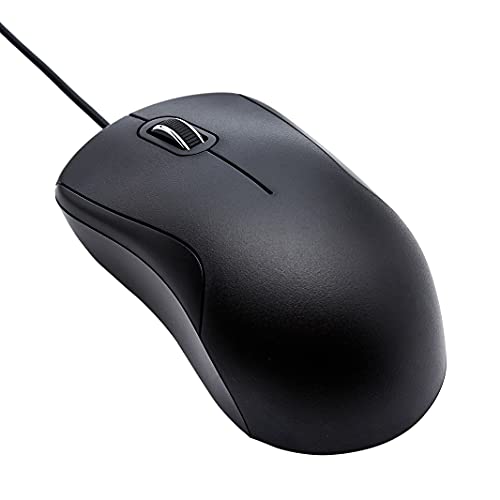
Amazon Basics 3-Button USB Wired Mouse 1000 DPI

TECKNET Wireless Mouse Bluetooth BT5.3/5.0 2.4G
More Details On Our Top Picks
Dual connectivity gives this Philips model a practical edge for a laptop desk that shifts between machines. USB-A and USB-C support covers older ports and newer ones, and the side scroll adds another layer of control for wide sheets or timelines.
The right-handed shape points this one toward daily office use, especially in a quiet room where silent clicking matters. The trade-off is simple, this is not the most minimal shell in the group, so travel-first setups may prefer something smaller like the Amazon Basics wired pick.
Strong Points
- Multi-device support suits mixed desktop and laptop work.
- USB-A and USB-C pairing broadens port compatibility.
- Side scroll helps with spreadsheets, editing timelines, and wide pages.
- Silent click design fits shared offices and late-night work.
- Rechargeable power cuts down on battery swaps.
Things To Consider
- Right-handed shaping narrows the fit for left-hand use.
- Productivity sizing can feel less travel-friendly than a compact mouse.
- Side controls may need a short adjustment period in busy workflows.
Feature Snapshot
Who It Suits Best
You get the most from this model in a home office or commuting setup that moves between two computers and plenty of horizontal documents.
A Better Fit Elsewhere
ProtoArc EM02 Wireless Trackball Mouse Gray suits desk users who want the pointer to move with less hand travel.
Spreadsheet-heavy work is where this INFINMIND model starts to make sense, because it combines side scroll with a smart flying scroll wheel. That second control is useful for fast document movement, while the quiet click format keeps office noise down.
Multi-device support also matters here, especially on a desk that jumps between a laptop, tablet, and desktop. The honest trade-off is that more controls can mean a short learning curve, so casual web use may not need the full feature set.
Highlights
- Smart flying scroll suits long documents and tall pages.
- Side scroll helps with wide spreadsheets and timelines.
- Multi-device pairing supports mixed-device desks.
- Quiet clicks fit shared rooms and open offices.
- Four DPI steps cover everyday pointer tuning.
Minor Gripes
- Extra controls may feel busy for light browsing.
- Feature density can take a session or two to learn.
- Grey finish is practical, though it does not stand out much.
Core Details
Who Will Love This
You fit this one best in a data-heavy workspace where a side wheel and fast scroll both earn their keep.
Where A Sibling Pick Shines
PHILIPS Ergonomic Wireless Mouse Multi-Device Bluetooth USB-A/C suits you better if simple cross-device switching matters more than extra scroll controls.
Trackball control changes the whole feel of desk work, because the pointer moves under your thumb while the body stays put. ProtoArc adds a 0 to 15 degree adjustable angle, which helps you set a flatter or more raised wrist position depending on your desk height.
That makes it a strong fit for compact setups where mouse travel space is tight. Compared with the side-scroll focus of the first two picks, this one is less about horizontal navigation and more about reducing hand movement during all-day use.
Best Bits
- Thumb ball control keeps the base stationary.
- Adjustable angle helps you fine-tune hand posture.
- Three-device support covers a workstation and portable gear.
- Bluetooth and 2.4G USB-A broaden compatibility.
- Rechargeable design suits regular desk use.
Areas To Watch
- Trackballs ask for a short habit shift from standard mice.
- Thumb control can feel unfamiliar in the first few days.
- Dust around the ball area may need routine cleaning.
Details At A Glance
Built With In Mind
You suit this model best if your desk is compact and you want less forearm movement without giving up wireless flexibility.
Another Choice May Suit
ELECOM Huge Plus Wireless Trackball Mouse 52mm fits you better when you want a larger control surface and more buttons.
ELECOM leans harder into desk control than the ProtoArc EM02, thanks to its 52 mm ball and 10 programmable buttons. That larger ball gives you more room to guide the pointer with the thumb, which is useful in detailed editing, long browsing sessions, or software with frequent shortcuts.
The wired option also sets it apart from the fully wireless trackballs in this list, so you get flexibility rather than a single connection style. The trade-off is size, because this is a more anchored, desk-bound shape that suits a permanent workstation better than a lap or travel setup.
Upsides
- Large 52 mm ball offers roomy thumb control.
- Ten programmable buttons support shortcut-heavy workflows.
- Bluetooth, 2.4G, and wired use cover several setups.
- Silent clicks help keep office noise down.
- Rechargeable power suits a fixed desktop station.
Small Caveats
- Large size suits desks better than cramped travel bags.
- Programmable buttons take time to set up well.
- Trackball upkeep can include occasional cleaning around the ball housing.
Technical Sheet
Right Fit For
You suit this model best if your desk stays fixed and you want a trackball with shortcut depth.
Swap It Out When
ProtoArc EM02 Wireless Trackball Mouse Gray fits better for compact desks where a smaller body and lower complexity matter more.
This SABLUTE model leans into desk utility with a side scroll wheel, 8 buttons, and 4000 DPI, which is a strong spread for the money-minded shopper. Small to medium hands get the clearest fit here, and the vertical form keeps the grip more upright than a standard flat mouse.
Compared with the Philips pick, this one looks more focused on straightforward ergonomic use than multi-device polish. The catch is that the stronger angle and button count can feel busy at first, though that usually settles once the hand learns the shape.
Bright Spots
- Side scroll wheel helps with lateral movement.
- 4000 DPI gives broad pointer-speed headroom.
- Eight buttons support layered productivity tasks.
- Bluetooth and 2.4GHz options suit mixed setups.
- Vertical styling can ease long desktop sessions.
Worth Noting
- Vertical shapes often ask for a short adjustment period.
- Small to medium hands get the cleanest fit.
- Button-heavy layouts can feel crowded in casual use.
Feature Rundown
The Right Fit
You fit this one best for budget-conscious office work that still needs side scroll control and extra buttons.
Look Elsewhere When
TECKNET Wireless Mouse Bluetooth BT5.3/5.0 2.4G suits you better if you want newer Bluetooth support and more connection flexibility.
Sometimes the plainest mouse solves the daily problem best, and this Amazon Basics option follows that logic closely. A 6-foot cable, plug-and-play USB connection, and 1000 DPI pointer speed keep the experience simple for office PCs, school desktops, or backup stations.
Unlike the wireless models above, this one removes charging and pairing from the equation. The trade-off is obvious, you give up cable-free movement, yet you gain a steady wired setup that makes sense on a shared workstation or in a room where setup time should stay low.
Positives
- Plug-and-play setup keeps installation simple.
- Wired USB connection avoids pairing steps.
- Precision scroll wheel supports ordinary navigation.
- 6-foot cable gives useful reach across a desk.
- Ergonomic grip helps with everyday office use.
Points To Note
- Wired use limits how freely you can rearrange the desk.
- 3-button layout suits simple tasks more than shortcut-heavy work.
- 1000 DPI is steady, though not aimed at fast-twitch control needs.
Core Details
Whose Shelf It Belongs On
You suit this mouse best if you want a dependable wired setup for a shared desk, backup machine, or classroom computer.
Where Shoppers Go Wrong
TECKNET Wireless Mouse Bluetooth BT5.3/5.0 2.4G suits you better if you need cordless flexibility and more feature depth.
TECKNET closes the list with the broadest wireless handshake in the group, because it supports Bluetooth 5.3, Bluetooth 5.0, and 2.4G. That mix matters on mixed-device desks, especially where one machine prefers Bluetooth and another still works better with a receiver.
Seven buttons, side scroll, and six DPI steps give you more control than the basic wired Amazon Basics mouse, while still staying less complex than the ELECOM trackball. You may find it especially useful in a home office that swaps between laptops and tablets, though the more feature-rich layout asks for a little setup attention.
Best Bits
- Three wireless paths widen compatibility.
- Six DPI settings support finer pointer tuning.
- Side scroll helps with wide workspaces.
- Seven buttons add useful shortcut support.
- Rechargeable design reduces routine battery changes.
Areas To Watch
- Multiple modes can mean more setup steps.
- Seven-button layouts suit work-heavy use more than simple browsing.
- Quiet-click behavior is useful, though some hands prefer a firmer button feel.
Feature Card
Made For
You suit this mouse best if you want one wireless tool that can move between several devices without feeling stripped down.
Where Another Pick Suits Better
Amazon Basics 3-Button USB Wired Mouse 1000 DPI fits you better when you want the simplest possible desk setup.
How To Choose The Right Scroll Wheel Mouses
Match The Scroll Style To The Work
Side scroll helps most on wide spreadsheets, video timelines, and document layouts that stretch across the screen. A precision wheel is simpler and works well for ordinary browsing, while a smart flying scroll adds speed for long pages. That difference matters more than style photos suggest, because the control you use every hour shapes comfort fast.
Trackballs are a different category entirely, since the pointer moves under your thumb instead of the whole mouse moving across the desk. That suits cramped desks, laptop trays, and long work sessions where repeated arm movement gets tiring.
Check Connectivity Before The Shape
Bluetooth and 2.4G wireless serve different setups, and some models offer both plus USB wired fallback. Multi-device support matters in mixed homes and offices, especially when a laptop, tablet, and desktop all live on the same desk. A wired mouse still makes sense for a fixed workstation where you want zero pairing steps.
Port type also matters more than many shoppers expect. USB-A and USB-C support, like on the Philips model, helps with older laptops and newer machines without adapters cluttering the desk.
Pay Attention To Hand Fit And Controls
Right-handed shells, vertical grips, thumb balls, and larger trackball housings all change how the hand rests. Small to medium hands usually need a different shape than large hands, and button-heavy models suit shortcut work better than casual browsing. The honest read is simple: comfort comes from matching the shell to the way you actually hold it.
DPI, or dots per inch, tells you how sensitive the pointer can feel. Higher numbers can help on large monitors, while lower settings can feel steadier for careful work, so a model with multiple DPI steps gives you more room to adjust.
Things Worth Knowing Before You Choose
Common Shopping Slip Ups
Many shoppers focus on scroll style and forget the grip shape. A mouse can have the right wheel and still feel awkward in a hand that doesn’t match the contour.
Another miss is buying extra buttons without a real use for them. Those controls help in creative or office work, but they only add value when shortcuts are part of your routine.
Where The Extra Money Goes
Higher-tier models usually spend the added cost on more connection modes, rechargeable power, extra buttons, and more complex scroll systems. Trackballs also tend to ask for more engineering because the housing, angle adjustment, and control surface all have to work together.
That upgrade makes sense for long desk sessions, shared workstations, or anyone juggling several devices. A simple wired mouse still does the job for basic navigation, so the premium should match the use case, not the label.
Frequently Asked Questions
What makes side scroll useful?
Side scroll helps you move across wide spreadsheets, timelines, and large documents without dragging the main wheel sideways. It saves a lot of pointer repositioning in horizontal workflows.
Are trackball mouses hard to learn?
They usually need a short adjustment period because the thumb controls the ball instead of the whole hand moving the mouse. Once the motion settles in, they can feel very natural on a tight desk.
Does Bluetooth matter more than 2.4G?
Bluetooth is handy for modern laptops and tablets, while 2.4G works well with a receiver on many desktops. A model that includes both gives you more flexibility across devices.
What is DPI in a mouse?
DPI describes pointer sensitivity, so higher levels move the cursor farther with less physical motion. Multiple DPI steps help you switch between careful edits and faster general use.
Is a wired mouse still worth it?
Yes, especially for a desk that stays in one place and needs a simple setup. A wired mouse avoids charging and pairing, which can keep routine use very straightforward.
Final Thoughts
Scroll Wheel Mouses make sense once your work starts asking for horizontal control, better hand posture, or less desk movement. The Philips and TECKNET models suit mixed-device setups, while the ProtoArc and ELECOM trackballs serve more stationary, desk-focused users. SABLUTE lands in the value lane, and the Amazon Basics mouse keeps things plain and reliable. Match the shape to your workday, and the right choice becomes fairly obvious.
