
Travel work asks a lot from a mouse: it has to slip into a laptop sleeve, stay quiet in a hotel room, and feel steady during long stretches at a gate or desk. The seven picks below focus on travel-friendly shapes, multi-device support, and the kind of small design choices that matter once your bag is already full.
Some are slim and simple, others go for folding frames or tri-mode wireless switching. That spread gives you a cleaner match whether you want something for daily commuting, business travel, or a compact backup that disappears into your kit.
Quick Shortlist For Travel Use

NYIEFADA Bluetooth Wireless Arc Travel Mouse
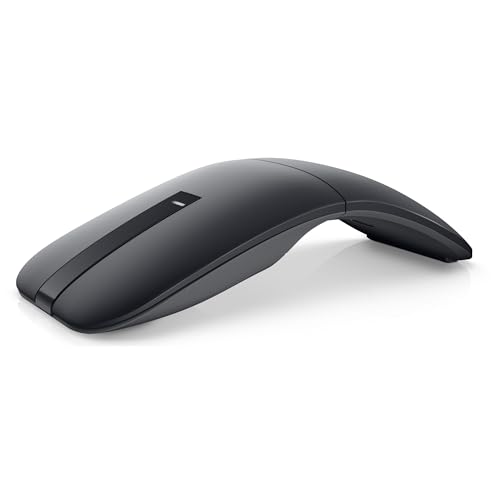
Dell Bluetooth Travel Mouse MS700

SABLUTE Wireless Mouse for Laptop M41
Uiosmuph Mini Wireless Bluetooth Mouse Black
WUDEMWWFE Bluetooth Arc Mouse Foldable

DELUX Wireless Bluetooth Pocket Mouse MF20-Black

VssoPlor Wireless Mouse Black and Gold
More Details On Our Top Picks
Travel-friendly arc mice usually trade a little desk familiarity for a cleaner bag fit, and this NYIEFADA model leans hard into that idea. The foldable frame and Type-C recharge support suit you well on a carry-on trip or a shared workspace.
The silent click setup matters in hotel rooms, trains, and late-night work sessions, where loud switches become annoying fast. Compared with the Dell MS700, this one feels more shape-driven and less minimalist, which suits you better when comfort matters more than a bare-bones profile.
Strong Points
- Foldable arc body saves space in a laptop bag.
- Tri-mode connectivity gives you more pairing flexibility.
- Silent clicks suit shared spaces and conference calls.
- Rechargeable Type-C power cuts down on battery swapping.
- The curved shape can feel steadier than flat travel mice.
Things To Consider
- The arc shape asks for a short adjustment period.
- Foldable mechanisms usually reward careful packing, not rough stuffing.
- The profile is travel-friendly, but not the slimmest in this list.
Feature Rundown
Who It Suits Best
You benefit most from this model if you want a compact mouse that still feels like a full travel companion, not just a backup.
A Better Fit Elsewhere
Delux Wireless Bluetooth Pocket Mouse MF20-Black suits power users who want up to 4000 DPI and a slimmer sliding form.
After the folding NYIEFADA mouse, Dell takes a cleaner route with only two buttons and a touch-scroll surface. That simpler layout suits you on a crowded tray table, especially since Bluetooth 5.0 LE and Swift Pair aim to reduce setup fuss on compatible systems.
The 4000 DPI ceiling gives this model more cursor reach than the basic travel crowd, so it can feel calmer on wide displays or higher-resolution laptops. The trade-off is obvious, though, because the minimalist shape leaves less room for the hand than the arc-style pick above.
What We Like
- Two-button layout keeps the surface uncluttered.
- Touch scroll feels clean for document work and web use.
- 4000 DPI supports faster cursor movement on larger screens.
- Bluetooth 5.0 LE fits modern laptop pairing needs.
- AAA batteries are straightforward to replace on the road.
Worth Noting
- Two-button designs suit efficiency, but not everyone loves the spare layout.
- Battery-based power means you may want spares in a carry pouch.
- The compact shell is practical, though less sculpted than the arc-shaped picks here.
- Touch scroll takes a little acclimation after a wheel mouse.
Core Details
Who Will Love This
You suit this mouse best if you value a stripped-back control setup and work mainly on modern laptops.
Another Choice May Suit
Uiosmuph Mini Wireless Bluetooth Mouse Black fits tighter bags and smaller hands more naturally.
SABLUTE takes a more straightforward path than the Dell and NYIEFADA options, with a slim body that stays easy to tuck beside a charger. The USB-C adapter and 3-level DPI structure make it a practical fit for work, classes, and hotel-desk sessions.
Sleep mode matters more than it sounds, because travel mice often sit in a bag between uses and you want less fuss at the next stop. You may find the smaller shape a touch spare for bigger hands, but that same compactness helps it vanish into a sleeve pocket.
Upsides
- Slim body packs neatly with a laptop and charger.
- Quiet clicking suits libraries, classrooms, and shared tables.
- Three DPI steps give you some pointer flexibility.
- Sleep mode helps conserve power during travel gaps.
- USB-C adapter support broadens compatibility for portable setups.
Small Caveats
- The smaller frame may feel narrow during long desktop sessions.
- Traveling with an adapter means one more piece to keep track of.
Details At A Glance
Made For
You fit this mouse best if you move between study spaces, office desks, and carry-on travel with a light kit.
Where A Sibling Pick Shines
Dell Bluetooth Travel Mouse MS700 suits you better if touch scrolling and a cleaner two-button layout matter more.
This Uiosmuph mouse leans into pocket-size portability more aggressively than the SABLUTE model. At 3.07 by 1.89 by 1.06 inches, it aims at tight carry spaces and smaller hands, which matters on trips where every inch in the bag feels claimed already.
The tri-mode wireless setup gives you flexibility, and the rechargeable USB-C design keeps the travel routine cleaner than hunting for loose batteries. The honest read is that the tiny footprint helps portability first, hand support second.
Reasons To Buy
- Very small footprint slips into crowded tech pouches.
- Lightweight shape suits travel carry and small hands.
- Tri-mode support helps across laptops, tablets, and mixed setups.
- USB-C charging fits a modern travel cable kit.
Areas To Watch
- The mini body may feel tight for larger palms.
- Packing this size carefully helps protect the compact shell.
- The strongest point is portability, not full-size comfort.
Quick Facts
Best Suited To
You fit this mouse best if you prioritize pocketability above all else and want a mouse that vanishes into a work bag.
Skip It When
NYIEFADA Bluetooth Wireless Arc Travel Mouse suits you better if you want a more hand-friendly curved shape.
WUDEMWWFE takes the arc idea in a slightly different direction by tying power behavior to the folded shape itself. Snap it curved and it turns on, flatten it and it powers down, which makes the design feel clever for bag use and quick desk resets.
The touch bar replaces a standard wheel, so the control experience shifts away from the familiar middle scroll. That appeals to you if you like compact gear with a more modern feel, though it asks for a little adaptation in exchange.
Highlights
- Fold-open and fold-flat power behavior feels very travel-specific.
- Touch bar control keeps the top surface uncluttered.
- Arc profile gives the hand a more shaped rest than slab-style mice.
- Small folded form stores neatly beside a laptop charger.
Points To Note
- The bending position has to be correct for power-on behavior.
- Touch-bar control may take practice after a wheel mouse.
- The shape is clever, but less conventional than the Dell MS700.
Feature Snapshot
Right Fit For
You fit this mouse best if you like compact gadgets with a more inventive control layout.
Look Elsewhere When
SABLUTE Wireless Mouse for Laptop M41 suits you better if you want a more familiar scroll and button feel.
DELUX is the most spec-forward option in this group, and that shows up in the 4000 DPI ceiling and the 2-in-1 sliding design. For long workdays away from a fixed desk, that combination gives you more pointer range and a body that still stays slim.
The 300mAh battery and front USB-C charging port make the travel story more practical than flashy. You can top it up during use, which suits airport lounges and remote work setups where outlet time is short, and the quiet clicks keep it from feeling overbearing beside the Dell MS700.
Best Bits
- Up to 4000 DPI supports faster cursor travel on larger displays.
- Sliding 2-in-1 body keeps the form slim for packing.
- Quiet clicks fit shared offices and late-night hotel use.
- USB-C port sits at the front for easier charging access.
- Rechargeable battery suits repeat travel without battery swaps.
Minor Gripes
- The sliding concept asks for a bit more handling care.
- High-DPI control helps speed, though some users prefer a simpler feel.
Core Details
The Right Fit
You fit this mouse best if you want the strongest technical spread in a pocket-size shape.
Swap It Out When
VssoPlor Wireless Mouse Black and Gold suits you better if you want a simpler, lower-commitment travel mouse.
VssoPlor is the plain-spoken choice in this list, and that’s useful in a category that can get cluttered with folding tricks and mode switches. The 2.4G nano receiver keeps setup simple, so it fits work laptops, backup bags, and anyone who wants a mouse that just starts the day with less fuss.
The black-and-gold finish adds a little visual polish, though the real appeal sits in the straightforward plug-and-play structure. Compared with the more complex DELUX and WUDEMWWFE models, this one stays easier to explain, easier to pack, and easier to live with on short trips.
Positives
- 2.4G receiver keeps the connection path direct.
- Plug-and-play setup suits quick hotel or office changes.
- Slim body carries easily beside a laptop charger.
- Quiet operation works well in shared work settings.
Softer Spots
- The simple layout gives up extras found on higher-spec picks.
- Battery and sensor details are not as feature-heavy as on the DELUX option.
- The design is practical first, flashy never.
At A Glance
Whose Shelf It Belongs On
You fit this mouse best if you want a simple secondary mouse for commuting or occasional travel.
Reach For A Different Pick When
Dell Bluetooth Travel Mouse MS700 suits you better if you want touch scroll and a more premium-feeling surface treatment.
How To Choose The Right Travel Computer Mouses
Shape, Size, And Pocket Fit
Travel mice earn their keep by disappearing into a bag without turning awkward in the hand. A mini shell like Uiosmuph’s works best for ultra-light packing, while an arc shape like NYIEFADA’s gives you more palm support on longer sessions.
Flat bodies help with storage, but they can feel less natural after an hour or two. That trade-off matters most on rail journeys, long airport delays, and hotel desks that already feel cramped.
Connection Style And Device Mix
Bluetooth suits modern laptops and tablets because it cuts receiver clutter, while 2.4G models often feel simpler for quick plug-in use. Tri-mode options, such as the NYIEFADA and Uiosmuph picks, help when you move between a work laptop, a personal machine, and a tablet.
Touch scroll and gesture-style controls can save space, though they usually ask for a short learning curve. A plain wheel, like the simpler travel mice here, stays familiar and easier for everyday office work.
Power, Charging, And Maintenance
Rechargeable mice reduce battery swaps, which helps on repeat trips and in carry-on bags where spare cells add clutter. AAA-powered options, like the Dell MS700, still appeal because they are easy to reset with a fresh pair.
Charging port placement matters more than it sounds. A front-mounted USB-C port, as on the DELUX model, lets you top up without rearranging your desk, and silent-click finishes usually stay easier on shared spaces.
What To Weigh Before You Decide
Common Shopping Slip Ups
Many travel mice look similar until you check shape, power, and connection style. A tiny shell sounds convenient, but it can feel cramped during daily spreadsheet work, while a folding design adds moving parts that reward careful packing.
Another common miss is overlooking device mix. A Bluetooth-only setup fits some laptops beautifully, yet a 2.4G receiver still helps when you want direct plug-and-play simplicity.
Why Higher Tier Costs More
The extra cost usually comes from tri-mode connectivity, rechargeable batteries, higher DPI ceilings, or more thoughtful control layouts. Those features matter most when your mouse shifts between office, flight, and home use without much downtime.
Upgrading makes sense for frequent travelers and mobile professionals who want fewer compromises. A simpler mouse still works for occasional trips, but premium touches pay off once the mouse becomes part of your everyday carry.
Frequently Asked Questions
Are travel mice better with Bluetooth or a USB receiver?
Bluetooth keeps your bag cleaner because it avoids a dongle. A USB receiver still helps when you want the quickest possible setup on older laptops or shared work machines.
Do silent clicks matter on a travel mouse?
Silent clicks matter most in quiet spaces like trains, hotel rooms, and libraries. They keep the mouse from becoming a small distraction during long sessions.
Is a foldable mouse worth it?
A foldable mouse makes sense when pocket space is tight and you travel often. The trade-off is a more mechanical feel, which some people prefer to handle carefully.
What DPI level suits travel work?
Mid to higher DPI settings help on laptop screens and larger monitors because you move the pointer farther with less hand travel. Lower settings can feel calmer if you prefer more precise cursor control.
Should you choose rechargeable or battery-powered?
Rechargeable mice reduce the need to carry spares and suit regular travelers well. Battery-powered models are still handy when you want a simple backup that is ready after a quick cell swap.
Closing Thoughts
The best travel mouse for you depends on how you carry it, how you connect it, and how often it leaves your desk. NYIEFADA and Uiosmuph favor compact travel shapes, Dell brings a cleaner premium feel, and DELUX gives you the strongest spec mix in the group. Keep your own bag space, hand size, and device lineup in mind, and the right pick becomes pretty obvious.
