
A good 1080p screen still carries the load for work, school, casual gaming, and a second monitor beside a laptop. You want enough desk space, a stand that fits your posture, and inputs that match the gear already on your desk. The six picks below lean on practical specs, not hype, so you can match a panel to your room, your setup, and the way you actually sit and work.
Quick Look At Our Shortlist

Amazon Basics 24-inch Full HD IPS Monitor
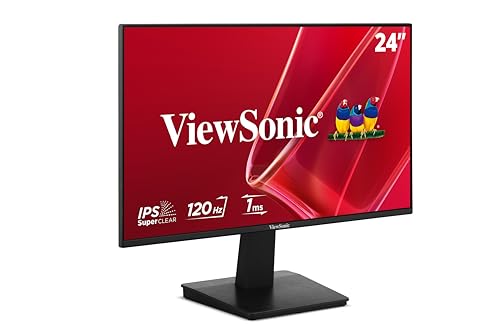
ViewSonic VA2448-MH 24 Inch 1080p Computer Monitor

Amazon Basics 23.8-inch 1080P Computer Monitor

ASUS 24” (23.8-inch viewable) 1080P VA249HG Eye Care Monitor

ASUS 24” 1080P Computer Monitor (VA249QG)

ASUS 27” 1080P Computer Monitor (VA279HG)
More Details On Our Top Picks
A 24-inch IPS panel with 75 Hz fits the plain-English use case well: spreadsheets, web work, and evening video without crowding a small desk. The adjustable stand and VESA support make placement easier, which matters more than people expect once your chair and desk are already fixed.
The trade-off is simple, it stays in the practical lane rather than chasing gaming extras or wide color claims. Built-in speakers and HDMI, DisplayPort, and VGA inputs add convenience, especially for a home office that still juggles older gear.
Strong Points
- IPS viewing angles help the image stay consistent across a normal desk setup.
- 75 Hz offers a slightly smoother feel than a standard 60 Hz panel for scrolling and cursor movement.
- HDMI, DisplayPort, and VGA make it easier to connect both newer and older devices.
- Adjustable stand support helps you fine-tune height and tilt without extra accessories.
- Built-in speakers reduce desktop clutter for basic work calls and casual media.
Minor Gripes
- The feature set is modest compared with the faster ASUS and ViewSonic options.
- Built-in speakers are convenient, though dedicated desktop audio still tends to sound fuller.
- The black finish is practical, but it can show dust on a bright desk.
Feature Snapshot
Who It Suits Best
Home office users who want a straightforward 24-inch screen with flexible connections and simple desk ergonomics will get the most from it.
Where A Sibling Pick Shines
Amazon Basics 23.8-inch 1080P Computer Monitor suits shoppers who want a faster 120 Hz option in a slightly smaller footprint.
The ViewSonic leans harder into motion than the first pick, with a 120 Hz IPS panel and variable refresh rate support. That pairing matters for lighter gaming, fast scrolling, and the kind of desktop work that feels a bit smoother the moment you move between windows.
Frameless edges also help it disappear visually on a multi-monitor desk, and the 1 ms response spec gives you a more responsive feel on paper than the 75 Hz Amazon Basics model. The honest read is that the built-in 2W speakers are fine for alerts and casual use, not the kind of audio that fills a room.
Upsides
- 120 Hz refresh rate suits users who notice smoother motion on the desktop and in games.
- Variable refresh rate can reduce visual stutter during supported gaming sessions.
- Frameless styling helps a dual-monitor setup look cleaner across a desk.
- Eye care positioning makes long email and document sessions feel less harsh visually.
- HDMI and VGA keep compatibility broad for laptops, towers, and legacy devices.
Things To Consider
- The 2W speakers are functional, but they are not a substitute for fuller external audio.
- Variable refresh rate only matters with supported devices and games.
- Anti-glare helps in bright rooms, though direct window light can still leave reflections.
Core Details
Built With In Mind
Mixed-use desk setups that move between office work and light gaming fit this screen especially well.
Another Choice May Suit
ASUS 24” 1080P Computer Monitor (VA249QG) is the better fit for a shopper who wants more all-around extras, including a stronger feature mix and integrated speakers.
This Amazon Basics panel trims the footprint a bit with a 23.8-inch size, which suits tighter desks and laptop-dock setups. The 120 Hz refresh rate gives it a snappier feel than the earlier 75 Hz Amazon Basics model, so daily navigation feels less rigid.
HDMI, DisplayPort, and VGA keep it flexible across modern and older machines, and VESA compatibility matters for wall or arm mounting. You may find the smaller size ideal for a dorm desk or home office corner where every inch counts.
Best Bits
- 23.8-inch sizing fits compact work areas without feeling oversized.
- 120 Hz creates smoother cursor movement and scrolling than a basic 60 Hz screen.
- HDMI, DisplayPort, and VGA support mixed device setups.
- VESA compatibility gives you more freedom with monitor arms and mounts.
Softer Spots
- The feature list stays functional rather than flashy.
- Smaller size helps save space, though it also leaves less room for side-by-side windows.
- Mounted setups may need a little planning around cable routing and arm placement.
Details At A Glance
Right Fit For
Small home offices, shared bedrooms, and dorm rooms benefit most from this compact layout.
Skip It When
Amazon Basics 24-inch Full HD IPS Monitor suits you better when an adjustable stand and built-in speakers matter more than a smaller footprint.
The ASUS VA249HG pushes beyond plain utility with 99% sRGB, a color space that covers a wider portion of the digital color range than a basic office screen. That matters for photo work, cleaner-looking UI design, and any desk where you care how content looks as well as how it reads.
Its 120 Hz panel, Adaptive-Sync, low blue light, and flicker-free design create a more polished everyday experience than the simpler Amazon Basics options. The trade-off is that some of the appeal sits in fine details, so casual spreadsheet users may not feel every extra dollar in the same way.
What We Like
- 99% sRGB supports more faithful color for creative and content-focused work.
- 120 Hz and Adaptive-Sync make motion look cleaner in supported use.
- Frameless styling works well in stacked or side-by-side monitor layouts.
- Low blue light and flicker-free operation suit long desk sessions.
- Wall-mount support gives you more placement options in small rooms.
Areas To Watch
- The richer feature set only makes sense if color and motion matter to your setup.
- Wall mounting usually means planning cable length and arm placement ahead of time.
- Some office users may never tap into the color-space advantage.
Feature Rundown
Whose Shelf It Belongs On
Content creators, design students, and detail-focused home office users will get the most from this screen.
A Better Fit Elsewhere
ViewSonic VA2448-MH 24 Inch 1080p Computer Monitor suits the gamer-leaning desk better, since its variable refresh rate gives motion a stronger edge.
The VA249QG reads like the most balanced ASUS choice here, because it combines 120 Hz, 1 ms response time, Adaptive-Sync, 99% sRGB, and built-in speakers in a single 24-inch frame. That makes it a strong fit for a desk that handles work by day and entertainment after hours, without asking you to bolt on much else.
Compared with the VA249HG, this one leans more into all-purpose convenience than color-first emphasis. The catch is that the feature stack can look busy on paper, so the real value depends on whether you actually use the speakers, sync support, and faster motion together.
Positives
- 120 Hz and 1 ms response give the screen a brisk, responsive feel.
- Adaptive-Sync helps supported games appear smoother and less torn.
- Built-in speakers keep a basic desk setup cleaner.
- 99% sRGB supports more consistent-looking color than a plain office panel.
- HDMI, DisplayPort, and VGA broaden compatibility across older and newer systems.
Worth Noting
- Speakers are handy, though many desks still benefit from separate audio.
- The broad feature list only pays off fully when you use several parts of it.
- Low blue light and flicker-free features help comfort, but they do not replace good desk lighting.
Quick Facts
Made For
Desk users who want one screen that can handle office work, streaming, and light gaming without much setup fuss will appreciate this model.
Look Elsewhere When
ASUS 24” (23.8-inch viewable) 1080P VA249HG Eye Care Monitor is the better call for color-sensitive work, since its panel places more emphasis on that side of the experience.
The 27-inch size changes the experience more than a spec sheet might suggest, because text and windows get more breathing room on the desk. For spacious setups, that extra width can feel like moving from a narrow workbench to a proper station.
It keeps the same 120 Hz, 1 ms, Adaptive-Sync, Eye Care, and frameless approach seen in the smaller ASUS models, but the larger panel gives you more comfort for side-by-side apps. One thing worth considering is desk depth, since a 27-inch 1080p screen can feel close at arm’s length in compact spaces.
Highlights
- 27-inch size gives documents, browser tabs, and tools more room.
- 120 Hz supports smoother movement for scrolling and supported games.
- IPS panel design helps the image stay consistent from normal angles.
- Frameless styling looks clean in a simple home office or gaming desk.
- VESA support makes arm mounting straightforward.
Room For Improvement
- The larger screen needs more desk depth than the 24-inch models.
- 1080p at 27 inches is roomy, though some people prefer denser text on a smaller panel.
- Wall or arm mounting usually helps this size feel more comfortable in tight rooms.
Technical Sheet
The Right Fit
You benefit most from this model when your desk can comfortably hold a larger screen and you want easier multitasking.
Swap It Out When
Amazon Basics 23.8-inch 1080P Computer Monitor works better for tighter desks, since its smaller panel is easier to place in a compact room.
How To Choose The Right 1080p Computer Screens
Screen Size And Desk Depth
A 24-inch panel remains the safest all-around size for most desks, because it gives you readable text without taking over the work surface. A 27-inch screen like the ASUS VA279HG opens up more room for side-by-side windows, but it asks for deeper desk space and a little more viewing distance.
Refresh Rate And Motion Feel
Refresh rate is how many times per second the screen updates, and 120 Hz feels noticeably smoother than 60 Hz for scrolling and light gaming. The difference is clearest on the ViewSonic VA2448-MH and the ASUS models, while the Amazon Basics 75 Hz screen stays comfortably in everyday territory.
Ports, Stands, And Mounting
HDMI covers most modern laptops and desktops, but DisplayPort and VGA help when your setup includes older hardware or a second machine. Adjustable stands and VESA support matter just as much, because a screen that sits at the wrong height can feel tiring long before the panel itself becomes an issue.
Color And Comfort Features
IPS panels usually hold their image more evenly across side angles, which helps on shared desks or when the screen sits off to one side. Color coverage like 99% sRGB on the ASUS VA249HG matters for creative work, while low blue light and flicker-free features are the quieter comfort upgrades that suit longer desk sessions.
Things Worth Knowing First
Hidden Buying Traps
Shoppers sometimes chase 120 Hz and forget about stand flexibility, which is awkward on a cramped desk or under a shelf. Another common miss is buying a larger panel without checking depth, then realizing a 27-inch screen sits too close for comfort.
The Upgrade Payoff
Higher-tier models usually cost more because they combine faster refresh, better color coverage, adaptive sync, and more thoughtful ergonomics in one frame. That upgrade makes the most sense for hybrid desks, light gaming, or color-sensitive work, while basic office use can stay perfectly satisfied with a simpler 24-inch IPS screen.
Frequently Asked Questions
What size works best for a 1080p desk screen?
A 24-inch model hits the easiest balance for text clarity, desk space, and general comfort. A 27-inch screen helps with multitasking, though it needs more room.
Is 120 Hz worth it for office work?
For spreadsheets and browsing, it mainly makes scrolling and pointer movement feel smoother. The payoff grows if you also play games or move through many windows all day.
Do built-in speakers matter?
They help when you want a cleaner desk and only need basic audio for calls or casual video. External speakers still sound fuller for music and movie use.
Why choose IPS over other panel types?
IPS panels usually keep color and contrast more stable from off-center angles. That helps a lot on desks where you lean back, share the screen, or use a second monitor.
Should you mount a 27-inch 1080p screen?
Mounting helps a larger screen sit at the right height and frees desk space. It also keeps a 27-inch panel from feeling too close in a shallow workspace.
Closing Thoughts
The right 1080p computer screen depends less on the logo and more on how your desk actually works. For a straightforward setup, Amazon Basics covers the basics without wasting space. For smoother motion, ViewSonic and ASUS step up in useful ways, while the 27-inch ASUS VA279HG gives you more room to work. Match the panel to your desk depth, your posture, and the kind of hours you spend in front of it, and the choice gets much easier.
