
You want a monitor that keeps PS5 motion clean without turning your desk into a science project. That usually means weighing refresh rate, panel type, response behavior, and port layout against the space you actually have. The seven picks below cover small desks, compact setups, and larger gaming stations with room to stretch out.
You’ll see a mix of 1080p, 1440p, and higher-refresh options, plus a portable screen for travel-minded setups. The right choice depends on how close you sit, how much clarity you want, and whether you care more about speed or desktop comfort.
Quick Shortlist For PS5 Gaming

ArcticPro 22 Inch Gaming Monitor 144Hz

INNOCN 24.5″ 1440P 240Hz Gaming Monitor 25G2S

LG 24G411A-B 24-inch Ultragear FHD Gaming Monitor
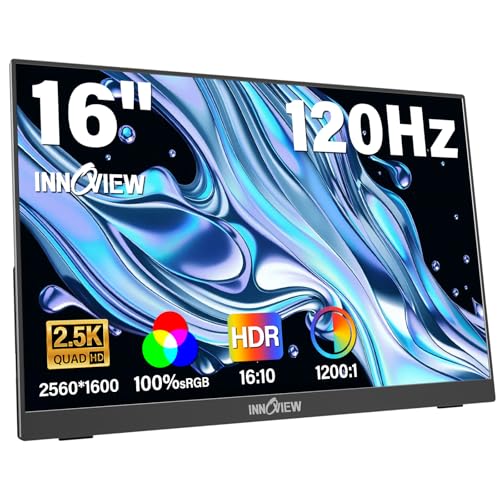
InnoView 16″ Portable Monitor 120Hz 2.5K QHD

Dell 27 240Hz Gaming Monitor SE2726HG

msi PRO MP243L E14 24-inch IPS 144Hz Monitor

Samsung 27″ Odyssey G5 G51F QHD Gaming Monitor
More Details On Our Top Picks
The 22-inch size keeps the ArcticPro easy to place on a narrow desk or in a shared room. Its 144Hz refresh rate suits PS5 action that benefits from cleaner motion, while the 3-sided frameless design helps the screen feel less boxed in.
The 105% sRGB color coverage matters for richer color volume, and the 4000:1 contrast ratio points to deeper separation between dark and bright areas. The honest trade-off is that 1080p on a 22-inch panel is more about speed and desk efficiency than extra detail.
Strong Points
- Small footprint fits tighter gaming setups.
- 144Hz keeps motion looking clean in fast scenes.
- VESA mount support gives you more placement options.
- HDMI and VGA cover simple desk hookups.
- Eye-care tuning is useful for long sessions in a dim room.
Things To Consider
- 1080p on 22 inches prioritizes speed over sharp text density.
- VGA is mainly relevant for older gear, not a PS5 setup.
- The smaller panel can feel cramped for split-screen play.
Feature Snapshot
Who It Suits Best
Space-conscious PS5 players who want a compact screen for a bedroom, dorm, or tight desk will get the most out of it.
Where A Sibling Pick Shines
The LG 24G411A-B 24-inch Ultragear FHD Gaming Monitor suits you better for a slightly larger 24-inch layout with stronger all-around versatility.
This INNOCN leans hard into speed and signal flexibility, which makes it the sharpest fit for competitive console play in this lineup. HDMI 2.1 matters because it opens the door to modern high-bandwidth console connections, while the Fast IPS panel aims to keep color and motion in the same conversation.
At 24.5 inches, it stays desk-friendly without feeling tiny, and the 1440p resolution gives you more detail than a basic 1080p screen like the ArcticPro. One thing worth considering, though, is that the feature set makes more sense for a PS5 setup centered on performance than for a casual couch viewing distance.
Highlights
- 1440p adds visible detail over standard Full HD.
- 240Hz leaves plenty of headroom for high-speed gaming.
- HDMI 2.1 suits modern console connections.
- Fast IPS helps keep color and motion balanced.
- Built-in speaker support simplifies a spare-room setup.
Areas To Watch
- The premium feature mix makes it more monitor than simple screen.
- 240Hz is more headroom than PS5 usually needs.
- Speaker volume and placement rarely satisfy a full living-room setup.
Core Details
Who Will Love This
Console competitors and mixed-device gamers who want higher resolution without moving into a huge screen will get the most from it.
A Better Fit Elsewhere
The Dell SE2726HG fits you better if you want a simpler 27-inch Full HD gaming panel with a more straightforward desk setup.
The LG here is the most familiar kind of gaming monitor in this group, and that’s not a bad thing. A 24-inch IPS panel with 144Hz overclocked refresh, 1ms MBR, and both G-Sync Compatible and FreeSync support makes it easy to slot into a mixed console and PC desk.
HDR10 adds a little more range to supported content, while the slim stand keeps the footprint tidy in a smaller room. Compared with the INNOCN, you give up the 1440p sharpness, but the trade-off is a cleaner, simpler 1080p lane that suits everyday gaming well.
Upsides
- 24-inch size feels comfortable for desk gaming.
- IPS panel keeps colors and angles stable.
- Overclocked 144Hz is well suited to PS5 action.
- Both major variable-refresh formats are supported.
- Slim stand helps preserve desk space.
Minor Gripes
- 1080p is less detailed than the 1440p options here.
- HDR10 on a monitor this class is useful but restrained.
- The slim stand may still leave little room under the screen.
Feature Rundown
Built With In Mind
PS5 gamers who want a familiar 24-inch layout with broad compatibility and no fuss around desk placement will appreciate it.
Another Choice May Suit
The Samsung Odyssey G5 G51F suits you better if you want a 27-inch QHD screen with more room for immersive play.
This one breaks from the desk-monitor pattern, which makes it useful for travel, temporary setups, and small rooms with almost no spare surface. The 16-inch portable form factor, 2.5K resolution, and 120Hz refresh rate give you a screen that’s more about mobility and sharpness than pure couch-distance immersion.
Two Type-C ports and HDMI make the connection story flexible, though the listing notes the adapter is excluded. Compared with the Dell or Samsung options, you trade away raw size for portability, and that trade makes sense only for a very specific kind of setup.
Bright Spots
- Portable format suits travel bags and temporary rooms.
- 2.5K resolution adds crisp desktop-style detail.
- 120Hz is strong for a portable screen.
- Two Type-C ports plus HDMI expand hookup options.
- 100% sRGB coverage helps with color-sensitive work and play.
Small Caveats
- The compact size limits immersion for living-room gaming.
- Adapter exclusion means you need to plan the connection path.
- Portable stands and bags usually need gentler handling over time.
Details At A Glance
Best Suited To
Frequent travelers, dorm setups, and PS5 owners who need a screen that can move easily will get the most value from it.
Look Elsewhere When
The LG 24G411A-B or Dell SE2726HG make more sense if you want a fixed monitor with a larger view and less cabling fuss.
The Dell moves into a larger 27-inch frame, which gives it a more spacious feel than the 24-inch LG and ArcticPro options. With 240Hz refresh, IPS technology, AMD FreeSync Premium, and DisplayPort 1.4 alongside two HDMI inputs, it’s built for a desk that handles multiple devices.
TÜV 3-Star certification appears in the listing, and the tilt stand keeps the setup simple rather than fussy. The main trade-off is still 1080p at 27 inches, so you get room and smooth motion first, extra pixel density second.
Best Bits
- 27-inch size feels roomy for desk gaming.
- 240Hz is excellent headroom for fast motion.
- IPS panel helps keep colors steady from side angles.
- Two HDMI ports make multi-device switching easier.
- DisplayPort 1.4 adds another useful input path.
Worth Noting
- 1080p on 27 inches gives up some sharpness.
- Tilt-only adjustment is basic compared with height-adjustable stands.
- Large screens need a little more desk depth to feel comfortable.
Technical Sheet
The Right Fit
PS5 gamers who want a larger screen and a clean, uncomplicated setup will feel right at home here.
Swap It Out When
The Samsung Odyssey G5 G51F suits you better if you want QHD sharpness and a more feature-heavy gaming profile.
The msi PRO MP243L E14 mixes gaming and office cues in a way that fits a multipurpose room better than a flashy battlestation. A 24-inch IPS panel, 144Hz refresh, HDR Ready label, HDMI, VGA, VESA mount support, tilt adjustment, and 4-side slim bezel give it a clean, practical shape.
Compared with the LG Ultragear, it adds a more work-friendly look, and that can matter in a home office that doubles as a PS5 station. The trade-off is straightforward: you get utility and flexibility first, then the more specialized polish you’d expect from a higher-tier gaming display.
Positives
- 24-inch size keeps it comfortable for everyday desk use.
- 144Hz supports smooth motion for console and casual PC play.
- VESA mount support gives you flexible placement options.
- Slim bezels help the screen feel less bulky.
- HDMI and VGA cover a wide range of older and newer gear.
Softer Spots
- VGA mainly serves legacy devices, not a PS5 connection.
- Tilt-only adjustment keeps ergonomics basic.
- HDR Ready is less specific than full HDR feature sets.
Feature Card
Whose Shelf It Belongs On
Mixed-use households and PS5 gamers who want a clean, practical monitor for everyday work plus play will appreciate it.
Where A Sibling Pick Shines
The Dell SE2726HG is the stronger fit if you want a larger 27-inch screen with a more aggressive gaming focus.
The Samsung closes the list with the most feature-rich desktop posture in the group. A 27-inch QHD panel, 180Hz refresh, 1ms response claim, HDR10, height-adjustable stand, Black Equalizer, Virtual Aim Point, and Auto Source Switch+ make it feel tailored to a serious gaming desk.
That extra control comes with a premium tilt toward console and PC versatility, and the QHD step-up gives you more detail than the Full HD 27-inch Dell. For most living rooms, the feature set is overkill, but for a dedicated setup it lands with real purpose.
Reasons To Buy
- QHD resolution gives a sharper view than standard 1080p.
- 27-inch size creates a comfortable immersive field of view.
- Height-adjustable stand helps you set a better posture.
- Black Equalizer and Virtual Aim Point suit focused gaming.
- Auto Source Switch+ is convenient in multi-device spaces.
Room For Improvement
- The feature set goes beyond what a casual setup needs.
- Larger QHD monitors need a desk with decent depth.
- Gaming extras are useful, but they add complexity for simple use.
Core Details
Perfect Match For
PS5 gamers building a dedicated desk setup who want more sharpness, more control, and more screen presence will like this most.
Reach For A Different Pick When
The INNOCN 24.5″ 1440P 240Hz Gaming Monitor 25G2S makes more sense if raw refresh headroom matters more than Samsung’s extra gaming tools.
How To Choose The Right 144hz Monitors For Ps5
Resolution, Size, And Seating Distance
Screen size changes the whole feel of a PS5 setup. A 24-inch Full HD panel keeps text and HUD elements easy to scan at close desk range, while 27-inch QHD models spread the image out with more detail and a bigger sense of space.
Desk depth matters just as much. A 27-inch screen can feel too large at arm’s length on a shallow desk, while a 16-inch portable panel works only when portability matters more than living-room scale.
Refresh Rate Versus Console Reality
Refresh rate tells you how often the screen can redraw each second. Higher numbers help motion look smoother, but the PS5 does not always push every game to the ceiling, so the practical sweet spot often sits below a monitor’s maximum claim.
That makes 144Hz a sensible floor and 180Hz or 240Hz a comfort cushion rather than a constant necessity. You still gain smoother menu movement and cleaner motion handling, especially in fast shooters or racing games.
Panel Type, Ports, And Everyday Use
IPS panels usually give you steadier color and wider viewing angles, which helps when you sit off-center or share the screen with someone else. Fast IPS models aim to keep that color behavior while tightening motion response, though that extra speed often costs more.
Port layout also matters more than most people expect. HDMI 2.1, DisplayPort, and a second HDMI input can make life easier in a room that switches between a console, laptop, and docked device.
Fit For Your Room, Not Just The Spec Sheet
A monitor that looks impressive on paper can still feel wrong in the room. A compact 22-inch panel suits a tight bedroom corner, while a height-adjustable 27-inch screen works better on a desk built around long sessions.
Portable models make the most sense for travel, temporary setups, or shared spaces. For a fixed PS5 station, a sturdier stand and a simpler cable path usually matter more than a very long feature list.
A Quick Reality Check
Where Shoppers Go Wrong
Many people focus on refresh rate alone and ignore the rest of the setup. That leads to mismatched screen size, awkward desk depth, or ports that don’t fit the way the room is wired.
Another common miss is choosing a large 1080p monitor without caring about viewing distance. The image can still work, but you may notice the trade-off in sharpness once you sit close.
What The Higher Tier Buys
Higher-tier models usually spend money on better panel tuning, stronger stands, and more flexible inputs. You also tend to get sharper resolution, faster motion handling, or extra gaming tools that make a dedicated desk feel more polished.
The upgrade makes sense when you sit there often, use the monitor for more than one device, or care about cleaner image detail. For a casual setup, a simpler screen often gives you most of the value with less complexity.
Frequently Asked Questions
Do You Need 144Hz For PS5?
You do not need it for every game, but 144Hz gives you a better motion cushion than basic office monitors. It’s a sensible target for fast-paced play and a good baseline for a modern console screen.
Is 1440p Better Than 1080p For PS5?
1440p usually looks sharper, especially on 27-inch screens. 1080p still works well on smaller monitors or when you want a simpler, more budget-conscious setup.
Does HDMI 2.1 Matter On A Gaming Monitor?
It matters most when you want modern console compatibility and a cleaner high-bandwidth connection path. A monitor can still work without it, but HDMI 2.1 gives you more room for newer features.
Are Portable Monitors Good For PS5?
They work best for travel, dorms, and temporary spaces. A portable screen gives up immersion, but it saves space and moves easily.
What Size Works Best On A Desk?
Most desk setups land well with 24 to 27 inches. A 24-inch screen feels easier to manage in tight spaces, while 27 inches adds more presence if your desk has enough depth.
Final Thoughts
Your best PS5 monitor depends less on hype and more on the room around it. A compact 22-inch screen, a sharper 1440p model, or a larger 27-inch display can all make sense depending on your desk, distance, and how much detail you want. The ArcticPro and msi options suit simpler setups, while the INNOCN and Samsung lean harder into performance and polish. Pick the one that fits your space first, then let the gaming features follow.
