
You need a monitor that handles spreadsheets, long work sessions, casual gaming, or mixed desk use without wasting space or forcing awkward scaling. This shortlist focuses on 1600 x 1200-class options and close matches, with a mix of business panels, gaming screens, and one renewed Dell that still makes sense for office work. The useful differences show up fast, in stand quality, refresh rate, panel type, and how much desk flexibility you get.
Quick Look At The Shortlist

LG 24G411A-B 24-inch Ultragear IPS Gaming Monitor

LG 27GX704A-B 27-inch Ultragear QHD OLED Gaming Monitor

Dell UltraSharp U2412M 24-Inch 1920×1200 Screen (Renewed)

Sceptre 27-inch Gaming Monitor 165Hz Series
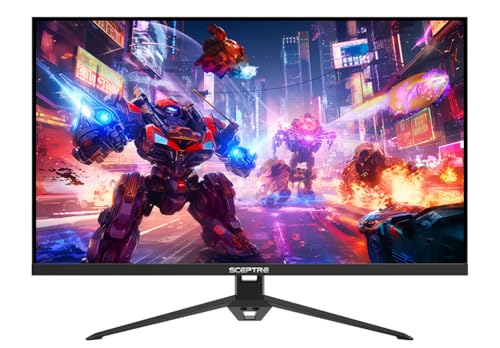
Sceptre New IPS 24-inch Gaming Monitor E248B-FPT168 Series

Hikers 27 Inch Curved Gaming Monitor G27H1Q Pro

ASUS 24” Business Monitor BE248QF
More Details On Our Top Picks
The 24-inch size keeps this LG manageable on a normal desk, and the IPS panel is the part that matters for everyday viewing because it holds color and angle consistency better than a basic TN-style screen. The 144Hz overclocked refresh rate, 1ms MBR, and G-Sync Compatible plus FreeSync support make it a cleaner fit for fast games than a plain office display.
That said, the Full HD resolution is still the trade-off, so text won’t feel as spacious as it does on a 1920 x 1200 panel like the Dell or ASUS below. For commuting gamers, dorm setups, or anyone pairing a modest PC with a compact screen, that compromise is easy to live with.
Strong Points
- 24-inch footprint fits small desks without crowding the keyboard area.
- IPS panel helps keep colors steady from a slight angle.
- 144Hz overclocked refresh gives motion a smoother feel in games.
- 1ms MBR suits fast on-screen movement and quick aiming.
- FreeSync and G-Sync Compatible support broadens GPU pairing options.
Things To Consider
- 1080p resolution leaves less vertical room for documents than 16:10 screens.
- The slim stand keeps the profile tidy, but it may offer less desk presence than heavier office models.
- Serious multitaskers may want more pixels for side-by-side windows.
Feature Snapshot
Who It Suits Best
Competitive newcomers and desk users with limited space will get the most from this model.
Where A Sibling Pick Shines
LG 27GX704A-B 27-inch Ultragear QHD OLED Gaming Monitor suits you better for premium visuals and much deeper contrast.
OLED changes the feel of a monitor in a way IPS panels usually cannot match, because each pixel emits its own light and dark scenes stay far cleaner. Paired with 240Hz refresh, 0.03ms response time, and HDMI 2.1, this LG is built for a high-end PC or console setup where motion clarity matters as much as color depth.
The honest trade-off is obvious: this is a more specialized gaming display than the ASUS BE248QF or Dell U2412M, both of which lean harder toward work. For cinematic games, dark-room play, and a desk where image quality is the center of attention, the fit is excellent.
Highlights
- OLED panel gives deep black levels and strong contrast behavior.
- 240Hz refresh supports extremely fluid motion in fast titles.
- 0.03ms response is aimed at sharp, quick transitions.
- HDMI 2.1 broadens use with current consoles and PCs.
- DisplayPort adds a second high-performance wired path.
Room For Improvement
- OLED is a premium route, so it makes most sense for focused gaming use.
- Its strengths are less relevant for heavy spreadsheet work than for visual play.
- Careful brightness and screen-stand habits usually matter more with OLED ownership.
Core Details
Built With In Mind
Serious gaming setups and home theaters with a single-screen focus suit this model best.
Another Choice May Suit
LG 24G411A-B 24-inch Ultragear IPS Gaming Monitor is the more sensible pick for smaller desks and lighter spending.
This Dell is the cleanest work-first choice in the group, mostly because 1920 x 1200 uses the taller 16:10 shape that gives documents, code, and web pages more breathing room. The IPS panel supports steadier color across the screen, and that matters in an office chair more than a gaming seat.
Being renewed changes the ownership story a bit, since condition can vary more than with a brand-new display. Still, for professionals who value the extra vertical space and a practical port mix, it’s a sensible middle ground beside the sharper gaming focus of the LG and Sceptre models.
Best Bits
- 16:10 aspect ratio gives more vertical workspace than 16:9 screens.
- IPS technology supports more consistent color across the panel.
- DVI-D, DisplayPort, and VGA widen compatibility with older gear.
- USB 2.0 ports help reduce clutter around a work desk.
- The renewed route can make a high-end office panel more accessible.
Worth Noting
- Being renewed means condition can vary from unit to unit.
- The older connection set suits mixed office gear, though it lacks the newer gaming-first extras found on the LG 27GX704A-B.
- Owners often prefer to check cable and stand condition carefully on renewed displays.
Details At A Glance
Whose Shelf It Belongs On
Office users, writers, and anyone who values vertical space over flashy gaming features will get the most from it.
Look Elsewhere When
ASUS 24” Business Monitor BE248QF suits you better if you want a newer business display with 100Hz and ergonomic adjustments.
Compared with the Dell, this Sceptre shifts from office-first to all-purpose gaming lean, while staying simple enough for a shared desk. The 27-inch panel, 165Hz refresh, 1ms response claim, and FreeSync Premium support point toward smoother play, and the built-in speakers help cut down on extra desktop hardware.
That 99% sRGB figure matters most for people who want color coverage that feels more dependable for general creative work than a barebones entry display. The downside is that the package spreads itself across more use cases, so it lacks the ultra-specialized polish of the LG OLED model.
What We Like
- 27-inch panel gives extra room for gaming and split windows.
- 165Hz refresh supports fluid motion in fast action titles.
- FreeSync Premium helps reduce visible stutter with supported GPUs.
- Built-in speakers simplify a desk with limited space.
- 99% sRGB coverage is useful for everyday color-sensitive work.
- HDMI and DisplayPort support common setup paths.
Points To Note
- The built-in speakers keep things tidy, though desktop audio fans may still want separate speakers or headphones.
- It aims for broad usefulness, so it does not chase OLED-level contrast.
- Owners with very small desks may find 27 inches a bit more demanding than the 24-inch options.
Quick Facts
Best Suited To
Gamers who want an easy all-around screen for both play and everyday desk work will appreciate it most.
Skip It When
LG 27GX704A-B 27-inch Ultragear QHD OLED Gaming Monitor is the smarter step up for deeper contrast and faster premium motion handling.
This Sceptre keeps the formula tight, with a 24-inch IPS panel, 180Hz-plus refresh, and multiple HDMI and DisplayPort inputs. For a gaming desk where you want speed without stepping into a larger 27-inch frame, that combination makes a lot of sense.
The built-in speakers and nearly borderless design help it work well in a neat two-monitor arrangement, which is a small but real ownership advantage. The trade-off is straightforward: it aims at spirited everyday gaming rather than the deeper contrast or taller workspace you get from the Dell and ASUS options.
Upsides
- 180Hz-plus refresh gives motion a quick, responsive feel.
- 24-inch size is easy to place on compact furniture.
- IPS panel supports steadier color behavior than basic panels.
- Two HDMI ports and two DisplayPort inputs add flexibility.
- Built-in speakers keep the setup cleaner.
- Low-profile bezels work well in a dual-screen layout.
Areas To Watch
- Speaker quality is usually a convenience feature, not the main draw.
- The 24-inch format leaves less room than the 27-inch Sceptre if you like larger on-screen elements.
- Desk cable management matters more once you start using multiple input options.
Core Details
Made For
Space-conscious gamers and multi-input desk setups fit this monitor well.
Reach For A Different Pick When
ASUS 24” Business Monitor BE248QF is the better fit for ergonomic workdays and more office-focused use.
Speed is the whole point here, from the 280Hz ceiling to the 1ms response claim and the curved 1500R shape, which wraps the image around your field of view a bit more than a flat screen does. The VA panel’s 5000:1 contrast ratio and 134% sRGB spec also suggest a display that leans hard into punchier image depth than the simpler IPS entries above.
That curve will feel most natural on a gaming desk with a centered seat position, less so in a tight office layout. Since this model includes an HDMI 2.1 cable and offers HDMI 2.1 plus DisplayPort 1.4 input options, it suits a modern setup that needs room to grow.
Reasons To Buy
- 280Hz support is aimed at very smooth motion in fast games.
- Curved 1500R design helps fill more of your forward view.
- VA panel brings strong contrast for darker scenes.
- 134% sRGB coverage suggests lively color presentation.
- Two HDMI 2.1 ports and one DisplayPort broaden hookup options.
- Includes one HDMI 2.1 cable, which saves an extra accessory purchase.
Softer Spots
- The curved shape is a fit-based choice, not the right answer for every desk.
- VA panels can feel different from IPS screens in side-angle viewing.
- The feature set is tuned more for gaming than everyday office calm.
Feature Rundown
Right Fit For
Competitive gamers who want a curved, high-refresh screen with strong contrast will value it most.
Swap It Out When
LG 24G411A-B 24-inch Ultragear IPS Gaming Monitor is the easier desk fit for smaller spaces and a more modest setup.
Among the work-focused models here, the ASUS stands out for ergonomics first. The 1920 x 1200 WUXGA panel gives you more vertical room than a standard 16:9 1080p screen, and the 100Hz refresh rate adds a smoother feel that’s welcome in long spreadsheet sessions or split-window office work.
The height adjustment, swivel, pivot, and tilt range make it easier to tune your posture, which matters in a shared office or a home desk used for several hours a day. Compared with the renewed Dell, this one is the cleaner new-in-box path for people who want modern adjustability without leaning into gaming extras.
What We Like
- 24.1-inch WUXGA panel gives extra vertical workspace.
- 100Hz refresh makes desktop motion feel smoother.
- Frameless design suits multi-monitor arrangements.
- Height, swivel, pivot, and tilt adjustments cover many desk setups.
- DisplayPort, HDMI, D-sub, and USB hub widen compatibility.
- Included HDMI and USB 3.2 cables help simplify setup.
Minor Gripes
- The business focus means it skips the gaming-first specs seen on the LG and Hikers picks.
- Frameless styling looks clean, though it still needs careful handling during installation.
- Some office setups may not need all the ergonomic movement this model offers.
Spec Overview
Who Should Grab It
Office users, remote workers, and anyone with posture-sensitive desk habits will benefit most from this monitor.
Where Another Pick Fits Better
Dell UltraSharp U2412M 24-Inch 1920×1200 Screen (Renewed) suits you better if a lower-cost refurbished office panel matters more than new ergonomic hardware.
How To Choose The Right 1600 X 1200 Monitors
Start With Aspect Ratio And Desk Use
A 16:10 panel gives you more vertical space than a standard 16:9 screen, which matters for documents, code, and web work. That extra height can feel small on paper but obvious during a long workday, especially beside the 1080p LG 24G411A-B.
For gaming-first use, the balance shifts toward refresh rate and response time instead. A 1920 x 1200 business monitor like the ASUS BE248QF makes more sense for office flow, while the Hikers and LG gaming models favor motion clarity.
Match Panel Type To The Room
IPS panels usually suit mixed-use desks because they keep color and viewing angle behavior steady. That helps when you sit off-center, share a screen, or move between writing, browsing, and light creative work.
OLED and VA panels bring different strengths. OLED, as on the LG 27GX704A-B, leans into contrast and dark-scene depth, while VA, as on the Hikers model, often emphasizes punchier contrast for games in a dim room.
Check Refresh, Response, And Real Use
Refresh rate tells you how many times the screen updates each second, so higher numbers usually feel smoother during fast motion. Response time describes how quickly pixels change, and that matters most in games where blur can distract you.
For mixed office use, 100Hz or 144Hz is already a noticeable step up from basic panels. For competitive play, 240Hz or 280Hz becomes a stronger argument, especially on the Hikers and LG OLED picks.
Think About Ports, Stand Adjustments, And Space
Port selection decides how easily you can hook up a PC, console, dock, or older machine. The Dell’s DVI-D and VGA remain useful in older offices, while the ASUS adds DisplayPort, HDMI, D-sub, and a USB hub for a more flexible desk.
Stand design matters more than many people expect. Height adjustment, pivot, and swivel can save your neck over a long week, and a slim stand helps the LG 24G411A-B stay unobtrusive in tight quarters.
Things Worth Knowing First
Wrong Turns To Avoid
Do not focus only on refresh rate and ignore the panel shape or resolution. A fast 24-inch gaming screen can still feel cramped beside a 1920 x 1200 office display.
Also watch the input list and stand design. A monitor that fits your video source but forces awkward posture tends to annoy you long before the specs feel impressive.
The Case For Spending Up
Higher-tier models usually cost more because of panel technology, motion handling, and better physical adjustment. OLED, higher refresh ceilings, and more flexible stands all push a display into a more expensive lane.
The upgrade makes the most sense for frequent gamers, people who sit at a desk for hours, or anyone who wants a monitor to pull double duty across work and play. For lighter use, a simpler IPS panel often covers the same basic ground with less fuss.
Frequently Asked Questions
Are 1600 X 1200 Monitors Good For Work?
Yes, the taller 16:10 layout helps with spreadsheets, documents, and code. You see more vertical content without scrolling as often.
Do Gaming Monitors Work For Office Tasks?
Yes, especially if you want smoother scrolling and casual play after work. A model like the LG 24G411A-B stays compact enough for mixed use.
Is OLED Worth It For A Desk Setup?
OLED makes the most sense when contrast and image depth matter more than plain office versatility. The LG 27GX704A-B is aimed squarely at that kind of use.
What Matters More, Refresh Rate Or Resolution?
That depends on your routine. Resolution helps text and workspace, while refresh rate helps motion feel smoother.
Should You Choose 24-Inch Or 27-Inch?
24 inches fits tighter desks and closer viewing distances. 27 inches gives more visual room for games and multitasking.
Final Thoughts
You now have a clear split between office-friendly 1920 x 1200 screens and faster gaming models with 24- or 27-inch frames. The ASUS BE248QF and Dell U2412M make the strongest case for work, while the LG OLED and Hikers models lean into premium motion and contrast. For a smaller desk, the LG 24G411A-B or Sceptre E248B-FPT168 keeps things simpler. Pick the display that matches your hours in front of the screen, not the spec sheet that looks busiest.
