
You’re usually shopping this category for a tight desk, a travel rig, or a small electronics project that needs a screen without stealing space. The right pick depends on panel size, input support, touch behavior, and whether you want a portable display for laptops or a tiny monitor for Raspberry Pi work. Some options here lean into gaming-friendly portability, while others make more sense beside a bench or inside a maker enclosure.
Quick Look At The Shortlist
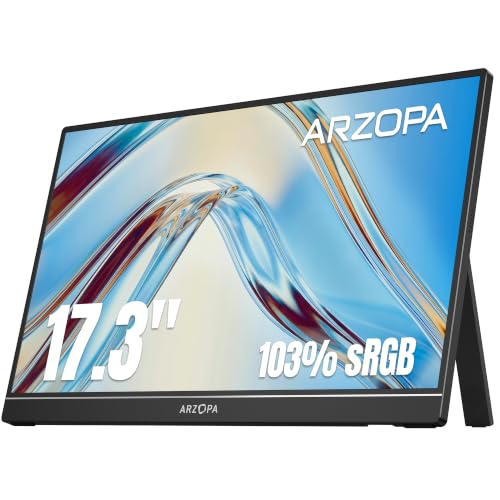
ARZOPA 17.3″ Portable Monitor A1M

InnoView Portable Monitor 18.5 inch 100HZ
Hosyond 5 Inch IPS LCD Touch Screen Display Panel

ELECROW 5″ Touch Screen Monitor 1024×600

ELECROW 5 Inch Touch Screen Monitor 800×480 LCD

PONKLOIE 17.3-inch Portable Monitor with Dual Speakers

ELECROW 5 Inch Mini Touchscreen Monitor 800×480
More Details On Our Top Picks
A 17.3-inch panel like this lands in a sweet spot for commuters, students, and anyone who wants a second screen without dragging around a desktop monitor. The built-in kickstand helps on a hotel desk or kitchen table, while HDMI and USB-C support make it easier to match with newer laptops and older gear.
The 1080p resolution keeps text readable for spreadsheets and documents, and the IPS panel means viewing angles stay usable from the side. Compared with the smaller 5-inch ELECROW and Hosyond options, this one is built for general work and play rather than embedded projects.
What We Like
- 17.3-inch size gives you more room for split-screen work.
- 1080p resolution suits everyday laptop extension and media viewing.
- IPS panel supports wider viewing angles for shared use.
- Built-in kickstand simplifies setup on a crowded desk.
- HDMI and USB-C input support broad device matching.
Things To Consider
- It still takes more bag space than a 5-inch maker display.
- Portable monitors rely on your source device for a clean setup, so cable planning matters.
- The gaming-friendly label helps frame the use case, but the real value is versatility, not flash.
Feature Snapshot
Who It Suits Best
Hybrid workers, frequent travelers, and casual gamers who want one portable screen for several devices fit this ARZOPA well.
Where Another Pick Suits Better
Choose the Hosyond 5 Inch IPS LCD Touch Screen Display Panel when your project sits inside a Raspberry Pi enclosure or a compact bench setup.
This one leans larger than the ARZOPA, and that extra half-inch does make a practical difference for spreadsheets, timelines, and couch gaming. The 100Hz refresh rate, meaning the screen updates up to 100 times per second, matters most for fast motion and a smoother pointer feel.
USB-C and HDMI keep it flexible, while HDR support adds another layer for video-heavy use, even though portable displays still depend on the source device’s output quality. It suits you best when screen space matters more than a smaller travel footprint.
Highlights
- 18.5-inch size gives you a roomier view than most portable panels.
- 100Hz refresh rate helps motion look smoother in games and scrolling.
- 120% sRGB points toward stronger color coverage for media work.
- HDMI and USB-C keep it easy to pair with common devices.
- HDR support adds flexibility for video playback and compatible sources.
Points To Note
- The larger footprint is less convenient in a slim backpack.
- Fast refresh helps most when your source device can output it cleanly.
- Like other portable screens, the setup depends on cable management and power planning.
Technical Sheet
Who Should Grab It
You get the most from this InnoView when you want a large portable display for mixed work, streaming, or gaming.
Look Elsewhere When
Choose the ARZOPA 17.3″ Portable Monitor A1M when you want a slightly slimmer travel companion with a more compact carry profile.
Bench builders and Pi hobbyists usually need a screen that disappears into the project, and this 5-inch Hosyond fits that role cleanly. The IPS panel helps keep the image usable from odd angles, which matters when your display sits inside a case, on a workbench, or beside test gear.
The 800×480 resolution is modest, but for menus, controls, and lightweight dashboards, that can be enough. Compared with the larger portable monitors above, this one favors embedded use over general computer extension.
Bright Spots
- 5-inch size keeps it easy to place in compact builds.
- IPS technology improves side-angle visibility for small enclosures.
- Capacitive touch gives you a more modern control feel.
- HDMI support broadens compatibility with common maker hardware.
Room For Improvement
- 800×480 resolution is fine for controls, but not spacious for dense desktop work.
- The small panel can feel cramped for long document sessions.
- Touchscreens in this class usually reward careful mounting and clean cable routing.
Quick Facts
Best Suited To
You’re in the right place with this Hosyond when your project centers on Raspberry Pi control, compact kiosks, or a small status display.
A Better Fit Elsewhere
Choose the ELECROW 5 Inch Touch Screen Monitor 1024×600 when you want a little more resolution for a similar compact footprint.
This ELECROW reads like the more flexible cousin to the Hosyond, mostly because the 1024×600 panel gives you a bit more room for interface elements. For Raspberry Pi dashboards, control panels, and small GUI tools, that extra breathing room can matter more than it sounds.
USB power support and HDMI compatibility make it fit neatly into maker setups, and the capacitive touch layer keeps interaction direct. The trade-off is the same as with most 5-inch screens, space is tight, so layout discipline matters.
Upsides
- 1024×600 resolution gives you more usable room than 800×480 panels.
- Capacitive touch improves tap accuracy for control interfaces.
- USB-powered design can simplify power planning in small builds.
- HDMI compatibility makes pairing with maker hardware straightforward.
Softer Spots
- Five inches still leaves limited room for full desktop use.
- The compact size rewards tidy mounting and short cable runs.
- For very small enclosures, the stand or bracket choice can matter as much as the screen itself.
Core Details
Whose Shelf It Belongs On
DIY builders who want a compact touch screen with slightly more layout space than the smallest 5-inch panels should look here first.
Swap It Out When
Reach for the Hosyond 5 Inch IPS LCD Touch Screen Display Panel when your priority is the IPS panel and you want a straightforward 5-inch control display.
This older-style ELECROW keeps things simple, and that can be the right move for a starter Raspberry Pi setup or a small Windows side display. The 800×480 resolution mirrors the Hosyond’s basic layout, so the main question is whether you want this panel’s touch-driven simplicity over the slightly richer feature set of the newer ELECROW above.
For hobby benches, the small form keeps it unobtrusive, and the touchscreen format makes menu work feel direct. The honest read is that it makes more sense for control and monitoring than for any task that asks for wide desktop space.
Best Bits
- Small 5-inch footprint suits compact maker setups.
- Touch input keeps navigation direct and simple.
- 800×480 resolution works for menus and lightweight tools.
- Fits Raspberry Pi-focused projects without crowding the bench.
Minor Gripes
- The display area is too limited for serious multitasking.
- It’s better for control than for text-heavy desktop work.
- Tiny touch screens reward careful cleaning and protected placement.
Details At A Glance
Perfect Match For
You’ll like this ELECROW most when your project needs a no-fuss touch panel for a Raspberry Pi or a small control station.
Another Choice May Suit
Choose the ELECROW 5″ Touch Screen Monitor 1024×600 when you want a bit more screen space for the same kind of compact build.
Built-in speakers give this PONKLOIE a small but useful edge for hotel stays, quick streaming, or game sessions where you’d rather pack one less accessory. That makes it feel more self-contained than the ARZOPA, though both sit in the same broad portable-monitor lane.
The 17.3-inch format keeps it practical for work and media, and the dual-speaker setup helps when your laptop audio is weak or your console spot is temporary. You may still want separate speakers for richer sound, but for grab-and-go use, the built-in option earns its place.
Positives
- 17.3-inch panel gives you comfortable room for day-to-day work.
- Built-in dual speakers reduce the number of extras you need to carry.
- Works well for travel desks, dorm rooms, and temporary setups.
- Suited to laptops, game consoles, and mixed-use situations.
Areas To Watch
- Integrated speakers usually help with convenience more than rich sound.
- The format still asks for sensible cable and power planning.
- For tiny bags, a 5-inch touchscreen is far easier to stash.
Feature Rundown
Right Fit For
Travel-heavy shoppers who want a portable screen with built-in audio should find this PONKLOIE appealing.
Where A Sibling Pick Shines
Choose the ARZOPA 17.3″ Portable Monitor A1M when you care more about a straightforward portable display than integrated speakers.
The TN panel here keeps costs and complexity in check, which is useful for a bare-bones Pi dashboard or a small embedded display. Compared with the Hosyond IPS option, this ELECROW is a more utilitarian choice, so you’re trading image consistency at angles for a simpler, stripped-back format.
Driver-free use is the headline convenience, especially for setups where you’d rather spend less time sorting software and more time wiring the project. For a workshop, that plain-vanilla approach can be exactly right.
Strong Points
- 5-inch size keeps the footprint tiny and easy to mount.
- TN panel suits straightforward interfaces and basic monitoring.
- 5-point capacitive touch gives you flexible on-screen control.
- Driver-free setup lowers friction for simple Raspberry Pi builds.
Worth Noting
- TN panels usually feel more position-sensitive than IPS options.
- The 800×480 layout is best for basic control use, not dense layouts.
- Small touch screens benefit from careful cleaning and protected storage.
Core Details
The Right Fit
You should look at this one when you want a compact touchscreen for a low-complexity Raspberry Pi project.
Where A Sibling Pick Shines
Pick the Hosyond 5 Inch IPS LCD Touch Screen Display Panel if your setup needs an IPS panel for better off-angle visibility.
How To Choose The Right 18 5 Inch Lcd Monitors
Screen Size, Portability, And Desk Space
Size drives the whole decision in this category. A 17.3-inch or 18.5-inch portable monitor gives you room for split windows, document editing, and console use, while a 5-inch touchscreen belongs in a Pi case or on a compact bench.
That trade-off is simple: bigger screens help your eyes and reduce scrolling, but they also take up more bag space and desk real estate. For travel, a kickstand and slim frame matter; for maker work, the ability to fit cleanly into a project matters more.
Resolution, Panel Type, And Touch Behavior
Resolution tells you how much detail the display can show, and 1080p is the comfortable floor for portable work monitors. Small maker screens can live with 800×480 or 1024×600 because menus, gauges, and status panels need less room than desktop apps.
Panel type changes how the screen looks from the side. IPS panels stay more consistent at angles, while TN panels usually feel more basic and are better suited to straightforward control layouts than shared viewing.
Ports, Power, And Device Matching
USB-C and HDMI are the connection pair that matters most for mixed-use portable screens. USB-C can simplify modern laptop setups, while HDMI keeps older machines, game consoles, and boards in play.
For touch displays, power routing and cable length matter just as much as image quality. Clean wiring makes a bench setup easier to live with, and it reduces the little annoyances that pile up around compact screens.
Who Should Choose Portable Versus Maker-Focused
Portable monitors suit you when you split time between desk work, travel, and entertainment. Maker-focused displays suit you when you want a screen that disappears into a project and stays there.
The better choice follows your daily routine, not the spec sheet alone. A roomy portable panel is the smarter upgrade for hybrid work, while a 5-inch touchscreen is the cleaner fit for tinkerers and Pi projects.
A Quick Reality Check
Wrong Turns To Avoid
Many shoppers grab the wrong size first. A small touchscreen looks clever until you need to read long lines of text, while a larger portable monitor feels great until it starts crowding a tight bag or bench.
Another easy miss is ignoring power and cabling. A screen can have the right panel and still feel awkward to use when the connection path is messy or your source device cannot feed it cleanly.
What The Upgrade Payoff
Higher-tier models in this group usually spend more on display size, refresh rate, color range, speakers, or touch quality. Those extras matter most for people who switch between work and play, or who want a monitor that does more than one job.
The upgrade makes sense when the screen becomes part of your daily routine. A larger portable display or a touch panel with a better panel type can save friction every time you sit down, which is often worth more than a bare-minimum spec sheet.
Frequently Asked Questions
Are 18.5-inch portable monitors too large for travel?
They’re large enough to feel practical for work, but less pocket-friendly than smaller screens. For carry-on use, they make the most sense when you want a real second display, not a tiny side panel.
Do 5-inch touch screens work well for Raspberry Pi projects?
Yes, especially for dashboards, control panels, and compact interfaces. They are not meant for wide desktop work, so layout planning matters.
Is IPS better than TN for small monitors?
IPS usually handles viewing angles better, which helps when the screen sits in an enclosure or on a shared desk. TN can still work fine for simple control tasks where angle consistency matters less.
Does 1080p matter on a portable monitor?
It does, because text clarity and workspace density both improve at that resolution. On a larger portable screen, 1080p is a sensible baseline.
Which matters more, HDMI or USB-C?
Both matter, since the better choice depends on your device. USB-C is convenient for newer laptops, while HDMI keeps consoles and older hardware easy to connect.
Closing Thoughts
You get the best result in this category by matching the screen to the job, not by chasing the largest number on the product page. For travel and desk extension, the ARZOPA, InnoView, and PONKLOIE portable panels make the most sense. For Pi work and compact builds, the Hosyond and ELECROW 5-inch options are far more practical. Once you match size, connection type, and use case, the short list gets much easier to sort.
