
You want a curved display that fits real desk life, not just a spec sheet. That usually means balancing size, refresh rate, panel type, and how much space you actually have for work, games, and streaming.
This roundup keeps the focus on that trade-off. Some picks lean toward fast-paced gaming, others make more sense for mixed use, and a few trade portability and compactness for wider screens and richer color.
Quick Look At The Shortlist

KTC 32 Inch 280Hz 240Hz Curved Gaming Monitor H32C5

Samsung 24 Essential S3 S36GD Series FHD 1800R Curved Computer Monitor LS24D366GANXZA

Dell 34 Monitor S3425DW WQHD VA 120Hz FreeSync Premium Eye Comfort
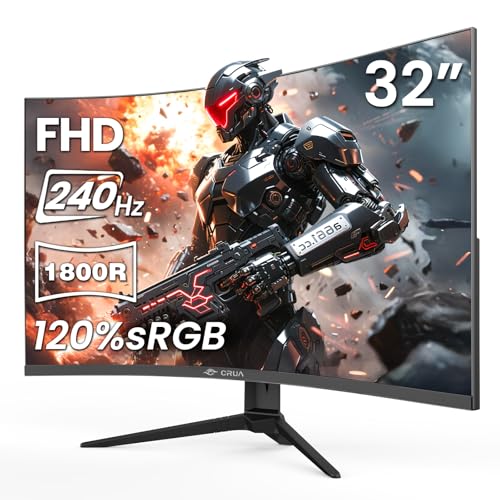
CRUA 32 FHD 1080P 240Hz Curved Gaming Monitor 1800R AMD FreeSync Black

CRUA 32 2K QHD 165Hz Curved Gaming Monitor Black

CRUA 27 Inch QHD 260Hz Curved Gaming Monitor 1800R VA Built-in Speakers

Alienware 34 240Hz QD-OLED Curved Gaming Monitor AW3425DW 34.2-inch WQHD
More Details On Our Top Picks
Fast-motion gaming benefits from a panel like this, especially on a desk where 32 inches feels roomy without turning into a wall. The 1500R curve bends a little tighter than the 1800R models in this list, so the wrap feels more pronounced in close seating.
The 240Hz to 280Hz positioning points toward high-frame-rate play, and Adaptive-Sync should help the image stay steadier during changing frame output. HDR support, 128% sRGB coverage, and a 3500:1 contrast figure also give it more color and depth than the plain 1080p spec might suggest, though 32 inches at FHD still looks less sharp than the QHD and WQHD options here.
Strong Points
- Very high refresh support suits twitch shooters and other quick-response games.
- 1500R curvature gives a more wrapped-in feel than the 1800R picks below.
- Adaptive-Sync helps reduce tearing when frame rates move around.
- 128% sRGB and HDR add more punch for games and video.
- HDMI and DisplayPort keep it easy to pair with a gaming PC or console desk setup.
Things To Consider
- 1080p on a 32-inch screen trades sharpness for speed and size, so fine text can look softer than on the QHD models.
- That tighter 1500R curve may feel strong on a shallow desk.
- The feature mix leans hard toward gaming, so office-first use is less compelling than on the Dell.
Feature Snapshot
Who It Suits Best
Competitive PC gamers who want speed first and desk footprint second will get the most from it.
Where A Sibling Pick Shines
The Dell 34 Monitor S3425DW suits mixed work and play better, especially for you who wants a wider canvas and less gaming-only tuning.
Small desks and second monitors are where this Samsung makes the most sense. The 24-inch size stays manageable in tight setups, and the 1800R curve is mild enough that it feels more natural than dramatic.
Game Mode and Advanced Eye Comfort point toward straightforward use, not a feature-heavy gaming rig. HDMI and D-sub keep old and new gear in the mix, which helps in school rooms, home offices, and basic desktop setups, though the smaller panel and 100Hz ceiling keep it firmly in the practical category rather than the enthusiast one.
Upsides
- 24-inch size fits compact desks without crowding a keyboard or notebook.
- 1800R curvature feels easy to live with for everyday use.
- Game Mode gives you a quick tuning option for casual play.
- HDMI and D-sub improve compatibility with older desktop gear.
Room For Improvement
- 100Hz is solid for general use, but it sits below the faster models in this roundup.
- The smaller panel gives less room for side-by-side windows than the 27- and 34-inch choices.
- For deep color work, the Dell and the Alienware have more ambitious panels.
Details At A Glance
Built With In Mind
Students, casual gamers, and home-office setups on a tight desk space fit this model well.
Another Choice May Suit
The KTC 32 Inch 280Hz 240Hz Curved Gaming Monitor H32C5 suits fast-action gaming better, especially for you who wants a much higher refresh ceiling.
The Dell shifts the whole category from compact curved screens to a wide-format desk display. WQHD, also called 1440p, gives you more detail than FHD, and the 34-inch span makes split windows feel much less cramped.
That wider frame pairs well with USB-C 65W power delivery, which can carry video and enough charging power for many laptops through one cable. Add 2x10W speakers, anti-glare coating, and Eye Comfort tuning, and this becomes a sensible all-day setup for home office work that still handles gaming with FreeSync Premium and 120Hz motion.
Highlights
- 34-inch WQHD panel gives you more working space than the 24-inch Samsung and the 32-inch FHD models.
- USB-C 65W power delivery reduces cable clutter on a laptop desk.
- Anti-glare finish helps in bright rooms with window light.
- Two 10W speakers handle basic audio without extra desk speakers.
- 95% DCI-P3 color coverage is useful for content that needs richer tonal range.
Softer Spots
- The 34-inch width asks for more desk depth than a compact monitor.
- 120Hz is smooth, though not as fast as the 240Hz and 260Hz gaming picks.
- Its strengths lean toward mixed use, so pure esports setups may want the KTC or CRUA 27.
Core Details
Right Fit For
Hybrid workers and multitaskers who want one screen for office apps, streaming, and light gaming will get the most from it.
Look Elsewhere When
The Alienware 34 240Hz QD-OLED Curved Gaming Monitor AW3425DW suits you better for premium gaming contrast and faster response emphasis.
This CRUA keeps the formula simple: a large 32-inch panel, 240Hz speed, and a familiar 1800R curve. That combination makes sense for fast gaming sessions in a room where you want a broad view without moving into ultrawide territory.
VA panel contrast, 120%sRGB coverage, and low blue light support make it feel better balanced than a bare-bones esports screen. The trade-off is still the same as most 32-inch FHD monitors, text sharpness will not match the QHD models, so this is stronger for motion than for dense spreadsheets.
Best Bits
- 240Hz refresh support gives you a quick, responsive feel in action-heavy games.
- 1800R curve keeps the wrap mild and comfortable for long sessions.
- VA contrast helps darker game scenes hold shape.
- Low blue light and wall-mount support add everyday flexibility.
Areas To Watch
- 1080p at 32 inches asks you to accept softer text than the QHD choices.
- Color and motion features lean toward gaming rather than creator work.
- Wall mounting is useful, but it also means you need a clean mounting plan before setup.
Feature Rundown
Whose Shelf It Belongs On
Gamers who want speed and a large screen for a lower-friction setup fit this pick well.
Swap It Out When
The CRUA 32 2K QHD 165Hz Curved Gaming Monitor Black suits you better for sharper desktop text and a more balanced work-and-play desk.
The jump from FHD to QHD changes the feel of a 32-inch screen right away, and that matters more here than the curve alone. You get a cleaner desktop for editing, browsing, and game HUDs, which is the real reason this model sits above the CRUA 32 FHD choice.
FreeSync helps steady movement, while the 1800R curve and 120%sRGB color support keep the panel pleasant for long sessions. A 100 x 100 mm mount pattern adds setup flexibility, though the 165Hz ceiling means it’s more measured than the 240Hz models if you live in competitive shooters.
Plus Points
- QHD resolution gives you noticeably more workspace than the FHD 32-inch monitors.
- 165Hz keeps gaming smooth without chasing the highest possible refresh rate.
- 120%sRGB helps images look richer for editing and media.
- 100 x 100 mm mounting support makes desk planning easier.
- For mixed-use desktops, the balance here is very sensible.
Minor Gripes
- 165Hz is fast, but it sits below the KTC, CRUA 32 FHD, and CRUA 27 speed tiers.
- The 32-inch chassis still asks for a decent amount of desk width.
- Gaming-first users may want a stronger motion focus than this model gives.
Quick Facts
The Right Fit
Home-office users who also game after hours should find this balance easy to live with.
Reach For A Different Pick When
The Dell 34 Monitor S3425DW suits you better if your desk time leans more toward spreadsheets, content creation, and wide-window multitasking.
The 27-inch size makes this CRUA feel more focused than the larger 32-inch gaming panels, and that can help on standard desks. QHD resolution gives you enough clarity for text and timelines, while the 260Hz rating pushes it closer to serious competitive play.
Built-in speakers add convenience for casual use, which is handy in a bedroom setup or a second desk where separate audio gear feels unnecessary. FreeSync, 120% sRGB, HDMI 2.0, DP 1.4, and the 100×100 mount pattern make it versatile, though speakers in monitors usually stay modest, so audio depth remains the one thing you may want to upgrade later.
Bright Spots
- 260Hz refresh support is a strong fit for fast mouse movement and quick frame transitions.
- 27-inch QHD keeps text sharper than FHD without making the screen unwieldy.
- Built-in speakers save desk space for casual listening and system sounds.
- HDMI 2.0 and DP 1.4 give you flexible input options.
- 100×100 mounting support works well with many arms and brackets.
Small Caveats
- The integrated speakers are convenient, but dedicated speakers usually sound fuller.
- For wide multitasking, the Dell 34 still gives you more horizontal room.
- The panel’s gamer-first tuning may be more than you need for plain office work.
At A Glance
Made For
Esports-minded gamers who still want a practical 27-inch desk footprint should look hard at this one.
A Better Fit Elsewhere
The Samsung 24 Essential S3 S36GD Series FHD 1800R Curved Computer Monitor LS24D366GANXZA suits simple daily use better when you want a smaller, easier desktop presence.
The Alienware sits at the high end of this group because its QD-OLED panel, ultra-fast 0.03ms response figure, and 240Hz refresh rate all point in the same direction. QD-OLED combines quantum dots and OLED technology, which matters because it usually brings deeper contrast and more vivid color than the VA and FHD alternatives here.
The 34.2-inch WQHD canvas feels expansive for games, while FreeSync Premium Pro, VESA AdaptiveSync, and DisplayHDR TrueBlack 400 strengthen the premium spec story. The trade-off is simple: this is the most ambitious choice here, so it makes sense for you who wants a flagship display experience rather than a straightforward everyday screen.
Reasons To Buy
- QD-OLED panel technology gives the display a distinctly upscale image profile.
- 240Hz refresh and 0.03ms response are tuned for fast motion.
- 34.2-inch WQHD size creates a big, immersive view.
- FreeSync Premium Pro and VESA AdaptiveSync add motion support across compatible gear.
- DisplayHDR TrueBlack 400 signals strong contrast handling for games and films.
Honest Caveats
- The premium panel class puts it well above the simpler Samsung and CRUA picks in cost position.
- 34.2 inches asks for a serious amount of desk room.
- Its strengths are most visible in a high-end gaming or media setup, so casual use doesn’t capture the full value.
Feature Card
Who Will Love This
High-end gaming setups and serious display enthusiasts fit this model best.
Not Your Match When
The Samsung 24 Essential S3 S36GD Series FHD 1800R Curved Computer Monitor LS24D366GANXZA is the calmer choice for compact spaces and simpler everyday tasks.
How To Choose The Right 1800r Curved Monitors
Match Screen Size To Desk Depth
A 24-inch curved monitor fits tighter desks and keeps everything within easy eye movement. A 32-inch or 34-inch screen feels more immersive, but it asks for more viewing distance and more room for the stand.
That matters in apartments, dorms, and shared home offices where every inch counts. The curve helps the image feel centered, but it does not replace physical desk space.
Choose Resolution For Your Main Task
FHD works for casual gaming and everyday desktop work, but text and window detail improve noticeably as you move to QHD or WQHD. That difference shows up most during long work sessions, editing, or side-by-side app use.
On a 32-inch screen, FHD saves money but gives up sharpness. On a 27-inch or 34-inch panel, QHD usually lands in a more balanced place.
Use Refresh Rate To Set Your Priority
Higher refresh rates matter most in fast shooters, racing games, and esports play. A 240Hz or 260Hz monitor feels more responsive than a 100Hz model, especially with a capable graphics card.
For mixed use, 120Hz or 165Hz often feels plenty smooth. The honest read is that very high refresh only pays off when your PC can keep pace.
Look Past The Curve Number Alone
1800R is a mild, comfortable bend for most desks, while 1500R feels stronger and more enveloping. Neither number makes a monitor better by itself, because panel type, resolution, and size still shape the whole experience.
VA panels usually favor contrast, while QD-OLED goes further on contrast and color depth. That’s where the premium jump starts to make sense.
Things Worth Knowing First
Mistakes Worth Dodging
Many shoppers fixate on refresh rate and ignore resolution. That usually leads to a large screen that looks softer than expected for office work.
Another common miss is underestimating desk depth, especially with 32-inch and 34-inch curved panels.
The Upgrade Payoff
Higher-tier models tend to spend the extra money on panel quality, faster response, wider color, and stronger motion handling. You also get better comfort features and extras like USB-C or integrated speakers on some picks.
That upgrade makes sense for gaming-heavy setups, content work, or a single-screen desk that has to do everything. For simple browsing and documents, a compact 24-inch option often covers the job cleanly.
Frequently Asked Questions
What does 1800R mean on a curved monitor?
1800R describes the radius of the curve, with a larger number indicating a gentler bend. On a desk, it usually feels easy to adapt to and less dramatic than tighter curves.
Is 240Hz overkill for everyday use?
For email, browsing, and office apps, yes, it can be more than you need. For fast gaming, especially with strong PC hardware, it can make motion feel cleaner and more immediate.
Does a curved screen help with productivity?
It can make a wide display feel more centered and easier to scan. The gain is subtle on a 24-inch panel and more noticeable on 32-inch and 34-inch screens.
Which panel type suits color work better?
QHD VA panels offer a solid step up from basic office displays, especially for mixed media use. QD-OLED goes further on contrast and color depth, which is why it sits in the premium class here.
Should you choose FHD or QHD on a 32-inch screen?
QHD usually looks cleaner and is easier on the eyes for text-heavy use. FHD makes more sense only when you care more about speed-focused gaming than desktop sharpness.
Closing Thoughts
You can narrow this category fast by deciding whether speed, desk space, or all-day balance matters most. The KTC and Alienware sit at opposite ends of the performance range, while the Samsung and Dell make the most sense for practical setups. The CRUA models fill the middle with different mixes of refresh rate, resolution, and screen size. Once you match the monitor to your desk and your main task, the right choice tends to show itself clearly.
