
A 24-inch screen fits the daily grind without taking over the desk. You get enough room for spreadsheets, classes, web work, and light gaming, while keeping the footprint sane for dorm rooms, home offices, and compact workstations. The right one depends on motion smoothness, panel type, stand adjustment, and how much flexibility you want from the inputs. That’s the real split in this group.
The Shortlist At A Glance

LG 24U411A-B 24-inch Full HD IPS Monitor

Amazon Basics 24-inch Full HD IPS Monitor

Sceptre Prime 24-inch Gaming Monitor E248W-FW100T

ViewSonic VA2456A-MHD 24 Inch 1080p Monitor
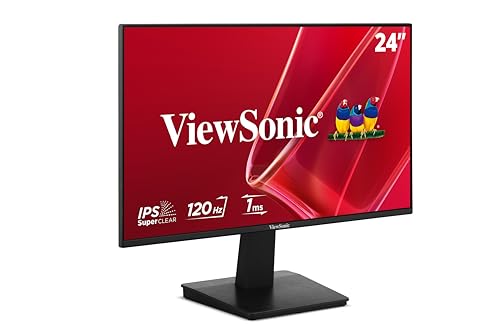
ViewSonic VA2448-MH 24 Inch 1080p Computer Monitor

Dell 24 Plus Monitor S2425HSM

More Details On Our Top Picks
LG leans into speed without turning this into a gaming-only screen. The 120Hz refresh rate means motion stays smoother than on a basic office panel, while IPS, or in-plane switching, helps keep color and viewing angles more even across a shared desk.
HDR10 support adds a little more range for supported content, and Reader Mode plus Flicker Safe make long document sessions less harsh on the eyes. The slim stand base also matters in a cramped setup, though the trade-off is a simpler footprint rather than a highly articulated stand.
What We Like
- 120Hz keeps cursor movement and scrolling notably fluid.
- IPS panel helps the image hold up from the side.
- Reader Mode suits long email, spreadsheet, and article sessions.
- HDMI connection keeps it straightforward for common desktops and laptops.
Small Caveats
- Slim stand base saves space, but it leaves less room for storage underneath.
- HDR10 on this class of monitor is useful, not dramatic.
- Single-purpose desk users may not need the extra refresh headroom.
Feature Snapshot
Whose Shelf It Belongs On
You get the most from this one in a mixed-use home office where work, streaming, and light gaming all share the same screen.
Where A Sibling Pick Shines
ViewSonic VA2448-MH fits better for a desk that needs variable refresh support and built-in speakers in one package.
This Amazon Basics screen keeps the formula simple, and that works well for desks where versatility matters more than flair. The 75Hz refresh rate is a step up from a plain 60Hz panel, so everyday motion feels a bit less sticky during scrolling and window dragging.
DisplayPort, HDMI, and VGA give you broad compatibility with older towers, current laptops, and office gear. The adjustable stand and VESA compatibility make placement easier, though the trade-off is that it stays more utilitarian than polished in look and feature set.
Reasons To Buy
- Three input types help with mixed hardware.
- Adjustable stand supports a more comfortable desk angle.
- VESA compatibility opens the door to arm mounting.
- Built-in speakers reduce desk clutter for basic audio needs.
Areas To Watch
- 75Hz suits office work better than fast-paced gaming.
- Built-in speakers are handy, but they rarely replace dedicated audio.
- Plain styling fits workstations, though it may feel understated on a design-led desk.
Technical Sheet
Made For
You’ll appreciate this most in an office, study nook, or mixed-device setup where compatibility matters more than extras.
Another Choice May Suit
Dell 24 Plus Monitor S2425HSM makes more sense for you if height, tilt, pivot, and swivel matter as much as the panel itself.
Gaming-first is the clear brief here, and the spec mix supports that. A 100Hz refresh rate and 1ms response time, meaning how quickly a pixel changes color, help motion look more immediate in fast scenes, while AMD FreeSync aims to reduce screen tearing from mismatched frame pacing.
Two HDMI ports and DisplayPort make it friendlier to a console-plus-PC desk than many basic screens. The built-in speakers and frameless front keep the package tidy, although the honest read is that audio and stand ergonomics matter more to you than color claims if this is for everyday work.
Highlights
- 100Hz and 1ms suit responsive play.
- AMD FreeSync helps motion look cleaner in compatible setups.
- Two HDMI ports give extra connection flexibility.
- 100% sRGB is useful for color-conscious casual work.
- Frameless design keeps multi-monitor setups visually tidy.
Points To Note
- Built-in speakers are convenient, but external audio still makes more sense for immersion.
- Gamers who want a highly adjustable stand may need to factor in mounting options.
- The look is sharp, though it leans practical rather than luxurious.
Feature Rundown
Right Fit For
You get the best value from this in a gaming corner that also handles everyday web use and streaming.
Look Elsewhere When
LG 24U411A-B is the cleaner choice for you if reading comfort and eye-friendly modes matter more than speed.
ViewSonic takes a productive angle without getting bulky about it. The thin-bezel IPS design and 120Hz refresh rate give it a cleaner desk presence than the more plain Amazon Basics unit, while still staying useful for office work and casual streaming.
SuperClear IPS is ViewSonic’s name for its angle-friendly panel tuning, which matters on desks where you’re not always square to the screen. Flicker-Free technology and a blue light filter add eye-comfort features for long sessions, though the practical trade-off is that you’re paying for polish, not gaming extras.
Bright Spots
- 120Hz helps everything feel smoother than standard office screens.
- Thin bezels work well in dual-monitor layouts.
- IPS viewing comfort suits shared desks and side angles.
- Flicker-Free and blue light filtering help with long document sessions.
Worth Noting
- It focuses more on work comfort than gaming extras.
- Thin-bezel styling looks good, though the stand details matter more if you adjust height often.
Core Details
Who Will Love This
You’re in the sweet spot here if you want a tidy home office monitor that still handles entertainment well.
Skip It When
Sceptre Prime E248W-FW100T makes more sense for you if gaming motion and input variety sit at the top of the list.
This one reads like the most flexible middle ground in the group. You get IPS, 120Hz, variable refresh rate support, meaning the display can adapt its refresh behavior to match compatible graphics output, plus HDMI and VGA for old and new hardware.
The built-in 2W speakers are handy for desk use, and the anti-glare finish helps in bright rooms. The trade-off is obvious enough: small speakers and a work-first layout keep it from pretending to be a full entertainment system, which is fine for most desks.
Best Bits
- Variable refresh support adds flexibility for compatible systems.
- HDMI and VGA cover a wide spread of devices.
- Anti-glare treatment helps in brighter offices.
- Two built-in speakers handle basic audio without extras.
- 120Hz keeps day-to-day motion feeling snappier.
Minor Gripes
- The 2W speakers are serviceable, not room-filling.
- Anti-glare helps with reflections, but strong light can still call for a better desk angle.
Core Details
The Right Fit
You’ll get the best use from this on a mixed office desk where laptops, older PCs, and occasional media all share one screen.
Reach For A Different Pick When
LG 24U411A-B is the stronger choice for you if reader modes and HDR10 matter more than input variety.
Dell pushes this model toward comfort first. The 23.8-inch panel, 144Hz refresh rate, and 1ms response time give you smoother motion than the office-focused entries above, while height, tilt, pivot, and swivel adjustments make it easier to fit long work sessions or a shared desk.
The two 3W speakers are a nice inclusion, and AMD FreeSync helps for casual play. The ash white finish stands out in a lighter workspace, though the honest trade-off is that you’re paying for a more complete stand and a more polished presentation than the simpler ViewSonic and Amazon Basics options.
Standout Traits
- Four-way stand adjustment helps fine-tune posture and screen position.
- 144Hz and 1ms support smoother motion than standard office panels.
- Dual 3W speakers keep the desk tidier.
- FreeSync adds comfort for casual gaming use.
- Ash white finish suits lighter workspaces.
Points To Note
- The stand features are the big reason to choose it, so desk layout matters.
- Built-in speakers are useful, but external audio still suits entertainment better.
- Its look is more refined than minimal, which may or may not suit every setup.
Details At A Glance
Whose Shelf It Belongs On
You’ll like this most if your desk setup changes through the day and you want better posture options built in.
Swap It Out When
Amazon Basics 24-inch Full HD IPS Monitor is the simpler fit for you if broad input compatibility matters more than stand flexibility.
SE2426H feels like Dell trimming the setup down to the essentials while keeping the useful motion specs intact. You still get 144Hz, 1ms, IPS, and AMD FreeSync, so the display makes sense for casual gaming and fluid everyday use without needing a complicated desk arrangement.
The 2x HDMI layout is straightforward, and the TÜV 3-Star eye-comfort marking suggests a stronger focus on viewing comfort than the bare-bones category average. The tilt-only stand is the catch, so this suits cleaner, simpler desks better than spaces where you need lots of position changes.
Strong Points
- 144Hz and 1ms support smooth, responsive motion.
- IPS helps keep the image consistent from the side.
- AMD FreeSync is useful for compatible gaming rigs.
- Two HDMI ports make source swapping easy.
- Compact tilt-only design keeps the desk uncluttered.
Room For Improvement
- Tilt-only adjustment is fine for simple setups, less so for posture tuning.
- You may want speakers or headphones since audio isn’t part of the listed feature set.
- The stripped-back stand makes it less adaptable than the Dell 24 Plus Monitor S2425HSM.
Core Details
Built With In Mind
You’ll appreciate this most if you want a tidy, no-fuss display with gaming-friendly motion and a modest footprint.
Where Another Pick Suits Better
Dell 24 Plus Monitor S2425HSM fits better for you if stand adjustability and built-in sound matter more than a minimal layout.
How To Choose The Right 24 Inch Displays
Panel Type Shapes Daily Comfort
IPS panels are the safe bet for mixed work, because they usually keep color and brightness steadier from the side. That matters on a shared desk, in a small office, or anywhere you glance at the screen from a slight angle. VA and TN would change the trade-offs, but this shortlist stays with IPS for a reason. You’re getting a more forgiving view for documents, browsing, and casual media.
Refresh Rate Matters More Than Many Expect
A 75Hz screen feels easier on the eyes than a plain 60Hz panel, and 120Hz or 144Hz goes further by making motion look smoother. That helps with scrolling, window movement, and light gaming, though the extra headroom is less useful for static spreadsheets alone. The sweet spot depends on how often you switch between work and entertainment. For a desk that does both, higher refresh rates earn their keep.
Stand Adjustment And Inputs Are The Quiet Differentiators
Height, tilt, pivot, and swivel can matter more than an extra feature badge once the screen sits on your desk every day. Multi-input support also saves headaches, especially for homes with a laptop, older desktop, and a console in rotation. A simple tilt stand is fine for a fixed posture, but a fully adjustable base changes how long the setup feels comfortable. That’s the part many shoppers regret skipping.
Eye-Comfort Extras Help Long Sessions
Flicker reduction, blue light filtering, reader modes, and anti-glare coatings all serve the same basic goal, making long sessions easier to live with. None of them replace sensible lighting or a good chair, but they do change the feel of a monitor in a real room. For students, home-office users, and anyone staring at text all day, those details are worth more than flashy branding. They’re the quiet features that age well.
What To Weigh Before You Buy
Common Shopping Slip Ups
A lot of people focus on panel size and ignore the stand, then end up fighting posture every afternoon. Another common miss is buying a gaming refresh rate that never gets used, or a work monitor that feels too plain for console use. Match the screen to the desk and the devices, not just the diagonal measurement. That keeps you from paying for the wrong kind of comfort.
The Upgrade Payoff
Higher-tier 24-inch displays usually earn their extra cost through better stand movement, faster refresh, stronger motion handling, and more polished eye-comfort features. Those upgrades matter most on a screen you use for hours, especially in a small room where the monitor sits close and every adjustment counts. The jump is easier to justify for hybrid work and casual gaming than for a basic backup screen. In that case, simpler models already cover the job.
Frequently Asked Questions
Are 24 inch displays large enough for work?
Yes, they fit email, browsing, documents, and many spreadsheet tasks well. The size stays manageable on compact desks.
Is 120Hz worth it on a 24 inch display?
It’s worth it for smoother scrolling and lighter gaming. For static office work, the advantage is smaller but still noticeable.
Do IPS panels matter that much?
They do when you want better side viewing and steadier color. That helps on shared desks and multi-monitor setups.
Should you care about built-in speakers?
They’re useful for calls, videos, and casual desk use. For music or richer audio, separate speakers still make more sense.
Is a fully adjustable stand important?
It helps more than many people expect, especially for long work sessions. A better stand can make the screen feel more usable than a stronger spec sheet.
Closing Thoughts
A good 24-inch display should fit your desk, your devices, and the way you spend time in front of it. For mixed use, the LG and ViewSonic options stand out for comfort and smoothness. For gaming, the Sceptre and Dell 24 Monitor SE2426H make a stronger case. For office flexibility, the Amazon Basics and Dell 24 Plus models keep things practical. Pick the one that matches your daily rhythm, not the one with the longest feature list.
