
A 24-inch screen fits a desk the way a well-cut jacket fits a frame, it gives you enough room without swallowing the setup. That size works for daily office work, homework, casual gaming, and a home station where space matters. The seven picks below focus on refresh rate, panel type, stand adjustability, and input mix, so you can match the monitor to how you actually use your desk.
Quick Look At The Shortlist

LG 24U411A-B 24-inch Full HD IPS Monitor 120Hz

Amazon Basics 24-inch Full HD IPS Monitor 75 Hz

Dell 24 Plus Monitor S2425HSM 23.8-inch FHD 144Hz

Dell 24 Monitor SE2426H 23.8-inch FHD 144Hz IPS

ASUS VA249QG 24 1080P Computer Monitor IPS 120Hz
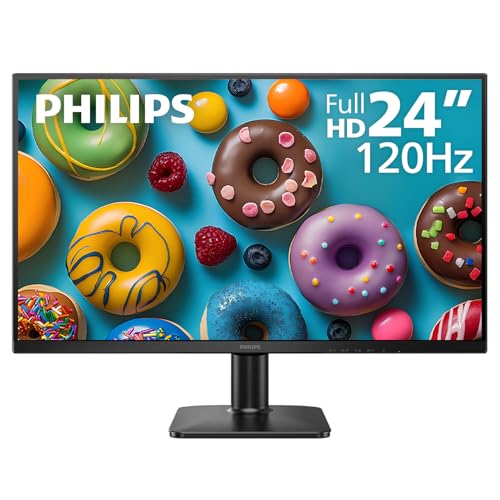
Philips 24E2N2100 24 Inch Computer Monitor FHD 120Hz

Sceptre 24-inch Prime Monitor 100Hz E248W-19203R
More Details On Our Top Picks
The LG 24U411A-B lands in the sweet spot for a small desk that still needs motion clarity. Its 120Hz refresh rate gives scrolling and casual gaming a smoother feel than a standard office panel, while the IPS screen keeps viewing angles broad for shared workspaces.
Reader Mode and Flicker Safe point it toward long document sessions and late-night use, though the slim stand base means you should like a clean, compact footprint. Compared with the Amazon Basics pick, this one is the sharper all-rounder for mixed work and entertainment.
Strong Points
- 120Hz suits smoother desktop motion and lighter gaming.
- IPS panel keeps color and contrast more stable off-center.
- Reader Mode is handy for long spreadsheet or study sessions.
- Flicker Safe helps reduce visual strain during extended use.
Things To Consider
- The slim stand keeps the footprint neat, but it offers less versatility than a fully adjustable arm-style setup.
- HDR10 is useful on paper, though 24-inch general-purpose monitors rarely turn that into dramatic theater-like punch.
Feature Snapshot
Who It Suits Best
Desktop users who split time between work, browsing, and casual games will get the most from this model.
Where A Sibling Pick Shines
ASUS VA249QG is a better fit for color-focused setups that also need DisplayPort, VGA, and built-in speakers.
This Amazon Basics model leans into straightforward office usefulness. The 75Hz panel is a modest step up from older 60Hz screens, and the mix of HDMI, DisplayPort, and VGA makes it easy to connect to newer and older machines without juggling adapters.
The adjustable stand and VESA compatibility help it fit a proper desk setup, which matters more than a flashy spec sheet for most home offices. Compared with the LG, it gives up speed, but it answers the practical question of what a simple workstation needs.
What We Like
- Three video inputs make mixed-device setups easier.
- Adjustable stand helps you fine-tune viewing height.
- VESA support opens the door to wall or arm mounting.
- Built-in speakers reduce desk clutter for casual use.
Room For Improvement
- 75Hz is fine for office work, though it feels less fluid than the 120Hz and 144Hz options above.
- Built-in speakers are convenient, but most desks still benefit from separate audio.
Core Details
Who Will Love This
Home office setups, student desks, and basic productivity stations suit this monitor well.
Another Choice May Suit
LG 24U411A-B is the smarter move for anyone who wants faster motion and a more fluid feel on the same size class.
The Dell 24 Plus S2425HSM is the most motion-forward pick in this group, and the 1ms response time makes that intent obvious. Response time is how quickly a pixel changes color, so a lower figure helps moving images stay cleaner during fast-paced play or quick cursor work.
You also get height, tilt, pivot, and swivel adjustment, which makes this a strong desk companion for mixed seating positions. Compared with the LG, it feels more gaming-minded; compared with the ASUS, it gives you a leaner speaker-first setup instead of a wider port mix.
Highlights
- 144Hz suits fast scrolling and responsive game play.
- 1ms response time supports cleaner motion transitions.
- Four-way stand adjustment helps with ergonomic positioning.
- Built-in speakers handle basic audio without clutter.
- HDMI keeps the connection path simple for laptops and consoles.
Small Caveats
- The stand is generous, but it also makes the desk footprint less compact than the simplest fixed-base designs.
- Single-input setups are easy here, though multi-device desks may still prefer more than HDMI alone.
Details At A Glance
Best Suited To
Fast-paced casual gaming and users who care about stand adjustment will get the most from this model.
Swap It Out When
Philips 24E2N2100 fits better for shoppers who want a more warranty-centered option and a simpler HDMI plus VGA setup.
SE2426H is the easier Dell to place into a typical desktop without overthinking the rest of the setup. Its IPS panel and 144Hz refresh rate give you the same broad-friendly viewing style as the LG, but with a more gaming-leaning refresh headroom and dual HDMI for simpler switching.
TÜV 3-Star certification signals a comfort-focused display package, though the tilt-only stand keeps the physical adjustability more modest than the S2425HSM above. For most desks, that trade-off feels sensible rather than limiting.
Upsides
- Two HDMI ports simplify laptop and console swapping.
- IPS panel supports a stable, familiar viewing angle.
- 144Hz keeps desktop motion smooth and responsive.
- AMD FreeSync helps make compatible gaming feel steadier.
Points To Note
- Tilt-only adjustment is basic, so taller workstations may want a separate arm.
- Shared-desk users may miss built-in speakers or a wider port mix.
Feature Rundown
Made For
Simple home desks, console-backed setups, and workers who value a clean two-HDMI layout fit this monitor well.
Reach For A Different Pick When
Dell 24 Plus S2425HSM is better for users who want full stand movement and built-in speakers in the same size class.
ASUS loads this one with the kind of extras that matter in a mixed home setup. The 99% sRGB coverage is the spec that stands out most, since sRGB is the standard color space for much web, office, and general digital work, and a high percentage usually means more faithful tone handling than a basic panel.
It also brings speakers, HDMI, DisplayPort, VGA, Low Blue Light, Flicker-Free support, and VESA mounting, so your desk can stay tidy while still handling old and new gear. Compared with the Dell SE2426H, this model offers a broader port spread and more color-oriented positioning.
Positives
- 99% sRGB coverage supports more controlled color work.
- 120Hz keeps everyday motion pleasantly smooth.
- Multiple inputs make desktop, laptop, and legacy hookups easier.
- Low Blue Light and Flicker-Free are useful for long stretches at the screen.
- VESA support helps with arm or wall mounting.
Areas To Watch
- The feature set is broad, so setup choices can feel more involved than on simpler office panels.
- Built-in speakers are handy, though separate audio still tends to sound fuller.
Core Details
Whose Shelf It Belongs On
Workstations that mix office tasks, media, and a little creative color sensitivity suit this ASUS well.
A Better Fit Elsewhere
Amazon Basics is the simpler choice for a bare-bones office desk that values easy setup over a longer feature list.
Philips takes a calmer route than the ASUS, but that calm is part of the appeal. The 4-year advance replacement warranty is the most notable line item here, especially for a workstation you want to keep in service without much interruption.
It still gives you 120Hz, IPS, HDMI 1.4, VGA, VESA support, Adaptive Sync, Flicker-Free operation, and Low Blue Light. For a long-term home desk or a small office that prefers a steady replacement path, that mix feels reassuring rather than flashy.
Bright Spots
- Four-year advance replacement coverage stands out in this size class.
- 120Hz provides smoother motion than basic office panels.
- Adaptive Sync can help compatible systems feel more even in motion.
- VESA support keeps mounting options open.
Honest Caveats
- HDMI 1.4 is fine for common use, though it is less flexible than newer connection standards.
- The feature set is practical, but it does not push as hard toward gaming as the Dell 24 Plus or SE2426H.
Technical Sheet
Built With In Mind
Home offices and workstations that value service coverage and dependable everyday pacing suit this Philips well.
Look Elsewhere When
ASUS VA249QG makes more sense for anyone who wants a wider port range and more color-oriented extras.
Sceptre keeps this one simple in the way many desks actually need. The 100Hz refresh rate is a neat middle ground between office-only screens and the more aggressive 144Hz models above, so daily motion feels a bit livelier without asking for a gaming-first build.
Its 100% sRGB spec gives it a cleaner color target than the most basic budget monitors, while HDMI x2, VGA, and built-in speakers make it easy to place in a spare room or starter office. Compared with the Amazon Basics pick, this one brings a broader media-friendly spec mix; compared with the Dell 24 Plus, it asks less of your setup and budget.
Best Bits
- 100Hz gives a more responsive feel than standard 60Hz office screens.
- 100% sRGB supports more consistent everyday color handling.
- Two HDMI ports and VGA make source switching easier.
- Built-in speakers keep a basic desk setup uncluttered.
Softer Spots
- The spec mix is practical, though the design language is less premium than the Dell or LG options.
- Owners who want the most motion headroom may still prefer 120Hz or 144Hz models.
Feature Card
Right Fit For
Starter desks, spare rooms, and shoppers who want basic comfort with a few useful extras fit this Sceptre well.
Consider Something Else When
Dell 24 Plus S2425HSM is the stronger match for users who want a higher-refresh monitor with more ergonomic stand movement.
How To Choose The Right 24 Inches Computer Monitors
Match Refresh Rate To Daily Motion
A monitor’s refresh rate tells you how many times per second the image updates, so 75Hz, 100Hz, 120Hz, and 144Hz each create a different feel at the desk. Office-heavy use can live happily at 75Hz, while scrolling, side-by-side windows, and lighter gaming feel more fluid as the number climbs.
A 24-inch screen stays compact, but motion still matters. You’ll notice the gap most in fast cursor work, gaming, and video-heavy routines.
Pick The Panel Around Your Seating
IPS panels are the safest all-purpose choice here because they hold color and contrast fairly steadily across wider viewing angles. That matters in a shared office, a bedroom desk, or any setup where you shift position often.
The trade-off is that IPS doesn’t automatically mean dramatic contrast or the deepest blacks. You’re choosing consistency and flexibility first.
Think About Ports And Desk Layout
HDMI covers the usual laptop and desktop connections, but DisplayPort and VGA add flexibility for older towers, secondary machines, or awkwardly mixed setups. Dual HDMI can be more useful than it sounds, especially for switching between a work laptop and a console without crawling behind the desk.
Stand design matters too. Tilt-only models keep things simple, while height, pivot, and swivel adjustment save your neck on longer days.
Don’t Ignore Extra Features You’ll Actually Use
Built-in speakers help in a pinch, yet they rarely replace dedicated audio. Low Blue Light, Flicker Safe, Reader Mode, and Adaptive Sync all sound technical, but each one has a practical job, from gentler long-session viewing to steadier motion on compatible systems.
The honest read is simple: pay for features that fit your habits, not for a spec stack that only looks impressive on paper.
A Quick Reality Check Before You Choose
Common Shopping Slip Ups
A lot of people get stuck chasing refresh rate and forget the stand. A 144Hz panel with basic tilt can still feel less comfortable than a 120Hz screen that lets you raise, lower, and pivot it properly.
Another common miss is port planning. A monitor with the right ports saves you from adapter clutter and awkward compromises later.
Where The Extra Money Goes
Higher-tier 24-inch monitors usually spend the added cost on smoother motion, better stand adjustment, wider port choice, and stronger color handling. You also see more attention to comfort features, such as flicker reduction and low blue light modes.
That upgrade makes sense for long desk sessions, mixed gaming and work, or setups that need a cleaner all-around finish. Casual word processing alone rarely needs every extra.
Frequently Asked Questions
Are 24-inch monitors good for small desks?
Yes, 24-inch monitors fit compact workspaces without crowding the rest of the desk. They still leave enough room for a keyboard, notebook, and a small speaker set.
Is 1080p still enough at 24 inches?
For most desk distances, 1080p is a comfortable match at this size. Text stays readable, and the screen avoids the scaling headaches that can come with higher resolutions on small panels.
Do you need 120Hz or 144Hz for office use?
Not always, but smoother refresh helps scrolling and mouse movement feel cleaner. Office users who spend hours at the screen often notice the difference more than they expect.
Are built-in speakers worth it?
They help for calls, alerts, and occasional media, especially on a tidy desk. Separate speakers still sound fuller, so built-ins are a convenience feature rather than a full audio answer.
What matters more, panel type or refresh rate?
Both matter, but they do different jobs. IPS helps with viewing consistency, while refresh rate shapes motion smoothness, so the right balance depends on whether you care more about color stability or fluid movement.
Closing Thoughts
A good 24-inch monitor should fit your desk, your ports, and your daily rhythm without demanding much attention. The LG and Dell models make strong sense for smoother motion, the Amazon Basics pick keeps things simple, and ASUS brings the broadest feature mix. Philips is the long-horizon service play, while Sceptre covers a practical middle ground. Choose the one that matches how you sit, work, and switch devices, and the rest of the setup gets easier.
