
27-inch mini-LED monitors hit a useful middle ground for desks that need detail without taking over the room. You get a size that suits gaming, photo work, and everyday multitasking, plus the brighter backlight control that mini-LED panels are known for. The catch is that the category splits fast, with some models chasing speed, others leaning into color, and a few trying to do both.
That’s where this shortlist helps. You can match the panel traits to your setup instead of guessing from a long spec sheet.
Quick Look At Our Top Picks

Dell 27 Monitor S2725QS

AOC Q27G3XMN 27 Inch Gaming Monitor
INNOCN 27 2K 1440P 320Hz Mini LED Gaming Monitor GA27T1M

KTC M27T6 27 Inch Mini LED Gaming Monitor
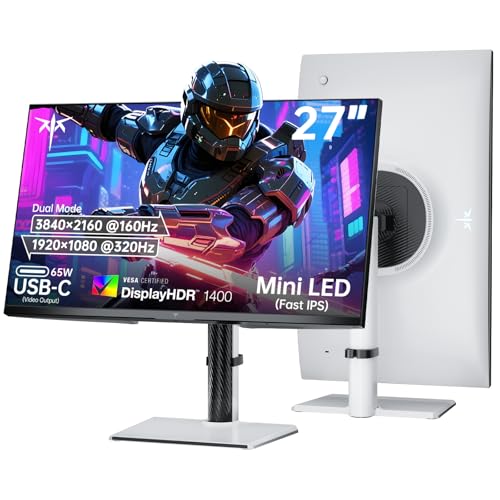
KTC 27 Inch Dual Mode Mini LED Monitor

Dell 27 Plus QHD Monitor S2725DSM
More Details On Our Top Picks
Desk users who split time between spreadsheets, streaming, and light gaming will notice the appeal right away. The 4K UHD panel gives dense text and crisp UI elements, while the 120Hz refresh rate keeps motion smoother than a typical office screen.
IPS means in-plane switching, a panel type known for steady color and wider viewing angles, so the screen stays consistent from a normal working position. Compared with the faster gaming-first picks below, this Dell leans toward clarity and balance rather than chasing extreme refresh numbers.
Strong Points
- 4K resolution suits detailed work, photo browsing, and wide timelines without crowding the desktop.
- 120Hz helps scrolling and casual gaming feel more fluid than a standard 60Hz office display.
- USB-C adds a cleaner laptop setup, especially on a desk that already runs a single-cable routine.
- Height, swivel, and pivot adjustments make it easier to set a comfortable viewing position.
- 99% sRGB coverage points to solid color range for everyday creative use and sharp general-purpose viewing.
Things To Consider
- 5ms response time suits mixed use, though speed-focused gaming panels below feel more aggressive.
- The anti-glare finish helps in bright rooms, but heavy overhead lighting can still influence contrast perception.
- 4K on 27 inches can make UI scaling part of setup, especially on older laptops.
Feature Snapshot
Who It Suits Best
Office-heavy setups, home desks with a laptop, and mixed-use workstations fit this model well.
A Better Fit Elsewhere
INNOCN 27 2K 1440P 320Hz Mini LED Gaming Monitor GA27T1M suits speed-first PC gamers who care more about refresh rate than 4K detail.
Fast competitive play is where this AOC makes sense, especially for desks that already use a separate audio setup or headset. The 180Hz refresh rate and 0.3ms response spec point it toward quick cursor movement and fast scene changes, which is the kind of edge-focused profile many gaming setups want.
Mini-LED backlighting is the headline here, and that means a denser set of small LEDs behind the panel for more controlled brightness zones than a basic edge-lit screen. Compared with the Dell S2725QS, this one gives up some all-purpose calm in exchange for a sharper gaming posture.
What We Like
- 180Hz keeps high-motion games feeling responsive on a 27-inch frame.
- Mini-LED backlighting helps scenes hold more depth than standard backlit monitors.
- HDR1000 support signals a stronger brightness target for games and video with dramatic highlights.
- Height adjustment makes it easier to line up with a keyboard tray or a low desk.
- USB 3.2, HDMI 2.1, and DisplayPort 1.4 give flexible connection choices for modern rigs.
Worth Noting
- The 0.3ms spec is tuned for speed, though real-world feel still depends on the rest of your system.
- Gaming-first tuning may be more than casual office use needs.
- At this feature level, cable management matters, because the back panel can get busy fast.
Core Details
Who Should Grab It
Competitive PC players and console setup owners who want a high-motion screen with mini-LED contrast fit this well.
Where A Sibling Pick Shines
Dell 27 Monitor S2725QS suits mixed work and gaming better, since its 4K panel and USB-C lean harder toward a clean desktop routine.
The 320Hz figure pushes this INNOCN into serious speed territory, so it fits fast shooters and twitch-heavy games better than the more general Dell picks. QHD resolution, also called 1440p, keeps the image dense without the heavier GPU load of 4K, which is a practical middle ground for many gaming desktops.
FreeSync and G-SYNC compatibility help the monitor stay in step with supported graphics cards, reducing the stutter that can show up when frame output moves around. The trade-off is clear enough: you’re buying into a gaming-first screen, and that focus leaves less room for everyday office polish than the S2725QS.
Highlights
- 320Hz gives you an unusually fast refresh target for twitch gaming.
- 1440p resolution keeps text and game detail sharp without the weight of 4K.
- Adaptive sync support helps frame pacing stay steadier with compatible hardware.
- HDR1000 suggests a more ambitious brightness ceiling for games and streaming video.
- The adjustable stand gives you room to set the screen to a sensible height.
Areas To Watch
- The speed focus makes this more specialized than a general-purpose monitor.
- Display performance still depends on the graphics card and the game you run.
- Speaker inclusion is handy in a pinch, though most gaming desks still lean on headsets or separate audio.
Details At A Glance
Whose Shelf It Belongs On
Fast PC gamers and esports-minded setups are the strongest fit here.
Swap It Out When
KTC 27 Inch Dual Mode Mini LED Monitor suits you better if you want one screen that can switch between 4K detail and 320Hz gaming.
This KTC lands in the zone where gaming style and desk ergonomics meet. The 148% sRGB claim points to a wide color gamut, which means the panel covers a larger share of the sRGB color space than a basic display, and that helps games, art, and vivid UI elements look more lively.
Compared with the AOC, it trades some refresh speed for a more rounded stand and wider color emphasis. You may find that mix more useful on a shared desk, especially where height, pivot, and swivel matter as much as frame rate.
Upsides
- 180Hz keeps gameplay smooth for mainstream PC titles.
- HDR 1400 suggests strong brightness ambition for supported content.
- 148% sRGB points to a broad color range for vivid images.
- Tilt, swivel, pivot, and height adjustment make setup easier in tight desk spaces.
- VESA mounting gives you a path to arm-based or wall-based placement.
Small Caveats
- The feature mix is broad, so the setup menu and cabling can take a little more care.
- Color-heavy tuning is helpful, though very exact content work still benefits from calibration tools.
- The built-in eye-care angle helps comfort, but screen distance and room lighting still matter.
Technical Sheet
Built With In Mind
Gamers who also care about desktop comfort and color-heavy visuals fit this model well.
Another Choice May Suit
AOC Q27G3XMN 27 Inch Gaming Monitor is the sharper match for pure competitive speed.
This is the most flexible screen in the group, and the dual-mode idea explains why. You can run 4K at 160Hz for sharper desktop work or switch to 1080p at 320Hz for faster gaming, which gives you a rare mix of detail and speed in one chassis.
That flexibility comes with a realistic trade-off, since dual-mode monitors ask you to choose the right mode for the task instead of leaving every decision to the panel itself. Compared with the INNOCN, this KTC feels more adaptable for a shared gaming-and-productivity desk, and the 65W USB-C port is handy for leaner laptop setups.
Reasons To Buy
- Dual-mode operation gives you two different display behaviors in one screen.
- 4K at 160Hz supports detailed work and fast motion together.
- 1080p at 320Hz suits high-frame-rate gaming sessions.
- 65W USB-C can simplify laptop connections on a tidy desk.
- HDR1400 and Fast IPS give the panel a high-end feature mix.
Softer Spots
- Mode switching adds a layer of setup that casual users may not need.
- 1080p on 27 inches can look less dense than 4K once you leave gaming mode.
- The feature stack may be overkill for office-only use.
Feature Rundown
The Right Fit
Desk builders who split time between gaming and laptop work will get the most from this one.
Reach For A Different Pick When
Dell 27 Plus QHD Monitor S2725DSM suits you better for a simpler display with built-in speakers and a more relaxed feature set.
Some desks need the straightforward option, and this Dell lands there neatly. QHD resolution keeps text and windows crisp without the heavier demands of 4K, while 144Hz is plenty for smooth scrolling and casual gaming.
The two 3W speakers are a practical touch for work calls, videos, or a setup that does not always rely on headphones. Compared with the other Dell in this list, this one trades USB-C and 4K detail for a simpler all-round package with built-in audio.
Bright Spots
- 144Hz gives the screen a smooth feel for daily use and light gaming.
- QHD resolution keeps the image sharp without the extra load of 4K.
- Built-in speakers reduce desk clutter for casual listening and meetings.
- Height, tilt, pivot, and swivel adjustments support more comfortable positioning.
- AMD FreeSync helps reduce visual tearing with supported hardware.
Minor Gripes
- The built-in speakers are useful, though dedicated audio still brings more depth.
- QHD is easier to run than 4K, but you give up some fine-detail workspace.
- Ash white styling may show dust more clearly than a darker shell.
Core Details
Perfect Match For
Home offices, student desks, and mixed-use setups that want simplicity with decent motion support fit this monitor well.
Look Elsewhere When
Delta-heavy gaming setups suit the AOC Q27G3XMN better, since its mini-LED gaming focus goes harder on speed and contrast.
How To Choose The Right 27 Inch Mini-Led Monitors
Start With The Workload You Actually Run
Gaming-first setups benefit from higher refresh rates, low response times, and adaptive sync support. In this list, the INNOCN and the KTC dual-mode model lean hardest into that brief.
Mixed-use desks need a different balance. The Dell S2725QS and Dell S2725DSM make more sense if you spend more time on documents, video, and general desktop work than on competitive play.
Match Resolution To Your System
4K brings very fine detail, but it also asks more from your GPU and often from your scaling preferences. QHD, also called 1440p, is the easier sweet spot for many 27-inch setups because it stays sharp without pushing the system as hard.
Dual-mode designs change that calculation a bit. The KTC dual-mode monitor lets you choose between sharper 4K and faster 1080p operation, which works well on a desktop that has both work and play duties.
Look At Backlight And Color Behavior
Mini-LED matters because it uses many smaller LEDs behind the panel, which can support more controlled brightness than simpler backlights. That tends to help scenes with bright highlights and deeper shadows feel more layered, especially in games and video.
Color coverage matters too. Numbers like sRGB coverage matter most for web content, general media, and creative workflows, while wider-gamut claims suit users who want richer tones without moving into professional display territory.
Don’t Ignore The Desk Details
Stand movement sounds ordinary until your monitor sits too high or too low for long sessions. Height, tilt, swivel, pivot, and VESA mounting all matter on a 27-inch screen because small ergonomic changes can make a long workday feel far less awkward.
Ports matter in the same practical way. USB-C helps reduce cable clutter for laptops, while HDMI and DisplayPort remain the safer choice for desktops and consoles.
A Quick Reality Check Before You Choose
Common Shopping Slip Ups
A lot of shoppers focus on refresh rate alone and miss the rest of the setup. A 320Hz panel helps fast motion, but poor desk fit, weak stand adjustment, or the wrong resolution can still make the screen feel off.
Another common miss is buying more speed than the system can use. A modest laptop or older GPU won’t make the most of a high-refresh mini-LED panel.
The Upgrade Payoff
Higher-tier models cost more because they stack multiple advantages at once, such as mini-LED backlighting, HDR support, wider color coverage, and more capable stands. In this group, that shows up in the AOC and KTC models, which pack more display tech into the panel and the chassis.
The upgrade makes sense for fast gamers, shared desks, and users who care about color richness plus motion handling. For everyday office use, the simpler Dell options are easier to justify.
Frequently Asked Questions
What makes mini-LED different from standard backlighting?
Mini-LED uses a denser array of smaller LEDs behind the panel. That can improve how brightness and darker areas sit together on screen.
Is 27 inches a good size for gaming and work?
Yes, 27 inches hits a useful middle point for sharpness and desk space. It gives you enough room for detail without demanding a huge workspace.
Do I need 4K on a 27-inch monitor?
Not necessarily. QHD already looks sharp at this size, while 4K makes the most sense for text-heavy work and users who want extra fine detail.
Why does refresh rate matter so much?
Higher refresh rates help motion look smoother, especially in fast games and rapid scrolling. They also make the whole desktop feel lighter during everyday use.
Are built-in speakers enough for most setups?
They handle basic audio, calls, and casual video well. Dedicated speakers or headphones still sound better for most gaming and media use.
Final Thoughts
These six monitors split into clear lanes, which makes the choice easier once you know your setup. The Dell S2725QS suits mixed-use desktops, the AOC and INNOCN lean harder into gaming speed, and the KTC dual-mode model gives you the broadest flexibility. The Dell S2725DSM keeps things simple with speakers and QHD clarity. Match the panel to the way you actually work and play, and the right 27-inch mini-LED screen becomes a much easier call.
