
Big screens make a real difference when you split time between spreadsheets, classes, creative work, and casual gaming. A 32-inch monitor gives you room to breathe, so your windows stop fighting for space and your posture gets a little less cramped. The seven picks below cover plain office use, sharper QHD panels, faster refresh rates, and a few feature-heavy options for mixed home setups.
The Shortlist At A Glance

Samsung 32″ Flat Computer Monitor LS32B304NWNXGO

ViewSonic VS3225-2K 32 Inch QHD 1440p IPS Monitor

32 Inch 1K FHD Monitor VESA 100x100mm

Acer SH322Q Hbih 31.5″ Full HD Ultra-Thin Monitor
Samsung 32″ S3 (S39GD) Series FHD 100Hz Curved Monitor
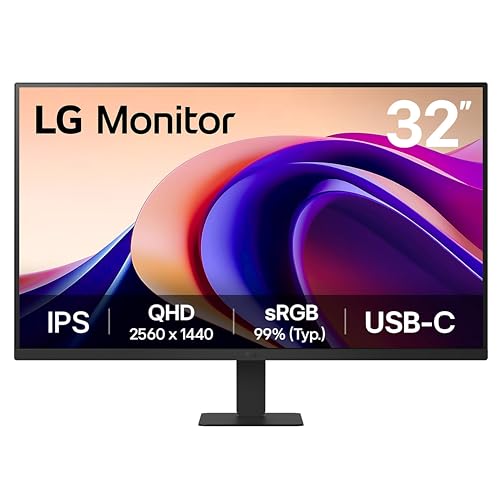
LG 32U631A-B 32-inch QHD IPS Computer Monitor
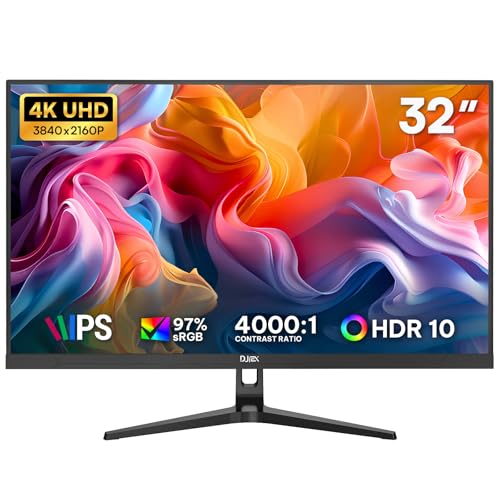
32 Inch 4K Computer Monitor UHD IPS Display
More Details On Our Top Picks
Samsung keeps this one simple, and that suits a desk that carries both work and entertainment. The flat panel, borderless look, 75Hz refresh rate, and AMD FreeSync make it a sensible fit for everyday use, not a flashy centerpiece.
You also get Game Mode, Advanced Eye Care, HDMI, and DisplayPort, so the monitor covers a lot of common setups without feeling overloaded. The trade-off is plain: this is a Full HD class screen, so shoppers who want sharper text density should look one step up to the QHD options below.
What We Like
- 75Hz refresh keeps desktop motion a little smoother than standard 60Hz panels.
- Borderless styling helps it sit neatly in dual-monitor layouts.
- HDMI and DisplayPort make desktop and laptop connections straightforward.
- Game Mode and FreeSync support give casual gaming a better fit.
- Advanced Eye Care is a practical touch for long work sessions.
Things To Consider
- Full HD on a 32-inch panel can look less crisp than QHD or 4K for text-heavy work.
- There is no built-in speaker listing here, so separate audio may matter.
- Simple ownership also means fewer premium extras for mixed media setups.
Feature Snapshot
Who It Suits Best
You get the most from this model in a home office, dorm desk, or casual living-space setup where a clean 32-inch screen matters more than ultra-sharp pixel density.
Where A Sibling Pick Shines
LG 32U631A-B 32-inch QHD IPS Computer Monitor is the better fit for spreadsheet-heavy work or long document days, since its QHD panel gives you more room for text and side-by-side windows.
ViewSonic pushes this one toward desk users who want more clarity without jumping to 4K. The QHD resolution means sharper text and more usable space than the Samsung flat FHD model above, while the IPS panel, anti-glare finish, and frameless design keep it friendly for work and media.
The 75Hz LCD, Variable Refresh Rate, HDR10, speakers, HDMI, and DisplayPort make it flexible for a laptop dock, a Mac desk, or a simple PC setup. In a busy office corner, that combination feels practical, though the built-in speakers are usually more backup than centerpiece.
Highlights
- QHD resolution gives text a crisper look on a 32-inch screen.
- IPS viewing angles help the picture hold up from the side.
- Anti-glare coating is useful in bright rooms and near windows.
- HDR10 support adds a bit more range for compatible media.
- Built-in speakers reduce desk clutter for lighter setups.
Worth Noting
- 75Hz keeps it in the mainstream range rather than high-refresh territory.
- Integrated speakers are convenient, but dedicated audio still sounds fuller.
- QHD on 32 inches suits productivity most when you sit at a normal desk distance.
Core Details
Made For
This fits office-heavy users, split-screen workers, and anyone who wants a larger canvas for documents, browser tabs, and video calls.
Another Choice May Suit
Samsung 32″ S3 (S39GD) Series FHD 100Hz Curved Monitor makes more sense for a couch-friendly living room desk, since its smart features and curved shape lean harder into mixed entertainment use.
ZZA keeps the formula stripped back here, which can be exactly right for a secondary desk, student space, or a straightforward office corner. The 1920 x 1080 resolution, IPS panel, and 60Hz refresh rate make it a plain, workable screen rather than a feature parade.
The 178-degree viewing angle, AMD FreeSync, VESA 100x100mm mount support, and tilt adjustment cover the basics well. Compared with the ViewSonic above, it gives up resolution and a few creature comforts, but that simplicity can be useful when you want a screen that stays out of the way.
Bright Spots
- IPS panel keeps the image consistent across wider viewing positions.
- VESA 100x100mm support makes arm or wall mounting easier.
- Tilt adjustment helps you line up the panel with your seating position.
- AMD FreeSync is a welcome touch for light gaming or smoother motion.
Areas To Watch
- Full HD on 32 inches can feel loose for dense text work.
- 60Hz is fine for office tasks, but less lively than the faster options in this list.
- Mounting hardware and cable routing matter more on a simple monitor like this.
Details At A Glance
Right Fit For
Students, secondary-desk users, and shoppers building a basic setup on a tighter budget get the most out of this model.
A Better Fit Elsewhere
Samsung 32″ Flat Computer Monitor LS32B304NWNXGO is the smarter step up for commuters or home-office users who want a cleaner all-purpose balance with 75Hz motion and HDMI plus DisplayPort.
This Acer leans toward users who want a flatter, slimmer look on the desk and a faster feel in motion. The 100Hz refresh rate and 1ms VRB response time, with VRB meaning visual response boost, make it a stronger fit for light gaming than the basic 60Hz options.
The adjustable stand and HDMI plus VGA ports keep it practical for older desktops and newer laptops alike. It stays Full HD, though, so anyone chasing sharper text or more room for side-by-side apps should still look at the QHD models above and below it.
Upsides
- 100Hz brings a smoother desktop feel than standard office panels.
- 1ms VRB suits fast-moving games and quick on-screen motion.
- Adaptive-Sync support helps reduce visible tearing in compatible setups.
- HDMI and VGA make it easy to hook up older gear.
- Adjustable stand improves comfort across different desk heights.
Softer Spots
- Full HD on this size is still the limiting factor for detail work.
- VGA is handy for legacy devices, but HDMI will usually be the cleaner path.
- Ultra-thin styling often means less visual heft, not more premium function.
Quick Facts
Best Suited To
This suits casual gamers, mixed-use desktop setups, and households that still keep one older computer in the mix.
Look Elsewhere When
LG 32U631A-B 32-inch QHD IPS Computer Monitor fits office-first users better, because its QHD resolution gives text and spreadsheet work more breathing room.
This Samsung takes a different route from the flat office monitors above, because it blends display duties with smart features. The curved FHD panel, Vision AI, Smart TV apps, Gaming Hub, USB-C, HDMI, and USB-A make it better suited to a desk that doubles as a media corner.
For apartment setups and multipurpose rooms, that mix can save space and reduce the need for another screen. The trade-off is straightforward: you’re paying for ecosystem features and a curved experience, so pure productivity shoppers may prefer the cleaner QHD layout of the ViewSonic or LG.
Reasons To Buy
- Curved screen shape can feel more immersive at a desk.
- Smart TV apps and Gaming Hub widen its use beyond work.
- USB-C adds a handy single-cable path for some laptops.
- USB-A keeps common accessories within reach.
- 100Hz refresh supports smoother everyday motion than standard 60Hz panels.
Points To Note
- Smart features are useful only when you want a monitor that also behaves like a media hub.
- White finish can show dust more readily on a busy desk.
- Curved screens fit some layouts better than others, especially in tight workspaces.
Feature Rundown
Whose Shelf It Belongs On
You get the best fit here in a small living room, studio apartment, or desk area that needs both display and entertainment features in one unit.
Where A Sibling Pick Shines
Samsung 32″ Flat Computer Monitor LS32B304NWNXGO is the safer choice for strict office work, since it stays simpler, flatter, and easier to place in a conventional workstation.
LG lands in a very workable middle ground for office use, with QHD resolution, IPS construction, and a 100Hz refresh rate. Compared with the ViewSonic, it pushes motion a little further, and compared with the Samsung flat FHD model, it gives you noticeably more detail room.
HDR10, Reader Mode, Flicker Safe, HDMI, and USB Type-C with 15W power delivery make it especially tidy for laptop desks. The honest read is that this is the kind of monitor you notice less over time, which is usually a good sign for a work-first screen.
Best Bits
- QHD resolution makes documents and browser windows feel less cramped.
- 100Hz offers a smoother feel than standard office refresh rates.
- USB Type-C with 15W PD helps simplify a laptop setup.
- Reader Mode and Flicker Safe suit long stretches at the desk.
- IPS panel keeps the image stable from side angles.
Minor Gripes
- 5ms response time is fine for work, but not built for serious gaming focus.
- 15W power delivery helps with cable cleanup, though it will not replace every laptop charger.
- Utility-first styling may feel plain next to the Samsung curved model.
Spec Overview
The Right Fit
You’ll get the most from this monitor on a productivity desk where document work, browsing, and video calls fill the day.
Skip It When
Samsung 32″ S3 (S39GD) Series FHD 100Hz Curved Monitor makes more sense for entertainment-first setups, since its curved panel and smart app support lean toward mixed media use.
This DJiEX monitor targets shoppers who want sharp text, cleaner image detail, and a more refined 32-inch workspace. The 4K UHD panel, IPS layer, 97% sRGB coverage, and 1300:1 contrast ratio give it a clearly more detailed profile than the QHD and Full HD picks above.
It also includes HDR10, FreeSync, HDMI, DisplayPort, VESA 75x75mm support, and low blue light mode, which keeps it practical for business desks and home offices. The trade-off is familiar: 60Hz is fine for productivity and media, but motion-minded users will still prefer the 100Hz models earlier in the list.
Standout Traits
- 4K resolution gives text and images a very crisp presentation.
- IPS panel helps maintain consistency across the viewing area.
- 97% sRGB is valuable for color-aware everyday work.
- VESA 75x75mm support makes mounting straightforward.
- Low blue light mode is useful for evening desk sessions.
Room For Improvement
- 60Hz refresh is less fluid than the 100Hz models in this roundup.
- 4K asks more from your graphics output than Full HD.
- Color and detail gains are most obvious at a proper desk distance.
Feature Card
Built With In Mind
This suits business users, home-office setups, and content-focused desks that benefit from extra sharpness over speed.
Swap It Out When
Acer SH322Q Hbih 31.5″ Full HD Ultra-Thin Monitor is the easier pick for casual gaming and simpler hardware, since it prioritizes faster motion and broader device compatibility.
How To Choose The Right 32 Inch Computer Monitors
Panel Type And Resolution Matter First
A 32-inch screen magnifies every design choice, so panel type and resolution deserve the first look. IPS panels keep color and viewing angles steadier, which helps when your chair moves or someone leans in beside you.
Resolution is just as important. Full HD works for lighter use, QHD gives you more room for documents and tabs, and 4K adds sharper text and image detail at the cost of more demand on your setup.
Refresh Rate Should Match Your Routine
Refresh rate means how many times the screen updates each second, and that shapes how smooth motion feels. A 75Hz or 100Hz panel feels nicer for scrolling and casual gaming than a plain 60Hz model.
That upgrade matters most for mixed use. Office work can live with 60Hz, but frequent gamers, multitaskers, and anyone sensitive to cursor motion usually appreciate the step up.
Ports, Stands, And Desk Fit Change Daily Use
HDMI and DisplayPort cover most laptops and desktops, while USB-C can simplify a modern notebook desk by carrying video through one cable. VESA mounting matters too, because a monitor arm can reclaim desk space and improve positioning.
Stand adjustments are easy to overlook, yet tilt, height, or a compact base can make a long workday easier. For small rooms or shared desks, the physical shape of the monitor can matter as much as the panel itself.
Match The Monitor To The Way You Work
Productivity-first desks usually benefit from QHD or 4K, especially for spreadsheets, writing, and side-by-side windows. Casual gaming and media setups often feel more relaxed with 100Hz, FreeSync, or smart features.
The right choice comes down to where the monitor spends its time. A clean office station, a mixed living-room setup, and a gaming-leaning desk all reward different feature sets.
A Quick Reality Check Before You Choose
Common Shopping Slip Ups
Many people focus on screen size and miss the pixel load that comes with 32 inches. A Full HD panel can look soft at this size, so text-heavy work usually benefits from QHD or better.
Another common miss is ignoring stand adjustments and ports. A panel with the right connectors and a usable stand saves a lot of frustration once it lands on your desk.
The Upgrade Payoff
Higher-tier models often cost more because they pack sharper panels, stronger color handling, better motion control, and more flexible connectivity. That extra spend also tends to buy a cleaner desk experience, especially with USB-C and VESA support.
The jump is worth it for workdays filled with text, design, or long multitasking sessions. For a simple spare monitor, the extra spend may not change your daily routine enough to matter.
Frequently Asked Questions
Is 32 inches too large for a desk?
For most standard desks, 32 inches works well as long as you keep enough viewing distance. It can feel oversized on a shallow table, especially with a flat panel and no stand adjustment.
Should you choose QHD or 4K at this size?
QHD is a strong middle ground for work and media, because it gives more space without demanding as much from your system. 4K suits sharper text and image detail, but it makes the most sense when your desk and hardware are ready for it.
Does 100Hz matter for office use?
It matters less than it does for gaming, but the smoother scrolling and pointer movement are noticeable. Many people still find 100Hz easier on the eyes during long desk sessions.
Are curved 32-inch monitors better?
Curved screens can feel more immersive for entertainment and relaxed desk use. Flat models usually make more sense for strict office work, spreadsheets, and multi-monitor alignment.
What port should you look for first?
HDMI covers most everyday setups, so it remains the safest baseline. USB-C becomes more useful when you want a simpler laptop connection, while DisplayPort suits many desktop rigs.
Closing Thoughts
A 32-inch monitor works best when the panel matches the way you actually sit and work. The Samsung flat model is easy to live with, the ViewSonic and LG step up the clarity, and the DJiEX 4K option pushes detail hardest. For gaming-leaning desks, the Acer and Samsung S3 bring more motion or more features, depending on your priorities. Pick the screen that fits your desk first, then let the extras follow.
