
Work at a 32-inch panel gives you breathing room for spreadsheets, timelines, side-by-side windows, and long writing sessions without crowding your desk. The right choice depends on resolution, panel type, refresh rate, and whether you want a monitor that stays purely work-focused or pulls double duty after hours. This roundup keeps the focus on practical fit, so you can match the screen to your desk, your laptop, and the way you actually spend the day.
Quick Look At The Shortlist

Samsung 32" Flat Computer Monitor LS32B304NWNXGO

HUANUO FlowLift™ Pro Monitor Arm


LG 32UR500K-B Ultrafine 32-inch 4K UHD Monitor

ViewSonic VS3225-2K 32 Inch QHD 1440p IPS Monitor
Samsung 32" S3 (S39GD) Series FHD 100Hz Curved Monitor
More Details On Our Top Picks
A flat 32-inch screen like this fits the classic desk setup, where you want room for documents without drifting into the complexity of a full creator display. The 75Hz refresh rate gives the motion a slightly smoother feel than basic office panels, and the borderless styling keeps the frame visually quiet. For daily email, spreadsheets, and light after-hours use, that balance is the point.
HDMI and DisplayPort support make it easier to pair with a desktop tower, dock, or a work laptop that stays parked at a station. Game Mode, AMD FreeSync, and advanced eye care features broaden the appeal, though the panel still reads as a practical monitor first. You may find it especially sensible for a shared home office where you want one screen to stay unobtrusive.
Strong Points
- 32-inch size gives you space for side-by-side windows without filling the whole desk.
- Borderless styling keeps the display visually tidy in a work setup.
- HDMI and DisplayPort cover common office connections.
- 75Hz adds a bit of smoothness for scrolling and cursor movement.
Things To Consider
- It stays closer to a work-first monitor than a feature-loaded creative panel.
- No stand adjustment details are listed in the source data, so ergonomic fit depends on your mount or desk height.
- Advanced eye care is useful in long sessions, but it does not replace a well-set desk layout.
Feature Snapshot
Who It Suits Best
You want a straightforward 32-inch monitor for office work, split-screen tasks, and occasional casual use.
A Better Fit Elsewhere
Dell 32 Monitor S3225QS suits you better when sharper 4K detail matters more than a simpler everyday layout.
This arm changes the whole shape of a desk because it lifts the screen off the base and opens up usable surface below it. The MechaSpring mechanism is aimed at easier positioning, while the tilt, swivel, and rotation joints cover the daily adjustments that matter during long work blocks. It pairs well with 32-inch panels from this list, especially the Samsung flat model or the Dell 4K screen.
The tool-free VESA mount is the practical part many people care about, since it reduces the usual setup hassle. C-clamp and grommet options widen the installation path, though the trade-off is that you need a desk edge or hole that fits the hardware. For home offices with cramped layouts, it can feel like the monitor finally got out of the way.
What We Like
- Supports screens from 13 to 32 inches, which suits this roundup well.
- Tilt, swivel, and rotation give you precise position control.
- Tool-free VESA mounting keeps installation more approachable.
- C-clamp and grommet bases cover two common mounting setups.
- Max load of 19.8 pounds gives it a clear use range for typical monitors.
Room For Improvement
- It only helps where the desk structure allows a clamp or grommet mount.
- Heavy monitors near the upper end of the range deserve careful fit checks.
Core Details
Built With In Mind
You want cleaner desk space and frequent screen repositioning for a home office or dual-monitor setup.
Where A Sibling Pick Shines
Samsung 32" Flat Computer Monitor LS32B304NWNXGO suits you better when you want a complete screen rather than an arm and mount.
The Dell model leans toward people who want their work screen to carry more detail than a standard 1080p panel can offer. Its 4K UHD resolution, 31.5-inch size, and VA panel make it a strong fit for finance work, design-heavy layouts, or anyone who keeps several windows open all day. The honest read is that it asks for a sharper source signal and a desk with enough depth to respect the large canvas.
FreeSync Premium and 120Hz are not everyday-office necessities, but they do make movement feel more composed in mixed work and media use. The 3000:1 contrast ratio and 300 cd/m2 brightness point to a display that should hold up well in controlled indoor light, while 99% sRGB coverage matters for color-sensitive tasks. Compared with the Samsung flat model, this one clearly serves the detail-first crowd.
Highlights
- 4K resolution gives text and interface elements a very crisp look.
- 31.5-inch VA panel offers a spacious workspace for multitasking.
- 120Hz makes motion feel smooth during scrolling and window movement.
- 99% sRGB helps color work feel more dependable for creative tasks.
- HDMI and DisplayPort keep connection options straightforward.
Softer Spots
- 4K at 32 inches can feel dense, so some users may need scaling adjustments.
- The source data does not include stand ergonomics, which matters on shallower desks.
- Its stronger feature set may be more than you need for plain text work.
Technical Sheet
Perfect Match For
You spend your day in large spreadsheets, design tools, or a workspace that benefits from sharp 4K detail.
Look Elsewhere When
ViewSonic VS3225-2K 32 Inch QHD 1440p IPS Monitor suits you better when you want simpler QHD resolution and a lighter setup.
This LG leans into simple, useful features rather than trying to impress with every possible spec. The 32-inch 4K panel is a good match for home office work, and the dual speakers keep desk clutter down when you need a quick call or a video without extra hardware. Reader Mode and Flicker Safe make sense for long document sessions, especially for people who stare at text more than charts.
OnScreen Control is the quiet practical feature here, because it can make monitor adjustments less fiddly during a busy day. HDR10 and the borderless design round out the package, though this still feels like a calm utility display rather than a flashy media screen. Compared with the Dell S3225QS, it asks less from the wallet conversation and less from the user who just wants a dependable setup.
Upsides
- 4K resolution gives you room for detailed work and cleaner text.
- Built-in speakers reduce the need for separate desktop audio.
- Reader Mode is handy for long document sessions.
- OnScreen Control simplifies routine display adjustments.
- Dual HDMI ports and a DisplayPort keep hookups flexible.
Points To Note
- Built-in speakers are useful, though most desk setups still benefit from external audio.
- Source data does not specify refresh rate, so motion-focused use is harder to judge from the listing alone.
- Its best traits lean practical rather than premium.
At A Glance
The Right Fit
You want a low-drama 32-inch 4K monitor for office work, text, and occasional media without adding extra desk gear.
Swap It Out When
Dell 32 Monitor S3225QS suits you better when refresh rate and color detail matter more than built-in speakers.
QHD at 32 inches lands in a very usable middle ground, sharper than basic Full HD but less demanding than 4K. The IPS panel matters here because it usually gives wider viewing consistency, which helps on desks where you lean, turn, or share the screen during a meeting. For laptop users who dock in and out, that balance is easy to live with.
Variable refresh rate, anti-glare treatment, and HDR10 give the monitor a more adaptable feel than the plain office models earlier in the list. Speakers are included, and HDMI plus DisplayPort keep things straightforward, though the 75Hz ceiling still keeps it closer to work-first than gaming-first. It’s a smart fit for people who want clarity without the scaling quirks of 4K.
Bright Spots
- QHD resolution gives you a sharper workspace than 1080p.
- IPS panel helps images stay readable from more angles.
- Variable refresh rate can smooth out supported content.
- Anti-glare finish helps in bright offices or near windows.
- Built-in speakers keep the desk layout simple.
Small Caveats
- 75Hz is fine for office work, though it stays modest compared with faster panels.
- Built-in speakers usually suit calls more than rich media playback.
- QHD may feel like the right middle step, but some people will still want 4K.
Details At A Glance
Who Will Love This
You use a 32-inch monitor for office tasks, laptop docking, and everyday clarity without overcomplicating the setup.
Another Choice May Suit
LG 32U631A-B 32-inch QHD IPS Monitor suits you better when you want a faster 100Hz panel with USB-C on the desk.
This Samsung goes in a different direction from the simpler office monitors above, because it mixes work display duties with smart-TV style features. The curved FHD screen and 100Hz refresh rate create a softer wraparound feel, which may suit you well on mixed-use desks where a little entertainment happens between calls. USB-C, HDMI, and USB-A make it easy to connect modern gear without fuss.
Samsung Vision AI, Smart TV apps, and Gaming Hub are the features that push it beyond a normal desk panel. That also means it can make more sense in a bedroom office, studio apartment, or hybrid space than in a strict corporate cubicle. The trade-off is clear enough: you gain versatility, but you give up the sharper desk focus of the Dell or LG 4K choices.
Best Bits
- Smart TV apps and Gaming Hub expand what the screen can do after work hours.
- USB-C, HDMI, and USB-A support a wide range of devices.
- 100Hz offers smoother motion than standard office refresh rates.
- Curved design can feel more immersive on a personal desk.
Areas To Watch
- FHD on a 32-inch panel is less sharp than QHD or 4K.
- The curved shape is a taste-driven choice, not a universal one.
- Smart features add usefulness, though they also add menu complexity.
Feature Rundown
Whose Shelf It Belongs On
You want one screen for work, streaming, and light play in a room that does not have space for separate devices.
Reach For A Different Pick When
LG 32U631A-B 32-inch QHD IPS Monitor suits you better if a sharper work image matters more than smart extras.
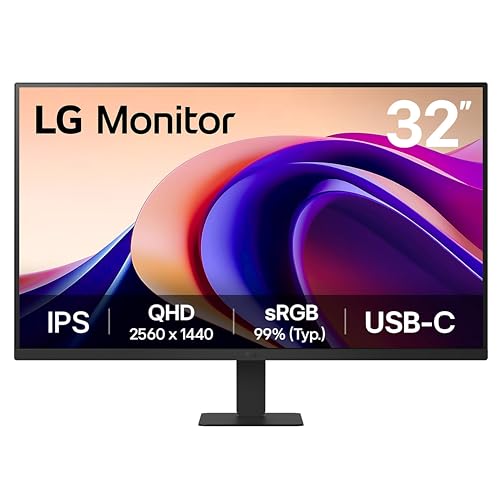
This LG sits in a sweet spot for desk work because it combines QHD resolution, an IPS panel, and a 100Hz refresh rate. That trio gives you sharp enough text, steady viewing angles, and a little extra smoothness for scrolling or moving between apps. USB-C with 15W power delivery adds real convenience for laptop users, especially in a setup that values fewer cables.
Reader Mode and Flicker Safe make it easier to stay on task during long sessions, while HDR10 and the anti-glare approach add practical breadth without making the monitor feel overstuffed. Compared with the ViewSonic VS3225-2K, this LG offers a faster refresh rate and a more modern USB-C path. The main trade-off is straightforward, because it’s still a work monitor first, not a flashy all-purpose entertainment screen.
Reasons To Buy
- 100Hz gives you smoother motion than the 75Hz models in this roundup.
- USB-C with 15W power delivery is handy for cleaner laptop desks.
- IPS panel supports reliable viewing from more angles.
- Reader Mode helps text-heavy work feel easier to live with.
- HDR10 and anti-glare add flexibility for mixed-light rooms.
Honest Caveats
- 15W power delivery is useful, though it won’t charge every laptop at full speed.
- It still sits in the work-first category rather than the media-heavy one.
- Some desks may prefer a deeper stand or an arm, depending on the layout.
Core Details
Best Suited To
You want a clean, modern 32-inch monitor for office work, laptop docking, and long text sessions.
A Better Fit Elsewhere
Dell 32 Monitor S3225QS suits you better when you want 4K detail and a more premium work canvas.
How To Choose The Right 32 Inch Monitors For Work
Match Resolution To Desk Distance
At 32 inches, resolution shapes comfort more than raw size does. QHD gives you a clean middle ground for office use, while 4K brings tighter text and more room for side-by-side windows, especially on a deeper desk. FHD can still work, but it looks softer at this size and makes the screen feel less refined.
That choice matters most for spreadsheets, document editing, and design tools. A monitor like the Dell S3225QS rewards detail-heavy work, while the ViewSonic VS3225-2K feels easier to live with for mixed office and laptop use. You’re matching clarity to workload, not chasing the biggest number.
Pick The Panel Type With Your Layout In Mind
IPS panels usually suit work setups because they hold viewing angles well, which helps on wider desks and in shared spaces. VA panels tend to bring stronger contrast, which can make dark text and mixed media feel deeper. Flat panels keep things straightforward, while curved screens suit personal desks where the monitor stays centered on you.
The Samsung S3 curved model leans toward a more immersive feel, while the Dell VA panel is built for strong contrast in a clean office. For a shared room or a laptop dock that moves around, IPS usually stays the safer choice. The right panel type is less about prestige and more about how you sit, share, and shift through the day.
Look Past Ports And Into Workflow
Connections decide how painless the desk feels after setup. HDMI and DisplayPort cover most desktops and docks, while USB-C can simplify a laptop station by carrying video and, on some models, light charging through one cable. That convenience is especially useful when you clear the desk each evening or switch between work and personal gear.
Built-in speakers, adjustable mounts, and software controls matter too, but only when they fit your routine. The LG 32U631A-B stands out for USB-C, while the HUANUO arm matters more for people who want the screen floating above the desk. Practical details usually beat flashy extras once the monitor is in daily use.
Think About Smoother Motion, Not Just More Pixels
Refresh rate affects how smooth scrolling and window movement feel, even in work tasks. A 75Hz or 100Hz panel can make everyday movement feel calmer than a basic 60Hz screen, and 120Hz goes further for anyone who splits time between work and media. That doesn’t replace resolution, but it does change the feel of the desktop.
For long workdays, the best fit is usually the panel that reduces friction without adding complexity. Samsung’s 75Hz flat model keeps things simple, while the LG 100Hz options and Dell’s 120Hz panel bring more polish. You can think of it like choosing shoes for a long commute, comfort shows up every hour.
Things Worth Knowing First
Common Shopping Slip Ups
One common mistake is treating all 32-inch screens the same. A 32-inch FHD panel, a 32-inch QHD panel, and a 32-inch 4K panel serve very different desks, so you want to match resolution to how close you sit and how much text you read.
Another misstep is ignoring the stand or mount plan. A great panel can feel awkward on a shallow desk, while an arm like the HUANUO FlowLift™ Pro Monitor Arm can solve the space issue before it becomes annoying.
What The Higher Tier Buys
Higher-tier models usually cost more because they mix sharper resolution, faster refresh rates, better panel behavior, and extra convenience features in one shell. You’re paying for a cleaner desktop, more flexible inputs, and often a more polished feel in daily use.
That upgrade makes the most sense for long-hours work, content-heavy tasks, or a setup that doubles as a media station. The Dell S3225QS and LG 32U631A-B show where the extra money tends to go, while simpler models still cover plain office duty well.
Frequently Asked Questions
Is 32 inches too large for work?
No, 32 inches is a very usable size for spreadsheets, timelines, and split windows. The key is choosing the right resolution so the screen feels productive instead of soft.
Should you choose QHD or 4K?
QHD suits many office desks because it balances clarity and simplicity. 4K makes the sharpest text and the most room for dense layouts, especially if you sit close and work with multiple windows.
Does a higher refresh rate matter for office use?
Yes, but mostly in the feel of scrolling and general motion. It won’t change your documents, though a 75Hz, 100Hz, or 120Hz panel can make the desktop feel smoother.
Is USB-C useful on a work monitor?
Very useful for laptop users, since it can reduce cable clutter and simplify docking. The value rises fast in a routine where you connect and disconnect every day.
Do built-in speakers matter?
They help for calls, alerts, and casual video, especially on a compact desk. External audio still sounds better for most setups, so built-in speakers are a convenience feature more than a core reason to choose a monitor.
Final Thoughts
The best 32-inch monitor for your desk depends on how much sharpness, speed, and connection simplicity you want in daily use. The Dell model suits detail-heavy work, the LG QHD options keep things practical, and the Samsung flat pick stays easy to live with for general office tasks. If your desk is tight, the HUANUO arm can matter as much as the screen itself. Choose the panel that fits your workflow, and the rest tends to fall into place.
