
Big ultrawide displays make sense in a home office, a gaming setup, or a desk that handles both. You get more horizontal room for timelines, spreadsheets, side-by-side windows, and field-of-view-heavy games, and that can cut down on constant window shuffling. The trade-off is size, desk depth, and the need to match resolution, refresh rate, and ports to your gear. The seven picks below focus on those real differences, not just screen size.
The Shortlist At A Glance
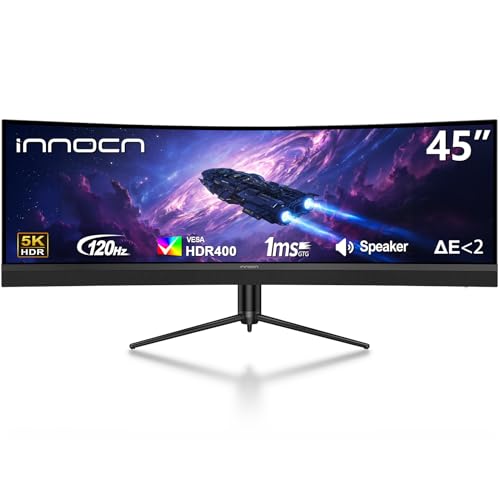
Sceptre Curved 24.5-inch Prime Gaming Monitor C255B-FWT240

Gawfolk 45 Inch Ultrawide Curved Monitor 200Hz 5K DQHD

INNOCN 40C1R Ultrawide Monitor 40-inch WQHD 3440 x 1440p

LG 45GR65DC-B Ultragear Curved Gaming Monitor 45-Inch 32:9 QHD

LG 45GX950A-B 45-inch Ultragear 5K2K WUHD OLED Curved Gaming Monitor

Gawfolk 45 inch Ultra-Wide Curved 1500R Gaming Computer Monitor DQHD

Deco Gear 49 Inch Curved Monitor 5K2K Ultrawide WDQHD 5120×1440
More Details On Our Top Picks
A compact curved screen with 240Hz refresh fits a desk where speed matters more than sheer width. The 1080p resolution keeps the load lighter on your graphics card, and the two DisplayPort plus two HDMI inputs make it easier to keep a PC and console connected without constant cable swaps.
The built-in speakers and blue light shift mode add convenience for everyday use, though serious audio setups will still sound better through separate speakers or headphones. Compared with the larger ultrawides in this list, this Sceptre makes more sense for tight spaces and competitive play than for sprawling multitasking.
Strong Points
- 240Hz refresh suits fast motion in esports-style games.
- 1080p resolution is easier to drive on modest hardware.
- Dual DisplayPort and dual HDMI inputs support multiple devices.
- Built-in speakers reduce desk clutter for casual setups.
- Blue light shift is useful for long evening sessions.
Things To Consider
- 24.5 inches is much smaller than the ultrawide options here.
- The speakers are convenient, but not a substitute for fuller audio.
- 1080p is fine at this size, though not as expansive for work as higher-resolution panels.
Feature Snapshot
Who Will Love This
Competitive gamers and space-conscious desk setups get the most from it.
Swap It Out When
Gawfolk 45 Inch Ultrawide Curved Monitor 200Hz 5K DQHD suits you better when ultrawide workspace matters more than speed-first simplicity.
This one pushes hard on gaming specs, with 200Hz refresh and a 5K DQHD panel spread across a 45-inch curved frame. In a busy gaming room, the 1500R curve helps keep the screen feeling wrapped around your field of view, and the VA panel’s 3000:1 contrast gives dark scenes more depth than a flatter budget screen.
The FreeSync and G-Sync support matters most if you want fewer tears in the image while moving across a range of frame rates. Compared with the Sceptre above, this is the broader, more immersive choice, though the extra width and resolution ask more from your desk space and graphics hardware.
Highlights
- 200Hz refresh gives you a fast-feeling gaming panel.
- 5K DQHD resolution packs in a large amount of workspace.
- 1500R curve helps the screen feel more enveloping at a desk.
- FreeSync and G-Sync support help smooth out frame pacing.
- VA contrast suits darker games and media scenes.
Minor Gripes
- The width can feel excessive on shallow desks.
- High resolution and refresh place more demand on your system.
- Built-in speakers usually suit background audio more than critical listening.
Details At A Glance
Built With In Mind
Gamers who want immersion and wide-screen presence without going all the way to OLED will appreciate it.
Another Choice May Suit
INNOCN 40C1R Ultrawide Monitor 40-inch WQHD 3440 x 1440p fits you better for mixed productivity where the screen can be a little easier to place.
This 40-inch panel sits in a useful middle zone, wider than a standard monitor but less imposing than the 45- and 49-inch choices. The 3440 x 1440 resolution, often called ultrawide WQHD, keeps text and timelines comfortable for office work while still giving games room to breathe.
It also brings 144Hz refresh, USB-C, and tilt and height adjustment, which makes day-to-day setup easier than the more fixed-feeling options in this roundup. For a home office that also sees evening gaming, that balance is the honest appeal.
Upsides
- 40-inch size is easier to fit than the larger ultrawides here.
- 3440 x 1440 resolution supports clear multitasking.
- 144Hz refresh keeps motion smooth for casual gaming.
- USB-C simplifies single-cable laptop connection.
- Tilt and height adjustment help dial in desk ergonomics.
Small Caveats
- It is less expansive than the 45-inch and 49-inch screens.
- The 21:9 shape is wide, but not as dramatic as 32:9 models.
- Mounting and desk clearance still deserve a quick check before setup.
Core Details
Whose Shelf It Belongs On
Hybrid workers and casual gamers who want a manageable ultrawide shape will get the most from it.
Reach For A Different Pick When
LG 45GR65DC-B Ultragear Curved Gaming Monitor 45-Inch 32:9 QHD makes more sense for a larger desk and a stronger gaming focus.
The LG 45GR65DC-B leans into speed and size at the same time, with a 45-inch 32:9 Dual QHD canvas and 200Hz refresh. That extra-wide aspect ratio is useful for racing titles, editing timelines, or anyone who likes a monitor that feels closer to a two-screen layout than a single panel.
HDMI 2.1, DisplayPort 1.4, and PiP plus PbP support give it a flexible port layout for mixed systems and split-input work. Compared with the INNOCN 40C1R, this one is much more commanding on a desk, and it asks for the space to match.
Bright Spots
- 32:9 layout gives you a very broad working area.
- 200Hz refresh supports a smooth gaming feel.
- HDMI 2.1 and DisplayPort 1.4 cover modern hookups.
- PiP and PbP help manage two input sources at once.
- VESA DisplayHDR 600 and 95% DCI-P3 support enhance image depth and color range.
Room For Improvement
- The wide footprint can dominate smaller desks.
- Panel size and speed make cable management more important.
- Like other large gaming displays, it rewards careful stand placement.
Feature Rundown
Right Fit For
Serious gaming desks and users who want a big ultrawide for work and play.
Where A Sibling Pick Shines
Deco Gear 49 Inch Curved Monitor 5K2K Ultrawide WDQHD fits you better for the biggest desktop span in this roundup.
OLED changes the feel of a monitor quickly, because each pixel can be controlled on its own rather than relying on a backlight layer. Here, that technology sits in a 45-inch curved frame with 5120 x 2160 resolution, 165Hz refresh, and a 0.03ms response time, which gives you a very sharp, fast canvas for games and creative work.
Dual-mode support and USB-C 90W make it especially appealing for a desk that shifts between laptop work and high-end gaming. The trade-off is obvious enough, this is the most specialized panel in the list, and its premium feature set only makes sense for people who will actually use it.
Standout Traits
- OLED panel delivers excellent pixel-level contrast.
- 5K2K resolution gives you extra detail for large workflows.
- Dual-mode support adds flexibility for different uses.
- 0.03ms response time suits very fast-moving games.
- USB-C 90W can simplify a laptop dock-style setup.
Areas To Watch
- It asks for a stronger budget than the non-OLED picks.
- OLED ownership usually rewards careful brightness habits and routine screen-saver use.
- The feature set is more than casual browsing really needs.
Technical Sheet
Best Suited To
Power users who split time between premium gaming and a serious desktop workflow.
Look Elsewhere When
INNOCN 40C1R Ultrawide Monitor 40-inch WQHD 3440 x 1440p is the saner match for simpler setups and lighter desk demands.
This Gawfolk keeps the ultrawide formula straightforward, with a 45-inch curved DQHD panel, 185Hz refresh, and FreeSync support. The 120% sRGB claim points to a wide color range, which is useful for media work and games that benefit from fuller-looking visuals.
The included speaker and HDMI 2.1 plus DP 1.4 inputs make it easier to drop into a mixed setup without extra gear. Compared with the LG 45GR65DC-B, it gives up some premium polish, but it also keeps the spec sheet direct and easy to understand.
Best Bits
- 45-inch curved format gives you a broad desktop span.
- 185Hz refresh keeps gameplay smooth for many genres.
- DQHD resolution supports wide multitasking lanes.
- FreeSync helps reduce visible tearing with supported graphics hardware.
- Built-in speaker adds simple everyday audio.
Honest Caveats
- The ultra-wide shape still asks for a roomy desk.
- Built-in audio is practical, but usually modest.
- Large curved screens reward careful cable routing during setup.
Feature Card
The Right Fit
Gamers and desk multitaskers who want a wide screen without going into the most expensive tier.
Skip It When
LG 45GX950A-B 45-inch Ultragear 5K2K WUHD OLED Curved Gaming Monitor makes more sense for you when premium contrast and OLED are the priority.
A 49-inch curved monitor feels less like a display and more like a work surface. The Deco Gear combines a 32:9 VA panel, 5120×1440 resolution, 120Hz refresh, and USB-C 65W, so it works well for people who keep many windows open and still want a clean cable path.
PiP, PbP, and a KVM switch make this the most office-friendly large screen in the list, especially for anyone juggling a laptop and desktop. Compared with the LG 45GR65DC-B, it leans more toward multitasking control than raw gaming speed, and that balance is its real appeal.
Positives
- 49-inch span gives you a lot of usable screen space.
- 32:9 format makes side-by-side work feel natural.
- USB-C 65W can simplify laptop docking.
- KVM switch helps one keyboard and mouse serve multiple devices.
- PiP and PbP support multitasking across two sources.
- Ergonomic stand helps you fine-tune placement.
Points To Note
- The footprint is large enough to demand a wide desk.
- 120Hz is good, though less aggressive than the 185Hz and 200Hz gaming-focused picks.
- Setup can take a bit longer because this much screen space rewards careful alignment.
Core Details
Whose Shelf It Belongs On
Power users, spreadsheet heavy setups, and workstation desks that need a lot of horizontal room.
Where Shoppers Go Wrong
Gawfolk 45 Inch Ultrawide Curved Monitor 200Hz 5K DQHD suits a smaller desk better when you still want a wide panel but not the full 49-inch spread.
How To Choose The Right 45 Inch Computer Monitors
Resolution And Aspect Ratio First
A 45-inch panel can be sharp and practical, or it can feel oversized without delivering enough detail. Resolution tells you how much image data fits on the screen, while aspect ratio describes the shape, and 32:9 or DQHD layouts spread windows much farther than a standard 16:9 panel.
That matters most for workspaces with spreadsheets, editing timelines, and split browser windows. A higher resolution also keeps text from looking coarse at this size, though your graphics hardware has to keep up.
Refresh Rate And Motion Handling
Refresh rate is the number of image updates per second, so 144Hz, 165Hz, 185Hz, or 200Hz can make motion look smoother than a basic office display. Gamers feel that most during fast camera movement, racing, and competitive play.
The trade-off is load, because higher refresh and higher resolution together ask more from your PC or console. For mixed use, a middle-ground spec often makes more sense than chasing the highest number on the page.
Curvature, Desk Space, And Comfort
Curved screens use a radius rating such as 1500R to show how tight the curve is, with lower numbers bending more. On a wide monitor, that curve can keep the edges easier to see without constant head turning, especially at normal desk distance.
Desk depth matters just as much. A 45-inch ultrawide can feel wonderfully immersive, but a shallow table turns that strength into a hassle.
Ports, Power, And Daily Convenience
USB-C with power delivery can carry video and charge a laptop through one cable, which is handy for hybrid work. HDMI 2.1, DisplayPort, PiP, PbP, and KVM support matter for people who switch between consoles, laptops, and desktops.
The best match is the one that fits your routine without adding friction. A monitor with the right inputs and stand adjustments often feels easier to live with than a flashier panel that needs extra adapters.
What To Weigh Before You Click
Hidden Buying Traps
A common mistake is treating all ultrawides as interchangeable. A 45-inch display with 1080p does not serve the same role as a 49-inch 5K2K panel, and the difference shows up in text clarity, workspace, and system demand.
Another slip-up is ignoring the stand, curve, and desk depth. A large screen can look great on paper and still feel awkward on a shallow surface or in a cramped corner.
The Upgrade Payoff
Higher-tier models usually cost more because of panel technology, stronger HDR support, wider color coverage, faster response, and better connector flexibility. OLED, USB-C power delivery, KVM switching, and PiP/PbP all add convenience that cheaper screens often leave out.
That upgrade makes sense for people who spend hours at the desk or split time between work and play. Casual browsing or light gaming rarely needs the most advanced panel in the group.
Frequently Asked Questions
Are 45 Inch Computer Monitors Good For Work?
Yes, they can be excellent for spreadsheets, timelines, and side-by-side windows. The bigger the resolution, the more comfortable the workspace usually feels.
Do Curved Screens Help At This Size?
A curve can make the edges feel more natural to scan on a wide panel. The effect is especially useful on 45-inch and 49-inch ultrawides.
Is 32:9 Better Than 21:9?
32:9 gives you a much wider canvas and can feel closer to two monitors joined together. 21:9 is easier to place and usually fits more desks.
What Port Should You Use For Gaming?
DisplayPort is often the cleanest choice for high refresh support on a PC. HDMI can still work well, especially for consoles and newer graphics setups.
Do You Need USB-C On A Monitor?
USB-C is useful when you want one cable for video, charging, and desk simplicity. It matters less for a fixed desktop that already has separate power and display connections.
Closing Thoughts
A 45-inch monitor works best when you match the shape to your desk and the resolution to your actual workload. Fast gaming builds lean toward the Sceptre, Gawfolk, and LG UltraGear models, while mixed workspaces get more from the INNOCN 40C1R or the Deco Gear 49-inch panel. OLED and KVM features sit in the premium lane for a reason, they solve specific problems rather than adding noise. Choose the screen that fits your space first, then let the rest of the spec sheet follow.
