
Screen choice gets real fast when you want 4K detail without messy tearing. These seven picks cover different setups, from a curved 32-inch panel for a desk that sees long sessions to OLED models for people who care about motion clarity and color depth. You’ll also see practical trade-offs, because the right monitor for a console station is not the same one for a mixed work-and-play desk.
Quick Look At The Shortlist
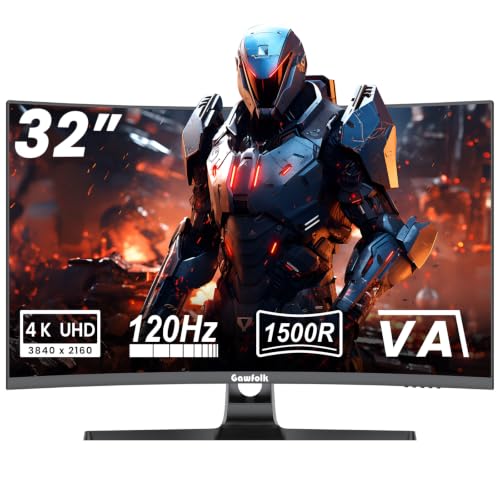
Gawfolk 4K Curved Monitor 32 Inch

ASUS ROG PG32UCDM 32 Inch 4K 240Hz OLED Gaming Monitor QD-OLED

Dell 32 Monitor S3225QS, 4K UHD VA
Samsung 27” Odyssey OLED G5 (G50SF) Series QHD

ASUS ROG XG27UCG 27 Inch 4K 160Hz USB-C G-SYNC Gaming Monitor

Samsung 27′ Odyssey G5 (G51F) Series QHD

ASUS TUF Gaming 27” 4K HDR Monitor (VG27UQ1A)
More Details On Our Top Picks
A 32-inch curved panel makes sense on a desk where gaming and everyday use share space. The 1500R curve wraps the image inward, which helps the screen feel more immersive without pushing you into an ultrawide footprint. VA panels usually favor stronger contrast than flat budget IPS models, so darker game scenes can carry more depth.
The trade-off is the usual VA behavior, viewing angles are not as open as some other panel types. Still, the 120Hz refresh rate and 1ms response claim give you a strong lane for console or PC play, and VESA 100×100 mounting makes it easier to fit a multi-monitor setup. You may find it especially sensible for a bedroom desk or a living room corner where a larger curved screen feels natural.
Strong Points
- 32-inch size gives you more workspace and easier text scaling than a 27-inch panel.
- 120Hz suits smoother play than standard office-grade screens.
- 1500R curvature helps the panel feel more enveloping on a closer desk.
- VESA 100×100 support keeps wall or arm mounting straightforward.
Things To Consider
- VA panels can look less consistent from off-center seats.
- The curved shape suits solo use better than side-by-side sharing.
- Large screens need more desk depth, especially on compact setups.
Feature Snapshot
Built With In Mind
Desk-first gamers who want a large curved screen for solo play will get the most from this one.
Where A Sibling Pick Shines
ASUS ROG PG32UCDM 32 Inch 4K 240Hz OLED Gaming Monitor QD-OLED suits competitive players who want faster motion handling and richer contrast.
This is the most aggressive spec sheet in the list, and it reads that way on purpose. A 4K OLED panel with a 240Hz refresh rate and 0.03ms response time is aimed at people who split time between competitive play and color-rich single-player games. The custom heatsink and graphene film are there to manage heat, which matters more on an OLED panel than on the VA models above.
USB-C with 90W output is a real desk convenience, especially for a laptop-plus-monitor setup, and the true 10-bit panel with 99% DCI-P3 coverage makes content work feel more capable. The honest read is that this is a premium desk anchor, not a casual upgrade. You get speed, color, and flexibility, but you also pay for all three.
Positives
- 240Hz and 0.03ms suit fast motion and quick aim changes.
- OLED technology brings very deep blacks and strong contrast.
- USB-C with 90W helps simplify laptop docking.
- True 10-bit color and 99% DCI-P3 coverage suit creative and cinematic work.
- Custom cooling hardware gives the panel a more serious thermal setup.
Worth Noting
- The feature set makes more sense on a high-end gaming desk than in a basic setup.
- OLED owners often stay attentive to static on-screen elements during long desktop sessions.
- The richer spec mix can be more monitor than some console-first setups need.
Details At A Glance
Who Should Grab It
Serious PC gamers and hybrid workstation users who want a single premium screen will get the most from this model.
Swap It Out When
Dell 32 Monitor S3225QS, 4K UHD VA is the better fit for a calmer all-day desk that leans toward work and long-form viewing.
Some 4K gaming monitors chase speed first, but this Dell leans toward comfort and balance. The 31.5-inch VA panel gives you 3840×2160 resolution, a 3000:1 contrast ratio, and a matte anti-glare surface, so it suits rooms where lighting changes throughout the day. That combination is useful on a work desk that also hosts evening gaming.
FreeSync Premium support and a 120Hz refresh rate keep it in the conversation for play, while the 99% sRGB claim points toward solid color coverage for common creative tasks. The 4ms response time is not as aggressive as the OLED models here, and that’s the trade-off for a more relaxed, office-friendly feel. You may find it the easiest screen to live with among the larger flat picks.
Highlights
- 31.5-inch size gives you a lot of usable desktop space.
- Anti-glare coating helps in bright rooms or near windows.
- 3000:1 contrast supports stronger dark scene separation than many flat IPS panels.
- 120Hz and FreeSync Premium make casual gaming feel responsive.
Areas To Watch
- 4ms response is fine for many people, but not as quick as the faster gaming-first models.
- VA viewing angles are narrower than what you get from a good IPS panel.
- The feature mix leans calm and practical, not flashy.
Core Details
The Right Fit
Home office users and casual gamers who want one screen for both jobs will appreciate the balance here.
Look Elsewhere When
ASUS ROG PG32UCDM 32 Inch 4K 240Hz OLED Gaming Monitor QD-OLED is the better choice for faster action and richer premium contrast.
On a smaller desk, 27 inches keeps the image close and easy to track, and this Samsung leans into that shape well. QD-OLED means you get OLED contrast with quantum-dot color behavior, which matters in dark games and bright, saturated menus. The 180Hz refresh rate and 0.03ms response time place it firmly in the fast-motion camp.
This model makes more sense for a focused gaming setup than for a do-everything workstation. Compared with the Dell S3225QS, it gives up screen real estate, but it gives back speed and a punchier image profile. You may like it most in a bedroom setup, a compact office corner, or any desk that cannot comfortably handle a 32-inch panel.
Upsides
- 27-inch footprint fits tighter desks without feeling cramped.
- QD-OLED panel delivers strong contrast and rich color.
- 180Hz helps action feel smooth and responsive.
- 0.03ms response time suits quick on-screen changes.
Small Caveats
- The smaller size gives you less room for multitasking than the 32-inch models.
- OLED care habits matter more on a screen used for static desktop work.
- QHD keeps the load lighter than 4K, but you also lose some fine detail.
Technical Sheet
Best Suited To
PC gamers with a compact setup and a clear focus on motion quality will get the most out of this screen.
Another Choice May Suit
ASUS ROG XG27UCG 27 Inch 4K 160Hz USB-C G-SYNC Gaming Monitor fits better for shoppers who want 4K detail plus USB-C flexibility.
Flexibility is the hook here. You get 4K at 160Hz, but the dual-mode setup also lets the panel shift to FHD 320Hz, which is useful for people who switch between image quality and raw speed. Fast IPS gives you the broader viewing behavior most desk users expect, so this one feels easier to share than the OLED options above.
The USB-C connection adds practical value for laptops and cleaner desks, and ELMB Sync is there to manage motion blur and variable refresh together. Compared with the Samsung OLED G5, this ASUS feels less compact but more adaptable across different game genres. It’s a shrewd choice for someone who wants one monitor to do a lot of jobs.
Best Bits
- Dual-mode output gives you a speed-first option for esports-style play.
- 4K at 160Hz covers both detail and motion smoothness.
- USB-C helps keep laptop setups simpler.
- Fast IPS suits mixed-use desks and multiple viewing positions.
- Tripod socket adds a useful mounting option for creators.
Room For Improvement
- The feature set is broad, so setup can feel more involved than on simpler displays.
- Dual-mode value matters most for people who actually switch between game types often.
- It is less space-efficient than a smaller 24-inch or 25-inch desk screen.
Feature Card
Whose Shelf It Belongs On
Desk users who jump between high-detail single-player titles and faster multiplayer sessions will appreciate the range here.
Where Shoppers Go Wrong
Samsung 27” Odyssey OLED G5 (G50SF) Series QHD is the sharper fit for a smaller desk that values OLED contrast over extra resolution.
This Samsung sits in a very sensible middle ground. QHD on a 27-inch panel gives you a lighter system load than 4K, while 180Hz and 1ms keep the gaming side sharp enough for competitive habits. The height-adjustable stand is useful in real desks where chair height and monitor position rarely line up perfectly on day one.
Black Equalizer, Virtual Aim Point, and Auto Source Switch+ point toward a monitor built with practical gaming features rather than visual drama. That makes it a strong fit for a shared room or a setup that sees console, PC, and general media use. The trade-off is simple, you are buying versatility and convenience more than top-tier image refinement.
Bright Spots
- 180Hz and 1ms are well matched for responsive gaming.
- Height adjustment makes desk setup easier to dial in.
- Black Equalizer and Virtual Aim Point add useful gaming extras.
- Auto Source Switch+ helps with multi-device use.
Points To Note
- QHD is less detailed than 4K for text-heavy work or large-screen viewing.
- The feature list is oriented toward practicality, not premium display artistry.
- Some gaming aids are useful, though not everyone will care about them.
At A Glance
Who Will Love This
Gamers who want a practical 27-inch screen with helpful setup features will get a lot of use from this model.
Skip It When
Dell 32 Monitor S3225QS, 4K UHD VA is the better call for someone who wants a larger 4K canvas and a calmer office lean.
This ASUS lands in the useful overlap between crisp 4K detail and fast refresh behavior. The 160Hz panel, 1ms response claim, and Extreme Low Motion Blur Sync give it a gaming-first posture without pushing into the ultra-premium tier of the OLED options. For mixed console and PC desks, that keeps it easy to understand.
DisplayWidget is a practical touch for screen management, and 95% DCI-P3 gives you wider color coverage than basic office panels. Compared with the Samsung G51F, this model reaches higher in image quality and gaming features, though it also asks more from your setup. The three-year warranty mention adds another reason it may appeal to cautious shoppers who want a longer ownership horizon.
Positives
- 4K resolution keeps text and game detail crisp.
- 160Hz gives you a fast-feeling panel for action games.
- Extreme Low Motion Blur Sync addresses motion clarity in a direct way.
- 95% DCI-P3 supports stronger color than standard office displays.
- DisplayWidget makes monitor control easier from the desktop.
Honest Caveats
- The 27-inch size suits sharper density, but it is not the largest work surface in this lineup.
- Gaming-focused features can be more than a basic media station needs.
- You’ll want a capable GPU or console setup to take advantage of the 4K and high refresh pairing.
Core Details
Right Fit For
Gamers who want a sharp 4K display with a strong all-around feature mix will find this one easy to place on a desk.
Reach For A Different Pick When
Gawfolk 4K Curved Monitor 32 Inch fits better for anyone who wants a larger curved screen that feels more relaxed at close range.
How To Choose The Right 4k G Sync Monitors
Panel Type Sets The Tone
OLED, VA, and IPS each shape the experience in a different way. OLED favors contrast and motion clarity, VA leans toward deeper dark scenes and often stronger contrast than basic flat IPS, while IPS usually gives broader viewing consistency for shared desks.
You feel that difference most in mixed use. A dark-room gamer who plays cinematic titles may gravitate toward OLED or VA, while someone who also edits documents or leaves the screen on all day often prefers IPS behavior.
Refresh Rate And Response Time Need Context
Higher refresh rates, such as 160Hz, 180Hz, or 240Hz, help motion look smoother. Response time, usually listed in milliseconds, describes how quickly pixels change state, and lower numbers can reduce blur in fast action.
Those numbers matter most when your setup can actually feed the panel. A console-heavy desk or a midrange GPU may never fully use the top-end ceiling, so a calmer 120Hz or 160Hz screen can make more sense than paying for headroom you won’t touch.
Size, Resolution, And Desk Depth Work Together
A 27-inch 4K display feels sharp and compact, while a 32-inch 4K panel gives you more room for windows and bigger in-game imagery. The larger screen also asks for more desk depth, especially with curved panels that sit closer to your face.
If your desk is shallow, a 27-inch option usually lands better. For a roomier setup, 32 inches can feel more natural, almost like having the image step forward without taking over the whole table.
Ports, Stand Adjustments, And Mounting Matter More Than They Sound
USB-C helps simplify laptop use, HDMI and DisplayPort cover typical gaming connections, and VESA mounting opens the door to arms or wall mounts. Height adjustment, tilt, and similar stand changes sound minor, but they decide whether the screen sits comfortably for long sessions.
Those details become important after the excitement fades. The right stand or mount keeps the desk cleaner, the viewing angle better, and the setup easier to live with week after week.
What To Weigh Before You Click
Hidden Buying Traps
Shoppers often fixate on refresh rate and ignore panel behavior, desk size, or connection needs. That’s how a screen ends up feeling too large, too shiny, or less practical than expected.
Another common slip is pairing a high-end panel with a system that can’t support it well enough to make the extra spend matter. Match the monitor to your actual hardware and space, not just the headline numbers.
The Upgrade Payoff
Higher-tier panels cost more because they usually combine faster response, stronger color, better backlighting or OLED behavior, and more refined connection options. You also tend to get extras like USB-C power delivery, dual-mode refresh behavior, or better thermal design.
That upgrade pays off when you spend long hours at the screen, care about image quality, or switch between gaming and work on the same desk. For a lighter setup, a simpler 4K or QHD screen can leave more room in the budget without feeling bare.
Frequently Asked Questions
Do 4k G Sync Monitors Help With Tearing?
They are built to align refresh behavior more smoothly with supported graphics output. That usually makes fast movement look cleaner than on a basic fixed-refresh screen.
Is OLED Worth It For Everyday Desk Use?
OLED shines most when you care about contrast and motion. For long static desktop sessions, a simpler IPS or VA screen can feel more relaxed.
Does 4K Always Make A Better Gaming Screen?
4K gives you more detail, but it also asks more from your system. A strong 1440p or QHD model can still be the smarter match for many rigs.
What Size Fits A Typical Gaming Desk?
Twenty-seven inches fits most compact setups cleanly, especially when the desk is shallow. Thirty-two inches feels better when you want more room for multitasking or sit farther back.
Should You Prioritize USB-C?
USB-C matters most for laptop users who want a cleaner cable setup. Desktop-only gaming setups usually care more about refresh rate, response time, and image quality.
Closing Thoughts
You have seven solid routes here, and the right one depends on how you use the screen more than on any single spec. The ASUS PG32UCDM is the premium motion-and-color play, the Dell keeps things calmer and easier to live with, and the Gawfolk gives you a larger curved canvas without overcomplicating the desk. Smaller setups lean toward the Samsung OLED G5 or ASUS XG27UCG, while the Samsung G51F and ASUS TUF models sit in the practical middle. Match the panel to your room, your hardware, and the kind of games you actually play.
