
Big screens can smooth out a busy desk, a living room setup, or a gaming corner that feels cramped on smaller displays. You get more room for side-by-side windows, easier text reading from a sofa, and a better view for fast-moving games or streaming nights.
This roundup focuses on 50-inch-class screens and close alternatives that fit that size-minded use case. Some are built more like monitors, some more like TVs, and a few land in the middle, which matters more than the label on the box.
Quick Look at the Shortlist

INNOCN 49-Inch Curved Ultrawide Monitor 49C1R

Roku 50-Inch Select Series Smart TV 2026 4K QLED

Samsung 50-Inch Class U8000H Series Crystal UHD 4K
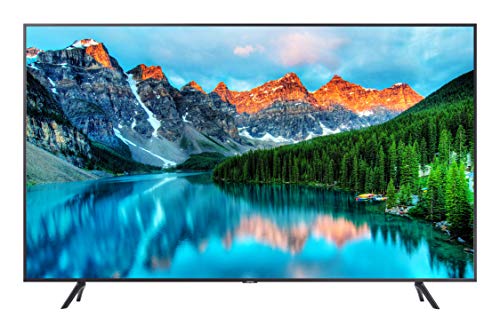
Samsung 50-Inch BE50T-H Pro TV

Samsung 43-Inch Odyssey Neo G7 Series 4K UHD Smart Gaming Monitor
Samsung 43-Inch M7 M70F Series 4K UHD Smart Monitor

Deco Gear 49-Inch Curved Ultrawide Monitor
More Details On Our Top Picks
A curved ultrawide like this makes sense for people who live in spreadsheets by day and games by night. The 32:9 shape gives you a long workspace that can replace a dual-monitor layout, and the 5120 x 1440 resolution keeps text and windows from feeling cramped.
The 120Hz refresh rate matters most during fast motion, where smoother movement can make the whole screen feel calmer. The trade-off is desk depth and room planning, because a 49-inch curved panel asks for more space than a standard flat display.
What We Like
- 5120 x 1440 resolution gives you room for multiple windows without the middle gap of two separate screens.
- 32:9 format helps video editors, coders, and traders keep timelines, tools, and reference panes visible at once.
- 120Hz refresh suits fast-moving games and keeps scrolling feeling smooth.
- USB-C, DisplayPort, and HDMI cover modern laptops and desktop towers without extra adapters in many setups.
- Built-in speakers help when your desk stays uncluttered, even though separate audio will usually sound fuller.
Room For Improvement
- The sheer width can feel excessive on shallow desks or in tight corners.
- Built-in speakers are handy, but they rarely replace a dedicated sound bar or headphones.
- Curved ultrawides need a little adjustment period, especially for first-time large-screen users.
Feature Rundown
Who It Suits Best
People building a single-screen workstation with gaming on the side will get the most from this layout.
Where A Sibling Pick Shines
Deco Gear 49-Inch Curved Ultrawide Monitor fits a similar desk-first setup, and it makes more sense for shoppers who want KVM and PIP/PBP tools.
This Roku set leans into ease, which is exactly what many living rooms need. QLED, or quantum-dot LED, aims to push richer color than a plain LCD panel, and the 50-inch size works well for apartments, bedrooms, or a family room that doesn’t need a giant wall-filler.
The voice remote and Bluetooth headphone mode are practical touches for shared homes. Compared with the INNOCN ultrawide, this is far less about desk productivity and much more about simple streaming, casual viewing, and quick access from the home screen.
Strengths
- Roku’s interface stays familiar, so setup tends to feel less intimidating for casual streamers.
- QLED color gives movies and sports a livelier look than many basic flat panels in this class.
- Bluetooth headphone support helps late-night viewing in shared spaces.
- Voice search can save time when you bounce between live news, shows, and apps.
Points To Note
- It’s built more for easy entertainment than for advanced picture tweaking.
- Those who want a monitor-like desktop experience should look elsewhere.
- The clean smart-TV feel is helpful, though some households may still want a separate streaming box for personal preferences.
Details At A Glance
Who Will Love This
Households that want a simple, familiar smart TV with light, everyday streaming use will feel right at home here.
Another Choice May Suit
Samsung 50-Inch Class U8000H Series Crystal UHD 4K works better for shoppers who want Samsung’s picture-processing approach and broader household entertainment features.
The U8000H reads like a mainstream living-room option with a little extra polish. Samsung’s Crystal Processor 4K is there to sharpen detail and tune color, while the Motion Xcelerator name points to smoother handling in sports and games.
That mix makes it a good fit for families who want one screen for news, movies, and console sessions. Compared with the Roku pick, this one leans more into Samsung’s own processing and content ecosystem, which matters more if you like a branded smart-TV experience.
Upsides
- 4K upscaling helps lower-resolution content look cleaner on a larger 50-inch panel.
- Motion Xcelerator is useful for sports fans and casual gamers who notice blur during fast scenes.
- Samsung Vision AI Companion adds a more guided smart-TV feel for everyday use.
- Endless free content broadens the set’s value for homes that watch a lot of ad-supported channels.
Small Caveats
- The feature list is broad, so picture tuning can feel less bare-bones than on a simpler set.
- People who want monitor-style ergonomics will still need a different category altogether.
- The smart-TV experience depends on how much you enjoy Samsung’s menu layout and content flow.
Core Details
The Right Fit
Families and mixed-use households that want a familiar smart TV with broad everyday appeal will get the most from this model.
Look Elsewhere When
Roku 50-Inch Select Series Smart TV 2026 4K QLED suits you better if you prefer the simplest possible streaming layout.
This Samsung Pro model lives in a different lane from the home-focused Roku and U8000H sets. It’s built for signage, menu boards, lobbies, and other commercial spaces where simple content management matters as much as picture quality.
The included TV tuner, speakers, HDMI, and USB keep it flexible for business use, while the 250-nit brightness level tells you it’s not trying to be a cinema screen. For retail counters or reception areas, that trade-off can make sense, though it’s far less compelling for a dark-room movie setup.
Reasons To Buy
- Digital-signage support fits shops, offices, cafés, and waiting areas.
- HDMI and USB ports make content loading and source switching straightforward.
- Built-in speakers and a TV tuner keep the setup from feeling overly bare.
- Commercial framing helps you think about it as a business display, not just a household TV.
Honest Caveats
- 250 nits is modest for brightly lit spaces, so placement matters.
- Home cinema shoppers will usually want a more picture-forward model.
- The black finish is practical, though it can show dust in busy storefronts.
Feature Snapshot
Built With In Mind
Shops, offices, and hospitality spaces that need a commercial display with easy content changes will get the most from this one.
Swap It Out When
Samsung 50-Inch Class U8000H Series Crystal UHD 4K makes more sense for a normal living room with mixed entertainment use.
Fast-paced gaming is the whole point here. A 144Hz refresh rate means the panel can show more image updates each second than a standard 60Hz screen, and the 1ms response time is aimed at reducing blur in twitchy movement.
Compared with the INNOCN and Deco Gear ultrawides, this Samsung is less about multitasking width and more about gaming performance on a large 43-inch canvas. In a console room or a PC battlestation, that focus can be worth the trade-off, though the size is still large enough to serve as a media display.
Highlights
- 144Hz refresh is a strong match for competitive play and smooth camera pans.
- 1ms response suits shooters and racing games where sharp motion matters.
- Quantum Matrix Technology points to more precise mini-LED control than a plain backlight.
- VESA Display HDR600 gives you a clearer sense of contrast in supported content.
- Samsung genuine parts and certified technicians are part of the service picture, which may matter to some owners over time.
Areas To Watch
- The gaming-first focus leaves less room for casual home-TV simplicity.
- 43 inches can feel smaller than the rest of this roundup for shared movie use.
- Mini-LED sets can be more involved to place and calibrate than basic TVs.
Quick Facts
Perfect Match For
Console and PC gamers who care more about motion handling than app simplicity will appreciate this screen most.
Reach For A Different Pick When
Roku 50-Inch Select Series Smart TV 2026 4K QLED suits you better for casual streaming and easier household sharing.
This M7 sits in the sweet spot between monitor and smart display. USB-C is the useful detail here, since that single cable can often carry video and power on laptop setups, which keeps the desk cleaner than a bundle of adapters.
Smart TV apps and Gaming Hub widen its role beyond office hours, so you can move from work to streaming without changing hardware. Compared with the Neo G7, it gives up the gaming-first punch in exchange for a more flexible everyday routine.
Bright Spots
- USB-C helps simplify laptop docking on desks that already feel crowded.
- Smart TV apps make after-hours viewing easier without adding another screen.
- Gaming Hub gives the monitor a more versatile identity than a plain office display.
- HDMI and USB-A keep older accessories and media sources in the mix.
Softer Spots
- It’s flexible, but that also means it doesn’t lean as hard into any one niche.
- Desk users who want a pure productivity panel may not need the smart-TV extras.
- The 43-inch size may feel large for small desks, so measuring matters.
Feature Card
Whose Shelf It Belongs On
Hybrid desk users who want one screen for work, apps, and casual play should feel at home here.
Skip It When
Samsung 43-Inch Odyssey Neo G7 Series 4K UHD Smart Gaming Monitor is the better match for competitive gaming focus.
The Deco Gear takes the same broad ultrawide idea as the INNOCN and adds a few desk-friendly extras. KVM, or keyboard-video-mouse switching, lets you control more than one source with a shared set of peripherals, and PIP/PBP, meaning picture-in-picture and picture-by-picture, helps you split the screen in useful ways.
That makes it appealing for people who jump between a work laptop and a gaming PC. The 49-inch curved form is still a lot of screen to manage, so it suits a proper desk more than a shallow workstation, but the feature load is strong for the class.
Best Bits
- 5120 x 1440 resolution gives you a wide, organized work surface.
- 120Hz refresh keeps gaming and scrolling feeling fluid.
- USB-C with 65W power delivery can handle laptop use with fewer cables.
- KVM support is useful for shared desks or dual-device setups.
- PIP/PBP gives you flexible screen layouts for work and play.
- The VA panel and HDR400 support make it a strong all-around media display.
Minor Gripes
- The long curved panel needs a desk with real depth.
- Feature density can feel overkill for someone who only needs a basic monitor.
- Managing ultrawide apps and game support can take a little setup time.
At A Glance
Made For
People who want one ultrawide screen to handle work tasks, media, and a second device will get the most from this setup.
A Better Fit Elsewhere
INNOCN 49-Inch Curved Ultrawide Monitor 49C1R is the cleaner choice for shoppers who want the stronger mainstream brand presence and a similar size-first layout.
How To Choose The Right 50 Inch Monitors
Match The Screen To The Room
A 50-inch screen can feel comfortable in a living room, but it can crowd a shallow desk fast. Measure depth, wall space, and viewing distance before you settle on a monitor or TV-shaped option.
Ultrawide panels such as the INNOCN and Deco Gear ask for even more physical room than a standard 50-inch set. That extra width feels great for side-by-side work, though it can dominate a smaller desk.
Decide Between Monitor Traits And TV Traits
Monitors usually make more sense for laptops, consoles, and split-screen productivity because they often bring USB-C, faster refresh rates, and more flexible layouts. TVs make life easier for streaming, live content, and a simple couch setup.
That difference matters more than brand logos. A Roku or Samsung living-room model is easier for family use, while an ultrawide monitor helps more when your day includes documents, timelines, and multiple windows.
Look Past Resolution Alone
4K sounds impressive, but the rest of the panel decides how useful that resolution feels. Refresh rate, response time, aspect ratio, and panel type shape the experience just as much as pixel count.
For games, a higher refresh rate like 120Hz or 144Hz can make motion feel smoother. For office work, a wider aspect ratio may matter more because it gives you room for tools, references, and message windows without constant switching.
Ports And Control Matter More Than Many Shoppers Think
USB-C can cut cable clutter on a desk, and HDMI keeps consoles and streamers easy to connect. Features like KVM, Bluetooth headphone mode, or picture-in-picture can save time in mixed-device homes.
Those details do not sound glamorous, but they decide how painless the screen feels to live with. A well-placed port layout is often the difference between a setup that feels tidy and one that keeps tangling itself.
Things Worth Knowing First
Common Shopping Slip Ups
Many people focus on size alone and forget about stand depth, viewing distance, or the difference between a monitor and a TV. That can leave you with a screen that sounds right on paper but feels awkward on your desk or wall.
Another easy miss is skipping the port list. A work-heavy setup needs the right inputs, and a living-room setup needs easier source switching and simple audio options.
Where The Extra Money Goes
Higher-tier models usually pay for faster panels, stronger backlighting, better motion handling, or more flexible inputs. On some screens, the premium also covers added convenience such as USB-C charging, KVM switching, or better smart-TV software.
That upgrade only pays off when your use matches the hardware. A gamer who notices blur will care about refresh rate, while a home office user may value cleaner cabling and easier multitasking more.
Frequently Asked Questions
Are 50-inch monitors good for work?
They can be excellent for work, especially in ultrawide form. You get room for multiple windows, but the desk has to be deep enough to keep the screen comfortable.
Can a 50-inch TV work as a computer monitor?
Yes, many people use TVs that way for casual computing, streaming, or console play. The key detail is whether the TV has the right ports and enough motion handling for your setup.
Is ultrawide better than a regular 50-inch screen?
Ultrawide is better for side-by-side productivity and wide timelines. A regular 50-inch TV style screen is easier for shared entertainment and simple streaming.
What matters most for gaming?
Refresh rate and response time matter most for fast games. Resolution matters too, but smooth motion often makes the bigger day-to-day difference.
Do I need USB-C on a big monitor?
You do not need it, but it can make laptop hookups much cleaner. One cable for video and power keeps a desk less cluttered and easier to live with.
