
Adaptive Sync Monitors can take a lot of the sting out of screen tearing, especially for gaming, desk work, and mixed-use setups. You get smoother motion without having to jump straight to an expensive panel, and that matters on a long workday or a late-night session. The seven picks below cover fast 24-inch and 27-inch screens, sharper QHD choices, and a few more practical everyday models for smaller desks.
Quick Look At Our Top Picks

KTC 27 Inch 240Hz Gaming Monitor H27F7
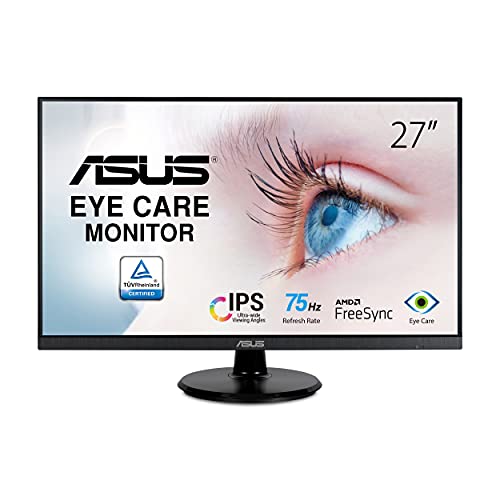
ASUS 27” 1080P Monitor VA27DQ

AOC 27 Inch Gaming Monitor Q27G4XN

Acer SH272 G0bih 27 Inch IPS Monitor

ASUS 27 Inch Computer Monitor VA279QG

Philips 22 Inch Computer Monitor 22E2N1100

ArcticPro 24 Inch 200Hz Gaming Monitor
More Details On Our Top Picks
For fast-paced games, this KTC keeps the focus on motion first. The 240Hz refresh rate means the image updates far more often than a basic office screen, and the 1ms MPRT label points to short persistence for cleaner-looking movement.
You also get a 27-inch 1080p layout, so desktop text stays easy to read without making the graphics card work as hard as a higher-resolution panel. The trade-off is obvious: sharpness is good for Full HD, but you are choosing speed over pixel density, which suits competitive play more than detail-heavy creative work.
Strong Points
- 240Hz refresh suits twitchy games and fast camera pans.
- 1ms MPRT helps moving objects look less smeared.
- Height, tilt, and pivot adjustment make desk setup easier.
- HDMI and DisplayPort give you sensible connection options.
- Fast IPS should feel friendlier for color and viewing angles than basic TN-style gaming panels.
Things To Consider
- 1080p on 27 inches is a speed-first choice, not a sharpness-first one.
- The profile makes more sense for gaming than for color-critical work.
- Pivot and vertical use can feel a little niche unless you truly want portrait mode.
Feature Card
Who It Suits Best
Competitive gamers who want a 27-inch screen and very fast motion handling will get the most from this one.
Swap It Out When
AOC Q27G4XN suits you better if you want sharper QHD detail for both games and day-to-day desktop work.
This ASUS leans into everyday comfort more than speed, and that’s a useful balance for a desk that does a little of everything. The frameless 27-inch IPS panel gives you broad viewing angles, so a second person across the desk won’t see the image fall apart.
Built-in speakers add convenience for video calls or light media, though many people will still prefer separate audio. Compared with the KTC above, this one is far less focused on esports pace, but it looks easier to live with for work and casual play.
What We Like
- IPS panel and 178-degree viewing angles fit shared desks well.
- Adaptive-Sync and FreeSync support help motion stay smoother in supported games.
- Built-in speakers reduce the need for a separate audio setup.
- Frameless styling works nicely in a dual-monitor layout.
Room For Improvement
- 75Hz is modest beside the faster gaming-first picks in this list.
- Integrated speakers are convenient, though usually not the main reason to choose a monitor.
- The tilt-only stand keeps things simple, but it limits posture tuning.
Details At A Glance
Who Will Love This
Home office users and casual gamers who want a calm, straightforward 27-inch monitor are the best fit here.
Where A Sibling Pick Shines
Philips 22E2N1100 suits you better when desk space is tight and you want a smaller screen footprint.
The AOC takes a sharper path than the first two picks, which is exactly why it stands out for mixed gaming and desktop work. QHD means 2560 by 1440 resolution, so text, interface elements, and game detail all get a cleaner, denser look than on 1080p screens.
You also get 180Hz refresh and a VA panel, which leans toward solid contrast rather than the wider-angle feel of IPS. That mix makes sense for a gamer who also watches films or spends time in story-driven titles, though the sharper image can ask more from your graphics hardware.
Upsides
- QHD resolution gives you noticeably more desktop space and finer detail.
- 180Hz suits fast shooters and racing games well.
- Height adjustment helps the screen land at a better eye line.
- DP 1.4 and HDMI 2.0 leave room for current systems and PCs.
- Zero-bright-dot coverage adds a reassuring ownership detail on the product page.
Minor Gripes
- QHD can ask more from your graphics card than a 1080p monitor does.
- VA panels often appeal for contrast, though they can feel different from IPS in side-by-side viewing.
- The earphone output is useful, but many desks will still rely on separate speakers or a headset.
Quick Facts
Built With In Mind
PC gamers who want more detail than standard Full HD without jumping to a huge screen should find this a strong fit.
Consider Something Else When
KTC H27F7 suits faster, more competitive play better if pure motion speed matters more than image density.
This Acer reads like a clean, no-drama monitor for a desk that does double duty. The ultra-thin body and ZeroFrame styling keep the visual footprint light, and that helps in apartments, shared offices, or any corner desk that already feels crowded.
Up to 120Hz gives it a more responsive feel than basic office screens, while Adaptive-Sync support helps smooth out supported games and video. The honest read is that it’s more flexible than flashy, which suits you well if the same screen handles documents, streaming, and occasional play.
Bright Spots
- Ultra-thin styling keeps the monitor visually light on the desk.
- 120Hz is a solid step up for everyday motion smoothness.
- HDMI and VGA support make old and new gear easier to use.
- The adjustable stand helps you settle on a more comfortable angle.
Areas To Watch
- 1080p on 27 inches favors practicality over crisp text density.
- The feature set is sensible, though not especially flashy.
- VGA remains useful for legacy gear, but most modern setups will lean on HDMI.
Spec Overview
Right Fit For
Home office users who want a slimmer 27-inch screen with a little gaming flexibility are the best match here.
Another Choice May Suit
ASUS VA279QG is the stronger move for mixed work and play if you want more features in the same 27-inch size.
The VA279QG sits in a useful middle ground, where work comfort and casual gaming both get attention. Its 27-inch IPS panel, 120Hz refresh, and 1ms MPRT combination makes it feel better suited to mixed desk life than the slower 75Hz ASUS above.
What gives it extra appeal is the 99% sRGB color claim, which matters for anyone who wants more consistent color in day-to-day content work. That said, it still stays in Full HD territory, so you are getting a practical all-rounder rather than a pixel-dense creator screen.
Positives
- 120Hz and Adaptive-Sync are a good match for smoother everyday motion.
- 99% sRGB coverage helps color-sensitive desk tasks look more consistent.
- IPS viewing angles work well for multi-monitor or shared viewing.
- Built-in speakers keep a basic desk setup tidy.
- VESA mounting makes arm or wall setups easier.
Small Caveats
- Full HD on 27 inches may feel less dense than QHD if you sit close.
- The built-in speakers are handy, though not a replacement for dedicated audio gear.
- Its strength is balance, not sheer gaming pace.
Core Details
Whose Shelf It Belongs On
Casual gamers, students, and home workers who want one screen for many tasks should find this a sensible match.
Look Elsewhere When
AOC Q27G4XN fits better for you if sharper QHD detail matters more than convenience features.
The Philips 22E2N1100 makes sense for a smaller desk where a 27-inch panel would simply feel crowded. Its 22-inch size keeps the footprint compact, and the Full HD resolution still gives you the familiar 1080p workspace that many people already know how to live with.
Because it reaches 120Hz and uses an IPS panel, it feels more current than a basic budget office screen. The trade-off is straightforward: you give up screen size, but in return you get a cleaner fit for compact home desks, dorm rooms, or a second monitor beside a laptop.
Highlights
- 22-inch size is easier to place on small desks.
- 120Hz overclocked refresh gives motion a smoother look than 60Hz.
- IPS panel supports wider viewing angles for a side-by-side setup.
- Four-year advance replacement coverage is a notable ownership detail on the listing.
Worth Noting
- The smaller screen is the main trade-off, especially for split-screen work.
- HDMI 1.4 and VGA are fine for compatibility, though not the widest modern port mix.
- The compact frame is easier to place, but it gives you less room for large spreadsheets.
At A Glance
Who Should Grab It
Small-desk users, students, and anyone adding a second screen beside a laptop will get the most value here.
Where Shoppers Go Wrong
KTC H27F7 suits you better if a larger 27-inch gaming panel matters more than desk-saving size.
ArcticPro’s appeal starts with the 200Hz refresh rate in a 24-inch frame, which is a nice fit for smaller gaming desks. You get the kind of motion speed that makes fast play feel lively, but the screen size stays easier to place than a bigger 27-inch panel.
The IPS panel and three-sided frameless design help it feel cleaner than many bare-bones gaming screens. In a compact room or a setup that also needs to hold a keyboard and speakers, that smaller footprint can matter as much as the refresh number.
Best Bits
- 200Hz refresh gives you very fluid motion for the size.
- 24-inch format works well on tighter gaming desks.
- IPS panel keeps colors and angles usable for everyday viewing.
- Three-sided frameless styling looks neat in a multi-monitor setup.
- DP and HDMI keep source connections simple.
Points To Note
- 24 inches gives you less workspace than the 27-inch models in this roundup.
- The lower footprint is handy, though it can feel small for split-screen productivity.
- The model name has a typo on the listing, which is worth ignoring and checking the exact item details.
Feature Rundown
Made For
Gamers with a compact desk and a desire for very fast motion handling should find this an easy fit.
Hide and Seek Better Elsewhere
AOC Q27G4XN fits you better if you want a larger 27-inch panel with sharper QHD detail.
How To Choose The Right Adaptive Sync Monitors
Refresh Rate, Size, and Motion Feel
A monitor’s refresh rate tells you how often the image can update each second, and that matters most in fast games and brisk scrolling. A 200Hz or 240Hz screen gives movement a more immediate feel than 75Hz, but it only pays off when your PC can keep up and your use case really benefits from speed.
Screen size changes the experience just as much. A 24-inch panel usually feels easier to place on a small desk, while 27 inches gives you more room for side-by-side windows and a more relaxed viewing distance.
Panel Type and Everyday Comfort
IPS panels usually suit mixed use because they keep colors and angles steady across the screen. VA panels lean more toward contrast, which can feel nice for darker games and movie use, though the image character is different from IPS.
For long desk sessions, eye-comfort features matter too. Low Blue Light and Flicker-Free modes do not change the monitor into a different class of product, but they can make long work blocks feel less tiring in ordinary home and office settings.
Ports, Stands, and Desk Fit
Connection options decide how easy the monitor is to live with. HDMI is common, DisplayPort is helpful for PC gaming, and VGA still matters for older laptops or legacy office gear.
Stand adjustment also changes ownership comfort in a real way. Height, tilt, and pivot help you line up the panel with your posture, while VESA mounting gives you room to use an arm or wall mount and reclaim desk space.
Match the Monitor to the Job
A competitive gamer usually wants high refresh and quick response over pixel density. A home office user often gets more value from a calm IPS screen with good angles, built-in speakers, and a stand that adjusts cleanly.
A sharper QHD screen makes sense for mixed work and play, especially at 27 inches. A compact 22- or 24-inch model fits better beside a laptop or in a small room, where desk space matters almost as much as panel quality.
A Quick Reality Check
Common Shopping Slip Ups
Many shoppers focus only on refresh rate and forget the desk setup around it. A fast monitor still feels awkward if the stand is fixed too low, the ports do not fit your gear, or the 27-inch size overwhelms a shallow desk.
Another easy miss is choosing a screen that is too dense or not dense enough for your usual distance. Full HD on 27 inches is practical, but a close seating position can make QHD feel cleaner for text and window work.
The Upgrade Payoff
Higher-tier adaptive sync screens usually cost more because they combine sharper panels, faster refresh rates, better stands, and more polished color behavior. The extra money also tends to go into nicer connectivity, stronger ergonomics, and features that make the monitor easier to keep on your desk for years.
The upgrade makes the most sense for people who split time between games, media, and real work. For a basic office corner, a simpler 75Hz or 120Hz screen can already feel like a sensible step up.
Frequently Asked Questions
What does adaptive sync actually do?
Adaptive sync helps the monitor line up with the frame output from a compatible device, which can reduce visible tearing and stutter. You usually notice it most in games or fast-moving video.
Is 240Hz worth it for everyday use?
A 240Hz screen feels very smooth, but the benefit is strongest in fast gaming and rapid cursor movement. For documents, email, and streaming, a 120Hz or 144Hz-style screen often feels plenty fluid.
Is 27 inches too large for 1080p?
That depends on how close you sit and how much sharpness you expect. At a normal desk distance, it works fine for many people, though QHD usually looks cleaner at the same size.
Do built-in speakers matter?
Built-in speakers help when you want a simple desk with fewer extras. They rarely replace a dedicated sound setup for music or games, so they’re more about convenience than depth.
Which port should you use for a gaming PC?
DisplayPort is usually the safer choice for a desktop gaming setup because it often gives the best feature support. HDMI still works well, especially for consoles and general-purpose connections.
