
Affordable Computer Monitors can still feel polished, whether you spend your day in spreadsheets, split your time between classes and calls, or want a clean screen for home use. The right pick saves desk space, keeps text sharp, and avoids the little annoyances that make a long session feel harder than it should.
In this roundup, you’ll see seven 1080p options with different refresh rates, panel sizes, and connection mixes. Some lean simple and steady, while others add smoother motion or stronger color coverage, so your choice can match how you actually use your desk.
Quick Look At The Shortlist

Amazon Basics 24-inch Full HD IPS Monitor

Amazon Basics 24 Inch 23.8-inch Viewable Monitor

AOPEN by Acer 21.5in FHD IPS 100Hz Office Monitor 22SA2Q EBI

Amazon Basics 23.8-inch 1080P Computer Monitor

Acer 21.5in FHD 100Hz Office Monitor KB220Q H2bi

Dell 24 Monitor SE2426H 23.8-inch FHD 144Hz
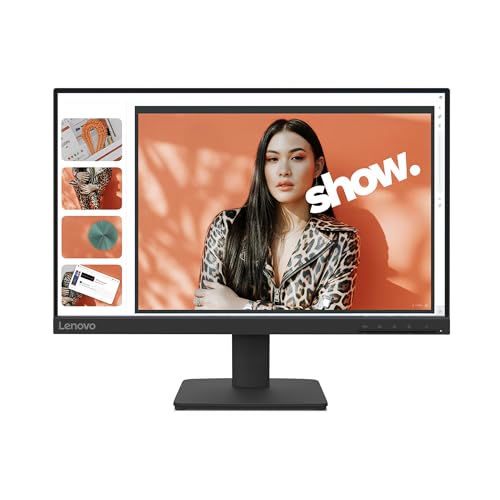
Lenovo L22-4e Office Monitor 21.5″ FHD IPS
For a plain desk setup, this one makes sense fast. The 24-inch IPS panel gives you a familiar size, and IPS, or in-plane switching, means color and viewing angles hold up better than basic panels in the same price band.
The 75 Hz refresh rate is a small but useful step above standard office screens, especially for scrolling documents or lighter entertainment. The adjustable stand, VESA mount support, and HDMI, DisplayPort, and VGA inputs help it fit older towers and newer laptops without much fuss.
What We Like
- 24-inch size suits spreadsheets, web work, and side-by-side windows without feeling cramped.
- IPS panel support keeps colors and text easier to view from off-center seating.
- 75 Hz motion feels a touch smoother than basic 60 Hz office panels.
- HDMI, DisplayPort, and VGA cover both newer and older computers.
- Adjustable stand and VESA support make desk placement easier to tailor.
Things To Consider
- 75 Hz is modest, so fast play or high-motion work will point you elsewhere.
- Built-in speakers are handy in a pinch, though separate desktop audio usually sounds fuller.
- VGA still helps with legacy gear, but it’s hardly the neatest cable path.
Feature Snapshot
Who It Suits Best
You’ll like this most if you want a dependable home or office screen with broad connection support and no learning curve.
A Better Fit Elsewhere
Amazon Basics 23.8-inch 1080P Computer Monitor fits better for you if smoother 120 Hz motion matters more than the more traditional pace here.
This one feels tuned for everyday use, especially on a shared desk where you want simple setup and a clean front. The 23.8-inch viewable area gives you nearly the same practical footprint as Item 1, but the 100 Hz ceiling makes motion a bit livelier.
The built-in speakers keep the desk uncluttered, and the VESA mount compatibility gives you room to move the panel off the stand later. One practical note, the protective film should come off before use, which is a small step that helps avoid confusion when the panel first comes out of the box.
Bright Spots
- 100 Hz refresh can make scrolling and light motion feel smoother than Item 1.
- 23.8-inch viewable size suits compact desks without giving up much screen room.
- Built-in speakers are useful for calls, video, and casual listening.
- VESA compatibility gives you more mounting and arm options later on.
Small Caveats
- The panel film needs removal before use, so setup takes one extra minute.
- Built-in speakers keep things simple, but they rarely satisfy anyone who wants fuller sound.
- Like most 24-inch office screens, it’s strongest for general work rather than motion-heavy gaming.
Core Details
Made For
You’re the best match for this pick if you want a tidy office monitor that also handles light media without extra gear.
Where A Sibling Pick Shines
Amazon Basics 24-inch Full HD IPS Monitor is the steadier choice for you if you’d rather have the classic 75 Hz setup and a more traditional all-purpose profile.
The smaller 21.5-inch footprint makes this AOPEN model easy to place in tight corners, dorm desks, or a second-screen setup. Compared with the larger Amazon Basics picks, it gives up a little desktop presence, but that trade keeps the layout neat.
The 1 ms response time, or the speed at which a pixel changes state, helps fast motion look more controlled. AMD FreeSync can also reduce visual stutter with compatible graphics hardware, which is useful for casual play after work and smoother scrolling during busy days.
Reasons To Buy
- 21.5-inch size fits compact desks and side-by-side monitor setups with less crowding.
- 1 ms response helps motion look sharper in fast scenes.
- AMD FreeSync support suits casual gaming with compatible hardware.
- HDMI and VGA cover modern laptops and older desktop towers.
- VESA mounting gives you more flexibility for arms and wall setups.
Areas To Watch
- The smaller panel can feel tight for people who keep many windows open at once.
- FreeSync matters most with compatible gear, so not every setup will use that feature fully.
- VGA is useful for legacy machines, though most newer desks will lean on HDMI instead.
Details At A Glance
Who Should Grab It
You’ll get the most from this if you want a compact monitor for mixed office use and the occasional game session.
Look Elsewhere When
Dell 24 Monitor SE2426H is the stronger fit for you if you want a larger 23.8-inch panel and a more aggressive 144 Hz pace.
This model pushes the affordable office-monitor idea a bit further than Item 1 and Item 2. The 120 Hz refresh rate stands out, and that matters most when you spend a lot of time scrolling, switching windows, or watching motion-heavy content on the side.
You also get IPS color, 99% sRGB coverage, 1500:1 contrast, and 16.7 million colors, which tells you this screen is built to look more polished than the simplest utility monitors. For a home office that doubles as a media spot, that mix feels useful rather than decorative.
Upsides
- 120 Hz brings smoother motion than the 75 Hz and 100 Hz options above it.
- IPS panel helps text and color stay consistent across the screen.
- 99% sRGB coverage suits color-aware tasks like basic photo work and content review.
- HDMI, DisplayPort, and VGA cover a wide span of devices.
- VESA support keeps it flexible for arms and wall mounting.
Worth Noting
- Getting the full 120 Hz speed depends on the right cable and compatible graphics output.
- The richer feature set makes sense for mixed work and media, though plain email work won’t use all of it.
- Like most monitors in this class, the built-in value comes from setup flexibility more than flashy extras.
Technical Sheet
The Right Fit
You’re the right match for this monitor if you want a budget-friendly screen that feels a step more polished for work and media.
Another Choice May Suit
Lenovo L22-4e is the more restrained option for you if a smaller 21.5-inch panel and a cleaner minimalist frame matter more.
The Acer KB220Q H2bi sits in a very practical middle ground. It keeps the footprint modest at 21.5 inches, yet it still brings 100 Hz motion, 99% sRGB coverage, and AdaptiveSync support for smoother pacing with compatible graphics.
That combination works nicely for people who spend hours in documents during the day and then stream or game a little at night. The flicker-less display and low-dimming design may also feel easier on the eyes during long desk sessions, which is a quiet quality-of-life win rather than a flashy one.
Standout Traits
- 100 Hz refresh keeps daily motion smoother than a basic office monitor.
- 99% sRGB coverage helps color look more even for design-adjacent work.
- AdaptiveSync is useful with compatible hardware for steadier motion.
- Flicker-less and low-dimming features suit long desk sessions better than bare-bones panels.
- HDMI and VGA make it easy to pair with mixed device types.
Room For Improvement
- The 21.5-inch size is efficient, but it won’t feel roomy for heavy multitasking.
- AdaptiveSync depends on compatible graphics, so the benefit varies by setup.
- Like the smaller screens in this group, it’s better for compact desks than wide workflow layouts.
Feature Rundown
Best Suited To
You’ll appreciate this most if you want a compact office monitor with a little extra motion polish and decent color coverage.
Skip It When
Dell 24 Monitor SE2426H is the more natural pick for you if a larger 23.8-inch frame and 144 Hz speed matter more than compactness.
The Dell SE2426H is the pick here for motion-first use. A 144 Hz refresh rate and 1 ms MPRT, which means moving-picture response time, make fast panning, light gaming, and busy browsing feel more responsive than the 75 Hz and 100 Hz options above.
Its IPS panel keeps the experience practical for everyday work too, while the tilt stand and two HDMI ports make setup straightforward. One thing worth considering, though, is that the faster pace matters most once your computer can actually send the monitor the right signal.
Highlights
- 144 Hz refresh is the smoothest option in this roundup.
- 1 ms MPRT helps motion stay crisp during fast on-screen action.
- IPS technology keeps the screen usable for both work and entertainment.
- Two HDMI ports simplify connection choices on a desk with several devices.
- Tilt adjustment helps you set a comfortable viewing angle without extra gear.
Softer Spots
- The full benefit depends on a system that can actually feed 144 Hz output.
- Its speed focus makes it a little more specialized than the gentler office-first monitors here.
- Tilt is helpful, but you do not get the broader stand flexibility some shoppers want.
Core Details
Who Will Love This
You’re the right match for this if you want a monitor that can handle daily work and still feel quick for games or animated content.
Whose Shelf It Belongs On
Amazon Basics 23.8-inch 1080P Computer Monitor is the calmer choice for you if you prefer a more color-aware office screen with 120 Hz rather than the faster Dell pace.
The Lenovo L22-4e keeps things tidy with a three-sided borderless design, so it feels less boxed-in than more traditional office screens. That matters on a small desk or in a dual-monitor layout, where visual clutter can be just as annoying as a weak panel.
Its 21.5-inch IPS display, 99% sRGB coverage, 100 Hz refresh rate, and 4 ms MPRT give it a balanced profile for office work, streaming, and light creative tasks. The honest read is that it leans clean and composed rather than flashy, which suits minimalist setups well.
Positives
- Borderless styling on three sides keeps the desk view clean.
- 21.5-inch size fits compact work areas without feeling oversized.
- 99% sRGB coverage supports more consistent color for everyday media and projects.
- 100 Hz refresh gives motion a little more polish than standard office screens.
- 4 ms MPRT suits common work and entertainment use without pushing the price tier too far up.
Minor Gripes
- The 21.5-inch panel may feel small for heavy multitasking or long spreadsheet sessions.
- Tilt-only adjustment is fine for many desks, but not as flexible as a fully adjustable stand.
- Its clean design is appealing, though it does not add extra hardware features for power users.
Quick Facts
Built With In Mind
You’re the best fit for this if you want a neat office monitor for a minimalist setup, light content work, or a desk where space matters.
Swap It Out When
Dell 24 Monitor SE2426H is the better call for you if faster motion and a larger 23.8-inch screen matter more than the Lenovo’s cleaner look.
How To Choose The Right Affordable Computer Monitors
Start With Screen Size And Desk Distance
Screen size changes how the whole desk feels. A 21.5-inch panel fits tighter work areas and second-screen setups, while 23.8-inch and 24-inch models give you more room for split windows and side-by-side documents.
That choice matters most for your viewing distance. A compact desk usually pairs well with the smaller screens, while a deeper desk makes the larger options feel easier on the eyes during long office sessions.
Match Refresh Rate To Your Daily Pace
Refresh rate is the number of times the image updates each second. In plain use, 75 Hz feels steady, 100 Hz feels smoother, 120 Hz feels more fluid, and 144 Hz gives the quickest motion in this group.
For email, documents, and light browsing, 75 Hz is fine. For lots of scrolling, casual gaming, or mixed work and entertainment, 100 Hz or higher makes the screen feel less stiff.
Choose The Right Connection Mix
HDMI handles most newer laptops, desktop towers, and streaming devices. DisplayPort helps on many PC setups, while VGA still matters for older gear that refuses to retire.
The best connection mix depends on the machine you already own. A monitor with HDMI, DisplayPort, and VGA gives you more room to grow, especially in a home office that may outlast the computer beside it.
Think About Stand Adjustments And Mounting
Tilt adjustment is enough for many desks, but adjustable stands help you fine-tune height and angle. VESA compatibility adds another layer of flexibility, since it lets you use an arm or wall mount.
That kind of flexibility is most useful in small rooms and shared workspaces. It also helps keep the desk cleaner, which matters more than people expect once the cables and laptop stand start piling up.
What To Weigh Before You Decide
Where Shoppers Go Wrong
A common mistake is chasing refresh rate while ignoring the rest of the setup. A 144 Hz screen still feels ordinary on a machine that can’t send the right signal, so the computer matters as much as the monitor.
Another slip-up is buying too large a screen for a shallow desk. That usually leaves you sitting too close, which makes the whole arrangement feel crowded.
Where The Extra Money Goes
Higher-tier monitors often pay for better motion handling, wider color coverage, sturdier stands, and more polished panels. You’re not just buying a bigger number, you’re buying a smoother desk experience and fewer compromises.
That upgrade makes sense for anyone who spends hours in front of the screen, works with color-sensitive projects, or plays fast-moving games after work. For basic office use, a well-chosen midrange screen is often enough.
Frequently Asked Questions
Are 24-inch monitors too large for small desks?
Not usually, as long as your desk has decent depth and you sit at a normal viewing distance. A 21.5-inch model just feels easier to place in tighter rooms.
Does 100 Hz matter for office work?
Yes, especially for scrolling, switching windows, and moving through long documents. The difference is subtle at first, then hard to give up once you notice it.
Is IPS worth choosing over simpler panel types?
IPS helps color and viewing angles stay more consistent across the screen. That usually makes daily use feel cleaner, especially when you do not sit perfectly centered all day.
Do built-in speakers replace a separate audio setup?
They work for quick video calls, alerts, and casual viewing. For fuller sound, separate speakers or headphones still make more sense.
What matters more, refresh rate or color coverage?
Refresh rate matters more for motion and everyday smoothness, while color coverage matters more for visual accuracy. Your own tasks should decide which one deserves priority.
