
Budget monitors can do a lot more than fill desk space. You want a screen that keeps text sharp, motion smooth enough for casual gaming or video, and connections that fit your laptop or desktop without drama. The seven picks below cover small desks, home offices, and mixed-use setups, so you can match the monitor to your space instead of settling for a guess.
Quick Look At Our Shortlist

Samsung 27″ S3 (S32GF) Series FHD Monitor 120Hz IPS Panel

AOC 22 Inch Computer Monitor FHD 120Hz Overclocked VA HDR 22B35HM23

Amazon Basics 23.8-inch 1080P Computer Monitor 120 Hz

Acer 21.5in FHD 100Hz Office Monitor KB220Q H2bi

Dell 24 Monitor SE2426H 23.8-inch FHD 144Hz IPS

Dell 27 Monitor SE2726H 27-inch FHD 144Hz IPS
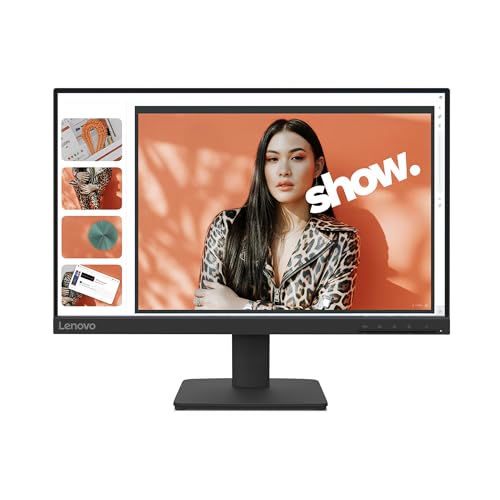
Lenovo L22-4e Office Monitor 21.5″ FHD IPS 100Hz
The 27-inch size gives you room for side-by-side windows without feeling cramped, and the IPS panel matters because it keeps colors steadier from different angles. In a shared desk setup or a small home office, that can make daily work feel less fussy.
The 120Hz refresh rate also makes a real difference for scrolling, casual games, and video playback, though you should still treat it as a practical monitor rather than a flashy gaming display. Samsung’s Eye Saver Mode and flicker reduction add comfort for long sessions, which suits you if you spend hours in spreadsheets, documents, or late-night browsing.
Strong Points
- 27-inch screen gives you more room for multitasking.
- IPS viewing helps colors stay consistent at angles.
- 120Hz motion feels smoother than a standard office panel.
- Eye Saver Mode and flicker reduction suit long desk sessions.
Things To Consider
- A 27-inch FHD screen is best at a normal desk distance, since very close viewing can make text look less dense than on a higher-resolution panel.
- Its feature mix leans practical rather than premium, so you are not getting a long list of extras here.
Core Details
Who It Suits Best
You suit this monitor best if you want a roomy screen for work during the day and smoother motion at night without moving into expensive territory.
Where A Sibling Pick Shines
Lenovo L22-4e fits you better if your desk is tight and you prefer a smaller 21.5-inch screen with a cleaner minimalist footprint.
The 22-inch size makes this AOC easy to place on narrow desks, dorm setups, or a second work station. VA means vertical alignment, a panel type often chosen for deeper contrast, so darker scenes can feel a bit more defined than on flatter budget panels.
Its 120Hz overclocked mode is useful for smoother motion, but the native 60Hz baseline tells you this model is still built with budget-first priorities. That trade-off is reasonable for email, web work, and light entertainment, though you may prefer a larger panel from Samsung or Dell for split-screen multitasking.
What We Like
- Small footprint helps it fit tight workspaces.
- VA panel suits everyday viewing with stronger contrast.
- 120Hz overclocked mode adds smoother motion for casual use.
- HDMI, VGA, and VESA support widen setup options.
Room For Improvement
- Native 60Hz means the higher refresh setting depends on the right connection and source device.
- At 22 inches, it feels more compact than roomy for heavy split-screen work.
- The budget lean shows in the simpler panel approach compared with the sharper motion focus on the Dell 24.
Details At A Glance
Built With In Mind
You fit this monitor best if you want a compact, no-drama screen for basic work, school tasks, or a backup station.
Another Choice May Suit
Amazon Basics 23.8-inch 1080P Monitor fits you better if you want a more balanced 23.8-inch screen with native 120Hz for everyday use.
This 23.8-inch panel lands in a very practical middle ground, which is why it feels so easy to recommend for a plain office desk or a home study corner. The IPS screen means color and viewing angles stay steadier than on basic TN-style budget screens, so you are not fighting the image every time you shift in your chair.
Native 120Hz is the big draw here, especially for smooth cursor movement and scrolling through long documents. The trade-off is simple branding and a feature set that stays focused on essentials, so it suits you best when you want a dependable all-purpose screen rather than a monitor packed with extras.
Highlights
- 23.8-inch size lands in a versatile middle zone.
- IPS panel supports steadier color across the screen.
- Native 120Hz helps everyday motion feel smoother.
- HDMI, DisplayPort, VGA, and VESA support cover common setups.
- Works well for office tasks, home use, and light entertainment.
Points To Note
- It stays focused on utility, so you should not expect premium extras.
- The wider set of ports helps, but cable management still depends on your desk layout.
Feature Card
Who Should Grab It
You suit this monitor if you want a steady, straightforward display for work, home admin, and casual after-hours use.
Swap It Out When
Dell 24 Monitor SE2426H makes more sense for you if 144Hz motion and a slightly more gaming-friendly feel matter more than broad utility.
The Acer KB220Q H2bi looks like the sort of monitor you put on a desk and stop thinking about, which is a compliment in this category. Its 21.5-inch footprint stays compact, while the 100Hz panel, 1ms response time, and AdaptiveSync support give you a little more motion confidence than a plain office screen.
That mix works well for spreadsheets, browsing, and a bit of gaming after work, especially in a room where you want the monitor to stay visually unobtrusive. The trade-off is scale, because a 21.5-inch screen can feel tight once you start juggling multiple full-size windows, so it suits focused work better than sprawling multitasking.
Upsides
- Small size keeps the desk from feeling crowded.
- 100Hz refresh gives motion a smoother edge than standard office panels.
- 1ms response time helps moving content stay crisp.
- AdaptiveSync support is handy for compatible graphics setups.
- Bluelight Filter and Flickerless Technology suit long work sessions.
Small Caveats
- The 21.5-inch layout is practical, though it can feel modest for wide spreadsheets or two-window work.
- A smaller panel also means you may sit a little closer to keep text comfortable to read.
Feature Rundown
The Right Fit
You fit this monitor best if you want a compact, easygoing office screen for work, study, and occasional gaming.
Where A Sibling Pick Shines
Lenovo L22-4e is the better fit for you if you want a similar compact class with a slightly cleaner minimalist look and 99% sRGB coverage.
This Dell steps up the motion story in a way that makes sense for a mixed work and gaming desk. A 144Hz refresh rate and 1ms MPRT, which stands for moving picture response time, help moving content look cleaner, while the IPS panel keeps color handling more stable than basic entry-level screens.
For you, that means smoother scrolling during office hours and less blur in fast games or action-heavy streaming at night. The 23.8-inch size is also friendly to typical desks, so it feels easier to live with than a bulkier 27-inch panel unless you specifically want more screen area.
Bright Spots
- 144Hz refresh rate gives the monitor a smooth, lively feel.
- 1ms MPRT helps fast movement stay sharp enough for casual gaming.
- IPS panel supports reliable color from common sitting angles.
- TÜV 3-star eye comfort adds a useful long-session touch.
- Two HDMI ports make desktop and console switching simpler.
Honest Caveats
- The 23.8-inch size is sensible, though it still feels smaller than a 27-inch desktop display.
- The tilt-only stand keeps things simple, but it gives you less ergonomic freedom than a full-height adjustable arm.
Spec Overview
Whose Shelf It Belongs On
You suit this monitor if you want a tidy everyday screen that also handles casual gaming better than a basic office model.
A Better Fit Elsewhere
Samsung 27″ S3 (S32GF) Series FHD Monitor 120Hz IPS Panel suits you more if you want a larger workspace and can give up some motion speed for extra screen real estate.
The bigger 27-inch frame gives this Dell more breathing room than the 24-inch version, and that matters the moment you keep several windows open or want video to feel less boxed in. The 144Hz panel, 1ms MPRT, and IPS technology line up well for mixed work, play, and streaming, so it sits in a nice middle zone.
Wide 178-degree viewing angles keep the image steadier when another person leans over from the side, which makes sense in shared rooms or collaborative workspaces. The honest read is that the size is the main draw, because FHD on 27 inches can feel less tight than smaller screens, so you are paying for space more than sharpness.
Reasons To Buy
- 27-inch size gives you more usable screen area.
- 144Hz motion suits gaming and fast scrolling.
- IPS panel keeps colors more dependable across the width of the screen.
- Wide 178-degree viewing angles help in shared workspaces.
- Thin bezels make the display feel less bulky on a desk.
Areas To Watch
- At 27 inches with FHD resolution, text can look less dense than on a higher-resolution large monitor.
- It asks for a bit more desk depth so the larger frame feels natural.
Technical Sheet
Made For
You suit this monitor if you want a roomy desktop screen with faster motion and do not mind the usual FHD trade-off on a larger panel.
Reach For A Different Pick When
Samsung 27″ S3 (S32GF) Series FHD Monitor 120Hz IPS Panel is the better fit if you want a larger screen but prefer a simpler motion focus and Eye Saver tools.
Lenovo keeps this one compact and visually quiet, which is helpful in a home office where the monitor should support the desk instead of taking it over. The three-sided borderless look makes the screen feel a little larger than its 21.5-inch size suggests, and the Raven Black finish should blend easily with most setups.
The 100Hz refresh rate, 4ms MPRT, and 99% sRGB coverage make it a sensible choice for office work and general media use, especially when you want color that feels more deliberate than the bare minimum. You may find the smaller screen limiting for heavy multitasking, but for focused work it keeps the experience simple and tidy.
Best Bits
- Three-sided borderless look helps the screen feel cleaner.
- 21.5-inch size works well on small desks.
- 100Hz refresh gives everyday motion a smoother pace.
- 99% sRGB coverage supports more faithful color handling.
- Tilt stand lets you make basic viewing adjustments.
Softer Spots
- The smaller size keeps it neat, though it leaves less room for large side-by-side layouts.
- A tilt-only stand keeps setup simple but limits position tuning.
Core Details
Perfect Match For
You suit this monitor if you want a neat office display for documents, browsing, and light media on a smaller desk.
Look Elsewhere When
Amazon Basics 23.8-inch 1080P Monitor 120 Hz is a better fit if you want a little more screen width and native 120Hz in a similarly simple category.
How To Choose The Right Budget Computer Monitors
Start With Screen Size And Desk Depth
Screen size shapes comfort before anything else. A 21.5-inch monitor fits narrow desks and keeps everything within easy reach, while 23.8-inch and 27-inch models give you more room for side-by-side windows and media.
Desk depth matters just as much, because larger screens need more viewing distance to feel natural. A 27-inch FHD panel can work well on a deeper desk, while a smaller 22-inch or 21.5-inch screen feels easier to place in a tight room.
Match Resolution To The Panel Size
FHD, which means Full HD at 1920 x 1080, is the common sweet spot in this category. On 21.5-inch and 23.8-inch panels, it usually looks clear enough for work, streaming, and browsing.
On a 27-inch screen, FHD gives you more physical size but less pixel density, so text can look a little softer up close. That trade-off suits you only when a bigger workspace matters more than the sharpest fine print.
Choose Refresh Rate By Daily Use
A 60Hz panel is fine for basic office tasks, but 100Hz, 120Hz, and 144Hz feel smoother in scrolling, simple animation, and light gaming. The difference shows up quickly once you move between documents or open fast-paced video.
You do not need the highest number in the group to get value. A 120Hz monitor like the Amazon Basics or Samsung model lands in a very useful middle ground, while 144Hz models from Dell make more sense for mixed work and play.
Look Past The Panel Type Label
IPS panels tend to suit shared desks because color stays more stable from wider angles. VA panels often appeal to people who like deeper contrast for darker scenes, though their off-angle behavior is usually less even than IPS.
Response time, AdaptiveSync support, and eye-comfort features also matter, but only in context. A casual home-office setup benefits more from steady color and a sensible stand than from chasing the fastest listed number.
A Quick Reality Check
Where Shoppers Go Wrong
Many people focus on size alone and ignore how close they sit to the screen. A 27-inch monitor can feel great from a proper distance, but the same panel may seem too large on a shallow desk.
Another common miss is overlooking ports and stand adjustment. HDMI, DisplayPort, VGA, and VESA support can save you trouble later, while tilt or mount support decides how easily the screen fits your space.
The Upgrade Payoff
Higher-tier models usually cost more because you get faster refresh rates, better color handling, sturdier stands, and more refined motion control. Extras like 144Hz, IPS, wider angles, and eye-comfort tuning add up quickly in this class.
The upgrade makes sense for gaming, creative side work, or a desk you use for many hours each day. For simple email, web browsing, and school tasks, a smaller 100Hz or 120Hz screen often delivers enough.
Frequently Asked Questions
Is 120Hz worth it on a budget monitor?
Yes, 120Hz usually feels smoother than a standard 60Hz panel in scrolling and general navigation. You notice it most on a desk you use every day.
Do you need IPS for office work?
IPS is a strong fit for office work because it keeps the image more consistent when you shift position. It also helps when more than one person looks at the screen.
Is a 27-inch FHD monitor a good match?
It works well when you want a bigger canvas for windows and media. The trade-off is lower pixel density than smaller 1080p screens.
What refresh rate suits a mixed work and play desk?
120Hz is a comfortable middle ground for most mixed-use setups. 144Hz makes sense when smoother motion matters more for games or fast scrolling.
Do VESA mounts matter on budget monitors?
They matter a lot in small rooms because they let you use an arm or wall mount. That can clear desk space and make the setup feel less crowded.
