
Coding takes enough focus without a dim panel, awkward stand, or a setup that feels cramped by 3 p.m. The right monitor can make long sessions easier on your neck, your eyes, and your patience, especially when you split screens, live in terminals, or keep reference docs open all day. This roundup focuses on models that fit real work habits, from wide curved displays to compact office panels and developer-first screens.
Quick Look At Our Top Picks


Pixio PX279 Wave Blue 27 inch 240Hz

LG 27UP650K-W 27-inch Ultrafine 4K

BenQ RD280U 28.2” 4K 3840×2560 3:2 Programming Monitor
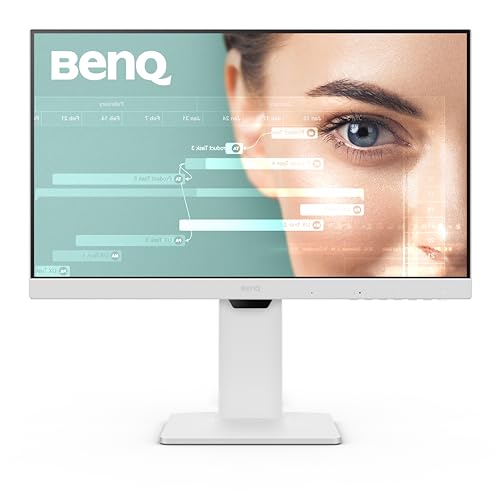
BenQ GW2486TC Office USB hub Monitor 24 inch

BenQ RD280UA 28.2” 4K 3840×2560 Programming Monitor
More Details On Our Top Picks
A 34-inch curved workspace changes the feel of a coding desk fast, and this Dell leans into that wide, low-stress layout. The WQHD resolution gives you more room than plain 1080p without pushing quite as hard as 4K, so it suits split windows, documentation, and a browser stack that stays open all day.
The 120Hz refresh rate and AMD FreeSync Premium matter more than they sound, because smoother motion helps the panel feel calmer during scrolling and side-by-side work. The trade-off is that VA panels usually lean more toward contrast than pure viewing-angle consistency, so it fits a solo desk better than a shared display setup.
Strong Points
- The 34-inch curved format gives you a broad view for code, docs, and terminal windows without constant tab switching.
- WQHD resolution lands in a sensible middle ground, offering more workspace than Full HD while keeping system demands reasonable.
- USB-C with 65W power delivery can simplify a laptop desk, since one cable may handle display and charging at once.
- The pair of 10W speakers helps on desks where you do not want separate audio gear taking up space.
- Anti-glare treatment and Eye Comfort support make long desk sessions feel less harsh under mixed lighting.
Things To Consider
- VA panels usually feel best straight on, so a shared desk or wide side seating can make color and contrast less even.
- The curved 34-inch shape needs a wider desk than a standard 27-inch screen, especially once you add a laptop stand or dock.
- Built-in speakers are handy, though dedicated desktop audio still sounds fuller for music or calls.
Feature Snapshot
Who It Suits Best
You get the most from this one if your desk mixes coding, browsing, and media in a single wide workspace.
A Better Fit Elsewhere
BenQ RD280U 28.2” 4K 3840×2560 3:2 Programming Monitor suits you better when code density and vertical space matter more than a broad curved view.
This Dell shifts the conversation toward sharper text and denser workspaces. The 31.5-inch 4K panel gives you a lot of room for code, design tools, and reference windows, which is handy on long projects where you keep several panes visible at once.
Compared with the S3425DW above, this one trades the ultrawide shape for pixel density and a more classic 16:9 layout. That can feel cleaner for line-by-line work, though 4K usually asks a bit more from your computer and can make interface scaling part of the setup conversation.
What We Like
- 4K resolution gives text and UI elements a very crisp look, which helps when you stare at code for hours.
- The 31.5-inch size keeps the screen large without the deeper desk footprint of an ultrawide.
- 120Hz refresh brings a smoother feel to scrolling, dragging windows, and moving through long documents.
- 99% sRGB coverage suits color-sensitive work better than a plain office panel, especially for web or design-adjacent tasks.
- DisplayPort and HDMI keep the connection side straightforward for desktop towers and laptops with dock support.
Worth Noting
- 4K can mean more scaling decisions, so you may spend a little time tuning text size to your liking.
- The VA panel’s strengths lean toward contrast, not the widest off-angle consistency.
- A larger, sharper display still benefits from a capable graphics setup in busy multi-window sessions.
Core Details
Who Will Love This
You suit this screen best if you want a big 4K desktop for code, spreadsheets, and visual work without stepping into ultrawide proportions.
Swap It Out When
LG 27UP650K-W 27-inch Ultrafine 4K works better for a smaller desk where you still want sharp 4K text in a tighter frame.
This Pixio is the speed-first choice in the group, and that comes through immediately in the 240Hz refresh rate. For competitive play after work, the 27-inch FHD panel keeps motion fluid without asking for the same graphics headroom as 4K.
Fast IPS means an in-plane switching panel, which usually balances color and viewing angles better than older office-style panels, so the screen still works for coding between games. The honest read is that 1080p on 27 inches is less crisp than the Dell and LG 4K models, so text-focused work may feel a little less refined.
Highlights
- 240Hz refresh rate gives you the smoothest motion profile in this roundup.
- 1ms GTG response time, meaning gray-to-gray pixel changes, helps keep blur under control in fast scenes.
- Adaptive Sync helps reduce visual tearing during gameplay, which matters after a long coding day.
- The 27-inch size sits comfortably on smaller desks than the ultrawide Dell 34.
- Fast IPS keeps the panel versatile for both gaming and everyday desktop tasks.
Room For Improvement
- FHD on 27 inches is not as sharp for text as the 4K options in this list.
- The performance focus gives you less premium coding space than the BenQ developer models.
- A speed-first panel can feel like overkill for someone who mostly writes code and rarely games.
Feature Rundown
Best Suited To
You fit this monitor well if coding shares desk time with competitive games and you want speed ahead of ultra-sharp text.
Look Elsewhere When
Dell 32 Monitor S3225QS suits you better when you want 4K clarity first and gaming second.
The LG 27UP650K-W feels like the safe, balanced answer for a clean coding desk. Its 27-inch 4K IPS panel gives you strong text sharpness without taking over your entire setup, which is useful in apartments, shared offices, and smaller home workstations.
Unlike the faster Dell and Pixio screens, this one stays more focused on steady clarity than raw motion speed. That makes it easier to recommend for work-first use, though the 60Hz ceiling will feel less lively to anyone who spends serious time gaming or flinging windows around.
Upsides
- 4K resolution on 27 inches gives you excellent text density for source code and documentation.
- IPS panel behavior usually keeps image consistency steadier across normal desk seating.
- Reader Mode and Flicker Safe speak to long-session comfort, especially in dimmer rooms.
- Height, tilt, and pivot adjustment help you match the screen to your chair and desk height.
- HDMI and DisplayPort make it easy to hook up a desktop or docking station.
Points To Note
- 60Hz is fine for office work, though it feels slower than the 120Hz and 240Hz options here.
- The 5ms response time is serviceable, but not aimed at fast-motion gaming.
- A 27-inch 4K panel benefits from thoughtful scaling so menus and text stay comfortable.
Details At A Glance
Made For
You suit this pick best if your coding desk also handles writing, browsing, and general office work.
Where A Sibling Pick Shines
Dell 34 Monitor S3425DW is the better route for multitaskers who want a wider canvas than this 27-inch 4K layout.
BenQ built this one for people who stare at code all day and care about how the screen behaves around that work. The 3:2 aspect ratio gives you extra vertical room compared with the wider Dell models, which is a real help in editors, notebooks, and long code files.
The Nano Matte Panel is a fine-coated, low-reflection surface, so glare control should feel more deliberate than on standard glossy or simple matte displays. That pairs well with the MoonHalo backlight and the 90W USB-C port, though the more specialized design means you are paying for coding-focused comfort rather than broad all-purpose flair.
Reasons To Buy
- The 3:2 shape gives you taller document space, which is excellent for code and reference-heavy work.
- 4K at 3840 x 2560 creates a dense, detailed desktop for text-heavy sessions.
- Nano Matte panel treatment helps keep reflections under control in bright rooms.
- MoonHalo backlight adds a softer glow around the screen area, which can make the desk feel less stark.
- 90W USB-C can simplify laptop setups with one cable for display and charging.
Small Caveats
- The taller layout takes a little getting used to, especially after years on 16:9 screens.
- Its specialized developer focus makes it less universal for general entertainment than the Dell 32 4K.
- The premium feature set will matter more to serious coders than casual home users.
Feature Card
Whose Shelf It Belongs On
You fit this monitor best if programming is your main job and you want a taller screen that favors dense work over casual media.
Another Choice May Suit
LG 27UP650K-W 27-inch Ultrafine 4K works better for general office use with a simpler, more familiar 16:9 shape.
This BenQ makes sense for a simple desk that still needs thoughtful extras. The 24-inch 1080p IPS panel keeps the footprint modest, so it fits a dorm setup, a secondary workstation, or a small office where the monitor has to sit close and stay out of the way.
The useful part is the mix of coding mode, adaptive brightness, USB-C, daisy chain support, and a noise-canceling mic. That combination feels practical for video calls and shared workdays, though 1080p at 24 inches is more about convenience than the sharpest text density.
Best Bits
- 24-inch size fits well on compact desks and in tight office corners.
- IPS panel support gives you stable viewing for everyday work.
- USB hub features can cut down on desktop clutter.
- Adaptive brightness is handy in rooms where lighting changes through the day.
- Daisy chain support helps streamline a multi-monitor workspace.
Areas To Watch
- 1080p at 24 inches is practical, but not as crisp as the 4K screens in this roundup.
- The smaller panel gives you less room for side-by-side editor windows.
- Office-first features matter most when you do more meetings and general productivity than heavy visual work.
Technical Sheet
Built With In Mind
You suit this monitor best if your coding desk is small and you want useful office features without a large panel.
Reach For A Different Pick When
BenQ RD280UA 28.2” 4K 3840×2560 Programming Monitor is the stronger fit for coders who want more vertical room and a more advanced desk setup.
The RD280UA takes the RD280U formula and pushes harder on desk ergonomics. The flexible arm matters because it gives you far more freedom to place the screen at the right height and reach, which is a real comfort boost during long coding blocks.
Compared with the RD280U, this version adds the ergonomic arm and coding hotkey angle to an already serious 3:2 developer display. That makes it a strong fit for people who care just as much about posture and position as they do about pixel density, though the full setup will take more planning than a standard stand-based monitor.
Positives
- The flexible arm gives you more placement options than a fixed stand.
- 3:2 4K resolution works well for code, docs, and long vertical layouts.
- Fine-coated panel treatment should help cut reflections in brighter rooms.
- 90W USB-C keeps laptop desks simpler and tidier.
- Coding-focused modes and hotkey support make the monitor feel tuned for long sessions.
Minor Gripes
- The arm-based setup can take more time to install and dial in than a normal stand.
- It makes the most sense for serious development work, not casual browsing or TV watching.
- Desk depth and clamp space matter more here than they do with the 24-inch BenQ office model.
Core Details
Right Fit For
You fit this monitor best if you want a developer screen with serious posture control and a taller coding layout.
Consider Something Else When
BenQ RD280U 28.2” 4K 3840×2560 Programming Monitor is the cleaner choice if you want the same coding-first screen without the arm-based installation.
How To Choose The Right Coding Monitors
Match The Screen Shape To Your Workflow
Ultrawide panels suit people who keep chat, docs, and code open side by side. A 3:2 monitor, like the BenQ RD280U models, gives you more vertical space, which helps when your day revolves around files, logs, and long functions.
Standard 16:9 screens still make sense for mixed use. They feel familiar, take less desk width, and usually work better in smaller rooms or office cubicles.
Pick Resolution For Text Comfort, Not Hype
4K on 27 to 32 inches gives you crisp text and more room for windows. That matters most during long coding sessions, because blurry or chunky text wears on you faster than people expect.
Full HD still has a place on compact desks and with lighter laptops. The trade-off is simple, you gain lower system strain and lose some sharpness.
Pay Attention To Refresh Rate And Panel Type
120Hz feels smoother than 60Hz, especially while scrolling or dragging code windows around. 240Hz goes further, but it makes the most sense for workstations that also serve gaming.
IPS panels usually offer steadier viewing angles, while VA panels tend to lean harder into contrast. For most coding desks, that means IPS for all-day clarity and VA for deeper-looking dark themes.
Think Through Connectivity And Desk Setup
USB-C with power delivery can keep a laptop desk simple, since one cable may handle display and charging. KVM support, where one keyboard and mouse control multiple sources, matters more if you switch between a work laptop and a personal machine.
Adjustable stands and monitor arms matter just as much as pixels. A screen that sits too high or too low gets annoying fast, and that’s the sort of problem you only notice after a full workday.
Things Worth Knowing First
Mistakes Worth Dodging
Many people chase resolution alone and ignore size, scaling, and desk depth. A 4K panel can feel awkward on a tiny desk, while a 27-inch 1080p screen can look rough once you spend all day reading code.
Another common miss is buying for gaming first and coding second. Fast refresh helps, but text comfort and stand ergonomics usually matter more for a work-first setup.
The Case For Spending Up
Higher-tier coding monitors usually put money into sharper panels, more refined stands, better USB-C support, and added comfort features. That extra spend often shows up in the details you touch every day, like cleaner cable routing and less neck strain from better adjustment.
The upgrade matters most for full-time developers, hybrid workstations, and anyone who keeps a monitor for many hours a day. For lighter use, a simpler 24-inch or 27-inch display can be enough.
Frequently Asked Questions
Is 4K worth it for coding?
Yes, especially on 27-inch and larger screens where sharper text helps during long sessions. You may need to adjust scaling so menus and UI elements stay comfortable.
Is an ultrawide good for programming?
Ultrawide screens work well for split windows, terminals, and reference material. They take more desk width, so they fit best on deeper workspaces.
What panel type works best for coding?
IPS is a strong all-around choice because it keeps image consistency steadier across the screen. VA can still work well, especially for darker themes and stronger contrast.
Does refresh rate matter for office work?
It matters more than many people expect, mostly for scrolling and general motion smoothness. 120Hz feels noticeably calmer than 60Hz, while 240Hz is most useful for gaming-heavy desks.
Should you choose USB-C on a coding monitor?
USB-C is very convenient for laptop setups because it can reduce cable clutter. A higher wattage port also helps keep your notebook charged during the day.
