
You spend enough hours staring at a screen, so the right monitor should feel calm, not demanding. This roundup focuses on computer displays that handle everyday work, mixed home use, and lighter play without forcing your eyes to work overtime.
You’ll see a mix of 24-inch, 27-inch, and 32-inch screens, plus a portable extender for travel-heavy setups. The real question is fit, not hype: desk space, refresh rate, panel type, ports, and comfort features all matter in different ways.
Quick Look At Our Shortlist

HP Series 3 27 inch FHD Monitor 327se (2025)

Samsung 32 Flat Computer Monitor LS32B304NWNXGO 2024

ViewSonic VS2747-H 27 Inch 1080p Computer Monitor
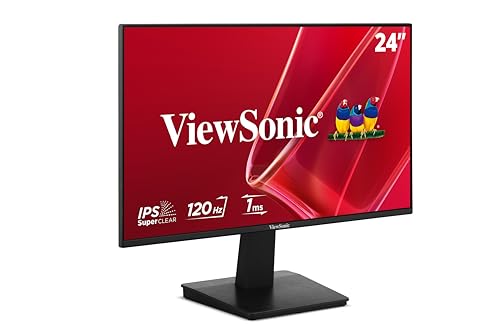
ViewSonic VA2448-MH 24 Inch 1080p Computer Monitor
sharanix Laptop Screen Extender 15.6 Inch Triple Portable Monitor

Dell 24 Plus Monitor S2425HSM 23.8-inch FHD

Dell 24 Monitor SE2426H 23.8-inch FHD
More Details On Our Top Picks
A 27-inch screen like this gives you more breathing room than a compact 24-inch model, and that matters on days filled with spreadsheets, writing, or split windows. The IPS panel, meaning in-plane switching for wider viewing angles, helps the image stay consistent when you’re not sitting dead center.
The 250 nits of brightness and 1300:1 contrast ratio won’t chase flashy specs, but they suit a steady desk setup well. You may find the built-in comfort features more useful than any one headline number, especially for long office sessions.
Strong Points
- 27-inch size gives you room for side-by-side apps without feeling cramped.
- IPS panel keeps colors and text looking steady from a slight angle.
- Eye Ease and Eyesafe certification point toward a calmer daily viewing experience.
- Full HD resolution keeps office work, browsing, and streaming clear on a straightforward setup.
- The black finish stays easy to place in a home office without drawing attention.
Small Caveats
- Full HD on 27 inches is sensible, though some text-focused users may prefer a denser panel.
- The 250-nit brightness suits indoor use better than a bright window-heavy room.
Feature Snapshot
Who It Suits Best
Office workers and home users who want a roomy, comfortable monitor for daily tasks will get the most from it.
Where A Sibling Pick Shines
ViewSonic VA2448-MH makes more sense for a smaller desk, especially for someone who wants a compact 24-inch footprint with a faster 120Hz panel.
A 32-inch flat panel like this is built for people who spread out across multiple windows all day. Compared with HP Series 3, you get more screen real estate, which can feel like a longer desk even when your furniture stays the same.
AMD FreeSync helps reduce tearing by keeping the monitor and graphics output closer together, and the 75Hz refresh rate adds a little extra smoothness over standard 60Hz screens. That’s useful for mixed work and casual gaming, though you’ll notice the size more than the speed in most office use.
Highlights
- 32-inch size gives you generous room for side-by-side documents, browsers, and messaging.
- Borderless styling makes a dual-monitor setup line up cleanly.
- AMD FreeSync helps motion look steadier in supported games and video.
- 75Hz refresh rate gives everyday scrolling a slightly smoother feel.
- Game Mode is handy for casual play without extra menu fuss.
Points To Note
- The larger footprint needs more desk depth than the 24-inch picks.
- It leans more toward comfort and size than fast-response gaming use.
Core Details
Made For
Home-office users who want a larger screen for multitasking and light gaming will find the size and feature mix appealing.
A Better Fit Elsewhere
Dell 24 Monitor SE2426H suits a tighter desk or a more compact setup, especially for someone who still wants 144Hz motion without the bulk.
This ViewSonic lands in the sweet spot between a roomy 27-inch panel and a practical 1080p layout. For most home office desks, that means enough space for documents and tabs without making setup feel fussy.
The 100Hz refresh rate, variable refresh rate support, and 1ms response time give it a more agile feel than a standard office screen. The catch is simple: speed helps most when you notice motion, while the IPS panel and anti-glare finish matter every minute you’re staring at text.
Upsides
- 100Hz refresh rate gives scrolling and cursor movement a livelier feel.
- Variable refresh rate can keep motion steadier in compatible games.
- IPS panel helps the picture stay consistent across a wider seating angle.
- HDMI and VGA support make it easier to match older and newer gear.
- Thin bezels suit a dual-screen desk without visual clutter.
Areas To Watch
- 27 inches at 1080p is still a practical choice, though some detail-oriented users may want more density.
- The flat, no-frills design keeps things simple rather than premium-looking.
Quick Facts
Best Suited To
Home-office users who want a simple 27-inch screen that can handle work, streaming, and casual gaming will get along with it.
Look Elsewhere When
Samsung 32 Flat Computer Monitor fits better for anyone who wants a larger canvas for heavy multitasking and can spare the desk space.
That 24-inch size keeps this ViewSonic easy to place on smaller desks, dorm setups, or shared work tables. Compared with the 27-inch picks, it asks for less space while still offering 120Hz motion that feels more fluid than the usual office monitor.
The frameless design helps it disappear a bit in multi-monitor setups, and the built-in 2W speakers add convenience for video calls or quick streaming. The honest read is that the speakers suit casual use, not room-filling audio, so the value sits more in convenience than sound power.
Bright Spots
- 24-inch footprint works well where desk space is tight.
- 120Hz refresh rate adds smoothness to scrolling and light gaming.
- IPS panel supports a consistent picture from off-center seating.
- Frameless styling helps dual-monitor layouts look cleaner.
- Built-in speakers keep a basic desk setup simpler.
Trade Offs
- Integrated speakers are handy, though external audio will usually sound fuller.
- The 24-inch layout suits compact work areas more than wide multitasking.
Technical Sheet
The Right Fit
Students, hybrid workers, and anyone with a small desk will appreciate the easy size and straightforward feature set.
Another Choice May Suit
HP Series 3 27 inch FHD Monitor makes more sense for someone who wants a bigger screen for side-by-side work without adding gaming-style extras.
This is the most unusual pick here, because it’s not a standard stand-alone monitor at all. It’s a triple-screen extender for laptops, so road warriors, remote staff, and frequent hotel-desk workers get a big productivity jump without carrying a full desktop setup.
The 15.6-inch FHD IPS panels, two-cable USB-C/HDMI plug-and-play setup, and support for Mac, Windows, and Android make it flexible on paper. The trade-off shows up in the same place most portable gear does: setup compatibility matters, and a travel-friendly accessory still asks you to think through your laptop size and workspace.
Reasons To Buy
- Triple-screen layout can expand your laptop workspace dramatically.
- 15.6-inch panels keep the whole unit more portable than full-size monitors.
- USB-C and HDMI support give you connection flexibility.
- Plug-and-play styling is useful for temporary workspaces and travel days.
- The included carrying case makes packing and storage easier.
Worth Noting
- Compatibility checks matter more here than they do on a standard monitor.
- The triple-screen design brings more parts to pack and manage.
- At 3.9 pounds, it stays portable, though not pocket-light.
Feature Card
Whose Shelf It Belongs On
Frequent travelers and remote professionals who work from changing locations will get the most value from it.
Skip It When
ViewSonic VA2448-MH is the simpler move for anyone who just wants a regular desk monitor with less setup effort.
This Dell feels more animated than the office-first screens above it, thanks to the 144Hz refresh rate and 1ms MPRT, meaning moving-picture response time. That combo helps motion look cleaner in games and smoother in scrolling-heavy work, while the 23.8-inch size keeps the panel friendly on a normal desk.
Height, tilt, pivot, and swivel adjustment give you more freedom than the fixed-position picks, and that’s useful when you shift between typing, streaming, and video calls. The built-in 2 x 3W speakers add convenience, though users who care about fuller audio will still want separate speakers or headphones.
Best Bits
- 144Hz refresh rate supports smoother motion for work and play.
- 1ms MPRT helps fast scenes look cleaner.
- Height, tilt, pivot, and swivel adjustments make desk setup easier.
- Built-in speakers reduce the need for extra accessories.
- AMD FreeSync helps supported games look steadier.
Room For Improvement
- People chasing audio depth will probably want separate speakers.
- The more adjustable stand adds flexibility, but it also adds a bit of desk complexity.
Details At A Glance
Built With In Mind
Mixed-use desks that switch between work, streaming, and casual gaming are the best match for this model.
Reach For A Different Pick When
Samsung 32 Flat Computer Monitor suits you better if your main priority is a larger screen for spreadsheets and split windows rather than speed.
This Dell keeps the formula simple: 23.8-inch FHD, IPS, 144Hz, 1ms MPRT, and AMD FreeSync. That combination makes it a comfortable step up from basic office displays, especially for someone who wants smoother motion without moving into a huge chassis.
The TÜV 3-Star eye comfort rating is the feature that separates it from the more gaming-leaning Dell 24 Plus. You may find the tilt-only stand less flexible than the fully adjustable S2425HSM, but the straightforward layout suits desk setups that don’t need a lot of fuss.
Plus Points
- 144Hz refresh rate keeps motion and scrolling feeling fluid.
- IPS technology helps the image stay stable from different seating angles.
- AMD FreeSync supports smoother motion in compatible games.
- TÜV 3-Star eye comfort focus is appealing for long desk sessions.
- 2 x HDMI ports make it easier to connect multiple sources.
Softer Spots
- Tilt-only adjustment leaves less flexibility than Dell’s more adjustable sibling.
- People who need built-in speakers will need to look to another model.
Core Details
Who Will Love This
People who want a compact, smooth-looking monitor for daily desk use and casual gaming will be well served here.
Swap It Out When
Dell 24 Plus Monitor S2425HSM is the better fit for anyone who wants more stand adjustment and built-in speakers in the same size range.
How To Choose The Right Computer Displays For Eyes
Screen Size And Desk Distance
Size changes the whole feel of a desk. A 24-inch monitor works well in tighter spaces and keeps everything within a short glance, while 27-inch and 32-inch screens give you more room for side-by-side windows and larger text at normal seating distance.
That extra size does come with a trade-off, because larger panels need more desk depth and can feel a little dominant in a small room. For shared offices, dorm desks, or narrow work nooks, a smaller panel often feels easier to live with.
Panel Type, Motion, And Clarity
IPS panels are useful because they keep color and contrast more stable when your seat isn’t perfectly centered. That matters in real life, since you rarely sit frozen in one posture all day.
Refresh rate also deserves attention. A 60Hz screen is fine for basic office work, but 75Hz, 100Hz, 120Hz, or 144Hz can make scrolling, window dragging, and casual gaming look smoother.
Comfort Features That Matter Over Time
Eye comfort labels, anti-glare finishes, and modest brightness levels help a monitor feel easier through long sessions. They do not replace smart lighting or proper breaks, but they can make a noticeable difference on busy workdays.
Height adjustment, tilt, and pivot matter just as much for many people. A screen that lines up with your posture usually feels better than a fancy panel sitting at the wrong angle.
Ports, Speakers, And Setup Flexibility
HDMI stays the most common hookup, while DisplayPort, VGA, and USB-C widen your options for newer and older devices. Extra ports help when you move a monitor between a work laptop, a desktop tower, and a backup machine.
Built-in speakers are handy for calls and casual viewing, though separate speakers usually sound fuller. That’s the kind of detail that feels small at first and then matters every day.
A Quick Reality Check Before You Choose
Common Shopping Slip Ups
People often focus on screen size first and forget desk depth, port count, or stand adjustability. A large monitor can feel awkward fast in a shallow workspace, even when the panel itself looks great on paper.
Another common miss is matching the screen to the task. Fast refresh rates help motion feel smoother, but a plain office setup may get more value from comfort features and a sensible size than from gaming extras.
What The Higher Tier Buys
More expensive models usually pay for stronger stands, faster refresh rates, extra motion handling, and better comfort features. In this category, that often means a more flexible desk posture, cleaner scrolling, or smoother-looking games.
That upgrade makes the most sense for people who sit at a screen all day or split time between work and play. For light use, a simpler display can still do the job without the extra hardware.
Frequently Asked Questions
What size monitor feels easiest on the eyes?
A 24-inch screen is often the easiest place to start on a smaller desk. A 27-inch model gives you more room without jumping to a large footprint.
Does a higher refresh rate help with office work?
Yes, it can make scrolling and cursor movement feel smoother. The benefit is subtle in documents, but noticeable during all-day use.
Is IPS worth choosing over other panel types?
IPS is useful for wider viewing angles and steadier color from off-center seats. That makes it a practical pick for shared desks and casual mixed use.
Do built-in speakers matter on a monitor?
They help with quick calls, videos, and low-fuss desk setups. Separate audio usually sounds fuller, so speakers on the monitor are mostly about convenience.
What matters most for long desk sessions?
Comfort features, stand adjustability, and a screen size that fits your space matter more than flashy extras. A monitor that matches your posture and room tends to feel easier day after day.
