
Curved ultrawides make long spreadsheets, side-by-side apps, and late-night gaming feel less cramped. This roundup focuses on 34-inch class screens that sit close to the 36-inch sweet spot, so you can compare office-friendly USB-C models, faster gaming panels, and a few smart-value choices without sorting through filler.
You’ll see where each screen fits best, what the trade-offs look like, and which ones make sense for daily desk use versus more focused gaming or media work. The goal is simple, help you match the panel to your space, your inputs, and how much motion smoothness or color range you actually need.
Quick Look At The Shortlist

Philips 34 Inch Curved Computer Monitor UWQHD 100Hz USB-C PD VA

Dell 34 Monitor S3425DW, WQHD VA, 120Hz

CRUA 34 WQHD 165Hz Ultrawide Curved Gaming Monitor
SAMSUNG Viewfinity S65UA Series 34-Inch Ultrawide QHD Curved Monitor
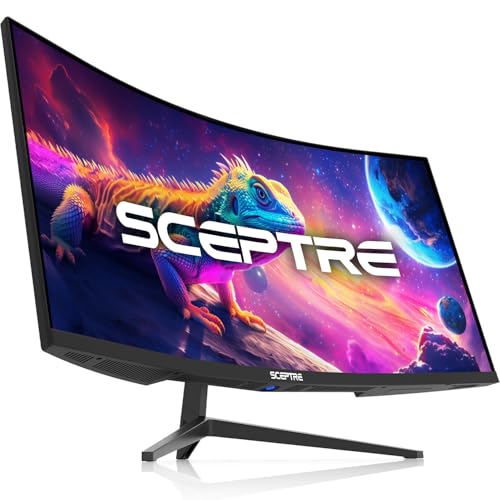
Sceptre 34-Inch Curved Ultrawide WQHD Monitor

CRUA 34 Inch 21:9 UWQHD 100Hz IPS Ultrawide Curved Monitor
Samsung 32 S3 (S39GD) Series FHD 100Hz Curved Monitor

34 Inch Ultrawide Curved Gaming Monitor, 165Hz, Tilt Adjustable
This Philips leans hard into desk usefulness, with USB-C power delivery, a USB 3.2 hub, and height adjustment doing more day-to-day work than flashy styling ever could. In a home office with a laptop, that mix cuts cable clutter and makes docking feel straightforward.
The 3440 x 1440 ultrawide layout gives you room for a browser, chat, and spreadsheet side by side, which suits commuters, analysts, and anyone living in windows all day. Built-in speakers help in a pinch, though external audio still makes sense for calls or music-heavy use.
Strong Points
- USB-C power delivery can handle a laptop connection and charge path in one cable, which simplifies a busy desk.
- The 34-inch ultrawide format gives you broad horizontal space for multitasking without stacking windows awkwardly.
- Height adjustment helps you line up the panel more comfortably for long work sessions.
- The USB 3.2 hub is handy for a mouse, keyboard receiver, or thumb drive you reach for often.
- Built-in speakers cover basic audio needs without adding immediate extra hardware.
Things To Consider
- VA panels usually bring strong contrast, but off-angle color shift can still show up more than on an IPS screen.
- Built-in speakers are convenient, though they usually stay in the background for clearer sound.
- The clean office focus means you get less gaming-specific flair than on the higher-refresh CRUA and Sceptre picks.
Feature Snapshot
Who It Suits Best
Desk workers who want a tidy USB-C setup with more horizontal room than a standard monitor will get the most from this Philips.
A Better Fit Elsewhere
Samsung Viewfinity S65UA Series 34-Inch Ultrawide QHD Curved Monitor suits you better if you want a more modern USB-C office layout with HDR10 and a cleaner stand.
Dell’s 34-inch curve feels aimed at long workdays first, then entertainment second, and that balance matters more than raw flash. The anti-glare finish and ComfortView Plus approach suit bright rooms or desks near a window, where reflections can get annoying fast.
Compared with the Philips, this one pushes refresh to 120Hz and adds HDR10, so moving windows and casual games should feel a touch livelier. The 2 x 10W speakers and USB-C with 65W power delivery make it a tidy single-cable center for a laptop setup, though the VA panel still carries the usual wide-screen contrast trade-off.
What We Like
- 120Hz refresh helps scrolling and general motion feel smoother than standard office panels.
- USB-C with 65W power delivery supports a simpler laptop connection on a shared desk.
- Anti-glare treatment is useful in rooms with overhead light or bright side windows.
- 3,000:1 contrast gives dark scenes more depth than many basic IPS office screens.
- The built-in 2 x 10W speakers add usable sound without extra desktop clutter.
Room For Improvement
- VA panels can show some color shift at off-center angles, which matters less at a straight-on desk.
- The design is more practical than decorative, so it won’t stand out for a style-forward setup.
- HDR10 is useful for compatibility, though the real payoff depends on the content you watch or play.
Core Details
Whose Shelf It Belongs On
You’ll like this Dell most if you split your time between office work, streaming, and light gaming on one monitor.
Another Choice May Suit
Philips 34 Inch Curved Computer Monitor UWQHD 100Hz USB-C PD VA fits better for you if your priority is a more work-first hub layout with a USB 3.2 hub and height adjustment.
This CRUA is the first true gaming-leaning option in the group, and its 165Hz panel puts motion smoothness ahead of office polish. For a desk that mixes shooters, racing games, and everyday work, the 34-inch 21:9 shape gives you room to play without feeling boxed in.
The 1500R curve keeps the wide panel feeling wrapped in toward you, which helps the edges feel less distant than a flat monitor of the same width. Compared with the Dell, this one trades a comfort-first office style for faster response and broader gaming appeal, though the lack of USB-C means laptop users will need a more old-school cable mix.
Positives
- 165Hz refresh is the headline feature, and it gives fast motion a noticeably more fluid feel than 100Hz models.
- 3440 x 1440 resolution fits side-by-side work during the day and wide game scenes at night.
- 120% sRGB coverage points to lively color, which helps for games and casual content work.
- DisplayPort 1.4 and HDMI 2.0 keep it flexible for PCs and consoles.
- The 75 x 75mm wall mount support helps you save desk depth with the right arm or bracket.
Areas To Watch
- No USB-C means a laptop dock setup is less tidy than with the Philips or Dell options.
- The gaming focus can feel a little less polished for formal office spaces.
- Wide-gamut color looks great for entertainment, though it can feel intense until you tune the picture settings.
Quick Facts
Built With In Mind
Gamers and multitaskers who want higher refresh without paying for office extras will get the most out of this CRUA.
Where A Sibling Pick Shines
Dell 34 Monitor S3425DW fits better for you if you want a softer daily-work balance with USB-C charging and stronger eye-comfort focus.
The Samsung Viewfinity leans into a neat, productivity-first setup, and the USB-C plus height-adjustable stand combo makes that obvious right away. On a small-to-medium desk, the cleaner cable path and border-light design help the display feel less bulky than many ultrawides.
HDR10 and the 1 billion color claim give it a broader media angle than the Philips, while the 100Hz rate stays comfortable for work and lighter gaming. One thing worth considering is the 1000R curve, which feels more enveloping than the gentler curves on several others here, so it suits some desks better than others.
Highlights
- USB-C support keeps a laptop desk setup simple and less cable-heavy.
- Height adjustment makes it easier to match the screen to your chair and eye level.
- 1000R curvature gives the wide panel a more wrapped-in feel.
- HDR10 and wide color support help movies and visual work look more expressive.
- The clean, near-borderless design suits offices where visual clutter matters.
Minor Gripes
- The stronger curve may feel more intense than the more relaxed 1500R and 3800R options.
- 100Hz is solid, though it sits below the faster gaming picks in this lineup.
- Users who want built-in speakers will need to look elsewhere.
Core Details
Perfect Match For
You’ll appreciate this Samsung most if you want an ultrawide for clean desk work, media, and a premium-looking setup.
Skip It When
CRUA 34 WQHD 165Hz Ultrawide Curved Gaming Monitor is the better fit for you if motion speed matters more than office refinement.
Sceptre takes a performance-heavy route without leaning on a lot of extras, which is exactly why it stands out here. The 180Hz ceiling, paired with a 1ms response time, makes it the sharpest motion-focused option in the list for competitive gaming or fast desktop scrolling.
Compared with the CRUA gaming panel, this Sceptre pushes refresh a bit further and adds dual DisplayPort inputs, so PC users with multiple sources get an easier time. The trade-off is straightforward, though, since built-in speakers are basic convenience gear and the overall design is more straightforward than polished.
Upsides
- Up to 180Hz refresh gives fast motion a very fluid feel on a compatible setup.
- 1ms response time helps reduce trailing blur in quick movement.
- 3440 x 1440 resolution keeps the wide screen useful for work and games alike.
- 100% sRGB coverage is a practical fit for broad, everyday color work.
- Two DisplayPort inputs make switching between devices easier for PC-heavy desks.
Points To Note
- The panel is tuned for speed first, so office-first users may not need all of its gaming headroom.
- Built-in speakers are a convenience, not a substitute for dedicated desktop audio.
- Owners who want a more refined stand or office finish may prefer Samsung or Dell instead.
Feature Rundown
Who Will Love This
You’ll get the most from this Sceptre if you want fast motion and a wide workspace without paying for office extras.
Look Elsewhere When
Dell 34 Monitor S3425DW suits you better if your desk time leans more toward comfort, brightness control, and USB-C convenience.
This white CRUA feels built for desks that do double duty, where design matters almost as much as the panel itself. The IPS display should appeal to anyone who wants steadier color from off-center angles than a typical VA screen, which matters in shared workspaces or creative setups.
Compared with the darker gaming-focused CRUA model, this one softens the pitch a little with 100Hz motion, a 3800R curve, and a cleaner look. That gentler curve can be easier for office work, though it also means the wraparound effect feels less dramatic than on the 1000R Samsung or the 1500R gaming picks.
Bright Spots
- IPS panel behavior usually keeps color more consistent across the screen than many VA alternatives.
- 120% sRGB and 92% DCI-P3 point to wide color reach for design and media work.
- The white finish gives it a fresher look that suits lighter room décor.
- Built-in speakers provide basic sound without adding another device to the desk.
- HDMI 2.0 and DisplayPort 1.4 cover common PC and peripheral setups.
Softer Spots
- 100Hz is plenty for work, though it won’t feel as quick as the 165Hz and 180Hz picks.
- The 3800R curve is fairly mild, so the ultrawide wrap feels subtler.
- White finishes can show dust more clearly, so a little upkeep keeps the desk looking tidy.
Details At A Glance
The Right Fit
You’ll like this CRUA most if you want a light-colored ultrawide for office work, editing, or a clean-looking home setup.
Reach For A Different Pick When
CRUA 34 WQHD 165Hz Ultrawide Curved Gaming Monitor makes more sense if gaming speed matters more than color style and décor.
This Samsung is the outlier in the lineup because it blends a monitor with smart-TV style features, which changes how you may use your desk. For a bedroom, studio corner, or casual setup, that can be handy, since Smart TV apps and Gaming Hub support reduce the need for extra boxes.
The 32-inch FHD panel keeps things simpler than the ultrawide models here, so you give up workspace width for a more compact footprint. Compared with the other Samsung in the list, this one feels less office-tuned and more living-space friendly, which is a fair trade for some homes.
Best Bits
- Smart TV apps and Gaming Hub reduce the need for a separate streaming device.
- USB-C, HDMI, and USB-A cover a flexible mix of connections.
- The 32-inch size fits tighter spaces more easily than a 34-inch ultrawide.
- 100Hz refresh gives everyday motion a smoother feel than a basic 60Hz display.
- The white finish helps it blend into lighter rooms and casual setups.
Worth Noting
- FHD at 32 inches is less spacious than the ultrawide WQHD screens in this roundup.
- It’s a mixed-use screen, so dedicated office users may want more horizontal workspace.
- The built-in smart features add convenience, though they also make the menu experience more involved.
Technical Sheet
Who Should Grab It
You’ll appreciate this Samsung most if you want a compact screen with streaming features built in.
Look Elsewhere When
Philips 34 Inch Curved Computer Monitor UWQHD 100Hz USB-C PD VA suits you better if your day revolves around documents, spreadsheets, and wider windows.
This DJiEX model takes a wide-angle, feature-heavy approach that suits work and play in equal measure. The 165Hz refresh, 1ms MPRT response, and PIP/PBP support give it a strong case for people who keep multiple windows or devices active all day.
Its 4000:1 contrast and 127% sRGB call out a panel that aims for punchy image depth and broad color, while tilt adjustment keeps the desk setup a little easier to dial in. Compared with the Sceptre, it brings similar motion speed but leans more toward multitasking utility than raw gaming talk.
Standout Traits
- 165Hz refresh and 1ms MPRT support smoother motion for games and quick cursor movement.
- PIP and PBP are useful for side-by-side device work, especially on hybrid desks.
- 4000:1 contrast can help darker scenes carry more separation.
- 127% sRGB points to a lively color range for content and media.
- Tilt adjustment gives you a little more control over the viewing angle.
Small Caveats
- It lacks the USB-C convenience that office-focused monitors bring.
- The more feature-packed spec list can feel busy if you only need a simple work screen.
- Desk users who value built-in speakers or a lighter finish may prefer other picks here.
Feature Card
Who Will Love This
You’ll like this DJiEX most if your desk needs split-screen flexibility as much as fast motion.
Swap It Out When
Sceptre 34-Inch Curved Ultrawide WQHD Monitor is the better fit if you want the same wide-gaming focus with dual DisplayPort inputs and a more straightforward price posture.
How To Choose The Right Curved 36 Inch Monitors
Panel Type Shapes The Whole Experience
VA panels usually give you stronger contrast, which helps movies and dark game scenes look deeper, while IPS panels tend to keep color steadier from the side. That matters on curved screens because you’re already dealing with a wider sweep across your desk, and the panel’s viewing behavior can either smooth that out or make the edges feel flatter. For shared workspaces, IPS often feels easier to live with, while VA can feel richer in a dim room.
Refresh rate matters just as much as the panel type once you start scrolling all day or gaming after work. 100Hz is a comfortable floor for most desk use, 120Hz feels a little smoother, and 165Hz or higher shifts the focus toward fast motion and competitive play. The trade-off is simple, higher refresh often costs more, so you should only pay for it when smoother motion is a real need rather than a nice number on the box.
Curve Radius Changes How The Screen Sits In Your Space
A tighter curve such as 1000R wraps the screen more aggressively around your view, which can feel immersive on a deep desk but a bit intense in a shallow one. Gentler curves like 1500R or 3800R feel easier to place in ordinary home offices, and they tend to work better for spreadsheets, editing timelines, and mixed daily use.
You should also think about how close you sit. A monitor that feels natural at arm’s length on one desk can feel too dramatic on another, especially with ultrawide panels that stretch across a lot of space. The right curve makes the edges feel closer without making the screen seem bent in an awkward way, and that balance is often more important than people expect.
USB-C, Ports, And Stand Adjustments Affect Daily Use
USB-C with power delivery is a quiet convenience that matters most once your desk gets busy. It can carry display signal and charge a laptop through one cable, which cuts clutter and makes docking less annoying, especially for commuters who move between home and office gear. Without it, you usually end up with more cables and a less tidy setup.
Stand adjustment sounds minor until you spend a week using the monitor. Height adjustment helps with neck comfort, while tilt keeps the image angle sane on different desks and chairs. Built-in speakers are handy for calls or casual video, though many desk setups still sound better with separate audio.
Match The Screen To Your Main Habit
Work-first users usually get the most from a 34-inch ultrawide with USB-C, height adjustment, and moderate refresh. Gaming-first shoppers should look harder at 165Hz or 180Hz models and pay attention to response time, because motion clarity matters more than a speaker set or a clean cable path. Creative work sits somewhere in between, and color coverage becomes a bigger part of the decision.
Space also matters. A 34-inch curved ultrawide can feel like a strong fit on a wide desk, but a smaller room may be happier with a compact 32-inch screen and fewer extras. Once you think in terms of how you actually sit, connect devices, and split windows, the choice gets a lot easier.
What To Weigh Before You Choose
Hidden Buying Traps
Many shoppers focus on refresh rate and ignore the connection mix, then discover that a laptop dock setup needs more adapters than expected. A second common miss is buying a very strong curve for a shallow desk, which can feel oddly close at the edges.
Another easy mistake is treating resolution and size as the same thing. A 34-inch ultrawide with 3440 x 1440 gives you a very different workspace than a 32-inch FHD screen, and that difference shows up every day in browser tabs, editing layouts, and document work.
Where The Extra Money Goes
Higher-tier curved ultrawides often cost more because they combine better stands, stronger USB-C support, wider color ranges, and higher refresh rates in one unit. Some also add features such as KVM-style multitasking tools, stronger speaker sets, or more polished bezels and cable management.
The upgrade pays off most when the monitor sits at the center of your day. Hybrid workers, serious gamers, and anyone editing photos or timelines will notice the extra comfort and flexibility more than casual users who only open email and a browser.
Closing Thoughts
The best curved ultrawide for you depends less on the headline size and more on how you work, play, and connect devices. USB-C office models make daily desk life easier, faster-refresh gaming screens make motion feel cleaner, and style-focused picks can fit a room better than a plain black slab. Once you match the curve, ports, and refresh rate to your routine, the right screen usually stands out fast. Keep your desk layout in mind, and you’ll land on a monitor that feels right from day one.
