
Weak laptop audio turns meetings, movies, and casual listening into a chore, especially on compact machines with tiny drivers. The seven picks below cover simple USB setups, clamp-on designs, Bluetooth options, and fuller 2.1 systems, so you can match your desk space and listening habits without overbuying. You’ll also see which models stay minimal and which ones bring more control, bass, or input flexibility. That makes the shortlist useful for home offices, dorm desks, and mixed PC setups alike.
Quick Look At The Shortlist
[Single] Computer Speaker for Desktop PC, USB-Powered, Plug-n-Play, Wired, External Speaker for Laptop, with Crystal-Clear Sound, Loud Volume, Rich Bass, Built-in USB-C Adapter for Full Compatibility
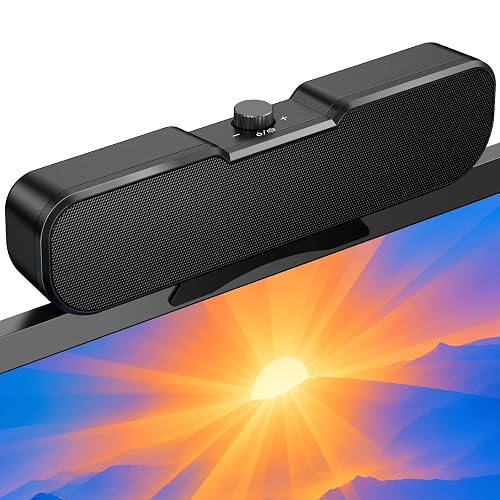
Cirqon Computer Speakers for Desktop PC, Easy Volume Knob, Sturdy Clamp, Clear Loud Sound, Laptop Speakers with Compact Design, USB/USB C Adapter for Power and Audio(Black)

Bluedee Computer Speakers for Desktop PC, 20W Peak, Bluetooth 5.4 USB USB-C, DSP-Tuned Stereo Sound, Dual Tweeters and Full-Range Drivers, RGB PC Speakers for Desktop, One-Knob Control, Plug and Play

Bluedee Computer Speakers with Subwoofer, 2.1 PC Speakers, 80W Peak Power, DSP-Tuned Sound, Deep Bass, Adapter Powered, Bluetooth 5.4 and USB/USB-C/AUX, RGB Desktop Speakers for Laptop and Monitor
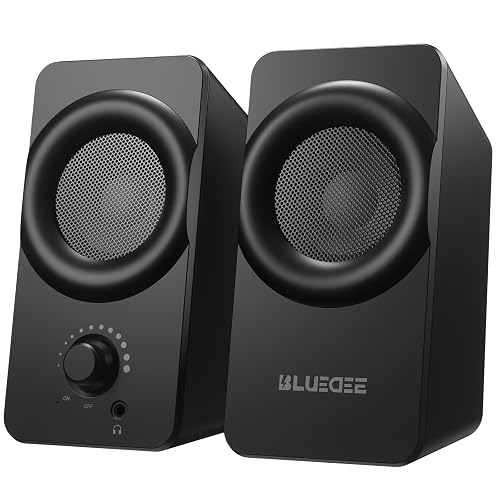
Bluedee Computer Speakers for Desktop PC, Dual Driver PC Speakers with RGB, Plug and Play Compact Wired USB Speakers for Laptop and Desktop, USB or USB-C for Power and Audio, Headphone Jack and Dynamic Light
[Upgraded] Computer Speakers for Desktop PC, USB Plug-n-Play, External Speakers for Laptop, Mini PC Sound Bar with Stereo Loud Sound, Enhanced Bass, Compatible with Windows, macOS, ChromeOS, Linux
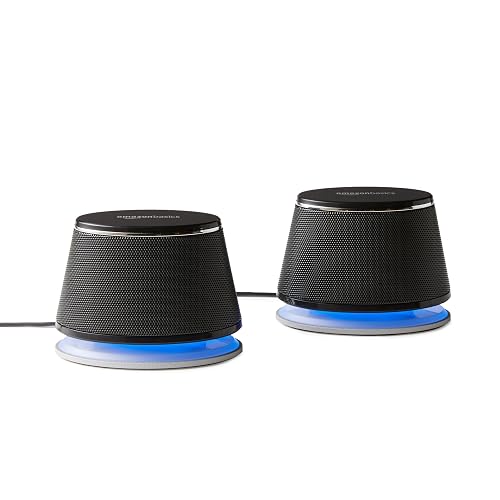
Amazon Basics Stereo 2.0 Speakers for PC or Laptop with Volume Control, 3.5mm Aux Input, USB-Powered, 1 Pair, Black
More Details On Our Top Picks
XKX keeps the formula simple here, which works nicely for a laptop desk that needs clearer sound without a lot of extra hardware. The USB-powered layout and included USB-C adapter make it easier to pair with newer machines, and the larger driver plus passive radiator should help the sound feel fuller than a tiny notebook speaker.
The trade-off is obvious enough, you are getting a single wired unit rather than stereo separation or app-based controls. For daily work, online classes, or background audio in a small room, that’s still a sensible setup, especially when you want fewer cables and a quick install.
What We Like
- USB power keeps the setup tidy on a laptop stand or compact desk.
- The USB-C adapter broadens compatibility for newer port layouts.
- A larger driver size usually gives you fuller midrange presence for voices and calls.
- Passive bass support helps music and videos feel less thin than built-in speakers.
Points To Note
- Single-speaker output will not create the wide stereo spread some desks need.
- Wired placement means your desk layout needs a little planning.
- One-piece designs can feel less immersive for gaming or film nights.
Core Details
Who It Suits Best
Space-conscious laptop users who want a simple audio upgrade for calls, streaming, and light music will get the most from this one.
Where A Sibling Pick Shines
Cirqon Computer Speakers for Desktop PC is the better fit for you if you want a clamp-mounted design with easier volume access from a tight monitor setup.
The clamp is the headline here, because it solves a real desk problem for monitor shelves and crowded workstations. You can mount it at the top, bottom, or sides of a screen, which keeps the speaker within reach and off the desk surface, and the volume knob stays easy to find from those positions.
That layout suits home offices and study corners where every inch counts. The honest trade-off is that clamp fit matters, so a thicker or unusually shaped display edge may rule it out, and a freestanding speaker may feel simpler for a more open desk.
Strong Points
- The clamp helps reclaim desk space around a crowded laptop or monitor.
- The single control knob is easy to reach and quick to understand.
- USB and USB-C power support keeps setup straightforward.
- Mounting flexibility works well for side, top, or lower screen placement.
Softer Spots
- Clamp fit depends on display thickness, so measuring first saves hassle.
- Mounted placement can complicate cleaning around the screen edges.
- Users who want a wide stereo image may prefer two separate speakers instead.
Feature Rundown
Who Will Love This
Minimal desks, monitor risers, and tidy workstations are where this Cirqon setup makes the most sense.
Swap It Out When
Bluedee Computer Speakers for Desktop PC, 20W Peak is a better match for you if you want Bluetooth support and a more feature-heavy desktop speaker.
This Bluedee model leans into flexibility, starting with Bluetooth 5.4 and continuing through USB and USB-C support. The DSP tuning, or digital signal processing, helps smooth the sound, while the dual tweeters and full-range drivers give it a more layered presentation than the single-piece XKX unit.
You’ll notice the RGB lighting and one-knob control most on a gaming desk or a media-heavy setup. The trade-off is that extra features can feel unnecessary for a no-frills office, so this makes more sense for you when audio sources and desk style both matter.
Highlights
- Bluetooth 5.4 adds wireless listening flexibility for laptops and phones.
- USB, USB-C, and Bluetooth support make it easier to match mixed device setups.
- Dual tweeters plus full-range drivers help vocals and instruments separate more cleanly.
- DSP tuning reduces harshness, which helps long listening sessions feel easier on the ear.
- The one-knob control keeps volume management simple.
Minor Gripes
- RGB lighting adds style, but not everyone wants visual extras on a work desk.
- The feature set is broader than many office users need.
- Wireless mode still depends on your device setup and pairing habits.
Technical Sheet
Best Suited To
Desk gamers, multitaskers, and anyone who switches between wired and wireless sources will get the most from this pick.
Look Elsewhere When
Amazon Basics Stereo 2.0 Speakers for PC or Laptop is the cleaner fit for you if you want a stripped-back, budget-minded wired setup.
Once you move into 2.1 territory, the shape of the sound changes fast, and this Bluedee set is built for that jump. The separate subwoofer handles low frequencies, so the smaller speakers can keep voices clearer while still giving movies, games, and music a bigger low-end presence.
It also brings a wide input mix, which matters on a desk shared between a laptop and a monitor dock. The catch is footprint, since a subwoofer takes more room than the compact options above, so this one suits you best when bass matters more than keeping the desk bare.
Reasons To Buy
- The 2.1 layout gives low-end support that smaller desktop speakers rarely match.
- DSP tuning helps smooth the overall sound for everyday listening.
- Bluetooth, USB, USB-C, and AUX support give you several hookup paths.
- Adapter power keeps the system independent from your laptop’s battery draw.
- RGB lighting gives a more styled look for a gaming or entertainment desk.
Room For Improvement
- The subwoofer needs more placement room than the compact picks in this list.
- Extra hardware means more cables and a less minimal setup.
- Some office desks will feel crowded once the bass unit is in place.
Core Details
Who Should Grab It
Media fans and gaming setups that want stronger bass and more connection options will get the most out of this model.
Another Choice May Suit
LIELONGREN [Upgraded] Computer Speakers for Desktop PC fits better for you if a slimmer sound bar shape matters more than a separate subwoofer.
This one sits in a sweet spot for mixed use, because it keeps the footprint compact while still layering in useful extras like a headphone jack and RGB lighting. Dual drivers usually give desktop audio a bit more body than the very smallest single-unit options, so it makes sense for day-to-day work plus evening media.
That said, the extras matter most on a desk where you switch often between private listening and open speakers. For a plain office setup, some of the styling may feel like more than you need, but for a shared bedroom desk or dorm corner, the balance is appealing.
Bright Spots
- Compact wired design keeps clutter under control on small desks.
- USB or USB-C power and audio support helps with newer laptops.
- The headphone jack adds a convenient private-listening option.
- Dual drivers should give voices and music a fuller presence than basic mini speakers.
- RGB lighting suits gaming corners and casual media setups.
Areas To Watch
- Lighting effects are a style choice, not a sound upgrade.
- Compact build means it will not replace a larger bass-focused system.
- Extra features can feel unnecessary for pure office work.
Feature Card
Whose Shelf It Belongs On
Students, dorm setups, and small-room desks are the strongest match for this Bluedee model.
Reach For A Different Pick When
Amazon Basics Stereo 2.0 Speakers for PC or Laptop is the simpler fit for you if you want a basic, no-frills speaker pair without lighting extras.
Sound bar style makes this LIELONGREN model easy to place under a laptop or small monitor, and that shape helps keep the desk looking orderly. The USB plug-and-play approach is also convenient for day-to-day use, while the platform support covers Windows, macOS, ChromeOS, and Linux.
That wider compatibility gives it an edge over more narrowly focused picks like the single XKX speaker. The trade-off is that a slim bar still has limits on stereo spread and bass depth, so it fits best when you want clean placement more than dramatic room-filling sound.
Upsides
- Low-profile sound bar styling leaves more room around the keyboard and mouse.
- USB plug-and-play setup keeps installation easy.
- Support for Windows, macOS, ChromeOS, and Linux makes it broadly versatile.
- Enhanced bass gives it more body than many bare-bones laptop speakers.
Worth Noting
- Sound bar shape favors neat placement over wide stereo separation.
- Bass output will still trail larger 2.1 systems with a separate subwoofer.
- Minimal controls mean you may rely more on your computer’s audio settings.
Quick Facts
Made With In Mind
People who want a tidy desktop speaker for mixed computer platforms will appreciate this design most.
A Better Fit Elsewhere
Bluedee Computer Speakers with Subwoofer, 2.1 PC Speakers is the better choice for you if you care more about bass depth than slim desk placement.
This pair keeps things old-school in a way that still makes sense for a lot of desks, because 3.5mm aux input and USB power are simple to understand and easy to set up. The in-line volume control is handy for quick adjustments, and the metal finish with padded base points to a more solid feel than the most basic plastic minis.
For a budget desktop or a laptop you dock often, that simplicity is the appeal. The trade-off is that you are choosing a more traditional 2.0 setup, so you get less feature depth than the Bluedee models with Bluetooth or a subwoofer, but you also get less fuss.
Best Bits
- 3.5mm aux input works with a broad range of laptops and desktops.
- USB power keeps cabling straightforward.
- In-line volume control is quick to reach during calls or videos.
- Metal finish and padded base suggest a sturdier desk presence than ultra-cheap mini speakers.
Small Caveats
- No wireless support, so the setup stays fully tethered.
- Traditional 2.0 output will not match a dedicated bass system.
- The lighted, finished design may feel more dated than newer RGB options.
Core Details
Who Should Grab It
Practical shoppers who want a basic speaker pair for everyday computer sound will find this Amazon Basics set easy to live with.
Skip It When
Bluedee Computer Speakers for Desktop PC, Dual Driver PC Speakers with RGB is the better choice for you if you want more desk personality and a headphone jack.
How To Choose The Right External Speakers For Laptop Computers
Start With Your Desk, Not The Box
Desk space decides a lot in this category. A clamp-mounted model like Cirqon can help a crowded workstation, while a sound bar such as LIELONGREN slips under a monitor and keeps the surface cleaner.
Shape matters just as much as sound. A 2.1 set with a separate subwoofer, like the Bluedee model with bass unit, asks for more room but gives you a fuller low end that smaller speakers usually cannot match.
Match The Connection To Your Devices
USB-powered plug-and-play speakers are the easiest path for many laptops. They reduce setup friction and keep cable counts low, which is handy for work-from-home desks and shared study spaces.
3.5mm aux still makes sense for older laptops or simple desktop towers, while Bluetooth adds flexibility for switching between a computer and a phone. The trade-off is obvious, wireless convenience can bring pairing steps and charging habits into the picture.
Choose Sound Style For How You Use It
Stereo pairs usually give you a wider spread for calls, music, and general desktop use. A single-speaker design is simpler and takes less space, but it will feel more concentrated and less open.
For movies and gaming, a system with a subwoofer or stronger driver array often feels more satisfying. For spreadsheets, video meetings, and background playlists, a compact USB set is often enough, and that’s the kind of honest fit most laptop owners end up appreciating.
Look For Controls You’ll Actually Reach
Knobs, inline controls, and one-touch power matter more than they sound. You’ll notice them most during meetings, late-night listening, or any session where volume changes happen often.
RGB lighting, headphone jacks, and multiple inputs are useful extras, but only when they match your routine. A cleaner desk usually wins for productivity, while a feature-rich model makes more sense for a mixed-use setup that pulls double duty.
Things Worth Knowing First
Where Shoppers Go Wrong
One common mistake is chasing bass without checking desk space. A separate subwoofer sounds appealing, yet it can crowd a compact setup fast.
Another slip-up is ignoring port layout. A USB-C adapter, aux input, or clamp range may seem minor until your laptop or monitor edge makes installation awkward.
The Upgrade Payoff
Higher-tier speakers usually cost more because they add more hardware, more connection options, or more careful tuning. Dual tweeters, full-range drivers, and DSP processing all add complexity, and that complexity tends to improve how voices, music, and effects sit together.
You’ll feel the upgrade most on a desk that handles streaming, gaming, and long listening sessions. For a bare-bones office machine, a simpler USB pair often makes more sense, and that is fine too.
Closing Thoughts
The right speaker for your laptop depends less on hype and more on layout, connection type, and how much sound depth you actually want. Compact USB models keep things easy, clamp-on designs save space, and 2.1 systems bring a bigger low end for media-heavy desks. Pick the one that fits your setup, not the one that tries to do everything.
