
Your computer’s cooling needs depend on the hardware inside and the way you use it. A laptop cooling pad can help during long gaming sessions or demanding work, while a desktop CPU cooler needs socket compatibility, case clearance, and enough heat-dissipation capacity for your processor. This shortlist covers slim laptop stands, compact single-tower designs, and larger dual-tower air coolers. You’ll find practical options for daily office work, beginner PC builds, and higher-load desktop setups.
The Shortlist At A Glance
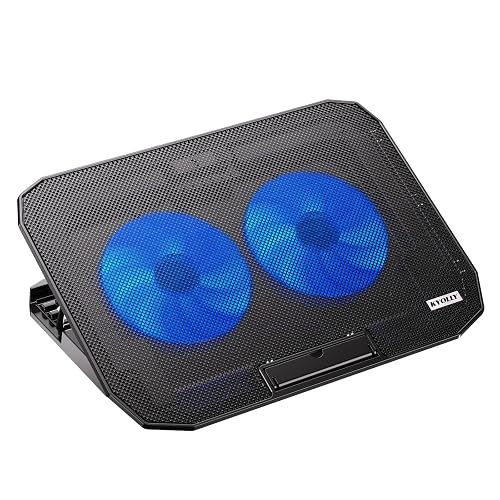
KYOLLY Ultra Slim Laptop Cooling Pad 2 Fans
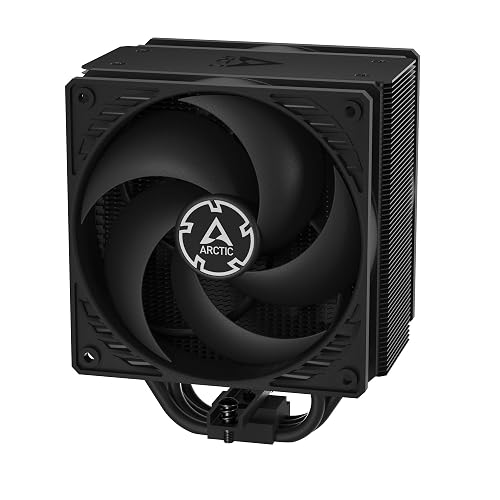
ARCTIC Freezer 36 Black Single-Tower CPU Cooler
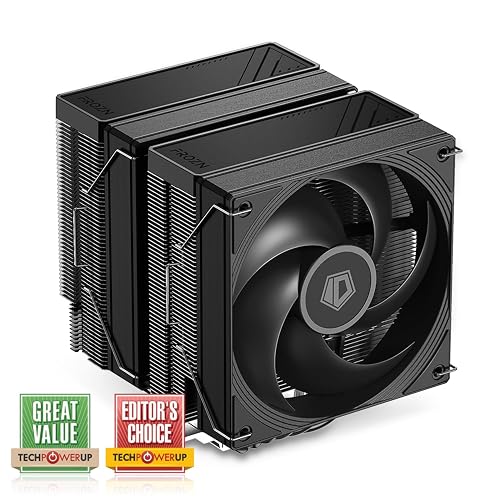
ID-COOLING FROZN A620 PRO SE Dual-Tower CPU Cooler
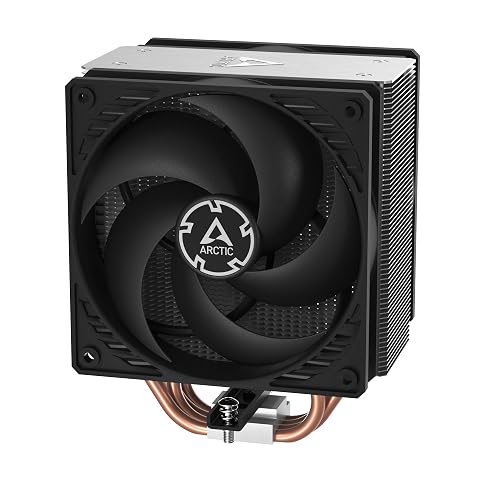
ARCTIC Freezer 36 CO Single-Tower CPU Cooler
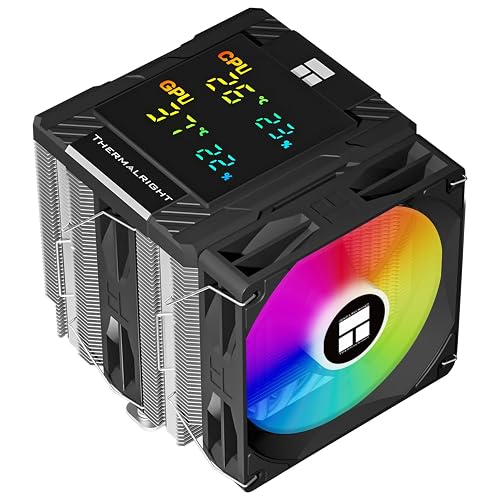
Thermalright Peerless Assassin 120 Digital ARGB Black
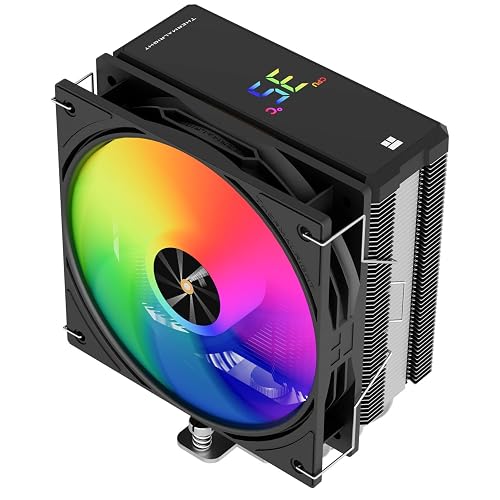
Thermalright Assassin X 120R Digital ARGB Black
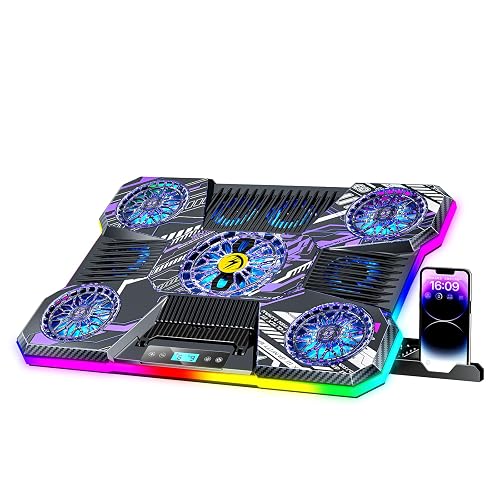
ChillCore RGB Laptop Cooling Pad 9 Fans
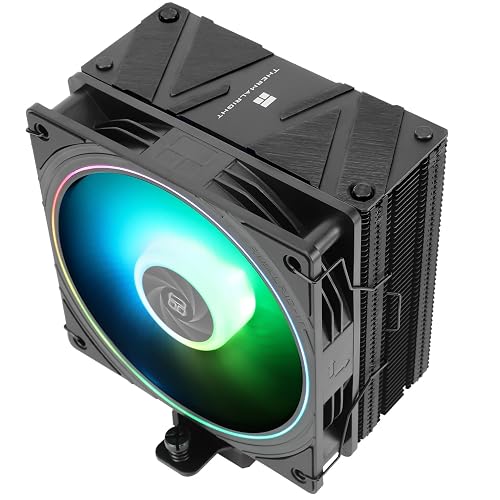
Thermalright Assassin Spirit 120 EVO CPU Cooler
More Details On Our Top Picks
Desk space matters during a commute or a long work session, and KYOLLY keeps its footprint narrow with two large fans beneath a precision metal mesh surface. The five height positions turn the pad into an ergonomic stand, while speed control lets you choose a quieter setting for documents or more airflow for demanding multitasking.
The two USB ports help you connect accessories without giving up the laptop’s only available port, though the exact port arrangement on your computer still matters. A soft blue activity light adds a quick visual cue, and the slim, light construction suits regular travel. You may find the compact design more convenient than the larger ChillCore, but it offers less fan coverage.
Strong Points
- Two fans and metal mesh encourage airflow beneath a laptop during extended sessions.
- Five height levels make typing and screen positioning easier at a desk.
- Speed adjustment supports quieter office use.
- Two USB ports help preserve connectivity for a mouse or storage device.
- Slim construction stores easily in a laptop bag.
Things To Consider
- Owners may need to clear dust from the mesh and fan openings periodically.
- The 10 to 15.6-inch size range may not suit larger notebooks.
- Two fans provide a smaller airflow field than ChillCore’s nine-fan layout.
Key Specs
Who It Suits Best
Choose this compact stand for daily laptop work, study sessions, and travel with a 10 to 15.6-inch notebook.
Where Another Pick Suits Better
ChillCore RGB Laptop Cooling Pad 9 Fans suits gaming notebook users who want broader fan coverage and an LCD speed display.
A push-pull layout places a fan on each side of the single tower, helping air travel through the heatsink rather than stopping at its front edge. The two 120 mm pressure-optimized fans use fluid dynamic bearings, a bearing style designed to reduce friction through a lubricated fluid layer. That combination makes sense for a general desktop used for gaming, editing, or extended office workloads.
Four heatpipes carry heat from the CPU contact area into the fin stack, and the included MX-6 compound simplifies a new build. Compared with the larger ID-COOLING FROZN A620 PRO SE, this tower should be easier to place in a crowded case, though the dual-tower model offers more cooling surface. The honest trade-off is straightforward installation planning around socket support and case clearance.
What We Like
- Two 120 mm fans create a practical push-pull airflow path.
- Four heatpipes transfer CPU heat into the tower fins.
- Fluid dynamic bearings suit repeated daily operation.
- Included MX-6 compound removes an extra setup step.
Worth Noting
- Single-tower capacity may be less suitable for especially demanding processors than a dual-tower design.
- Dust buildup between fins can gradually restrict airflow, so periodic cleaning remains part of ownership.
- Socket and case compatibility deserve a check before installation.
At A Glance
Made For
This cooler fits desktop builders who want a conventional air tower for everyday gaming, productivity, and general PC assembly.
Consider Something Else When
Thermalright Peerless Assassin 120 Digital ARGB Black fits enthusiasts who need a dual-tower layout and want an integrated display.
High-load desktop work benefits from the FROZN A620 PRO SE’s dual-tower heatsink, six heatpipes, and two 120 mm PWM fans. PWM, or pulse-width modulation, lets the motherboard adjust fan speed according to workload. During long rendering sessions or sustained gaming, that arrangement gives you more fin area than the ARCTIC Freezer 36’s single tower.
The 157 mm height keeps the cooler within the fit range of many tower cases, while the black finish blends into dark interiors. You may find the 40 mm standard RAM clearance useful, although taller memory can require closer checking because clearance is limited to 63 mm at its maximum. Installation is described as easy, but a dual-tower cooler still needs more room to handle than a compact single-tower model.
Highlights
- Dual towers provide a large fin area for sustained CPU workloads.
- Six heatpipes spread heat through both sections of the heatsink.
- Two quiet 120 mm PWM fans support automatic speed control.
- 27.2 dB(A) maximum noise specification suits quieter desktop rooms.
- 157 mm height works with many standard tower cases.
Trade Offs
- Large tower dimensions can complicate access around memory slots and motherboard components.
- Standard RAM clearance is 40 mm, so tall modules need a fit check.
Technical Sheet
Right Fit For
Pick this cooler for a capable desktop build handling gaming, content creation, or other sustained CPU-heavy workloads.
Not Your Match When
Thermalright Assassin X 120R Digital ARGB Black better suits compact cases and modest desktop upgrades that need a shorter single tower.
For a desktop that runs for long stretches, the Freezer 36 CO follows the same single-tower, four-heatpipe approach as the standard Freezer 36. Its distinction comes from dual-ball-bearing fans, which are designed to tolerate heat and dust better than simpler bearing arrangements. That makes the CO version worth attention for always-on workstations or systems that see frequent daily use.
Two pressure-optimized 120 mm fans create push-pull airflow, and the 200 to 1800 RPM range gives the motherboard room to adjust fan activity. Compared with the standard ARCTIC model, this version places more emphasis on bearing durability rather than a different tower layout. In most home offices, the practical caveat is keeping the fins and fan blades clear of dust.
Upsides
- Dual-ball-bearing fans are suited to warm, dusty, or frequently used systems.
- Push-pull airflow moves air through the single heatsink tower.
- Four heatpipes help carry processor heat into the fin stack.
Room For Improvement
- The single tower has less physical cooling area than the ID-COOLING dual-tower design.
- Fan and heatsink dust still require occasional cleaning for consistent airflow.
- Installation planning remains necessary around socket and case dimensions.
Quick Facts
Best Suited To
This model suits desktop users who value a bearing design intended for frequent operation and straightforward tower cooling.
Look Elsewhere When
ID-COOLING FROZN A620 PRO SE suits heavier workloads and larger cases where a dual-tower heatsink makes sense.
Thermalright gives you a substantial dual-tower cooler with six heatpipes, two fans, and a digital screen built into the top cover. The published 162 mm height is taller than the ID-COOLING FROZN A620 PRO SE, so case clearance deserves attention before installation. You may appreciate the display during a gaming session because it can show temperature, processor usage, or graphics temperature without opening monitoring software.
The copper base and copper heatpipes provide the heat-transfer hardware, while the ARGB lighting adds visual customization for a windowed build. This is a more elaborate choice than ARCTIC Freezer 36, but the extra size and screen add installation and cable-management considerations. Dusting around two towers also takes more care than cleaning a compact single-tower cooler.
Best Bits
- Dual towers and six heatpipes suit demanding desktop workloads.
- Digital top display can show processor or graphics information at a glance.
- AM4, AM5, and several Intel sockets support current upgrade paths.
- ARGB lighting gives a compatible case a coordinated appearance.
- Copper contact components support heat movement from the processor.
Small Caveats
- The 162 mm height may not fit every mid-tower case.
- Dual-tower cleaning and RAM clearance need more planning than a smaller cooler.
Feature Snapshot
Who Will Love This
Choose this design for an enthusiast PC build where sustained workloads, display feedback, and ARGB styling all matter.
Swap It Out When
ARCTIC Freezer 36 Black suits you better when you want a simpler single-tower installation and no display hardware.
A 151 mm single tower gives this Thermalright a more manageable shape than the taller Peerless Assassin 120 Digital. Four heatpipes feed an aluminum heatsink, and the 120 mm PWM fan reaches 2000 RPM. For a first desktop upgrade from a basic stock cooler, the combination offers a visible step up without taking over the motherboard area.
The top digital panel can show CPU temperature, CPU usage, and graphics temperature, which adds useful information during a long gaming or editing session. ARGB lighting brings extra style, although it also means more cables and software or header compatibility to consider. Depending on your case airflow, the compact tower may be easier to position than the dual-tower choices, but it has less heatsink mass.
Bright Spots
- 151 mm height supports more case layouts than taller dual-tower coolers.
- Digital panel gives you quick access to key system readings.
- Four heatpipes offer a direct path into the aluminum heatsink.
- PWM control can adjust the fan to changing processor loads.
Points To Note
- Single-tower cooling has less surface area than the Peerless Assassin design.
- ARGB and display connections add setup work during cable management.
- Regular fin cleaning helps maintain open airflow through the tower.
Core Details
Who Should Grab It
This model suits beginners and regular desktop users who want a compact tower, monitoring display, and broad socket coverage.
A Better Fit Elsewhere
Thermalright Peerless Assassin 120 Digital ARGB Black is better suited to high-load systems that have room for a larger dual-tower cooler.
Nine fans give ChillCore a very different approach from KYOLLY’s two-fan platform. Separate top and bottom air inlets support different fan operating modes, while the LCD display shows current fan speed. That layout appeals to gaming notebook users who want broad airflow under a machine during long sessions rather than a small, travel-first stand.
Eight height adjustments let you tune the viewing angle at a desk, and the extra positions may help you find a comfortable setup for a larger gaming notebook. The trade-off is bulk: nine fans, an LCD panel, and a multi-position stand generally demand more storage space than KYOLLY. You may also need to clean more openings because dust can collect across a wider intake area.
Reasons To Buy
- Nine fans create broad airflow coverage beneath a gaming notebook.
- Top and bottom inlets support different operating modes.
- LCD readout gives you a quick view of fan speed.
- Eight height levels offer more angle control than KYOLLY.
Areas To Watch
- The larger multi-fan platform stores less easily than an ultra-slim pad.
- More intake openings create more surfaces to keep clear of dust.
- Fan noise may be more noticeable at higher activity than with a smaller pad.
Feature Rundown
Whose Shelf It Belongs On
This pad fits gaming notebook users who keep a laptop at a desk and value wide airflow coverage, angle control, and visible fan information.
Another Choice May Suit
KYOLLY Ultra Slim Laptop Cooling Pad 2 Fans suits commuters and students who need a lighter, narrower stand for a 10 to 15.6-inch laptop.
Simple hardware can be exactly what a mainstream desktop needs. The Assassin Spirit 120 EVO uses a single tower, four heatpipes, and a 120 mm PWM ARGB fan rated up to 2000 RPM, giving you a familiar layout for a first build or a replacement cooler. Its 156 mm height sits between the smaller Assassin X 120R and the taller Peerless Assassin.
The heatpipes use Thermalright’s AGHP design, intended to reduce orientation-related effects when the case sits vertically or horizontally. S-FSB bearings support the fan assembly, and the PBT plus PC construction is aimed at repeated computer use. You may find the design easier to install and clean than a dual-tower cooler, though the smaller heatsink has a more limited fit for demanding processors.
Plus Points
- Four heatpipes keep the internal design straightforward for a first desktop build.
- 156 mm height fits many standard tower cases.
- 2000 RPM maximum fan speed supports active airflow during heavier use.
- ARGB lighting adds customization for compatible desktop systems.
- AGHP heatpipe design addresses different case orientations.
- Broad AM4, AM5, and Intel socket support helps with platform changes.
Honest Caveats
- Single-tower cooling offers less fin area than the two dual-tower Thermalright options.
- ARGB connections add a small amount of cable-management work.
- Dust around the fan and fins still calls for routine cleaning.
Details At A Glance
Built With In Mind
This cooler suits value-focused PC builders, beginners, and everyday desktop users who need broad socket support in a conventional tower format.
Reach For A Different Pick When
Thermalright Assassin X 120R Digital ARGB Black is a better fit for compact upgrades where a monitoring display matters more than the extra heatpipe design.
How To Choose The Right Coolers For Computers
Start With The Computer Type
Laptop pads sit beneath an existing computer, so size, grip, portability, fan layout, and height adjustment matter most. KYOLLY targets 10 to 15.6-inch laptops with a slim two-fan design, while ChillCore gives you nine fans and eight angle settings for a more desk-based gaming setup. Match the platform to your laptop footprint rather than choosing by fan count alone.
Desktop CPU coolers replace or supplement the processor’s cooling assembly. You need to match the socket, case height limit, RAM clearance, and motherboard layout before focusing on airflow.
Match Cooling Capacity To Your Workload
A compact single tower with four heatpipes makes sense for office work, casual gaming, and moderate desktop use. Dual-tower models with six heatpipes and two 120 mm fans offer more fin area for long rendering sessions, sustained gaming, and other CPU-heavy tasks. More cooling hardware also means more weight, more installation space, and more dusting.
Fan speed tells you the available operating range, not the noise level you’ll hear in every situation. PWM control lets the motherboard raise or lower speed with processor activity, which can keep light workloads calmer than constant full-speed operation.
Check Space Before You Commit
Measure the case’s maximum CPU cooler height and compare it with the cooler’s published height. The Thermalright Peerless Assassin reaches 162 mm, while the ARCTIC Freezer 36 models use a single-tower layout that may be easier to position. Memory height matters too, especially around large dual-tower heatsinks.
For laptop pads, check the supported screen-size range and the available desk depth. A nine-fan platform can offer wider airflow, but a slim pad is easier to move between a home office, classroom, and travel bag.
Consider Maintenance And Setup
Every cooler collects dust over time, especially in homes with pets, carpeting, or limited case filtration. Removable access, open fan spacing, and a case that can be opened comfortably make cleaning less frustrating. Thermal compound also needs careful application during installation, and socket support should match your exact motherboard platform.
Displays and ARGB lighting add useful information or style, yet they introduce extra connections. A basic fan cooler may be the calmer choice for a work computer, while a display-equipped design suits a visible gaming build.
Things Worth Knowing First
Mistakes Worth Dodging
Choosing a desktop cooler by fan speed alone can lead you toward a poor fit. A 2000 RPM fan doesn’t solve a case-clearance problem, and a large dual-tower heatsink won’t help when your processor socket isn’t supported. Check socket lists, cooler height, RAM clearance, and motherboard space together.
Laptop users can make a similar mistake by ignoring size. A pad built for 10 to 15.6-inch computers may not support a larger notebook securely, while a broad nine-fan unit may take more room than your travel setup allows.
Where The Extra Money Goes
Higher-tier designs usually add more heatpipes, a second tower, additional fans, display hardware, or more elaborate lighting. Those additions can make sense for sustained CPU loads, a visible gaming build, or a system you plan to keep under heavy use.
For email, office documents, and light gaming, a smaller single tower may give you the easier installation. Spend more on cooling capacity when your processor, case airflow, and workload genuinely call for the extra hardware.
Closing Remarks
You’ll get the clearest match by separating laptop pads from desktop CPU coolers first, then checking dimensions and platform support. KYOLLY favors portability, ChillCore favors broad notebook airflow, and the desktop choices range from compact single towers to larger dual-tower designs. A simple cooler can serve everyday computing well, while a display-equipped or high-capacity model makes more sense for an enthusiast build. Choose the format that fits your computer, case, workload, and maintenance habits, then verify the detailed compatibility information before completing your setup.
