
You want a desktop that handles email, documents, web tabs, streaming, and everyday office software without taking over your workspace. These Cpu Computers focus on refurbished business machines with Windows 11 Pro, solid-state storage, and compact cases suited to home offices, study areas, and small workplaces. You’ll find modest quad-core options for routine tasks, plus higher-spec models for heavier multitasking and larger file libraries. The right choice depends on your storage needs, monitor setup, wireless connectivity, and tolerance for older hardware.
The Shortlist At A Glance
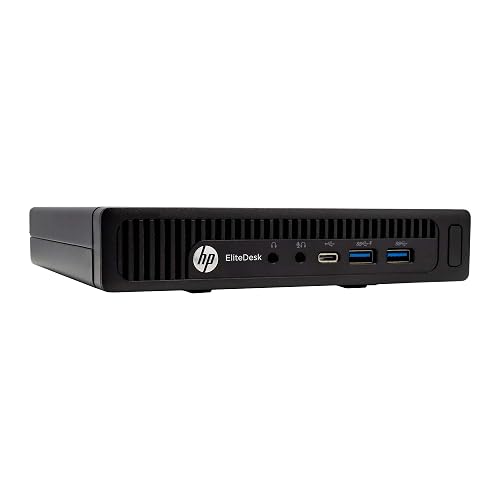
HP EliteDesk 800 G2 Desktop Mini Business PC

Dell OptiPlex 7050 Micro Computer
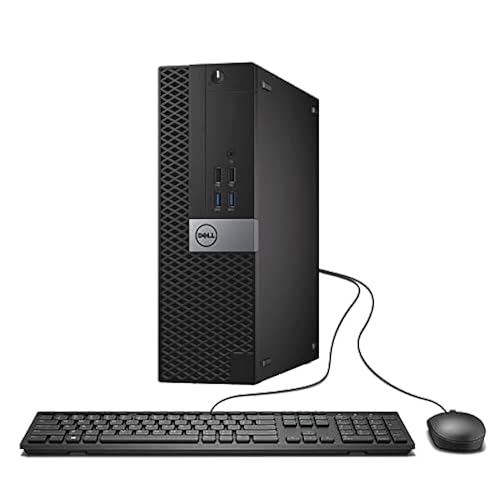
Dell Optiplex 7040 SFF Intel Core i5-6500
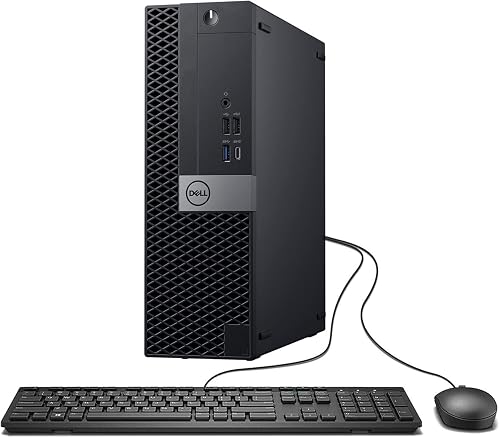
Dell Optiplex 7050 SFF Desktop PC i7-7700
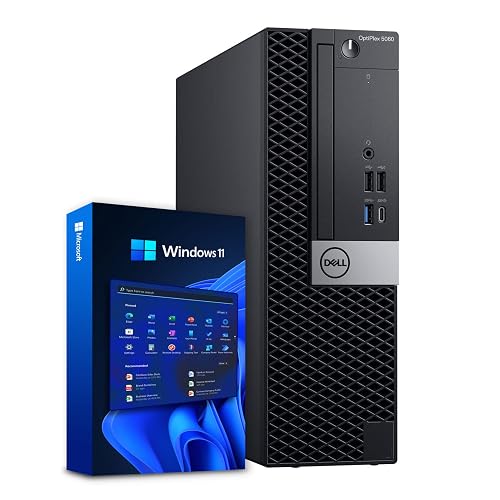
Dell Optiplex 5060 Desktop Computer i5-8500

Dell OptiPlex 7070 SFF Desktop Computer i7-9700
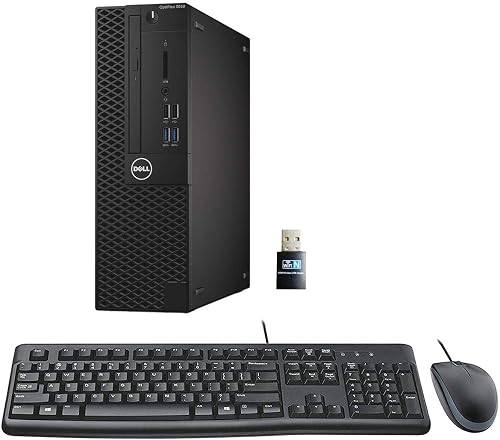
Dell Optiplex 3050 SFF Desktop Computer i5-6500
More Details On Our Top Picks
Desk space disappears quickly around a monitor, keyboard, and paperwork, so this mini EliteDesk makes sense for a tidy home office. Its Intel Core i5-6500T quad-core processor, 16GB of DDR4 memory, and 240GB SSD suit documents, browser work, video calls, and routine Windows tasks.
The SSD, a solid-state drive with no spinning disk, helps the system feel responsive during everyday loading. You get VGA and DisplayPort outputs, though the smaller drive leaves less room for large media libraries. For most students and office users, that trade-off keeps the setup straightforward.
Strong Points
- Mini desktop format leaves more room around your monitor.
- 16GB memory supports several office apps and browser tabs.
- DisplayPort and VGA cover newer and older monitors.
- The SSD avoids the slower feel associated with mechanical storage.
Things To Consider
- 240GB can feel tight for photos, games, or large video folders.
- Mini cases usually offer less internal upgrade space than SFF towers.
Key Specs
Who It Suits Best
You’ll appreciate this choice for a compact study desk, front-office station, or basic home workstation.
Consider Something Else When
Choose the Dell OptiPlex 7050 Micro Computer for a similarly small case with slightly more SSD space.
The Dell 7050 Micro follows the same small-footprint idea as the HP, but its 256GB SSD gives you a little more working room. Its i5-6500T processor and 16GB DDR4 memory fit email, spreadsheets, remote work, and light media use without demanding a large tower.
You may find the micro chassis especially useful behind a monitor or beneath a shallow desk shelf. The honest read is that compact hardware can make cleaning and access less convenient, yet the space savings are meaningful in a crowded office.
What We Like
- Micro form factor suits narrow desks and shared work areas.
- 256GB SSD provides modestly better file space than the HP.
- 16GB DDR4 is a sensible starting point for daily productivity.
Trade Offs
- The older quad-core platform is less suited to demanding creative workloads.
- Small enclosures can make dust removal and component access more involved.
- Large local media collections may outgrow the included drive.
At A Glance
Made For
This model fits remote workers and students who need a small, ready-to-use Windows desktop for routine tasks.
Not Your Match When
The Dell OptiPlex 7070 SFF Desktop Computer i7-9700 suits you better for heavier multitasking and larger applications.
For a desk that needs a little more physical room but still avoids a full tower, this SFF, meaning small form factor, sits between the micro models and larger desktops. The i5-6500 reaches up to 3.6GHz, while 16GB RAM and a 256GB SSD cover documents, browsing, and streaming.
WiFi reduces cable clutter, and the built-in DVD-RW drive gives you a useful path for older discs. Compared with the HP EliteDesk 800 G2 Desktop Mini Business PC, this Dell is less discreet but more convenient for physical media.
Highlights
- DVD-RW drive helps you access existing discs and archives.
- WiFi supports flexible placement away from the router.
Room For Improvement
- 256GB storage may require external space for extensive files.
- The SFF case takes more desk or shelf room than a micro computer.
- Older internal hardware may limit demanding software choices.
Technical Sheet
Right Fit For
You’ll get the most from this desktop in a home office that still relies on DVDs or a wireless network.
Look Elsewhere When
The Dell Optiplex 3050 SFF Desktop Computer i5-6500 is a better fit for you when display support matters more than the optical drive.
Large working files and busy browser sessions call for more headroom, and this 7050 SFF supplies it with 32GB DDR4 and a 1TB SSD. The Intel i7-7700 has four cores and reaches 3.60GHz, giving you a stronger fit for spreadsheets, multitasking, and office applications than the older i5 systems.
WiFi, Bluetooth, HDMI, and dual-monitor support make a multi-screen desk easier to arrange. Depending on your software, the four-core design may still feel dated for intensive rendering, but most productivity users should value the generous memory and storage first.
Standout Traits
- 32GB DDR4 gives you substantial room for simultaneous applications.
- 1TB SSD accommodates larger documents, photos, and installed programs.
- Dual-monitor support suits research, finance, and administrative work.
- WiFi and Bluetooth reduce cable dependence around your desk.
- SFF dimensions balance expansion potential with a manageable footprint.
Points To Note
- Four processor cores may be limiting for advanced editing workloads.
- Used desktop condition can vary, so inspect the listing details carefully.
Feature Snapshot
Best Suited To
You’re a strong match for this desktop when your work involves many applications, large folders, or two displays.
A Better Fit Elsewhere
The Dell OptiPlex 7070 SFF Desktop Computer i7-9700 is better suited to you for heavier CPU-focused work.
A newer six-core Intel i5-8500 gives the OptiPlex 5060 a useful middle position in this group. You get 16GB DDR4 for ordinary multitasking, plus a 500GB SSD and 1TB HDD, meaning a fast solid-state drive paired with a larger mechanical hard drive.
That split works well for a home office storing documents, photos, and media without placing everything on the quicker drive. WiFi and Bluetooth simplify setup, though the HDD adds moving parts and may feel less responsive than an all-SSD arrangement such as the 7050’s.
Upsides
- Six processor cores offer a useful step above the older quad-core choices.
- 500GB SSD keeps frequently used programs responsive.
- 1TB HDD gives you practical room for archives and media.
- WiFi and Bluetooth suit flexible home or office layouts.
Minor Gripes
- The mechanical HDD can be slower and noisier than solid-state storage.
- 16GB memory is adequate, though heavy multitasking may favor 32GB.
- Dual-drive systems benefit from organized file storage and periodic drive checks.
Quick Facts
Who Will Love This
You’ll find this layout useful for home administration, schoolwork, and office tasks involving both active files and archives.
Swap It Out When
The Dell Optiplex 7050 SFF Desktop PC i7-7700 suits you more when 32GB memory and an all-SSD setup matter.
Eight CPU cores make the OptiPlex 7070 the clear fit for demanding desktop multitasking in this lineup. Its i7-9700 reaches up to 4.70GHz, while 32GB DDR4 and a 1TB NVMe M.2 SSD give you fast application access and substantial workspace capacity.
NVMe is a high-speed storage interface designed for quick data transfers, so large programs and active files should feel well matched to this configuration. Five USB 3.1 ports, four USB 2.0 ports, two DisplayPorts, WiFi 6E, and the included wireless keyboard and mouse make it well suited to a busy office. The catch is a higher hardware tier than routine email and word processing requires.
Reasons To Buy
- Eight-core i7 processing gives you strong multitasking headroom.
- 32GB RAM supports large working sessions and many open applications.
- 1TB NVMe SSD combines speed with useful capacity.
- Two DisplayPorts support a dual-screen workspace.
- WiFi 6E and the wireless accessories simplify desk setup.
- Broad USB selection accommodates peripherals, drives, and accessories.
Honest Caveats
- You may not benefit from the extra CPU capacity during basic office work.
- Wireless accessories depend on keeping their connection setup organized.
Feature Rundown
Whose Shelf It Belongs On
You’re the right fit for this desktop when large spreadsheets, many applications, and dual-display office work fill your day.
Reach For A Different Pick When
The Dell Optiplex 5060 Desktop Computer i5-8500 is more suitable for you when dual-drive storage matters more than maximum processing capacity.
The Optiplex 3050 keeps the familiar SFF shape and pairs it with an i5-6500, 16GB DDR4, and a 256GB SSD. WiFi, DisplayPort, HDMI, and listed 4K support give you more display flexibility than the smaller HP, which matters for a two-screen study or administrative station.
For basic documents, browsing, and streaming, the specification balance is sensible. You may find the 256GB drive restrictive after installing large programs, and the older quad-core platform makes this a focused everyday desktop rather than a demanding workstation.
Bright Spots
- HDMI and DisplayPort make varied monitor setups easier.
- Listed 4K support benefits compatible high-resolution displays.
- WiFi helps you avoid a network cable across the room.
Small Caveats
- 256GB storage leaves limited room for large local libraries.
- The SFF case occupies more space than a micro desktop.
- Older processing hardware is less suitable for intensive editing.
- Refurbished condition can differ, so check the supplied configuration closely.
Core Details
Who Should Grab It
This Dell suits you for basic home or office computing with a flexible monitor arrangement and modest storage needs.
Where A Sibling Pick Shines
The HP EliteDesk 800 G2 Desktop Mini Business PC fits you better when the smallest possible desk footprint is your priority.
How To Choose The Right Cpu Computers
Start With Your Daily Workload
Your processor, often called the CPU, performs the calculations behind applications and multitasking. Quad-core chips suit email, documents, browsing, streaming, and basic administrative software, while six- and eight-core models give you more room for large spreadsheets, heavier applications, and simultaneous work.
The Dell OptiPlex 7070’s eight-core i7-9700 is a sensible step up for demanding office routines. Basic users can stay with the HP EliteDesk 800 G2 or Dell Optiplex 3050 without paying for capacity that sits unused.
Match Memory to Your Habits
RAM is short-term working memory for active programs. 16GB suits ordinary home and office use, but 32GB feels more comfortable with many browser tabs, large spreadsheets, communication software, and creative tools open together.
Storage affects both responsiveness and capacity. An SSD loads Windows and applications quickly, while an HDD offers more room at a slower pace. The Dell Optiplex 5060 combines both approaches, whereas the 7070 keeps its 1TB storage on a faster NVMe SSD.
Check the Case and Connections
A Micro or Mini computer works well behind a monitor, on a shallow shelf, or in a reception area. An SFF case takes more room but can offer easier access and a more flexible internal layout. Measure your desk area before choosing, especially alongside a monitor stand and cable bundle.
Port selection deserves equal attention. HDMI and DisplayPort help with modern monitors, VGA supports older screens, and WiFi reduces network cabling. Dual-display users should confirm that the chosen connections match both monitors.
Consider Refurbished Ownership
Refurbished business desktops can make practical sense, but you should inspect the included accessories, condition notes, operating system, and exact storage configuration on the listing. Keep ventilation openings clear, remove dust with suitable care, and organize cables so the compact case remains accessible.
Things Worth Knowing First
Mistakes Worth Dodging
A common mistake is choosing storage by capacity alone. A 1TB HDD gives you room, but a 240GB or 256GB SSD may feel quicker for active applications. You should also check display outputs before assuming two monitors will connect easily.
Another slip is overlooking case size. Micro and Mini models save space, while SFF desktops provide a larger physical enclosure. Match the form factor to your desk, maintenance habits, and accessory layout.
Where The Extra Money Goes
Higher-tier Cpu Computers generally add newer processor generations, more cores, larger memory capacity, faster NVMe storage, or richer connectivity. Those upgrades matter during large spreadsheet work, heavy multitasking, and frequent file transfers.
Routine email and document work rarely needs the highest specification here. Paying more makes sense for professional workloads, extensive local files, dual displays, and longer ownership expectations.
Final Verdict
You can keep your choice straightforward: select the HP EliteDesk 800 G2 for the smallest setup, the Dell Optiplex 5060 for mixed storage, or the Dell OptiPlex 7070 for serious multitasking. The Dell OptiPlex 7050 Micro remains a tidy middle option, while the 7040 and 3050 suit basic work with useful legacy or display connections. Check the case dimensions, ports, storage layout, and included accessories against your desk and daily software. A well-matched refurbished desktop can give you capable everyday computing without unnecessary bulk.
