
Finding a capable gaming desktop around the $1000 mark means balancing frame rates, storage speed, and future upgradeability without overspending. Shoppers entering this segment usually want a machine that handles modern titles at 1080p or 1440p straight out of the box, avoiding the hassle of sourcing individual parts. The challenge is spotting which prebuilt systems actually deliver genuine value versus those that cut corners on the power supply or motherboard. This guide compares six options to help you match the right configuration to your specific play style and multitasking needs.
The Shortlist At A Glance
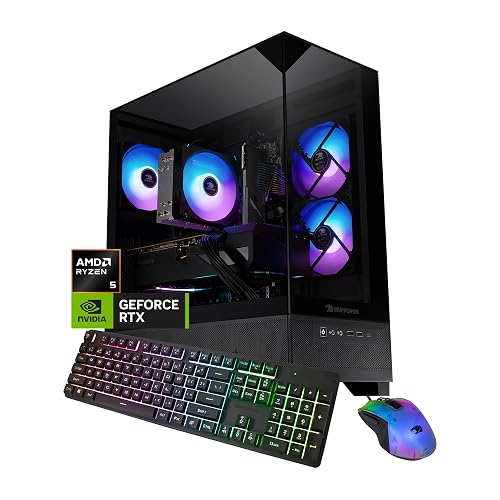
iBUYPOWER Element SE Gaming PC Ryzen 5 8400F RTX 3050
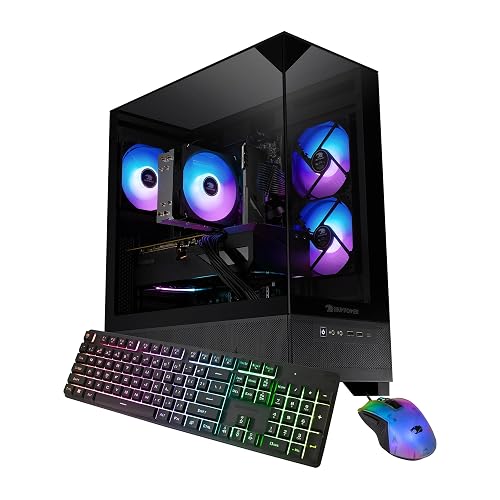
iBUYPOWER Element SE Gaming PC Ryzen 5 5500 RX 6500XT

Alienware Aurora Gaming Desktop Intel Core Ultra 7 265KF
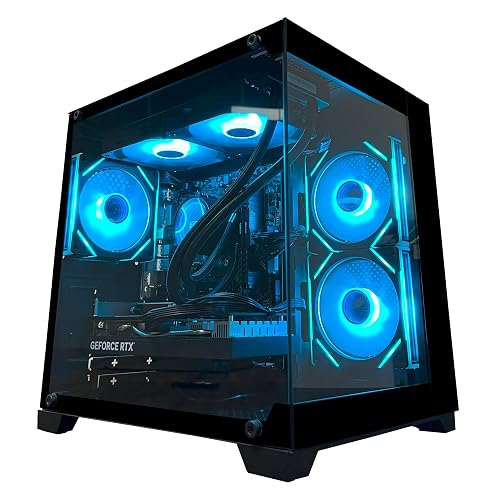
YAWYORE Gaming PC Ryzen 7 5700X RTX 5060

KOTIN Prebuilt Gaming PC RTX 5070 Ryzen 7 9700X

Evounic Gaming Desktop PC 12-Core RTX 4060
More Details On Our Top Picks
Starting the list with a current-generation footprint, this iBUYPOWER configuration pairs AMD’s Ryzen 5 8400F processor with NVIDIA’s RTX 3050 graphics card. That combination targets the 1080p gaming crowd directly, delivering playable frame rates in popular esports and mid-tier titles. The inclusion of 16GB of DDR5 memory (the latest consumer RAM standard, offering roughly 50% more bandwidth than DDR4) keeps multitasking smooth during streaming or browser-heavy sessions.
A 1TB NVMe SSD (a compact storage drive that reads data significantly faster than older spinning hard drives) provides ample room for a substantial game library. You also get a bundled keyboard and mouse, making it a genuine plug-and-play option. Compared to the older Ryzen 5 5500 build later on this list, the newer DDR5 platform here gives you a clearer path for future component upgrades.
Strong Points
- Current-gen DDR5 memory offers a tangible speed boost over older DDR4 systems.
- 1TB NVMe storage holds several large modern games without needing immediate expansion.
- Bundled gaming keyboard and mouse save you from buying separate peripherals right away.
- Windows 11 Home comes pre-installed and ready for immediate setup.
Things To Consider
- The RTX 3050 6GB GPU will struggle with maximum graphics settings in the latest AAA releases.
- Prebuilt cases often use proprietary layouts that can complicate future motherboard swaps.
Who It Suits Best
First-time desktop gamers moving up from a laptop who want a balanced, ready-to-go setup without building it themselves.
Where Another Pick Suits Better
Shoppers prioritizing raw graphical horsepower over a newer CPU platform should look at the YAWYORE Gaming PC Ryzen 7 5700X RTX 5060 for its stronger frame-pushing capability.
Dropping the budget requirement down a notch brings you to this second iBUYPOWER Element SE build. It shifts to AMD’s slightly older Ryzen 5 5500 processor and pairs it with the Radeon RX 6500 XT graphics card. This configuration clearly targets the budget-conscious entry tier, offering enough horsepower for older titles or competitive games running at reduced settings.
The memory steps down to 16GB of DDR4 at 3200MHz, matching the older processor’s platform. Storage is also halved to a 512GB NVMe SSD, which fills up quickly if you play large modern releases. The honest read here is that you are trading performance for a lower entry cost compared to the Ryzen 5 8400F model.
Highlights
- Lower cost of entry makes desktop gaming accessible for tighter budgets.
- 512GB NVMe SSD still delivers fast boot and load times for your core applications.
- Included keyboard and mouse complete the starter package out of the box.
Worth Noting
- The RX 6500 XT 4GB struggles with demanding modern AAA titles at high settings.
- 512GB storage fills up fast, often requiring an external drive or internal upgrade within months.
- DDR4 memory places you on a dead-end platform with limited future CPU upgrade potential.
Made For
Casual gamers or students who play lighter titles and need a functional desktop for everyday computing on a strict budget.
Skip It When
Anyone wanting to play modern releases at 1440p should skip this and grab the KOTIN Prebuilt Gaming PC RTX 5070 Ryzen 7 9700X instead.
Alienware’s Aurora line takes a distinctly different approach from the budget builds, focusing on acoustic management and chassis design. The matte “basalt black” exterior houses an Intel Core Ultra 7 265KF processor, a modern architecture built to handle heavy multitasking and demanding creative workloads alongside gaming. The chassis specifically redirects airflow to reduce fan noise during intense sessions.
This system targets shoppers who want a refined, quiet machine sitting on their desk rather than a loud, flashy tower. Customizable AlienFX lighting zones add aesthetic personalization without overwhelming the minimal design. The trade-off for this premium chassis and acoustic tuning is a higher overall cost relative to the raw component specs.
Upsides
- Intel Core Ultra 7 processor delivers strong single-core speed for high-refresh-rate gaming.
- Acoustic-focused chassis design keeps fan noise low during long gaming sessions.
- Customizable lighting zones provide visual flair without dominating the room.
- Premium internal layout aids consistent airflow under sustained heavy loads.
- Windows 11 Home comes pre-installed for immediate use.
Room For Improvement
- You pay a notable premium for the brand name and chassis design over raw component value.
- Proprietary motherboard layouts limit future DIY component upgrades compared to standard cases.
Quick Facts
Right Fit For
Professionals and enthusiasts who want a quiet, aesthetically refined desktop that handles both work and play without sounding like a jet engine.
Look Elsewhere When
Shoppers wanting to maximize raw graphical performance per dollar should reach for the KOTIN Prebuilt Gaming PC RTX 5070 Ryzen 7 9700X instead.
This YAWYORE build steps up the internal hardware significantly by introducing the GeForce RTX 5060 with 8GB of GDDR7 memory. Paired with an 8-core Ryzen 7 5700X, this configuration targets 1080p and entry-level 1440p gaming with modern rendering features. The GPU supports DLSS 4 multi frame generation, a technology that creates intermediate frames using AI to smooth out motion and boost frame rates in supported titles.
It also includes 32GB of DDR4 memory across two sticks, giving you headroom for heavy browser usage alongside gaming. The MSI B550M-A PRO motherboard provides a stable, reliable base for the system. An 80 Plus Bronze certified 650W power supply delivers stable, efficient power delivery for daily operation.
Bright Spots
- RTX 5060 GDDR7 graphics bring next-generation frame generation tech to a value tier.
- 32GB of RAM handles heavy multitasking and browser tabs without stuttering.
- MSI B550M-A PRO motherboard offers a reliable, well-documented base for stability.
- ARGB fans provide customizable lighting straight from the factory.
Trade Offs
- DDR4 memory places you on an older platform, limiting future CPU upgrade paths.
- The GPU brand may vary depending on supplier availability, which affects port layout and cooling design.
Feature Snapshot
Who Will Love This
Upgraders coming from older systems who want next-gen GPU features and ample memory without paying top-tier prices.
A Better Fit Elsewhere
Those wanting the newest DDR5 memory standard should consider the iBUYPOWER Element SE Gaming PC Ryzen 5 8400F RTX 3050 for its modern platform foundation.
Pushing toward the top of this segment, the KOTIN prebuilt pairs a GeForce RTX 5070 12GB with AMD’s current-gen Ryzen 7 9700X. That combination targets smooth 1440p and entry-level 4K gameplay, giving you headroom for modern AAA titles. The system includes 32GB of DDR5 6000MHz memory, the current standard for high-end gaming, ensuring rapid data access for the processor.
A standout physical feature is the integrated 11.3-inch smart display, which shows real-time CPU and GPU temperatures and usage stats while you play. Cooling is handled by a 360mm AIO (All-in-One) liquid cooler, a system that uses a pump and radiator to dissipate heat more effectively than standard fans. An 850W 80 Plus Gold power supply provides stable, efficient power with headroom for future component upgrades.
Reasons To Buy
- RTX 5070 12GB GDDR7 handles demanding modern titles at 1440p resolution.
- 360mm liquid cooler keeps the Ryzen 7 CPU frosty during extended gaming sessions.
- Integrated 11.3-inch smart screen adds a functional, distinctive monitoring tool.
- WiFi 7 support provides the latest wireless standard for low-latency online gaming.
- 850W 80 Plus Gold PSU leaves plenty of headroom for future GPU upgrades.
Honest Caveats
- The 11.3-inch smart display adds complexity and is an extra component that could eventually malfunction.
- A 360mm liquid cooler requires a case with adequate mounting space, limiting future case swaps.
Spec Overview
Who Should Grab It
Enthusiast gamers and streamers who want a high-end 1440p experience with top-tier cooling and modern connectivity right out of the box.
Consider Something Else When
Shoppers who prioritize a quiet, minimal aesthetic over raw performance should look at the Alienware Aurora Gaming Desktop Intel Core Ultra 7 265KF instead.
Closing the list with a focus on sheer volume, the Evounic desktop packs a 12-core processor alongside an RTX 4060 GDDR6 graphics card. The standout spec here is the massive 64GB of RAM, which goes far beyond typical gaming needs and targets heavy multitaskers. A dual-drive setup pairs a 512GB NVMe SSD for the operating system with a 1TB HDD (a traditional hard drive) for bulk game storage.
The case features seven ARGB fans and a liquid-cooled 650W power supply to manage thermals. This configuration leans into high memory capacity and storage flexibility, though the HDD runs considerably slower than the NVMe drive for game loads.
Plus Points
- 64GB of RAM handles extreme multitasking, streaming, and memory-heavy applications effortlessly.
- Dual storage setup separates fast OS booting from bulk file storage.
- Seven ARGB fans provide aggressive airflow and customizable lighting.
- WiFi 6 and Bluetooth 5.4 offer modern wireless connectivity options.
Small Caveats
- The 1TB HDD loads games significantly slower than the NVMe SSD.
- 64GB of RAM is overkill for gaming alone, adding cost that could have gone to a better GPU.
- A 650W power supply running seven fans and liquid cooling leaves minimal headroom for future upgrades.
Built With In Mind
Heavy multitaskers who stream, edit video, and game simultaneously while needing massive memory and bulk storage capacity.
Swap It Out When
Those wanting a balanced GPU for pure 1440p gaming should swap this out for the YAWYORE Gaming PC Ryzen 7 5700X RTX 5060.
What Matters Most Before Choosing 1000 Gaming Computers
GPU and CPU Balance
The graphics card dictates your frame rates and resolution ceiling. Around the $1000 mark, you typically find cards ranging from the RTX 3050 to the RTX 5070. A stronger GPU matters more for gaming than a top-tier CPU, so prioritize graphical horsepower unless you stream or render video heavily.
Memory Generation and Capacity
DDR5 memory offers significantly more bandwidth than DDR4, keeping your system responsive under heavy loads. Sixteen gigabytes remains the functional minimum for modern gaming, though 32GB provides comfortable headroom for multitasking.
Storage Type and Speed
NVMe SSDs load games and applications in seconds compared to older HDDs. Prioritize a system with at least a 1TB NVMe drive, as modern game installs easily exceed 100GB each.
Power Supply and Thermals
An 80 Plus Bronze or Gold certified power supply ensures stable, efficient power delivery. Adequate cooling, whether air or liquid, keeps components from thermal throttling during extended sessions.
Things Worth Knowing First
Traps First Timers Fall Into
Shoppers often fixate on RAM capacity while ignoring the GPU. A system with 64GB of RAM and an entry-level graphics card will still struggle to run modern titles smoothly. Another common misstep is overlooking storage type, assuming all drives perform the same. Loading a game from a 1TB HDD takes significantly longer than from an NVMe SSD, turning every launch into a wait.
The Upgrade Payoff
Higher-tier models cost more because they include current-generation platforms, robust power supplies, and advanced cooling. Spending up gets you a system that remains relevant longer and accepts future component upgrades without requiring a full rebuild. The extra investment pays off when a stronger power supply and newer motherboard let you drop in a faster graphics card two years down the line.
Frequently Asked Questions
Is a prebuilt gaming PC worth it over building my own?
Prebuilts save you the time and hassle of sourcing parts, assembling components, and troubleshooting boot issues. You trade some flexibility and potential cost savings for the convenience of a plug-and-play system with a unified support channel.
What graphics card do I need for 1440p gaming?
Smooth 1440p gaming generally requires a mid-to-high-tier GPU, such as the RTX 5070 or better. Entry-level cards like the RTX 3050 or RX 6500 XT are better suited for 1080p gaming on reduced settings.
How much RAM is enough for modern gaming?
Sixteen gigabytes handles most current games comfortably without background applications running. Thirty-two gigabytes provides headroom for multitasking, streaming, and memory-heavy creative applications.
Does DDR5 memory make a noticeable difference?
DDR5 offers higher bandwidth and faster data transfer rates than DDR4, which helps overall system responsiveness. The real-world gaming difference is often subtle, but DDR5 places you on a newer platform with better future upgrade potential.
Can I upgrade a prebuilt gaming PC later?
Most prebuilts allow GPU, storage, and RAM upgrades, though proprietary cases and motherboards can limit your options. Always check the power supply wattage and physical clearance inside the case before buying new components.
The Takeaway
Finding the right gaming desktop means matching your specific play style and multitasking habits to the correct balance of components. You have options ranging from budget-friendly 1080p starters to 1440p-ready powerhouses with liquid cooling. Prioritize the graphics card for pure gaming performance, or lean into memory capacity for streaming and creative work. Whichever direction you choose, a well-balanced prebuilt keeps you in the game without the hassle of building it yourself.
