
Switching between a laptop and tablet used to mean carrying two devices. A single convertible solves that, folding flat for touch-based tasks and propping up for traditional typing work. Students, mobile professionals, and anyone short on desk space benefit most from this hybrid form factor. The challenge is sorting through options that range from cloud-centric ChromeOS models to full Windows machines with enterprise-grade specs. This roundup covers five distinct picks across those tiers.
The Shortlist At A Glance
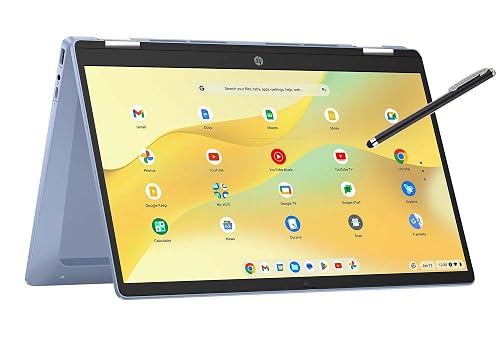
HP 14 2-in-1 Chromebook (14b-Renewed)
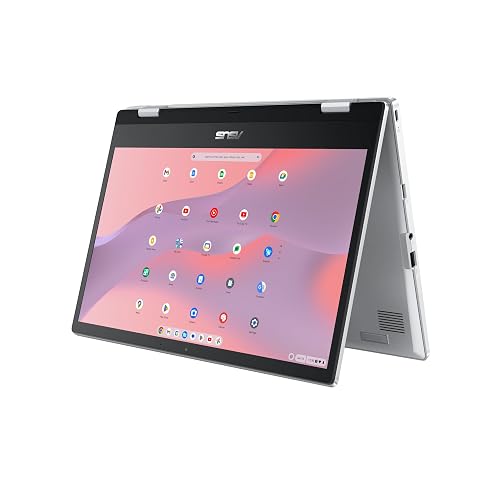
ASUS Chromebook Flip CX1 (CX1400FKA-AS88FT)
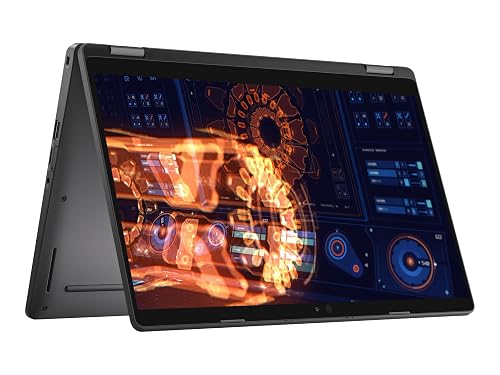
Dell Latitude 5300 2-in-1 (Renewed)

Dell Latitude 7420 2-in-1 Business Laptop (Renewed)
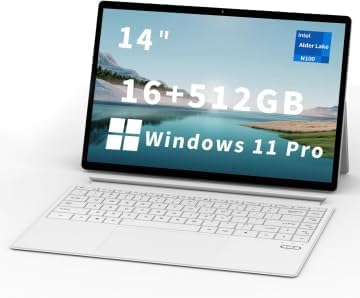
FUNYET 14 Inch 2 in 1 Touchscreen Laptop
More Details On Our Top Picks
A renewed Chromebook makes sense for anyone whose computing lives almost entirely inside a browser. The 14-inch FHD panel on this HP gives you enough real estate for split-screen docs and a video call simultaneously. With 4GB of RAM and 64GB of storage, the spec sheet is modest, but ChromeOS is lightweight enough that those numbers feel less constraining than they would on Windows. You get a 360-degree hinge for tablet or tent mode, plus Android phone tethering built in for those moments when campus or cafe Wi-Fi drops out.
For note-takers and casual web browsing, the configuration holds up well. Heavy multitaskers pushing double-digit Chrome tabs may notice some lag, a reality of the memory ceiling rather than the processor. The renewed status means someone else owned it first, so minor cosmetic wear is possible even though full functionality is expected. An included protection plan covers accidental drops and spills from day one, which adds genuine peace of mind for a student backpack companion.
Plus Points
- FHD resolution on a budget convertible is uncommon at this tier
- ChromeOS keeps boot times fast and requires minimal background maintenance
- Bundled accidental damage plan covers spills and cracked screens from purchase day
- Instant tethering pairs with an Android phone for quick cellular backup
Worth Noting
- 4GB RAM creates a ceiling for anyone running more than a handful of tabs
- 64GB of internal storage fills quickly with offline files and Android apps
- Renewed condition means cosmetic blemishes are possible despite full functionality
Quick Facts
Who It Suits Best
Students and casual users who live inside ChromeOS and need an affordable, portable convertible for web-based coursework and streaming.
A Better Fit Elsewhere
Shoppers needing more memory for multitasking should consider the ASUS Chromebook Flip CX1, which doubles the RAM to 8GB for smoother tab-heavy sessions.
Stepping up from the HP, this ASUS model addresses the two biggest bottlenecks: memory and storage. The Flip CX1 pairs 8GB of RAM with a 128GB eMMC drive, giving ChromeOS considerably more breathing room for Android apps and offline files. ASUS uses a NanoEdge design on the 14-inch FHD touchscreen, meaning thinner bezels that shrink the overall footprint compared to standard 14-inch convertibles. The 360-degree hinge feels sturdy for daily transitions between laptop and tablet modes.
Intel’s Celeron N4500 handles document editing, video streaming, and web browsing without complaint. Battery life is notable here, with ASUS targeting up to 11 hours on a charge for all-day campus or office use. The Transparent Silver finish resists fingerprints better than darker alternatives. An included accidental damage plan covers drops and spills from the purchase date, mirroring the protection found on the HP pick but applied to a more capable machine.
Highlights
- 8GB RAM keeps ChromeOS responsive with demanding tab counts
- 128GB storage doubles the HP’s capacity for offline files and apps
- NanoEdge bezels create a more compact chassis for the same screen size
- Up to 11 hours of battery life covers a full workday away from an outlet
- Accidental damage coverage is included from day one
Trade Offs
- Celeron N4500 lacks the horsepower for local photo or video editing
- eMMC storage is slower than a true SSD under heavy file operations
- ChromeOS limits compatibility with traditional Windows or Mac software
Right Fit For
Commuters and students wanting a lightweight, all-day ChromeOS convertible with enough memory for serious browser multitasking.
Look Elsewhere When
Anyone needing full Windows desktop software should skip this and grab the Dell Latitude 5300, which runs Windows 11 Pro with 16GB of RAM.
Here is where the conversation shifts from ChromeOS to a full Windows 11 Pro machine. The Latitude 5300 is a business-class convertible, which means a different tier of build quality and connectivity compared to consumer Chromebooks. An 8th-generation Intel Core i5-8365U processor drives this unit, backed by 16GB of DDR4 RAM and a 256GB SSD. That combination handles spreadsheets, multiple browser windows, and video calls simultaneously without the memory pressure you feel on the HP. The 13.3-inch FHD touchscreen is slightly smaller than the 14-inch panels on the Chromebooks but offers the same resolution.
Port selection is where the Latitude pulls ahead. You get USB Type-C, HDMI, and a backlit keyboard that makes evening work easier. Renewed business laptops commonly show minor wear on the chassis or keycaps, and the 8th-gen processor is a few generations behind current Intel silicon. For office work and general productivity, the age barely matters. The included accidental damage plan adds a safety net for daily commuting wear.
Reasons To Buy
- 16GB RAM handles heavy Windows multitasking without slowdown
- True SSD storage delivers faster boot and file transfer speeds than eMMC
- USB Type-C and HDMI ports cover modern and legacy display needs
- Backlit keyboard supports working in dim environments
- Business-class chassis typically survives daily travel better than consumer plastic
Points To Note
- 8th-gen processor is older and less efficient than current Intel tiers
- 13.3-inch screen is marginally smaller than the 14-inch Chromebook displays
- Renewed units may carry visible cosmetic wear from prior office use
Feature Snapshot
Who Will Love This
Office workers and students needing full Windows compatibility with enough memory for serious multitasking on a budget.
Reach For A Different Pick When
Those wanting a newer processor and double the storage should look at the Dell Latitude 7420, which steps up to an 11th-gen chip and a 512GB SSD.
Moving from the 5300 to the 7420 brings a generational leap in processing power. The 11th-gen Intel Core i5-1145G7 runs at a 2.6GHz base clock and boosts to 4.4GHz, delivering noticeably faster application launches and smoother multitasking than the 8th-gen chip in the 5300. Storage doubles to a 512GB SSD, giving you ample room for project files, media libraries, and installed software without the constant juggling a 256GB drive requires. The 14-inch FHD touchscreen returns the display size you get on the Chromebooks, pairing full Windows capability with a comfortable viewing area.
This is a business-class machine, so the chassis is built for enterprise durability standards. The convertible hinge holds the tablet orientation firmly, and the unit accommodates any work style from handheld tablet use to docked desktop mode. Renewed business laptops in this tier typically show less wear than consumer-grade refurbs, though minor scuffs remain possible. The bundled accidental damage plan covers drops and cracked screens from the purchase date.
Standout Traits
- 11th-gen processor delivers a tangible speed bump over the 5300’s 8th-gen chip
- 512GB SSD stores large project files without external drive dependency
- Enterprise build quality withstands daily travel and docking station cycles
- Windows 11 Pro includes advanced security features for business environments
Softer Spots
- Renewed status means prior ownership and possible cosmetic marks
- Heavier than the FUNYET 2-in-1, making it less ideal as a pure tablet
Built With In Mind
Business professionals and power users who need a fast Windows convertible with generous storage and enterprise-grade durability.
Swap It Out When
Shoppers prioritizing a thin, lightweight tablet experience over raw Windows power should reach for the FUNYET 2 in 1, which weighs roughly two pounds and measures under half an inch thick.
Unlike the renewed Dell units above, this FUNYET model arrives new and targets the thin-tablet-hybrid niche. The 12th-gen Intel N100 processor is an efficiency-focused chip designed for everyday computing rather than heavy rendering. Paired with 16GB of DDR5 RAM running at 6400MHz, the memory is faster than the DDR4 in the Latitude 5300, which helps browser responsiveness. The 512GB SSD matches the Latitude 7420’s storage capacity, and the 1920×1200 display offers slightly more vertical pixels than the standard 1080p panels on the other picks.
At roughly two pounds and 0.4 inches thick, this is the lightest and thinnest option in the lineup. The 100% sRGB color coverage gives accurate tones for casual photo viewing. Battery life targets over 10 hours with up to 8 hours of video playback. Built-in Wi-Fi 6 and Bluetooth 5.2 cover modern wireless connectivity. Four HiFi speakers and an integrated microphone handle video calls without a headset, though audio quality from quad speakers in a thin chassis rarely matches a dedicated external setup.
Bright Spots
- Two-pound weight makes it the most portable pick for pure tablet use
- DDR5 RAM at 6400MHz delivers faster memory bandwidth than the Dell DDR4 options
- 1920×1200 display adds vertical screen space for documents and browsing
- New condition avoids the cosmetic wear variables of renewed units
- Wi-Fi 6 and Bluetooth 5.2 provide current-generation wireless connectivity
Small Caveats
- Intel N100 is an entry-level chip, not suited for demanding software
- Quad speakers in a thin chassis lack the depth of dedicated audio hardware
- Brand lacks the established service network of Dell or HP for long-term support
Who Should Grab It
Casual home users and students wanting a brand-new, ultra-thin Windows convertible for browsing, streaming, and light productivity.
Where A Sibling Pick Shines
Those needing enterprise durability and a more powerful processor should grab the Dell Latitude 7420, which trades portability for business-class build and an 11th-gen Core i5.
What Matters Most Before Choosing 2 In 1 Computers
Operating System and Software Compatibility
Your first decision is ChromeOS versus Windows 11. ChromeOS is fast, secure, and lightweight, running Android apps and web tools but blocking traditional desktop software. Windows 11 Pro supports the full range of desktop applications, from Adobe Creative Cloud to specialized business tools. Anyone relying on specific Windows-only programs for work or school should eliminate ChromeOS options immediately. Those whose workflow lives in a browser save money and gain battery life by choosing ChromeOS.
Memory and Storage Tiers
RAM determines how many applications and browser tabs stay open before the system slows. 4GB is the minimum for basic ChromeOS use, 8GB supports comfortable multitasking, and 16GB handles heavy Windows workloads. Storage type matters as much as capacity. eMMC flash is common in Chromebooks and budget Windows machines, offering decent speed but lagging behind a true SSD under heavy file operations. SSD storage, found in the Dell Latitude units, boots faster and transfers files more quickly.
Processor Generation and Class
Intel Celeron and N-series chips are efficiency processors built for web browsing and document editing. Core i5 processors from the 8th generation onward handle multitasking, larger spreadsheets, and light creative work. Newer generations improve power efficiency and single-core speed, so an 11th-gen chip outperforms an 8th-gen model at similar clock speeds. Match the processor class to the heaviest software in the daily routine.
Before You Click Buy
Traps First Timers Fall Into
Confusing eMMC storage with a true SSD is the most common slip-up. Both are flash memory, but eMMC is significantly slower under heavy file operations and large app installs. Another mistake is assuming all renewed units look new. Business-class refurbs like the Dell Latitudes typically function perfectly but may carry scuffs or worn keycaps from prior office use. Check the seller’s grading standard before committing.
The Upgrade Payoff
Spending more in this category buys faster processors, more RAM, and genuine SSD storage rather than eMMC. The jump from 8GB to 16GB of RAM keeps a Windows machine responsive for years longer as browser tabs and app memory demands grow. Moving from a Celeron to a Core i5, as seen between the ASUS and the Dell 5300, transforms the experience from adequate to genuinely smooth. Paying for the 7420’s 11th-gen chip and 512GB SSD is worth it for anyone whose daily work involves large files and constant multitasking.
Frequently Asked Questions
What is a 2 in 1 computer?
A 2 in 1 computer is a convertible device that functions as both a traditional laptop and a touchscreen tablet. Most use a 360-degree hinge to fold the keyboard behind the screen, though some use a detachable keyboard design. This hybrid form factor suits users who want typing productivity and touch-based interaction in a single device.
Is 4GB of RAM enough for a Chromebook?
For basic web browsing, email, and a handful of Android apps, 4GB of RAM is sufficient on ChromeOS. Heavier multitasking with double-digit browser tabs or multiple Android apps running simultaneously will push that memory to its limit. Stepping up to 8GB, as the ASUS Flip CX1 offers, provides a more comfortable buffer for demanding sessions.
What does renewed mean for these laptops?
Renewed units are pre-owned devices that have been inspected, cleaned, and restored to full working order by a refurbisher. They may show minor cosmetic wear but should function like new. The included accidental damage plans on these picks cover drops, spills, and cracked screens from the purchase date, adding protection beyond the standard functionality guarantee.
Can these 2 in 1 computers run Windows software?
The Dell Latitude 5300, Dell Latitude 7420, and FUNYET model all run Windows 11 Pro and support standard desktop applications. The HP and ASUS Chromebooks run ChromeOS, which does not support traditional Windows software. Those needing specific Windows programs should choose one of the Dell or FUNYET options.
How does a 360-degree hinge work?
A 360-degree hinge rotates the screen fully backward, folding the keyboard flat against the back of the display to create a tablet shape. This mechanism allows four primary modes: standard laptop, tent mode for presentations, stand mode for media viewing, and full tablet mode. The hinge hardware must be sturdy enough to hold the screen at any angle without wobble.
Closing Thoughts
Finding the right 2 in 1 computer comes down to matching the operating system, processor, and memory to a daily routine. ChromeOS options like the HP and ASUS suit browser-based workflows with minimal maintenance. The Dell Latitudes deliver Windows power for business multitasking, while the FUNYET fills the ultra-portable niche for casual users. Pick the tier that fits the heaviest task in the weekly schedule, and the rest follows naturally.
