
1080p Oled Monitors make sense for you when motion clarity, deep contrast, and desk-friendly sizing matter more than chasing ever-larger panels. This shortlist mixes true 1080p options with higher-resolution OLED choices, because the real decision often comes down to panel behavior, refresh rate, and where you sit. You’ll also see a portable entry for travel setups, since that matters for second-screen work and console carry-on use.
Quick Look At The Shortlist

ASUS ROG XG27AQDMG 27 Inch 1440p 240Hz Glossy OLED Gaming Monitor

LG 24G411A-B 24-inch Ultragear Full HD IPS Gaming Monitor

LG 27GX704A-B 27-inch Ultragear QHD OLED Gaming Monitor 240Hz
Samsung Odyssey OLED G5 (G50SF) 27″ QD-OLED Gaming Monitor

Dell SE2726HG 27-inch FHD 240Hz Gaming Monitor
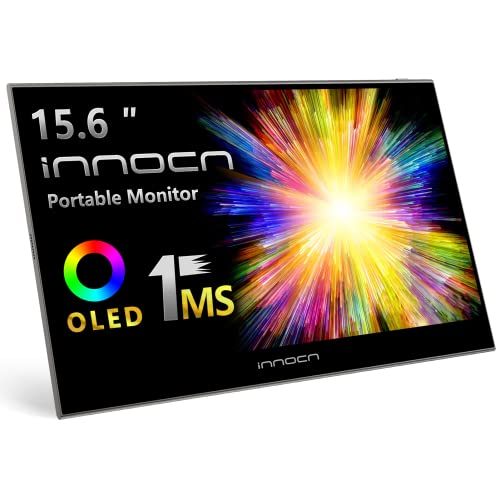
INNOCN 15.6" OLED Portable Monitor Full HD 1080P

AOC Q27GAZD 27" QHD 240Hz QD OLED Gaming Monitor
More Details On Our Top Picks
For fast-paced play on a desk setup, this ASUS leans hard into motion clarity, with a 240Hz panel and 0.03ms response time that suit twitch-heavy games. The glossy OLED finish gives it a different look from the matte, IPS-style alternatives in this list, and the custom heatsink plus uniform brightness support points to a panel built for steadier use across long sessions.
You also get G-SYNC compatibility and 99% DCI-P3 coverage, which matters when you want smoother frame matching and richer color range in the same screen. The honest trade-off is that a glossy surface can reflect more room light, so it fits best in a controlled gaming space rather than a bright office corner.
What We Like
- 240Hz refresh rate keeps movement crisp in shooters and racing games.
- 0.03ms response helps reduce smear during quick camera pans.
- Custom heatsink adds a practical thermal buffer for long use.
- Uniform brightness support helps the image feel steadier across the panel.
- 99% DCI-P3 coverage gives you wide color range for games and media.
Points To Note
- The glossy finish can catch reflections in sunlit rooms.
- 1440p is sharper than 1080p, but it asks more from your graphics card.
- The feature set skews heavily toward gaming rather than office use.
Feature Snapshot
Who Will Love This
Competitive PC gamers who want an OLED panel with a glossy look and quick motion response will get the most from this ASUS.
Swap It Out When
LG 27GX704A-B 27-inch Ultragear QHD OLED Gaming Monitor 240Hz suits you better when you want a similar speed profile with a more understated presentation.
This LG is the clearest fit for you when 1080p is the actual target, not a compromise. The 24-inch size keeps pixel density sensible at Full HD, and the slim stand makes it easier to slide into a small desk without feeling crowded, which is useful in dorms, spare rooms, or compact battlestations.
Its IPS panel, 144Hz overclocked refresh, 1ms motion blur reduction, and adaptive sync support give it a clean, uncomplicated gaming brief. The trade-off is obvious, though, since it lacks OLED contrast and the deep blacks that separate the pricier picks above it.
Strong Points
- 1080p resolution fits well on a 24-inch screen.
- 144Hz overclocked refresh keeps gameplay smooth for everyday competitive use.
- IPS viewing angles help the image stay consistent from off-center seating.
- HDR10, G-SYNC compatibility, and FreeSync broaden console and PC flexibility.
Areas To Watch
- IPS contrast stays flatter than OLED in dark game scenes.
- 24 inches feels compact for multitasking across many windows.
- The slim stand is practical, but it leaves less room for desk accessories underneath.
Core Details
Made For
Entry-level PC and console gaming setups with limited desk depth fit this LG especially well.
A Better Fit Elsewhere
Dell SE2726HG 27-inch FHD 240Hz Gaming Monitor suits you better when you want a larger panel with a faster refresh ceiling for a broader daily mix.
Compared with the ASUS glossy model, this LG pushes the same fast-panel idea into a slightly more reference-style gaming monitor package. You get QHD resolution, 240Hz speed, 0.03ms response, HDMI 2.1, and DisplayPort, so the feature mix fits both high-end PC rigs and current consoles in a clean, direct way.
VESA DisplayHDR True Black 400 is the standout line here, since it signals a stronger dark-scene presentation than standard HDR wording usually suggests. The trade-off is that a 27-inch QHD OLED asks for a stronger graphics card than the 24-inch 1080p LG, so it makes more sense for a setup that already has headroom.
Upsides
- QHD resolution gives you more workspace than 1080p.
- 240Hz refresh suits high-speed gaming and fast camera movement.
- 0.03ms response supports clean transitions in rapid action scenes.
- HDMI 2.1 makes it a sensible match for newer consoles.
- True Black 400 certification points to strong dark-room image depth.
Minor Gripes
- The higher resolution raises GPU demands.
- OLED care habits matter more than they do with IPS panels.
- Its strengths are tuned more for gaming than for broad office work.
Details At A Glance
Best Suited To
Serious PC gamers who want OLED contrast without giving up a large, sharp desktop view will appreciate this LG most.
Another Choice May Suit
LG 24G411A-B 24-inch Ultragear Full HD IPS Gaming Monitor fits you better when lower system demands and a tighter footprint matter more than contrast depth.
Samsung’s G50SF takes a slightly different route from the two LG OLED choices, leaning on QD-OLED for a vivid, modern presentation. The 180Hz refresh rate is lower than the 240Hz panels above, but it still sits well above the pace most desktops need, and the 0.03ms GtG figure keeps it firmly in fast-gaming territory.
The practical upside is the mix of sharp QHD detail and broad adaptive sync support, which gives you a flexible monitor for both PC and console setups. The compromise is simple: compared with the LG 27GX704A-B, this model gives up some refresh headroom, so it fits best when styling and OLED image character matter more than chasing the highest number on the box.
Highlights
- QD-OLED gives you a vivid, high-contrast screen profile.
- 180Hz refresh is still strong for most fast games.
- 0.03ms response helps keep fast motion tidy.
- G-SYNC compatibility and FreeSync broaden system matching.
Softer Spots
- The 180Hz ceiling trails the faster 240Hz picks here.
- Samsung focus leans more toward gaming than mixed office work.
- OLED ownership usually rewards a little more care with static desktop elements.
Technical Sheet
The Right Fit
Style-conscious gamers who want a sharp OLED desktop with fast enough motion for console and PC play will get strong mileage here.
Look Elsewhere When
LG 27GX704A-B 27-inch Ultragear QHD OLED Gaming Monitor 240Hz suits you better when raw refresh speed matters more than Samsung’s design-led feel.
The Dell makes a strong case for a no-fuss 1080p gaming monitor that still keeps up with faster panels. Its 27-inch IPS screen, 240Hz refresh rate, and DisplayPort 1.4 support give you a broad, practical spec set, and the tilt adjustment makes desk positioning easier without extra hardware.
That matters for mixed-use setups, where you might game in the evening and handle everyday work during the day. The trade-off is the expected one for a full HD IPS screen at this size, since it won’t deliver OLED contrast or the denser image of the QHD models above.
Best Bits
- 27-inch size gives you more presence than many 24-inch 1080p screens.
- 240Hz refresh supports very smooth competitive play.
- IPS technology keeps off-angle viewing more stable.
- Two HDMI ports and DisplayPort 1.4 make setup flexible.
- Tilt adjustment helps you set a comfortable screen angle.
Room For Improvement
- Full HD on 27 inches is less sharp than smaller 1080p screens.
- The panel is built for speed, not OLED-level contrast.
- The stand only offers tilt, so height tuning depends on your desk setup.
Quick Facts
Whose Shelf It Belongs On
Gamers who want a simple, large 1080p screen for daily use and fast sessions will get the most from this Dell.
Where A Sibling Pick Shines
LG 24G411A-B 24-inch Ultragear Full HD IPS Gaming Monitor suits you better when you want tighter 1080p clarity on a smaller panel.
Portable OLED monitors solve a different problem from the desktop screens above, and this INNOCN lands squarely in that lane. At 15.6 inches with Full HD resolution, it makes sense as a second screen for a laptop bag, a hotel desk, or a console setup that needs a carry-friendly display rather than a permanent one.
The 100% DCI-P3 color claim, 1ms response, and 100000:1 contrast figure make it appealing for photo work, media review, and travel gaming. The compromise is obvious, though, since the smaller panel gives you less desktop room than the 24- and 27-inch options in this roundup.
Positives
- 15.6-inch size makes it easy to pack and reposition.
- 1080p resolution stays practical at this screen size.
- Full DCI-P3 coverage is useful for color-sensitive travel work.
- USB and mini HDMI support broadens laptop and console pairing.
- Ultra-slim form suits carry bags and tight workspaces.
Things To Consider
- The smaller screen is less comfortable for multitasking than a desktop monitor.
- You’ll likely want a stable stand or case for regular travel use.
- The travel-first format is less suited to a fixed home gaming desk.
Feature Rundown
Built With In Mind
Frequent travelers, laptop users, and console players who need a second screen they can carry will benefit most from this INNOCN.
Where Shoppers Go Wrong
AOC Q27GAZD 27" QHD 240Hz QD OLED Gaming Monitor suits you better when you want a larger fixed display for a permanent desk.
The AOC Q27GAZD sits in a useful middle ground, especially for you if one screen needs to handle both gaming and everyday console use. QD-OLED, QHD resolution, 240Hz refresh, and 0.03ms response give it the same fast-screen DNA as the stronger OLED picks, while HDR support, earphone out, and VESA mount compatibility add a bit of practical flexibility.
Compared with the Samsung OLED G5, this AOC trades some of that design-led polish for straightforward versatility. The catch is that its 27-inch QHD format still asks more from your PC than the 24-inch 1080p LG, so it belongs with systems that can keep up.
Reasons To Buy
- 240Hz refresh supports smooth high-speed play.
- QD-OLED panel should appeal to anyone who values contrast and color pop.
- Earphone output and VESA mount support add setup flexibility.
- Console-ready design helps it fit mixed gaming setups.
Honest Caveats
- QHD at 27 inches is more demanding than 1080p.
- The feature mix is practical, but not as polished as the most premium-feeling picks.
- OLED ownership still rewards sensible screen-saver habits during long desktop sessions.
Core Details
Perfect Match For
Console-ready gaming desks and mixed-use setups suit this AOC best, especially when you want OLED contrast with some mounting flexibility.
Another Choice May Suit
LG 24G411A-B 24-inch Ultragear Full HD IPS Gaming Monitor is the better fit for a tighter desk and a lower-demand 1080p setup.
How To Choose The Right 1080p Oled Monitors
Screen Size And Pixel Density
Start with size, because 1080p looks very different on 24 inches than it does on 27 inches. A 24-inch panel keeps Full HD looking denser and cleaner, while 27 inches gives you more physical workspace but can make text and UI elements feel less crisp at the same resolution.
For desk gaming, that trade-off matters more than marketing language. The smaller display usually suits tight setups and sharper everyday text, while the larger one feels more spacious for games, streaming apps, and split windows.
Panel Type And Motion Behavior
OLED and QD-OLED panels bring the dark-scene contrast and quick pixel response that gaming monitors are known for, and that usually shows up most in action-heavy titles. IPS panels stay more common in budget 1080p screens, and they’re still useful when you care about wider viewing angles and simpler ownership.
Refresh rate matters just as much as panel type. 144Hz is enough for many casual setups, 180Hz gives a little more speed, and 240Hz is where fast shooters and racers start to feel especially fluid.
Ports, Consoles, And Desk Layout
Connection choice decides how painless your setup feels. HDMI 2.1 helps newer consoles, DisplayPort is often the cleaner PC route, and a VESA mount opens up more desk space than a fixed stand.
You should also think about the room itself. Glossy OLED finishes look striking, but bright windows and overhead light can create reflections, so a controlled room usually suits them better than a sunlit office.
Fit For Your Actual Use
Competitive PC gamers benefit most from 240Hz OLED options, while mixed-use desks often do fine with a solid 1080p IPS monitor and a lighter budget. Portable OLED screens are a different category altogether, since they make sense for travel, laptop expansion, and console carry use.
The best match is the one that aligns with your room, your graphics card, and how much desk space you actually have. That three-way fit tends to matter more than any single spec line.
What To Weigh Before You Commit
Common Shopping Slip Ups
A lot of shoppers focus on refresh rate and ignore size. A 27-inch 1080p panel can look softer than a 24-inch one, so resolution and panel size need to line up.
Another common miss is buying a glossy OLED for a bright room without thinking about reflections. Room lighting can shape day-to-day enjoyment more than a spec sheet suggests.
The Upgrade Payoff
Higher-tier OLED monitors usually spend the extra money on faster panels, stronger color handling, better HDR support, and more capable connection options. Those parts show up in real use as cleaner motion, deeper dark scenes, and a smoother fit with modern consoles or high-end PCs.
The upgrade makes the most sense for fast-action gaming, media-heavy setups, and desks where image quality matters every day. For basic use, a strong 1080p IPS screen can still cover the job with less strain on your system.
Frequently Asked Questions
Are 1080p Oled Monitors Good For Competitive Gaming?
Yes, because OLED response behavior and high refresh rates suit fast motion very well. A 240Hz model makes the strongest case for twitch play.
Is 24 Inches Better Than 27 Inches For 1080p?
Usually, yes, because Full HD looks denser on the smaller panel. A 27-inch 1080p screen gives you more space, but the image can feel softer.
Do Oled Monitors Need Special Care On A Desk?
They benefit from sensible screen habits, especially during long sessions with static UI elements. That usually means using sleep timers and a screensaver-friendly workflow.
Can You Use These Monitors With Consoles?
Yes, several picks here support console-friendly inputs such as HDMI. The LG and AOC models are especially practical for mixed console and PC setups.
Is A Portable Oled Monitor Good For Daily Work?
It works well as a second screen, especially for travel and temporary desks. A full-size monitor still makes more sense for long office days and multitasking.
Closing Thoughts
You have a clear split in this list: the 1080p IPS picks keep setup simple, while the OLED and QD-OLED models bring the richer contrast and quicker motion that fast gaming setups crave. For most desks, the LG 24G411A-B is the easiest 1080p fit, while the ASUS and LG OLED models make the strongest case for a more serious screen. The best choice comes down to room lighting, desk depth, and how hard your PC or console can push the panel.
