
Two things matter most in this category, motion clarity and crisp desktop space. You want a 4K panel that keeps text clean for spreadsheets and timelines, then still feels smooth enough for gaming, scrolling, and everyday multitasking.
This roundup stays focused on practical fits. You’ll see compact 27-inch options, roomier 32-inch screens, and one curved giant that suits immersive setups better than tight desks.
The Shortlist At A Glance

Dell 27 Monitor S2725QS

Dell 27 Monitor S2725QC
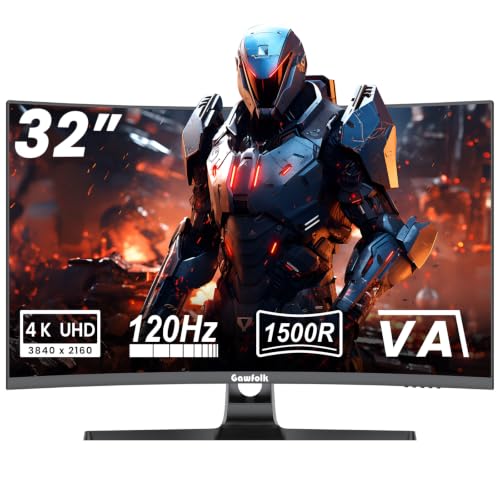
Gawfolk 4K Curved Monitor 32 Inch

Dell 32 Monitor S3225QS

LG 32UR500K-B Ultrafine 32-inch

LG 27US500-W Ultrafine Monitor 27-Inch

Samsung 37” Odyssey G7 (G75F)
More Details On Our Top Picks
That 27-inch size keeps the Dell S2725QS manageable on a normal desk, yet the 4K panel still gives you plenty of room for side-by-side windows. The IPS screen should suit mixed use well, from office work to evening gaming, and the height, swivel, and pivot adjustments help you match the screen to your chair instead of the other way around.
The 120Hz refresh rate is the headline here, because it makes scrolling and movement feel more fluid than a standard 60Hz 4K display. You also get USB-C alongside HDMI and DisplayPort, so this fits a laptop dock setup better than the simpler LG models later in the list. The trade-off is plain enough, the 27-inch size gives sharpness and flexibility, but not the roomier cinematic feel of the 32-inch picks.
Strong Points
- 4K resolution gives you crisp text and clean detail for spreadsheets, design files, and long work sessions.
- 120Hz refresh makes daily motion feel smoother, which you’ll notice while scrolling and moving between windows.
- USB-C, HDMI, and DisplayPort make it easier to connect both modern laptops and desktop rigs.
- Height, swivel, and pivot adjustments help you dial in a more comfortable desk posture.
- 99% sRGB coverage gives the panel a strong color range for general content and light creative work.
Things To Consider
- The 27-inch size feels compact next to the larger 32-inch screens in this roundup.
- 5ms response time is fine for most mixed use, though speed-focused gamers may want the faster-feeling options later here.
- Anti-glare helps in bright rooms, but strong side lighting can still ask for careful placement.
Feature Snapshot
Who It Suits Best
Desk workers who also game in the evenings get the clearest payoff here, especially in a setup that needs one screen to do several jobs well.
Where A Sibling Pick Shines
Dell 27 Monitor S2725QC suits laptop-heavy setups better, since its USB-C-first mix is a cleaner fit for single-cable desks.
This Dell takes the same 27-inch footprint and pushes harder toward desk simplicity. The USB-C connection is the big practical difference from the S2725QS, because a laptop user can keep cable clutter down while still getting 4K clarity and 120Hz motion.
The 163 PPI figure, which means pixels per inch, explains why text should look tight and detailed at normal desk distance. Eye Comfort Technology and the LED Edgelight System add a more work-friendly angle, and that matters in a setup where the monitor spends long hours on documents, tabs, and video calls. The honest read is that this is more polished for productivity than flashy for gaming, even though the 120Hz panel still gives you the smoothness you want.
What We Like
- USB-C makes docking a modern laptop much cleaner than juggling separate video and power lines.
- 163 PPI supports dense, crisp text that feels well suited to office work and coding.
- 4K resolution and 120Hz together give you both detail and fluid movement.
- 99% sRGB coverage supports a strong everyday color range.
- Anti-glare helps keep reflections in check on bright desks.
Worth Noting
- The 27-inch panel still suits compact desks more than cinematic setups.
- 4ms response time is respectable, but speed-first gaming setups may lean toward the curved Gawfolk or Samsung options.
- Eye Comfort features help with long sessions, though good lighting habits still matter for any desk.
Quick Facts
Made For
Remote workers, laptop users, and anyone who wants a single-cable desk with a sharp 27-inch screen get the most from this model.
Another Choice May Suit
Dell 27 Monitor S2725QS fits better for mixed office and gaming use, since its adjustable stand is more flexible for varied desk positions.
The Gawfolk moves away from the flatter Dell designs and leans into immersion with a 1500R curve, which means the panel bends along a 1500 mm radius for a wraparound feel. On a gaming desk, that shape can make a large 32-inch screen feel less distant and more centered in your field of view.
The VA panel brings the usual trade, stronger perceived depth than many basic panels, but less of the wide-angle polish you get from IPS. Sync support for both G-Sync and FreeSync is a useful inclusion for mixed GPU setups, and the 1ms response time gives this model a speed-first profile that suits action games better than office-heavy workdays. VESA 100×100 mounting also helps if your desk space is tight and you prefer an arm or wall mount.
Highlights
- 32-inch curved format creates a more immersive view than the flat 27-inch Dell models.
- 1ms response time suits fast-moving games and quick on-screen transitions.
- G-Sync and FreeSync support widens compatibility with different graphics setups.
- VESA 100×100 mounting gives you extra placement flexibility on a desk arm or wall mount.
- 120Hz keeps motion smooth enough for a gaming-first 4K screen.
Small Caveats
- The curve is a taste issue, and not every desk or task benefits from it.
- VA tuning usually favors contrast over viewing-angle uniformity, so side seating is not its strongest suit.
- A 32-inch gaming panel needs more desk depth than the smaller Dell options.
Core Details
Built With In Mind
Gamers who want a curved 4K panel with quick response behavior and more screen presence than a 27-inch model should look here first.
Swap It Out When
Dell 32 Monitor S3225QS suits mixed media and everyday desktop use better, because its larger flat VA screen feels easier to live with outside games.
The S3225QS is the more relaxed Dell here, with a 31.5-inch panel that gives you extra room without going full ultrawide. Compared with the 27-inch S2725QS, it should feel better for media, large spreadsheets, and side-by-side work, especially on a deeper desk.
The 3000:1 contrast ratio is the spec that stands out, because VA panels tend to give darker blacks and a stronger sense of depth than many IPS options. That makes the image feel a little richer in dim rooms, though the trade-off is that side angles usually matter more than they do on an IPS screen. Eye Comfort and anti-glare round out the practical side, so this is a sensible long-session monitor rather than a showpiece.
Upsides
- 31.5-inch size gives you more usable space than the 27-inch Dell models.
- 3000:1 contrast supports deeper-looking blacks and more dimensional picture depth.
- 120Hz keeps desktop movement and casual gaming feeling smooth.
- Eye Comfort and anti-glare features suit long work sessions in mixed lighting.
- 99% sRGB coverage helps keep color presentation balanced for general use.
Areas To Watch
- The larger footprint asks for a wider, deeper desk.
- VA viewing-angle behavior can look less even from the side than IPS alternatives.
- 4ms response time is fine for many people, but twitch-first gamers may still prefer faster-feeling alternatives.
Details At A Glance
Whose Shelf It Belongs On
Home-office setups with enough desk depth for a 32-inch display get the best match from this model.
Reach For A Different Pick When
LG 27US500-W Ultrafine Monitor 27-Inch fits smaller desks better, especially when you want a cleaner footprint and less physical bulk.
The LG 32UR500K-B is the most straightforward large-screen utility pick in this group. Its 32-inch 4K panel gives you generous workspace for documents and media, while the borderless design keeps the frame visually quiet on a desk.
Built-in speakers matter more than they sound on paper, because they cut down on extra gear for casual video, calls, or background listening. OnScreen Control also helps you manage the workspace from the mouse rather than digging through monitor buttons, and that feels especially useful on a busy home-office desk. The trade-off is that this model leans more toward convenience than gaming speed, so it sits closer to office use than the faster Dell and Samsung entries.
Best Bits
- 32-inch 4K format gives you plenty of room for side-by-side work.
- Built-in speakers reduce the need for separate desktop audio gear.
- OnScreen Control makes quick layout and picture changes easier from the computer.
- Reader Mode and Flicker Safe features suit longer document-heavy sessions.
- Borderless styling keeps the screen looking tidy on a desk.
Points To Note
- This model is more work-friendly than speed-driven.
- Built-in speakers are handy, though dedicated speakers usually bring fuller sound.
- The larger size asks for enough desk depth to avoid feeling cramped.
Feature Rundown
Right Fit For
Home-office users and casual media viewers who want a large, simple display with built-in convenience features will get the most from it.
A Better Fit Elsewhere
Dell 32 Monitor S3225QS suits gaming and mixed entertainment more cleanly, because its 120Hz panel makes motion feel more responsive.
For smaller desks, this LG makes the 4K formula feel more manageable. The 27-inch IPS panel keeps the footprint neat while still giving you the sharpness you want for text, photos, and a couple of side-by-side windows.
Its 1000:1 contrast ratio is a standard IPS-style number, so the image should look balanced rather than dramatically deep. The stronger color angle here is HDR10 support with up to 90% DCI-P3 coverage, which points to a broader color range than basic office screens. Onscreen Control and the tilt-adjustable stand make the practical side easy, though this model is more about clean everyday use than gaming speed.
Reasons To Buy
- 27-inch size fits smaller desks better than the 32-inch models.
- IPS panel supports wider viewing angles for shared viewing or off-center seating.
- HDR10 with up to 90% DCI-P3 coverage gives the screen a stronger color range than simple office panels.
- Onscreen Control helps you tweak layout and monitor settings from the computer.
- Borderless styling keeps the monitor visually light on the desk.
Rooms For Improvement
- This model does not lean into gaming speed the way the 120Hz Dell and Gawfolk options do.
- The tilt-only stand is simpler than the more adjustable Dell S2725QS.
- 1000:1 contrast is ordinary for IPS, so dark-room depth is more modest than on the VA picks.
Technical Sheet
Best Suited To
Students, home-office users, and anyone with limited desk depth will appreciate how easy this monitor is to place and live with.
Skip It When
Dell 27 Monitor S2725QS makes more sense for gaming and posture adjustment, because its stand and 120Hz panel are more versatile.
The Samsung G7 is the biggest and fastest-feeling screen in this roundup, and that size changes the whole desk experience. At 37 inches with a curve, it feels built for a command-center setup where gaming, streaming, and wide work layouts all share the same space.
165Hz is the standout spec, because it pushes motion fluidity beyond the 120Hz ceiling of the other picks here. The 1ms GtG response time, which means gray-to-gray pixel transition speed, suits fast-action gaming, while DisplayHDR 600 and FreeSync Premium Pro point to a more demanding visual tier. The trade-off is obvious, this kind of screen needs room, both physically and visually, so it rewards spacious desks more than compact rooms.
Positives
- 37-inch curved format creates an expansive view for gaming and multitasking.
- 165Hz refresh rate gives you the fastest motion handling in this lineup.
- 1ms GtG response time supports quick on-screen transitions in fast games.
- DisplayHDR 600 points to a higher-brightness class than the basic 4K office picks.
- FreeSync Premium Pro helps the screen match compatible gaming setups more smoothly.
Softer Spots
- The large curved panel needs significant desk depth.
- It makes the most sense for gaming-heavy use, not casual office duty.
- Premium features raise expectations, so basic desktop work may not fully use the panel.
Core Details
Whose Shelf It Belongs On
Dedicated gamers with a spacious desk and a taste for big-screen immersion are the natural match for this Samsung.
Look Elsewhere When
Dell 32 Monitor S3225QS is easier to place in mixed-use rooms, because it keeps the size large without becoming as dominant as the 37-inch Samsung.
How To Choose The Right 120hz 4k Monitors
Start With Size And Desk Depth
Size changes everything in this category. A 27-inch display like the Dell S2725QS or LG 27US500-W suits smaller desks and leaves room for a laptop, keyboard, and not much else, while 32-inch and 37-inch panels need more breathing room.
Desk depth matters just as much as width. A curved model like the Gawfolk or Samsung G7 can feel immersive, but only when you can sit far enough back for the arc to make sense.
Match Panel Type To Your Use
IPS panels, such as the two Dell 27-inch models and the LG 27US500-W, usually feel more even from angle to angle. That makes them a strong fit for office work, shared screens, and mixed daily use.
VA panels, like the Gawfolk, Dell S3225QS, and LG 32UR500K-B, usually lean toward stronger contrast and deeper-looking dark scenes. They can look richer for movies and games, though side-angle uniformity is usually the trade-off.
Look Past Resolution Alone
All seven screens in this roundup serve 4K detail, but motion speed and connection flexibility change the ownership experience. A 120Hz monitor keeps scrolling and gameplay smoother than a standard 60Hz display, while 165Hz on the Samsung G7 goes even farther for fast action.
Ports matter too. USB-C on the Dell S2725QC helps a laptop desk stay cleaner, while HDMI and DisplayPort are better for straightforward desktop hookups and console use.
Choose Features That Fit Your Routine
Small conveniences add up over a long week. Height, swivel, and pivot adjustment help the Dell S2725QS suit different chairs and work postures, while OnScreen Control on the LG models makes quick changes less annoying.
Built-in speakers, HDR support, and eye-comfort features all have a place, but only when they match how you actually use the screen. For gaming-first spaces, prioritize response time and refresh rate first, then decide whether the extras are worth the desk space.
What To Weigh Before You Click
Common Shopping Slip Ups
A lot of people fixate on 4K and ignore the physical size. A 32-inch or 37-inch panel can overwhelm a shallow desk, while a 27-inch model may feel more practical for work and mixed use.
Another common miss is treating all 4K screens as equal. IPS and VA handle contrast and viewing angle differently, so the right choice depends on whether you want office neutrality or deeper image depth.
Why Top Tier Costs More
Higher-tier models usually spend their budget on smoother motion, larger panels, better HDR support, or more advanced sync behavior. That’s why the Samsung G7 sits apart from the simpler office-oriented LG models.
You also pay for convenience details like USB-C, adjustable stands, built-in speakers, or wider color coverage. Those extras matter most in a daily setup that has to do more than just display a picture.
Frequently Asked Questions
Are 120Hz 4K monitors worth it for work?
Yes, smooth scrolling and cleaner motion make a real difference during long desk sessions. The benefit is subtle at first, then obvious once you switch back to 60Hz.
Does 4K look too small on a 27-inch screen?
Not usually, because the higher pixel density keeps text and icons sharp. That said, some people prefer system scaling so UI elements feel easier to read.
Is IPS or VA better for 120Hz 4K monitors?
IPS is usually the safer all-round call for wide viewing angles and balanced color. VA tends to suit darker-room viewing and stronger contrast more naturally.
Do you need USB-C on a 4K monitor?
You do not need it, but it simplifies a laptop desk a lot. One cable can keep the setup cleaner than HDMI plus separate power routing.
Should you choose 32 inches instead of 27 inches?
32 inches gives you more room for multitasking and media, so it fits bigger desks well. 27 inches is easier to place and often feels cleaner in tighter spaces.
Closing Thoughts
For a sharp work screen that still moves smoothly, the Dell S2725QS and S2725QC are the safest places to start. The Gawfolk and Samsung G7 make more sense once gaming becomes the main event, while the LG models lean toward straightforward daily use and simple desk management. Size, panel type, and ports should do most of the deciding for you, not just the headline refresh rate. Pick the screen that matches your desk first, then the rest tends to fall into place.
