
A PS5 can look very different on the right monitor, especially once you move past basic 1080p panels. You want crisp 1440p detail, steady motion at 120Hz, and ports that keep setup simple instead of fussy. This roundup focuses on seven monitors that fit living rooms, desks, and mixed-use gaming spaces without leaning on hype. Some are built for speed, others for cleaner desktop use, and a few strike a middle ground that makes daily ownership easier.
Quick Look At The Shortlist

KTC 27 Inch Gaming Monitor 27M1 1440p 200Hz with Built-In Speakers

INNOCN 24.5 Inch 1440P 240Hz Gaming Monitor 25G2S

AOC 27 Inch Gaming Monitor Q27G4XN 2K QHD 180Hz

Samsung 24 Inch Odyssey G3 G30D FHD Gaming Monitor

Samsung 27 Inch Odyssey G5 G51F QHD Gaming Monitor
27 Inch 1440P Gaming Monitor 200Hz Fast IPS

Dell 27 Plus QHD Monitor S2725DSM 27-Inch 144Hz
More Details On Our Top Picks
KTC leans hard into speed, with a 27-inch 1440p Fast IPS panel, Adaptive Sync support, and a listed 200Hz refresh rate that can climb to 210Hz in overclock mode. For PS5 play, that combination gives you the clean middle ground between sharp image detail and responsive motion, especially on action games and racers.
The included speakers and height-adjustable stand make daily setup easier than the more bare-bones options in this list, though built-in audio rarely replaces a proper sound system. The shielding hood is a practical touch for brighter rooms, and the wide color coverage plus low Delta E figure suggest a screen aimed at people who also care about desktop work between gaming sessions.
Strong Points
- 27-inch 1440p size suits a typical desk or media stand.
- Fast IPS keeps motion and viewing angles more consistent than a basic VA panel.
- Height adjustment helps you line up eye level without adding a separate arm.
- Built-in speakers cover light game audio or menus in a pinch.
- Adaptive Sync adds a practical buffer for mixed-console and PC use.
Areas To Watch
- Speaker output will feel modest beside a headset or soundbar.
- OC mode is a nice extra, though many consoles will stay at lower supported rates.
- The hood helps with glare control, but it also adds bulk on a crowded desk.
Feature Snapshot
Who It Suits Best
PC and PS5 gamers who want a sharper 27-inch screen with useful ergonomics will get the most out of it.
Where A Sibling Pick Shines
Dell 27 Plus QHD Monitor S2725DSM suits you better when you want a cleaner mixed-use display with a calmer feature set.
This INNOCN model is the speed-focused choice in the group, and the 24.5-inch size keeps it compact for a tight gaming desk. HDMI 2.1 matters here because it gives the PS5 a modern connection path, while FreeSync and G-SYNC compatibility help cover mixed-platform use.
You may find the smaller screen size better for close-in gaming, where less eye movement is needed to track action. The honest trade-off is that 24.5 inches feels less cinematic than the 27-inch picks above, so it suits competitive play more than couch-distance use.
What We Like
- 240Hz panel offers extra motion headroom for PC gaming.
- 24.5-inch size fits small desks without crowding your keyboard.
- HDMI 2.1 keeps PS5 connection support up to date.
- Speaker inclusion helps with quick setup in secondary rooms.
Small Caveats
- The smaller size can feel less immersive for story-heavy games.
- Fast panels usually reward clean cable routing and careful stand placement.
- Speaker quality will suit menu audio better than room-filling sound.
Core Details
Who Will Love This
Competitive console and PC gamers with a smaller desk will appreciate the compact footprint and fast panel.
Skip It When
AOC 27 Inch Gaming Monitor Q27G4XN fits better for you when a larger 27-inch view matters more than raw refresh headroom.
Right after the faster INNOCN, this AOC feels more measured, with a 27-inch VA panel, 180Hz refresh, and a height-adjustable stand. VA, or vertical alignment, usually brings stronger contrast than a typical IPS panel, so darker game scenes can look a bit denser, though viewing angles are usually less generous.
The mix of DisplayPort 1.4, HDMI 2.0, earphone out, and VESA mounting makes it easy to adapt to a desk or wall-arm setup. For most PS5 setups, the extra headroom above 120Hz is less important than the combination of size, contrast, and flexible mounting.
Highlights
- 27-inch QHD layout gives you a clear step up from 1080p.
- VA contrast suits darker games and movie-heavy use.
- Height adjustment helps keep the center of the screen at eye line.
- VESA support opens the door to monitor arms and wall setups.
- Earphone output keeps wired audio simple on a compact desk.
Points To Note
- VA panels can show slower transitions in some dark scenes.
- HDMI 2.0 leaves less connection headroom than HDMI 2.1 models.
- The feature set is practical, but not as loaded as the Samsung G5.
Details At A Glance
The Right Fit
PS5 gamers who want a straightforward 27-inch monitor with sensible extras should feel at home here.
A Better Fit Elsewhere
Samsung 27 Inch Odyssey G5 G51F QHD Gaming Monitor makes more sense for you when HDR10 and a richer feature set matter more.
This Odyssey G3 steps away from the 1440p focus and lands at 24 inches with Full HD resolution, so it is more about space savings than pixel density. That can suit a dorm desk, a second room, or a setup where the monitor sits close to you and the lower resolution is easier to live with.
Features like Black Equalizer, Virtual Aim Point, Eye Saver Mode, and Flicker-Free tuning make it feel game-friendly without a lot of extra clutter. The trade-off is obvious, though, since this is the least sharp panel in the roundup and the least aligned with a PS5 at 1440p.
Bright Spots
- 24-inch footprint fits narrow desks and smaller rooms.
- Eye Saver Mode and Flicker-Free settings suit long sessions.
- Adjustable stand helps with basic ergonomic setup.
- Black Equalizer and aim-point overlay support competitive habits.
Softer Spots
- Full HD is a step down from the sharper 1440p models here.
- The smaller canvas feels less suited to large single-player worlds.
- It makes more sense as a space saver than a PS5 showcase piece.
Core Details
Who Should Grab It
Space-conscious gamers who value compact size over 1440p sharpness will appreciate this one most.
Reach For A Different Pick When
KTC 27 Inch Gaming Monitor 27M1 1440p 200Hz with Built-In Speakers suits you better when image detail matters more than saving desk space.
Compared with the AOC above, this Samsung brings HDR10 into the mix, along with Auto Source Switch+ and a broader feature set around the stand and tuning tools. For a PS5 desk setup, that gives you a polished-feeling screen that handles both gaming and general media without asking much in return.
The 27-inch QHD panel is the practical center of this roundup, and it lands in a sweet spot for clarity, comfort, and immersion. The slight catch is that some extras, such as Black Equalizer and Virtual Aim Point, matter more for competitive habits than for single-player use, so part of the appeal depends on your play style.
Best Bits
- QHD resolution gives a clean step up in detail.
- HDR10 adds more range for supported game and video content.
- Auto Source Switch+ makes multi-device use less fiddly.
- Height-adjustable stand helps with a permanent desk setup.
- Black Equalizer and aim-point tools support fast shooters.
Room For Improvement
- Extra gaming features matter more to competitive players than to everyone else.
- The richer feature set comes with more settings to learn.
- It feels more desk-focused than the smaller Samsung G3.
Technical Sheet
Best Suited To
Desk gamers who want a refined 27-inch QHD screen with useful gaming extras will get the most out of it.
Another Choice May Suit
INNOCN 24.5 Inch 1440P 240Hz Gaming Monitor 25G2S is the better match for faster competitive play in a smaller footprint.
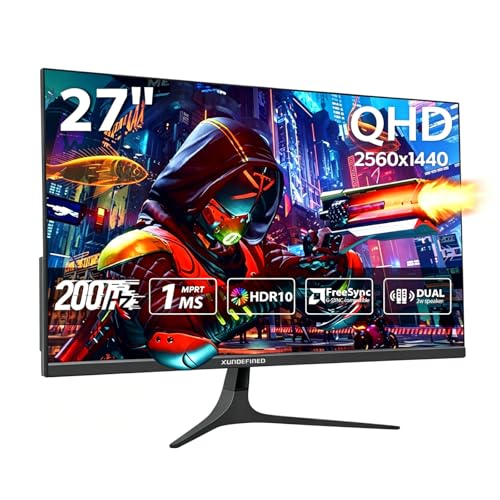
This unnamed-brand monitor is the broad-compatibility option, with HDMI x2, DisplayPort x2, FreeSync, and G-SYNC support that make it easy to move between PS5, Switch, Xbox, and PC gear. In a mixed setup, that matters more than flashy branding because it reduces the need to reshuffle cables every time you change systems.
The built-in speaker and VESA mounting support add everyday convenience, and the 125% sRGB claim hints at a lively color presentation for games and media. The trade-off is that a long feature list can hide some uncertainty around the overall chassis and stand polish, so this one makes the most sense when versatility matters more than premium finish.
Reasons To Buy
- Broad console support keeps the screen useful across multiple systems.
- Two HDMI and two DisplayPort inputs make swapping devices simpler.
- VESA mounting gives you room to build a cleaner desk.
- Built-in speakers are handy for a secondary room or quick setup.
- Fast IPS and 200Hz support keep motion-focused gaming in view.
Honest Caveats
- The open-ended brand presentation makes long-term finish harder to judge from specs alone.
- Built-in audio will still feel modest beside separate speakers or a headset.
- The feature density can matter more than the shell quality here.
Feature Rundown
Built With In Mind
Multi-console homes and desk setups with a lot of device swapping will benefit most from this one.
Swap It Out When
Dell 27 Plus QHD Monitor S2725DSM suits you better if you want a more polished mainstream monitor with simpler choices.
Dell takes a quieter route than the gaming-first models above, and that makes the S2725DSM appealing for mixed use. You get a 27-inch QHD screen, 144Hz refresh, built-in 3W speakers, and a stand that moves through height, tilt, pivot, and swivel, which is a strong mix for a desk that pulls double duty.
Compared with the Samsung G5, this one feels less about gaming flair and more about everyday ergonomics. The honest read is that 144Hz is still a good fit for PS5 play, but the real strength here is how easy it is to live with from Monday to Sunday.
Positives
- Four-way stand adjustment makes positioning unusually flexible.
- 27-inch QHD resolution suits gaming, work, and streaming.
- Built-in speakers are useful for a clean desk layout.
- HDMI and DisplayPort support keeps wiring straightforward.
Minor Gripes
- It feels more general-purpose than enthusiast-focused.
- Speaker output is practical, not room-filling.
- Gaming extras are lighter than on the Samsung Odyssey models.
Core Details
Whose Shelf It Belongs On
Desk users who want a clean, comfortable monitor that also handles PS5 gaming well will appreciate this Dell most.
Look Elsewhere When
INNOCN 24.5 Inch 1440P 240Hz Gaming Monitor 25G2S makes more sense for you if competitive speed matters more than ergonomic polish.
How To Choose The Right 1440p 120hz Monitors For Ps5
Resolution, Size, And Distance
A PS5 can output a sharp 1440p image, but screen size still changes how that sharpness feels. A 27-inch panel usually lands in the sweet spot for a typical desk, while 24 to 25 inches works better in tighter spaces or for close-in play. Smaller screens can feel quicker to scan, though the image has less cinematic presence.
Refresh Rate And Console Support
120Hz is the target for PS5-friendly motion, but many monitors in this roundup go higher on paper. That extra headroom matters more on a gaming PC than on the console itself, so you should treat it as a cushion rather than the main selling point. HDMI 2.1 is worth extra attention on compact speed-focused models like the INNOCN, while HDMI 2.0 can still be fine for simpler PS5 setups.
Panel Type, Contrast, And Motion
IPS panels usually keep colors and viewing angles steady, which works well on shared desks and mixed-use rooms. VA panels, like the AOC, often bring stronger contrast, so darker scenes look denser, though they may not feel quite as crisp in fast motion. That contrast-versus-motion trade is the sort of detail that matters once you spend long evenings between games and streaming.
Extras That Change Daily Use
Height adjustment, VESA mounting, built-in speakers, and multiple inputs matter more than they first appear. A stand that moves in several directions helps you avoid awkward neck angles, and a second HDMI or DisplayPort input saves time in multi-system homes. The right extras depend on your room, not just your game library.
Before You Click Buy
Common Shopping Slip Ups
A lot of PS5 shoppers chase refresh rate and ignore the connection path, then end up with a screen that needs more setup compromise than expected. Screen size can trip you up too, because a compact panel feels tidy on a small desk but less absorbing from a sofa. Matching the monitor to your seating distance is the cleaner way to shop.
The Upgrade Payoff
Higher-tier models usually spend the extra money on better stand movement, stronger color handling, more flexible ports, and nicer on-screen tuning. That matters most when the monitor sits in daily use for gaming, schoolwork, and streaming rather than one narrow purpose. Paying more makes sense when you want the desk itself to feel less compromised.
Frequently Asked Questions
Do You Need HDMI 2.1 For PS5?
No, not for every 1440p setup. HDMI 2.1 helps on some faster monitors, but a well-matched HDMI 2.0 screen can still suit many PS5 gaming setups.
Is 27 Inches Better Than 24 Inches?
For most desks, 27 inches gives a more comfortable balance of detail and immersion. A 24-inch panel works better in cramped spaces or close viewing positions.
Is IPS Or VA Better For Gaming?
IPS usually handles wide viewing angles and color consistency more cleanly. VA can bring stronger contrast, which helps darker scenes look richer.
Do Built-In Speakers Matter?
They help with quick setup and light daily use. Separate speakers or a headset still sound better for long sessions.
Which Pick Fits Mixed Use Best?
Dell 27 Plus QHD Monitor S2725DSM is the most balanced choice for gaming and general desk work. It keeps the layout clean without pushing the setup too far toward esports styling.
Closing Thoughts
You have several good paths here, and the right one depends on how you use the screen outside of PS5 sessions. The KTC and Samsung G5 lean toward a fuller 27-inch desk experience, the INNOCN favors speed in a smaller shell, and the Dell makes the cleanest everyday companion. The useful part is that none of these asks for a strange compromise. Pick the one that matches your room first, then let the refresh rate do its job.
