
Shopping for 1440p Budget Monitors usually comes down to one question, how much screen quality do you want before the price climbs. You’re looking at the sweet spot for sharper text, more usable workspace, and cleaner gaming visuals without jumping to a high-end panel. That matters whether your desk handles long work sessions, late-night matches, or a cramped apartment setup.
These seven picks cover fast gaming displays, office-friendly panels, and a couple of balanced options in between. The differences show up in refresh rate, stand adjustability, color coverage, and connection options, so you can match the monitor to how you actually use it.
Quick Shortlist For Faster Comparison

KTC 27 Inch Gaming Monitor 27M1 1440p 200Hz

KTC 24 Inch Gaming Monitor H24T7 1440P 180Hz
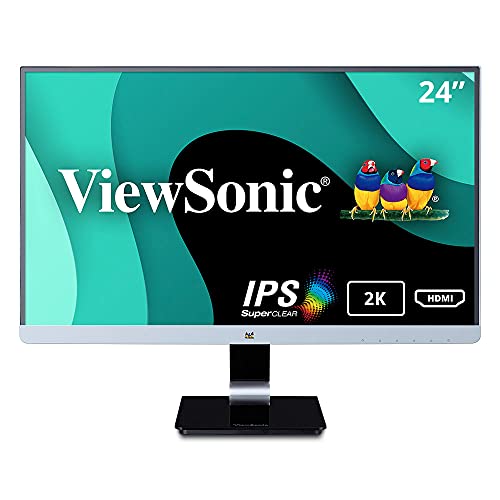
ViewSonic VX2478-SMHD 24 Inch 1440p IPS Monitor

ViewSonic VS2725-2K 27 Inch 1440p 100Hz Monitor

Sceptre IPS 27 Inch 2K QHD 75Hz Monitor E275W-QPT

Acer 27in QHD IPS 100Hz Office Monitor SB272U Ebiip

Samsung 27″ Odyssey G5 G51F QHD 180Hz Monitor
More Details On Our Top Picks
Fast-paced gaming is where this KTC makes its case. A 27-inch Fast IPS panel with 1440p resolution, 200Hz refresh, and Adaptive Sync gives you the core ingredients for sharp motion and reduced tearing, while the built-in speakers keep desk clutter down. The shielding hood is a niche touch, and the height-adjustable stand matters more than it sounds on a long desk.
The color claims are also unusually strong for a budget-leaning gaming panel, with 130% sRGB and a listed ΔE under 2 for tighter color matching. That won’t turn it into a studio display, but it does help if you game and edit in the same corner. The trade-off is simple, this is tuned first for speed, not for office minimalism.
Strong Points
- 200Hz refresh suits fast shooters and racing games, with extra headroom for motion-heavy play.
- 27-inch 1440p scaling gives you more workspace than a 1080p panel without pushing into premium territory.
- Fast IPS keeps the screen snappy while preserving the wider viewing angles IPS panels are known for.
- Height adjustment helps you line up the panel with your chair and reduce awkward neck angles.
- Built-in speakers are handy for casual use, especially on a secondary desk or in a tight setup.
Things To Consider
- The gaming-first spec mix gives you less reason to choose it for a quiet office-first build.
- Built-in speakers are convenient, though most desk setups still sound better with separate audio gear.
- The shielding hood is useful for glare control, but it also makes the display feel more specialized.
Feature Rundown
Who It Suits Best
Competitive players who want a sharp 27-inch panel with strong speed and everyday stand flexibility fit this model well.
A Better Fit Elsewhere
ViewSonic VS2725-2K suits office-first setups better, especially when you care more about a calmer all-purpose screen than a 200Hz ceiling.
A 24-inch 1440p monitor changes the feel of a desk fast, and this KTC leans into that compact footprint. The Fast IPS panel, 180Hz ceiling, and Adaptive Sync support give it a lively profile for smaller gaming setups, while the tilt, pivot, and height adjustments make portrait use practical for code, chat, or document work. That vertical flexibility is the real differentiator here.
HDR 400 is listed too, which can help with supported content, though budget HDR tends to be more about compatibility than dramatic brightness shifts. The honest read is that this model suits you best when desk space is tight and a 24-inch frame feels easier to manage than a 27-inch panel. Compared with the KTC 27M1, it gives up some screen width but gains a tidier footprint.
Upsides
- 24-inch sizing keeps the monitor manageable on narrow desks and dorm-style setups.
- Pivot support makes portrait orientation useful for spreadsheets, chat windows, and vertical timelines.
- 180Hz refresh gives gaming a quick feel without jumping to a larger chassis.
- Height and tilt control help you set a better viewing angle in shared spaces.
Small Caveats
- The smaller screen area can feel tight for split-screen office work compared with a 27-inch model.
- HDR 400 is useful on paper, though results vary across content and source quality.
- Portrait use asks for a little desk planning, especially around cable length and side clearance.
Core Details
Who Should Grab It
Compact desks, vertical workflows, and gaming setups that need a small but speedy display fit this KTC well.
Where A Sibling Pick Shines
ViewSonic VS2725-2K suits you better for a more conventional 27-inch workspace with a calmer all-purpose feel.
The ViewSonic VX2478-SMHD takes a quieter route than the two KTC gaming models. Its 24-inch IPS panel, 2K WQHD resolution, and clean chassis make sense on desks that do double duty for work and media. You also get HDMI, DisplayPort, and Mini DisplayPort support, which is helpful around older laptops or mixed-device setups.
Flicker-Free processing and a blue light filter round out the comfort story for long sessions at the desk. That won’t make the panel dramatic, but it does make it easy to live with, especially for office work, class notes, or streaming while you answer email. The included Mini DP to DP cable is a small but welcome touch.
Bright Spots
- 24-inch size keeps the panel compact without dropping to a cramped 1080p layout.
- IPS viewing angles help the picture stay consistent from a side chair or shared workspace.
- HDMI, DisplayPort, and Mini DisplayPort inputs make older and newer devices easier to connect.
- Flicker reduction and the blue light filter support longer desk sessions more comfortably.
- The included cable bundle saves a small setup step out of the box.
Worth Noting
- The refresh rate focus is more basic than the gaming-first KTC and Samsung picks.
- 24 inches may feel modest once you start juggling several wide windows at once.
- Its strengths sit in consistency rather than flashy feature density.
Feature Snapshot
Built With In Mind
Office users, students, and mixed-use desk setups fit this ViewSonic especially well.
Look Elsewhere When
KTC 27 Inch Gaming Monitor 27M1 suits you better once gaming speed and a larger 27-inch canvas move higher on the list.
This ViewSonic looks aimed at desks that need one screen to do almost everything. The 27-inch QHD panel gives you the familiar productivity sweet spot, and the 100Hz refresh makes scrolling and lighter gaming feel smoother than a plain 60Hz office panel. HDMI and DisplayPort keep it easy to slot into a laptop or desktop rig.
Variable refresh rate helps reduce tearing in supported games, while the anti-glare finish and eye-care features are useful in bright rooms. Compared with the VX2478-SMHD, you get more screen real estate and a calmer all-purpose shape. The trade-off is that it’s less specialized than the KTC gaming options, which is exactly why some desks will prefer it.
Highlights
- 27-inch QHD size gives you room for two side-by-side windows.
- 100Hz refresh adds a smoother feel for everyday movement and casual gaming.
- HDMI and DisplayPort make it straightforward to connect common desktops and laptops.
- Anti-glare and eye-care features suit bright offices and long spreadsheet sessions.
Areas To Watch
- It doesn’t chase the very high refresh levels that gaming-first models offer.
- The design is deliberately practical, so it won’t feel flashy on a showcase desk.
- At 27 inches, it still asks for enough depth to sit at a comfortable viewing distance.
Details At A Glance
Perfect Match For
Home office setups that also handle casual gaming or streaming fit this model neatly.
Another Choice May Suit
Samsung 27″ Odyssey G5 G51F is the better call for you when gaming speed and HDR10 matter more than office-first balance.
The Sceptre E275W-QPT keeps things straightforward, and that restraint is part of its appeal. You get a 27-inch IPS panel with 2560 x 1440 resolution, 75Hz refresh, HDMI and DisplayPort input, plus built-in speakers for basic desk use. The 99% sRGB claim matters more here than the gaming features, because this pick makes the most sense for general work, streaming, and casual creative tasks.
Compared with the KTC and Samsung gaming models, it gives up speed, but it also avoids the price pressure that comes with chasing high refresh numbers. The machine-black finish is plain in a good way, and plain setups are easier to keep clean. For a home office or a student desk, that simplicity can be enough.
Best Bits
- 27-inch QHD resolution gives you crisp text and enough room for multitasking.
- 99% sRGB coverage supports more consistent color for everyday content work.
- Built-in speakers save desk space for a setup that stays compact.
- HDMI and DisplayPort cover the common connection paths without fuss.
Minor Gripes
- 75Hz is fine for daily use, though it trails the faster gaming monitors in this roundup.
- Built-in speakers are useful, but they’re still a convenience feature rather than a full audio solution.
- The design is basic, so you’re choosing function more than style.
Quick Facts
Whose Shelf It Belongs On
Students, office users, and casual home setups that need a large 1440p display without gaming-first extras fit this monitor well.
Swap It Out When
ViewSonic VS2725-2K makes more sense once you want a stronger all-around office feel and 100Hz motion instead of 75Hz.
The Acer SB272U Ebiip leans hard into office usefulness, and that focus shows in the feature mix. A 27-inch IPS panel, 100Hz refresh, 1ms response claim, AMD FreeSync support, and dual HDMI ports create a practical setup for a laptop dock or a desktop that swaps between work and play. VESA mounting also gives you desk flexibility that matters more than flashy styling.
Bluelight Filter and Flickerless Technology are the comfort pieces, and those are the kind of details that matter after a full workday. Compared with the Sceptre, this one feels more ready for a fixed workstation, especially if you want mounting freedom and a cleaner office layout. The trade-off is that its personality is plain, which is fine for a monitor built to disappear into the background.
Positives
- 27-inch QHD gives you a comfortable amount of workspace for spreadsheets and browser tabs.
- 100Hz refresh helps scrolling and general motion feel smoother than a basic office display.
- Dual HDMI plus DisplayPort make it useful for mixed-device desk setups.
- VESA mounting supports arm or wall mounting for a tidier desk surface.
- Bluelight Filter and Flickerless Technology suit long office days or evening use.
Honest Caveats
- The office-first focus means it skips the high-refresh identity of the gaming models here.
- Plain styling helps it blend in, though it won’t stand out on a design-heavy desk.
- Mounting it on an arm adds setup work, even though the flexibility is worthwhile.
At A Glance
The Right Fit
Home office workers who want a clean, flexible 27-inch monitor with sane specs and easy device switching fit this Acer well.
Where A Sibling Pick Shines
Samsung 27″ Odyssey G5 G51F is the stronger match for you when gaming features move ahead of office comfort.
Samsung’s Odyssey G5 lands in a familiar place for gaming-oriented 27-inch 1440p monitors, but the feature set gives it some extra polish. You get 180Hz refresh, 1ms response, AMD FreeSync, HDR10, a height-adjustable stand, Black Equalizer, Virtual Aim Point, and Auto Source Switch+. That combination is handy for PC or console setups where motion, contrast control, and easy input switching all matter.
Compared with the KTC 27M1, this Samsung feels more focused on the classic gaming desk experience than on color-heavy extras. The built-in game features are useful, though some of them are more situational than essential, and that’s fine. For you, the value here comes from the way the parts fit together rather than any single headline spec.
Reasons To Buy
- 180Hz refresh and 1ms response support quick motion in fast games.
- HDR10 adds another layer of content compatibility for supported titles and video.
- Height adjustment helps you set the screen to a comfortable eye level.
- Black Equalizer and Virtual Aim Point give the monitor a more gaming-specific toolset.
- Auto Source Switch+ is useful in mixed-console and PC setups.
Points To Note
- The gaming extras matter most in game-heavy use, not in plain office work.
- At 27 inches, the screen still needs enough desk depth to feel comfortable.
- Some of the feature value is tied to game support, so not every setting gets used every day.
Feature Card
Who Will Love This
PC gamers and console gamers who want a 27-inch 1440p display with a strong feature mix fit this Samsung best.
Reach For A Different Pick When
ViewSonic VS2725-2K suits you better for a calmer all-purpose monitor that leans toward office use and less toward gaming extras.
How To Choose The Right 1440p Budget Monitors
Match The Screen Size To Your Desk
27 inches remains the easiest all-around choice for 1440p because it gives you enough space for side-by-side windows without making text feel tiny. A 24-inch panel can still look sharp, but it behaves more like a compact workstation display, which suits smaller desks and shorter viewing distances. The trade-off is simple, the bigger frame feels roomier, while the smaller one stays easier to place.
Desk depth matters just as much as size. A 27-inch panel works best when you sit far enough back to take in the corners without turning your head all day.
Sort Gaming Speed From Office Comfort
Refresh rate tells you how often the screen updates each second, and higher numbers usually feel smoother in motion. Fast gaming models such as the KTC 27M1 and Samsung Odyssey G5 make sense for shooters, racers, and fast action, while 100Hz or 75Hz panels are more than enough for spreadsheets, web work, and streaming. That gap is where your budget really stretches or saves.
Response time matters too, because it affects how quickly pixels shift between frames. Office users can treat it as a secondary factor, while competitive gamers should keep it near the top of the list.
Check Inputs, Stands, And Mounting Options
HDMI and DisplayPort cover most modern setups, but mixed-device desks benefit from extra flexibility such as Mini DisplayPort or dual HDMI. Adjustable stands matter in a real room, not a spec sheet, because height, tilt, and pivot can prevent awkward posture and make portrait layouts usable. VESA mounting adds another layer of control for arm-mounted desks or wall setups.
Convenience features also save time after the box is open. Built-in speakers, Auto Source Switch, and wide-device compatibility are modest additions, yet they make everyday use smoother.
Color And Eye Comfort Still Count
IPS panels are a strong fit for shared rooms because they keep image consistency better from off-center seats. Color claims such as sRGB coverage matter most if you edit photos, design content, or simply want a more lively-looking picture. Eye-care tools like flicker reduction and blue light filters matter most during long sessions, especially in a bright home office or dorm.
For most setups, the right balance is better than chasing the most extreme spec in one area. A monitor that is easy to position, easy to connect, and clear enough for daily work usually ages better than a narrow specialist pick.
What To Weigh Before You Click
Mistakes Worth Dodging
One common slip-up is buying a fast gaming monitor for a plain office desk and then never using the higher refresh rate. Another is choosing a 24-inch screen for heavy multitasking, only to discover that the workspace feels cramped once you open several windows. A third is ignoring stand adjustability, which becomes annoying fast in a shared room.
Connector count matters too. A monitor with the wrong port mix can force extra adapters and a messier desk.
The Upgrade Payoff
Higher-tier models usually cost more because they combine better motion handling, stronger panel tuning, and more flexible stands or gaming tools. You also tend to see more thoughtful extras, such as source switching, wider color handling, or stronger ergonomics. Those touches do not sound dramatic on paper, yet they shape how the monitor feels every day.
Spending up makes more sense for gamers, dual-purpose desks, and anyone who wants the monitor to stay useful for several years of mixed use. For basic work, the simpler end of the range is often enough.
Frequently Asked Questions
Is 1440p worth it on a budget monitor?
Yes, because 1440p usually gives you sharper text and more usable space than Full HD. The jump feels especially obvious on 27-inch models.
Does a higher refresh rate matter outside gaming?
It still helps scrolling and general motion feel smoother. The difference is most obvious during fast movement, not static documents.
Should you choose 24 inches or 27 inches?
Twenty-four inches suits compact desks and portrait use. Twenty-seven inches works better for multitasking and a more relaxed viewing distance.
Do built-in speakers remove the need for external audio?
They cover basic sound without extra gear. Separate speakers or headphones usually sound fuller and clearer.
Are IPS panels a smart choice here?
IPS is a strong all-around panel type for color consistency and viewing angles. That makes it a solid fit for desks where the screen may be seen from more than one position.
Final Thoughts
The right 1440p Budget Monitor depends on how you sit, what you do most, and how much motion speed matters in your day. The KTC and Samsung picks make the strongest case for gaming, while the ViewSonic and Acer models lean more naturally into work and mixed-use desks. Sceptre keeps the value angle simple, and the smaller KTC fills a niche that matters on tight setups. Choose the panel that matches your desk first, then let the features follow.
