
These 1440p ultrawide gaming monitors suit you if you want a wider field of view without jumping to 4K demands. The sweet spot shows up in racing sims, open-world games, and work-heavy desks where one screen needs to handle play, chat, and side windows. You also get a cleaner path to faster refresh rates than many higher-resolution panels. The trade-off is simple, size and panel type matter a lot more than marketing copy suggests.
That means your shortlist should hinge on curve radius, panel tech, ports, and whether you value motion clarity or richer contrast. The seven picks below cover aggressive refresh, OLED contrast, value-oriented ultrawides, and a couple of broader-use options for mixed gaming and desk work.
Quick Look At Our Shortlist

Alienware 34 Curved Gaming Monitor AW3425DWM

INNOCN 24.5 1440P 240Hz Gaming Monitor 25G2S

CRUA 34 WQHD 165Hz Ultrawide Curved Gaming Monitor

Alienware 34 240Hz QD-OLED Curved Gaming Monitor AW3425DW
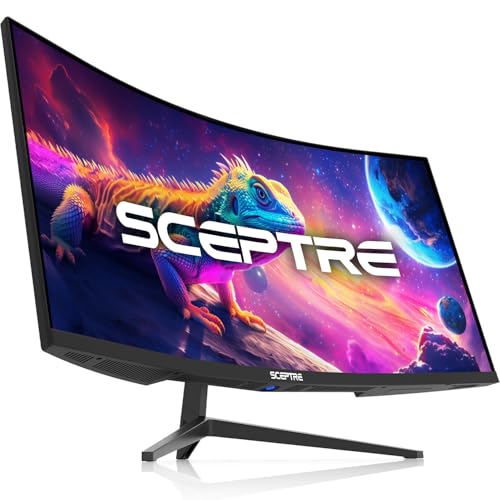
Sceptre 34-Inch Curved Ultrawide WQHD Monitor C345B-QUT168 Series

ASUS TUF Gaming 34 Ultra-Wide Curved Monitor VG34VQ3B

CRUA 34 Inch 165Hz UWQHD IPS Ultrawide Gaming Monitor
More Details On Our Top Picks
Alienware’s 34-inch curved format is a strong fit for you if you want a broad desktop arc without moving into OLED pricing. The 180Hz refresh rate and 1ms response time point to quick motion handling, while AMD FreeSync Premium and VESA AdaptiveSync help reduce tearing across compatible systems. The 1500R curve is fairly tight, so the screen wraps around your field of view in a way that suits racing, shooters, and long work sessions alike.
The honest read is that this one feels aimed at the core gaming crowd first, not the desk minimalist. It makes the most sense for you if you want a dependable ultrawide that can stay on a rig for years without feeling dated by basic motion specs.
Strong Points
- 34-inch ultrawide shape gives you room for game HUDs and side apps without feeling cramped.
- 180Hz refresh supports smoother motion in fast games and scrolling-heavy desktop use.
- 1ms response time helps keep blur in check during quick camera pans.
- FreeSync Premium and VESA AdaptiveSync broaden compatibility with modern graphics setups.
- 1500R curvature keeps the edges within a comfortable viewing arc for desk-based play.
Things To Consider
- VA-style ultrawide panels can feel less immediate for color-critical creative work than OLED alternatives like the Alienware AW3425DW.
- The aggressive curve may take a day or two to feel natural on a shallow desk.
- Its gaming-first feature set leaves fewer extras for mixed office use than the CRUA IPS options.
Feature Rundown
Who It Suits Best
Serious gaming setups that need a curved ultrawide with fast refresh and broad sync support will get the most from this monitor.
Where A Sibling Pick Shines
Alienware 34 240Hz QD-OLED Curved Gaming Monitor AW3425DW suits you better if richer contrast and faster-looking pixel transitions matter more than a conventional panel.
For fast shooters and competitive play, this 24.5-inch panel shifts the focus away from sheer width and toward speed. The 240Hz refresh rate, Fast IPS panel, and up to 0.5ms response figure all point toward crisp motion handling, while HDMI 2.1 broadens compatibility with newer consoles and laptops. You also get FreeSync and G-SYNC compatibility, which helps the display fit more mixed-gaming setups than the simpler single-purpose screens.
That smaller footprint is the catch, and it matters on a wide desk. You give up the cinematic sweep of the Alienware and CRUA ultrawides, but you gain a tighter frame that feels practical for desk distances where every inch counts.
Upsides
- 240Hz refresh suits twitch-heavy play and fast camera movement.
- Fast IPS keeps viewing angles steadier than many bargain curved panels.
- HDMI 2.1 helps the monitor work cleanly with PS5 consoles and newer gaming laptops.
- FreeSync plus G-SYNC compatibility gives you broader graphics-card flexibility.
- Built-in speaker support adds a simple audio option for casual setups.
Softer Spots
- The 24.5-inch size is less immersive than the 34-inch ultrawides in this list.
- A compact screen can feel small for split-screen work or a multi-window desktop.
- Speaker quality on monitors usually serves as a convenience layer, not a replacement for dedicated audio.
Core Details
Right Fit For
Competitive players with limited desk depth or mixed console and PC setups will get the most from this compact monitor.
Another Choice May Suit
Alienware 34 240Hz QD-OLED Curved Gaming Monitor AW3425DW suits you better if immersion and contrast matter more than a smaller competitive layout.
CRUA’s 34-inch ultrawide lands in the part of the market where you want the broad canvas first and fancy extras second. The 165Hz refresh rate, 1500R curve, and 120% sRGB rating make it attractive for everyday gaming, streaming dashboards, and side-by-side work windows. HDMI 2.0, DisplayPort 1.4, audio out, and a 75x75mm mount pattern give the setup a practical edge for desk owners who like straightforward compatibility.
The trade-off shows up in the feature set compared with the Alienware models above. You get a useful bundle, but not the same premium motion polish or contrast-focused panel story that the higher-tier picks bring.
Bright Spots
- 34-inch 21:9 format gives you extra horizontal space for games and multitasking.
- 165Hz refresh is a solid middle ground for smooth gaming without chasing extreme specs.
- 120% sRGB support helps color-rich content look more lively in standard use.
- DisplayPort 1.4, HDMI 2.0, and audio out cover common desktop connections.
- 75x75mm mounting support makes arm setups easier for compact desks.
Areas To Watch
- HDMI 2.0 is less future-proof than the HDMI 2.1 option on the INNOCN panel.
- The curved VA-style experience may feel less open than a flat workspace for spreadsheets.
- Built-in ergonomics depend heavily on the stand or mount you pair with it.
At A Glance
Built With In Mind
Budget-conscious gaming desks and mixed-use setups benefit most from this monitor’s broad feature spread and simple connectivity.
Swap It Out When
Alienware 34 240Hz QD-OLED Curved Gaming Monitor AW3425DW fits you better if deeper contrast and higher-tier motion handling matter more than value balance.
This is the step-up pick for you if contrast and motion clarity matter as much as raw screen width. QD-OLED combines quantum dots with OLED-style self-lit pixels, so the panel can deliver deeper dark scenes and very quick pixel transitions, while the 240Hz refresh and 0.03ms figure speak to responsive play. The 1800R curve is a little gentler than the first Alienware model, which may feel easier on a long desk.
Compared with the CRUA and Sceptre ultrawides, the picture here leans much more premium and much less utilitarian. The honest read is that this panel suits you best when your games, movies, and late-night sessions all need the same refined display.
Best Bits
- QD-OLED panel design usually delivers stronger dark-room contrast than conventional LCD alternatives.
- 240Hz refresh and 0.03ms response point to very fast motion behavior.
- 1800R curvature feels a bit less aggressive than tighter 1500R screens.
- FreeSync Premium Pro and VESA AdaptiveSync broaden gaming compatibility.
- DisplayHDR TrueBlack 400 adds a meaningful premium-display cue for darker scenes.
Small Caveats
- OLED-style panels usually ask more attention from owners who leave static UI elements on screen for long hours.
- The premium lean makes this a less casual choice than the budget CRUA models.
- You may find the leap in quality more worthwhile for dark-room gaming than for daytime office work.
Details At A Glance
The Right Fit
Enthusiast gaming setups and dark-room entertainment spaces benefit most from this premium ultrawide.
Look Elsewhere When
Sceptre 34-Inch Curved Ultrawide WQHD Monitor C345B-QUT168 Series makes more sense if you want a lower-commitment ultrawide for mixed desk use.
Sceptre’s curved ultrawide is built for straightforward desk life, not for chasing the flashiest panel tech. You get a 34-inch WQHD canvas, up to 180Hz refresh, DisplayPort x2, built-in speakers, and 100% sRGB coverage, which gives it a practical mix for gaming after work and regular desktop chores in the same day. The R1500 curve is familiar and comfortable, and that matters more than it sounds when you sit in front of it for hours.
Compared with the Alienware AW3425DW, this model gives up the premium display story but keeps the essentials lined up neatly. It’s a sensible fit for you if value, simple connectivity, and a balanced feature list matter more than chasing the highest-end panel type.
Positives
- 34-inch ultrawide format gives you enough width for gaming, browser tabs, and chat windows.
- Up to 180Hz refresh supports smooth-feeling motion in everyday play.
- DisplayPort x2 makes multi-device swaps easier on a shared desk.
- Built-in speakers keep the setup simple for casual use.
- 100% sRGB coverage is useful for color-consistent general media work.
Points To Note
- Built-in speakers are convenient, though dedicated audio still makes a bigger difference for most gaming rooms.
- The mixed 180Hz and 165Hz wording suggests you should read the mode details carefully on the product page.
- Its feature set is lighter than the ASUS TUF and Alienware premium options.
Core Details
Whose Shelf It Belongs On
General-purpose gamers and home office users who want a balanced ultrawide without extra setup complexity fit this monitor well.
Reach For A Different Pick When
Alienware 34 Curved Gaming Monitor AW3425DWM suits you better if you want a more clearly gaming-focused curve and premium-brand tuning.
ASUS leans into tuning here, so you get a monitor that feels aimed at gamers who like control as much as speed. The 180Hz refresh, 1ms response, Extreme Low Motion Blur Sync, and FreeSync Premium package suggest a display tuned for quick action, while the 90% DCI-P3 gamut adds a wider color range than basic gaming panels. DisplayWidget Center also matters because it gives you a cleaner way to adjust the screen without poking around the OSD all day.
That extra tuning comes with a little more setup attention, which is normal for feature-heavy displays. You may find it best if you switch between game genres, tweak image behavior often, and want a monitor that doesn’t feel barebones beside the Alienware AW3425DWM.
Highlights
- 180Hz refresh and 1ms response give you a strong motion-focused baseline.
- Extreme Low Motion Blur Sync helps the panel suit fast, high-action games.
- 90% DCI-P3 coverage is useful for fuller-looking colors.
- DisplayWidget Center makes adjustment access more convenient than buried hardware menus.
- Built-in speaker support keeps the desk setup lighter.
Room For Improvement
- Feature-rich tuning can mean more menu time during first setup.
- The model’s strength is customization, not minimalist simplicity.
- Owners who want the deepest contrast may still prefer the Alienware QD-OLED above it.
Spec Overview
Made For
Gamers who like setting control, motion tuning, and a broad feature list will get the most out of this monitor.
A Better Fit Elsewhere
Sceptre 34-Inch Curved Ultrawide WQHD Monitor C345B-QUT168 Series suits you better if you want a simpler setup with fewer adjustment layers.
This CRUA leans into IPS, which is useful when you want a wider ultrawide that handles mixed lighting and shared-use desks more gracefully than some curved VA panels. PIP and PBP, meaning picture-in-picture and picture-by-picture, let you see two sources at once, and that is genuinely handy for trading screens, streams, or a work laptop plus game console setup. The tilt stand and 75×75 mount support keep the install side straightforward.
Compared with the other CRUA model above, this one adds more flexibility for multitaskers rather than focusing only on the curved gaming angle. It makes sense for you if your screen spends as much time showing charts, chats, and reference material as it does showing a game.
What We Like
- IPS panel behavior suits mixed desk lighting and broader viewing angles.
- PIP and PBP are useful for split-source workflows and side-by-side monitoring.
- 3440×1440 resolution gives you sharp ultrawide workspace density.
- FreeSync support helps keep compatible gaming smoother.
- Tilt stand plus 75×75 mount support offers more placement flexibility.
Minor Gripes
- IPS contrast usually trails OLED and many VA-style ultrawide panels in dark rooms.
- PIP and PBP are most useful only for users who regularly juggle two sources.
- The feature mix is strong for multitasking, but not as gaming-purist as the Alienware models.
Feature Snapshot
Who Should Grab It
Multitaskers, traders, stream watchers, and gaming setups that regularly split attention between two sources fit this monitor well.
Where A Sibling Pick Shines
CRUA 34 WQHD 165Hz Ultrawide Curved Gaming Monitor fits you better if you want the more affordable, simpler curved version without PIP and PBP.
How To Choose The Right 1440p Ultrawide Gaming Monitors
Panel Type Sets The Tone
Start with the panel, because it shapes the whole experience. OLED and QD-OLED panels, like the Alienware AW3425DW, usually emphasize contrast and very quick pixel transitions, while IPS panels such as the INNOCN and CRUA models tend to hold up better for mixed lighting and side-angle viewing.
VA-style panels often sit between those two in feel, with stronger depth than many IPS screens but a less uniform desktop look for some use cases. For a dark game room, premium contrast matters a lot, and for a shared desk in daylight, IPS often feels easier to live with.
Refresh Rate Needs Match Your Games
Higher refresh rates matter most in fast shooters, racing, and esports titles. A 240Hz screen like the INNOCN or Alienware AW3425DW can make motion feel more immediate, while 165Hz to 180Hz models still feel smooth for most single-player and mixed-use setups.
Don’t chase the biggest number alone. The rest of the chain matters too, especially response time, panel type, and the GPU you actually plan to use.
Curve, Size, And Desk Depth Work Together
Ultrawide monitors live or die by fit. A 34-inch screen with a 1500R or 1800R curve can feel natural on a medium-depth desk, while a smaller 24.5-inch screen like the INNOCN fits tighter spaces better.
Too much curve on a shallow desk can feel close and immersive, but not always comfortable for spreadsheets or side-by-side editing. That’s why your desk depth, seating distance, and how often you split windows should shape the final choice.
Ports And Extras Decide Daily Ease
HDMI 2.1 helps newer consoles and laptops, while DisplayPort 1.4 remains the safer choice for many PC gaming rigs. Extras such as built-in speakers, PIP/PBP, or mount compatibility can save desk space and reduce clutter.
The best match is usually the one that reduces friction every day, not the one with the longest spec sheet. For mixed gaming and work, that practical side usually matters more than a single flashy feature.
What To Weigh Before You Decide
Mistakes Worth Dodging
Many shoppers fixate on refresh rate and ignore the panel type or curve. That’s how you end up with a screen that looks fast on paper but feels awkward at your desk.
Another common slip is buying an ultrawide without checking port support and mounting needs. A monitor with the right resolution but the wrong inputs can turn setup day into a long afternoon.
What The Higher Tier Buys
Premium models usually spend their extra cost on the panel itself, tighter motion handling, and stronger HDR behavior. In this group, that’s most obvious in the Alienware QD-OLED pick, where contrast and response speed sit above the more basic curved options.
You also tend to get better tuning tools, broader sync support, and a more refined overall finish. That upgrade makes sense for dark-room gaming, long sessions, and anyone who wants the display to feel special rather than merely functional.
Frequently Asked Questions
Do 1440p ultrawide monitors work well for both gaming and work?
Yes, the 34-inch 21:9 format gives you room for games and side windows at the same time. IPS models and monitors with PIP or PBP are especially handy for mixed desk use.
Is 240Hz worth it on an ultrawide monitor?
It matters most for fast competitive games and high frame-rate PCs. For slower single-player games, 165Hz or 180Hz still feels very smooth.
Should you choose OLED or IPS?
OLED and QD-OLED usually shine in contrast and motion clarity, especially in darker rooms. IPS is often the safer pick for mixed lighting, daily desktop use, and broader viewing angles.
How much desk space does a 34-inch ultrawide need?
A 34-inch ultrawide needs enough depth that the curve and side edges sit comfortably in view. Medium-depth desks usually work better than very shallow ones.
Are built-in speakers enough for gaming?
They can handle casual use and simple setups without extra hardware. Dedicated speakers or headphones still give you more control and better sound separation.
Final Thoughts
Your best 1440p ultrawide comes down to how you play and how you sit at your desk. The Alienware AW3425DW stands out for premium contrast, while the AW3425DWM and ASUS TUF models feel better for a more traditional gaming setup. CRUA and Sceptre cover the practical end of the range, and the INNOCN fits the competitive narrow-desk crowd. Pick the one that matches your room first, then let the spec sheet confirm the choice.
