
You want a monitor that keeps motion crisp without turning your desk into a compromise. These seven picks cover the usual split, a sharper 1440p panel for richer detail, faster 240Hz options for twitch play, and smaller 24-inch models for tighter spaces or secondary setups.
The right choice depends on how you game, how much desk depth you have, and whether you care more about resolution, speed, or a compact footprint. The lineup below keeps that trade-off visible so you can match the screen to your setup instead of guessing.
The Shortlist At A Glance
Alienware 27 Gaming Monitor AW2725DM

Dell 27 240Hz Gaming Monitor SE2726HG

Amazon Basics 27 inch Gaming Monitor
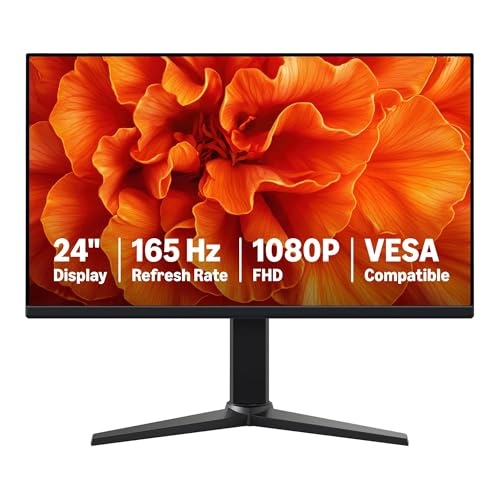
Amazon Basics 24 Inch Gaming Monitor

Samsung 27 Odyssey G5 G51F Series

Sceptre IPS 24 inch Gaming Monitor E248B-FPT168

Sceptre 24-inch Prime Gaming Monitor E248B-FW165T Series
More Details On Our Top Picks
Alienware’s 27-inch panel sits in the sweet spot for desk gamers who want sharper text and cleaner scene detail than a plain 1080p screen can deliver. The WQHD resolution, Fast IPS panel, and 180Hz refresh rate make it a strong match for mixed play, from story-driven titles to faster shooters, and the 3H anti-glare finish helps in brighter rooms.
The trade-off is straightforward, this is more screen than a compact starter setup really needs. Still, the HDMI 2.1, DisplayPort 1.4, USB support, and height-style adjustment make it easier to build around than a stripped-down budget panel like the Amazon Basics options.
Strong Points
- WQHD resolution gives you noticeably more detail than standard 1080p.
- Fast IPS helps keep motion clear while preserving wide viewing angles.
- 180Hz refresh rate suits fast-paced play without feeling excessive for everyday use.
- 95% DCI-P3 and 1.07 billion colors point to strong color depth for games and general desktop work.
- HDMI 2.1, DisplayPort 1.4, and USB make system connections less restrictive.
Worth Noting
- 27 inches and 1440p ask for a bit more desk space and graphics muscle than 24-inch FHD models.
- The finish is anti-glare, but bright side lighting can still influence how deep dark scenes feel.
- Owners usually need to spend a little time dialing in color and position to get the best result.
Feature Snapshot
Who It Suits Best
PC gamers who want a sharper 27-inch screen for both fast play and everyday desk use will get the most from this one.
A Better Fit Elsewhere
Dell 27 240Hz Gaming Monitor SE2726HG suits competitive FPS players who care more about raw refresh speed than extra resolution.
Where the Alienware leans into sharper 1440p detail, this Dell leans hard into speed. The 240Hz FHD panel is aimed at quick-response play, and the IPS technology keeps the image from looking narrow or washed out from the side.
You’ll notice the difference most in fast shooters, arena games, and anything where the mouse feels like an extension of your hand. The tilt-only stand keeps setup simple, though it does leave less ergonomic room than a height-adjustable model like the Samsung Odyssey G5.
Highlights
- 240Hz refresh rate gives you a very fast feel for competitive play.
- IPS panel technology keeps color and viewing angles more consistent than basic TN-style screens.
- Two HDMI ports and DisplayPort 1.4 make console and PC hookup easier.
- AMD FreeSync Premium helps smooth out visible tearing when frame output varies.
- TÜV 3-Star support signals a more comfort-minded display profile for long sessions.
Points To Note
- 1080p on a 27-inch panel is less sharp than the 1440p Alienware above.
- The tilt stand is basic, so height or swivel flexibility is limited.
- 240Hz only pays off fully with a system that can push very high frame rates.
Core Details
Who Will Love This
Competitive PC gamers who value refresh speed more than pixel density will get the cleanest fit here.
Skip It When
Samsung 27 Odyssey G5 G51F Series makes more sense for you if you want 1440p resolution and a more adjustable stand.
This 27-inch Amazon Basics model keeps the formula lean, FHD resolution, 165Hz refresh, and a 1ms response time. That combination suits you well if you want a straightforward gaming screen for everyday play without paying for the extra resolution and feature depth of the Alienware or Samsung picks.
The trade-off is clear in desktop work and text-heavy use, where 1080p on 27 inches looks less refined than 1440p. Still, the VESA compatibility and adaptive sync support make it easy to fold into a practical setup, especially for first-time monitor upgrades.
Bright Spots
- 165Hz keeps motion quick enough for most mainstream games.
- 1ms response time points to fast pixel transitions for sharper action scenes.
- VESA compatibility gives you more mounting options.
- Adaptive sync helps the screen stay smoother when frame output wobbles.
Small Caveats
- 1080p on 27 inches is a visible compromise for text clarity.
- The feature list stays basic compared with the Dell and Alienware alternatives.
- For desk-heavy work, you may find a smaller panel easier to live with.
Details At A Glance
Built With In Mind
Casual and midrange PC gamers who want a simple 27-inch upgrade without extra complexity will fit this monitor best.
A Better Fit Elsewhere
Alienware 27 Gaming Monitor AW2725DM suits you better if sharper WQHD text and richer color handling matter more than staying basic.
Compared with the 27-inch Amazon Basics model, this 24-inch version is the neater fit for smaller desks, dorm corners, and second-screen gaming stations. The 23.8-inch viewable area keeps the panel manageable, while the 165Hz refresh rate and 1ms response still cover the fast-motion basics.
That smaller footprint is the point, really. You lose the broad workspace of the 27-inch panel, but you gain a setup that feels less crowded, which matters more than people expect in tight rooms or shared spaces.
Upsides
- 24-inch class sizing fits tight desks far better than larger monitors.
- 165Hz gives you a quick feel for everyday gaming.
- VESA compatibility leaves the door open for arms or wall mounting.
- Adaptive sync helps smooth out uneven frame delivery.
Areas To Watch
- Smaller size means less screen space for split windows and desktop multitasking.
- 1080p is fine at this size, though it still trails the Alienware’s sharper 1440p panel.
- Basic positioning needs may push some setups toward an external stand or arm.
Core Details
Right Fit For
Small-room gamers and students who want a compact screen with a quick refresh rate will appreciate this one most.
Another Choice May Suit
Sceptre IPS 24 inch Gaming Monitor E248B-FPT168 makes more sense if you want built-in speakers and more connection options.
The Samsung G5 G51F leans into the gaming side of the equation with 180Hz, 1ms response, HDR10, and extras like Black Equalizer, Virtual Aim Point, and Auto Source Switch+. Compared with the Dell, it gives you 1440p image sharpness instead of raw 240Hz speed, and the height-adjustable stand helps it sit properly on more desks.
That makes it a smart middle ground for someone who wants a serious gaming screen without giving up ergonomics. The honest read is that the image tuning tools matter most in darker titles and fast shooters, while the higher resolution helps everything from menus to map screens feel cleaner.
Best Bits
- QHD resolution gives you more detail than 1080p panels in this roundup.
- 180Hz refresh rate keeps motion quick for gaming.
- Height adjustment is useful for getting the screen line aligned with your seat.
- Black Equalizer and Virtual Aim Point add useful gaming-specific tuning.
- Auto Source Switch+ helps with mixed-device setups.
Trade Offs
- The feature set is strong, but it is still built around a 27-inch single-monitor use case.
- HDR10 helps format support, though picture impact still depends on content and setup.
- There is more to configure here than on the basic Amazon Basics models.
Feature Rundown
Whose Shelf It Belongs On
PC and console gamers who want a well-rounded 27-inch 1440p screen with useful gaming features will fit this model well.
Look Elsewhere When
Dell 27 240Hz Gaming Monitor SE2726HG makes more sense if absolute refresh speed matters more than image density.
Sceptre’s 24-inch IPS model reads like a sensible desk companion, especially for smaller rooms or budget-conscious gaming setups. The 165Hz refresh rate, adaptive sync support, and built-in speakers keep it practical, while the inclusion of DisplayPort, HDMI, and three HDMI inputs broadens how you can hook things up.
Compared with the Amazon Basics 24-inch panel, this one brings built-in audio and a more connection-heavy layout. That makes it easier to use in a simple bedroom or dorm setup, though the built-in speakers are more about convenience than room-filling sound.
Reasons To Buy
- 24-inch size suits tighter desks and simpler gaming stations.
- Built-in speakers reduce the need for extra desk accessories.
- Three HDMI ports plus DisplayPort give you flexible connections.
- 165Hz and adaptive sync cover the basics for smooth play.
Softer Spots
- The audio is convenient, but external speakers still sound fuller in most rooms.
- 1080p keeps system demands lower, though it is less detailed than the 1440p picks above.
- Owners who swap cables often may need a tidy setup plan because the port count invites more devices.
Quick Facts
Best Suited To
Small-space gamers and anyone building a no-fuss desktop setup will get the most from this Sceptre.
Where A Sibling Pick Shines
Amazon Basics 24 Inch Gaming Monitor is the cleaner fit if you want a similar compact size with a simpler feature layout.
This newer Sceptre keeps the 24-inch footprint but adds a more source-friendly layout, with two DisplayPort inputs, two HDMI inputs, and built-in speakers. That combination is handy for a desk that regularly switches between a gaming PC, console, or work machine, because you do not have to live in cable-swap mode.
It feels more like a practical hub than a pure spec chase. You still get 165Hz for gaming, but the real value sits in the input flexibility, which is exactly the sort of detail that matters in a shared room or a mixed-use setup.
Standout Traits
- Two DisplayPort and two HDMI inputs give you unusually flexible source handling.
- 24-inch sizing keeps the monitor easy to place on smaller desks.
- 165Hz refresh rate is enough for smooth everyday gaming.
- Built-in speakers add convenience for quick setup.
Honest Caveats
- The feature mix is practical, but the panel still lives in the 1080p comfort zone.
- Built-in speakers help with convenience more than audio depth.
- For picture sharpness, the Alienware and Samsung picks sit higher on the ladder.
Core Details
The Right Fit
Desk users who move between a few devices and want a compact monitor with easy source switching will appreciate this most.
Swap It Out When
Sceptre IPS 24 inch Gaming Monitor E248B-FPT168 fits better if you want a similar size with a slightly simpler arrangement.
How To Choose The Right 165hz Gaming Monitors
Resolution And Panel Size
Resolution decides how much detail sits on the screen, and panel size decides how visible that detail feels. A 27-inch 1440p monitor, like the Alienware or Samsung picks, gives you a cleaner desktop and sharper game HUDs than a 27-inch 1080p panel.
For tighter desks or simpler systems, 24-inch 1080p models stay easier to drive and easier to place. The trade-off is less workspace and softer text, so choose the size that fits your desk first and your hardware second.
Refresh Rate And Motion Clarity
165Hz is already a solid step above standard 60Hz motion, and it suits most fast-paced games well. Push higher, as Dell does with 240Hz, and you get a more urgent feel that competitive players notice right away.
The catch is that extra refresh only pays off when your system can keep frame output high. That’s why a midrange setup often lands better with a 165Hz or 180Hz panel than a 240Hz one that your hardware can’t fully feed.
Ports, Stands, And Daily Ergonomics
Ports matter more than they first appear. HDMI, DisplayPort, and extra inputs decide whether you can keep a PC, console, and work machine attached without constant swapping.
Stand adjustment matters just as much for long sessions. Height adjustment, tilt, and VESA compatibility can turn a decent panel into a far more comfortable one, especially on shared desks or in smaller rooms.
Where Value Actually Sits
Budget screens usually keep the panel straightforward and the extras light. That works fine for a secondary room, a starter rig, or a setup where you care more about smooth motion than rich color tuning.
Higher-tier models earn their place through sharper resolution, better panel behavior, more flexible inputs, and more refined stands. You pay for those parts because they affect how the monitor lives on your desk every day, not just how it looks on a spec card.
Things Worth Knowing First
Wrong Turns To Avoid
Many shoppers fixate on refresh rate and forget the rest of the picture. A fast 27-inch 1080p screen can still feel rough at desktop distance, so size and resolution need to stay in step.
Another common miss is ignoring stand adjustment. A monitor that sits too low or tilts badly can feel awkward fast, even when the panel itself is solid.
The Upgrade Payoff
Spending up usually buys you sharper resolution, more flexible connectivity, and a stand that fits your posture better. Those are quiet upgrades, but they shape daily use more than flashy labels do.
That’s where the Alienware and Samsung models stand apart from the simpler Amazon Basics and Sceptre screens. The more expensive route makes sense when you use the monitor for gaming and regular desktop work, not just a quick evening session.
Frequently Asked Questions
Is 165Hz enough for gaming?
For most play styles, yes. It gives you a clear motion upgrade over standard refresh rates without pushing your system as hard as 240Hz.
Is 27 inches too large for a 165Hz monitor?
Not at all, but desk depth matters. A 27-inch screen usually feels best when you sit far enough back to take in the whole panel comfortably.
Should you choose 1080p or 1440p?
1080p makes sense for simpler systems and smaller desks. 1440p gives you better detail and cleaner text, especially on 27-inch models.
Do built-in speakers matter?
They help when you want a tidy, simple desk setup. Separate audio gear usually sounds fuller, so built-ins are mainly about convenience.
Does adaptive sync matter on these monitors?
Yes, especially when frame rates move around during gameplay. It helps motion look smoother by matching the display more closely to system output.
Closing Thoughts
Your best fit depends on the kind of space you game in and the kind of motion you care about. The Alienware and Samsung panels make a stronger case for sharper 27-inch gaming, while the Dell leans into speed for competitive play. The Amazon Basics and Sceptre options stay sensible for smaller desks and simpler setups. Match the screen to your room and your hardware, and the choice gets much easier.
