
For fast-paced games, a good 180Hz monitor keeps motion steadier without forcing you into oversized desks or complicated setups. You’re mostly balancing panel type, screen size, resolution, and inputs, then deciding how much contrast or color consistency matters in your room. The seven picks below cover compact 24-inch panels, larger 27-inch choices, and a QHD option for sharper desktop work.
The Shortlist At A Glance
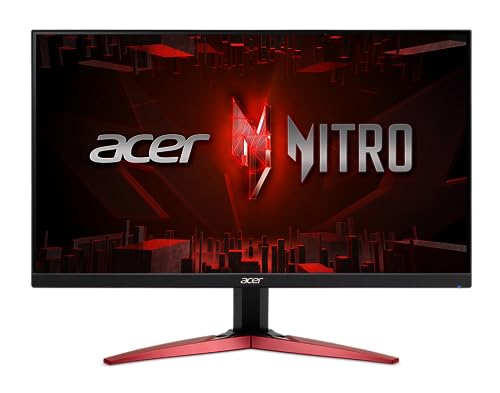
Acer Nitro KG241Y M3biip 23.8in 180Hz Monitor

LG 27GS50F-B 27-inch Ultragear 180Hz Monitor

Samsung Odyssey G5 G51F 27-inch QHD Monitor

24 Inch Curved 180Hz Gaming Monitor 1800R

ArcticPro 24 Inch 200Hz Gmaing Monitor IPS
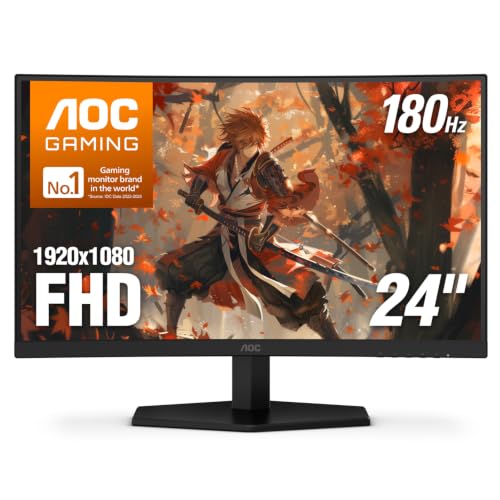
AOC C24G42E 24 Inch Curved 180Hz Monitor

AOC 24G51F2 24 Inch Fast IPS 180Hz Monitor
More Details On Our Top Picks
The Acer Nitro keeps the footprint modest at 23.8 inches, which helps on desks where a 27-inch panel can feel a little much. Its IPS panel should suit mixed use, since you get wider viewing behavior than many VA panels, while the 180Hz refresh target keeps motion more fluid for daily gaming.
The trade-off is plain: full HD on a smaller screen is sensible, but it won’t feel as roomy for multitasking as the Samsung Odyssey G5. You also get dual HDMI and DisplayPort, so a console and a PC can both stay connected without constant cable swaps.
Strong Points
- 23.8-inch size fits tighter desks without crowding the keyboard area.
- IPS panel gives more consistent off-angle viewing for shared spaces.
- 180Hz refresh helps motion stay cleaner during fast action.
- Dual HDMI and DisplayPort make setup changes less annoying.
- VESA support opens the door to arm mounting or wall mounting.
Things To Consider
- 1080p on 23.8 inches is practical, though desktop sharpness is still tied to the resolution ceiling.
- The feature set is straightforward, so you won’t get the richer desktop feel of QHD.
- Bluelight filtering and flicker control help with comfort features, but they don’t replace sensible room lighting.
Feature Snapshot
Who It Suits Best
Space-conscious PC gamers who want a compact screen with flexible inputs will get the most out of this Acer.
Where A Sibling Pick Shines
LG 27GS50F-B 27-inch Ultragear 180Hz Monitor suits you better if you want a larger view for long desktop sessions and a more spacious layout.
The LG takes a more spacious route than the Acer Nitro, and the 27-inch frame gives your game HUD, browser tabs, and desktop windows room to breathe. The 3-side virtually borderless design keeps the front view tidy, which matters more than it sounds when the monitor sits at eye level all day.
Its 1ms MBR, or motion blur reduction mode, is aimed at cleaner motion appearance, though that setting can trade away a bit of brightness depending on how you use it. HDR10 and FreeSync round out a practical feature list, making this a strong fit for a mixed gaming and work desk.
Highlights
- 27-inch layout gives you more usable screen space than the Acer Nitro.
- 3-side borderless styling helps multi-monitor setups feel less cluttered.
- 1ms MBR targets cleaner motion appearance in fast scenes.
- HDR10 adds format support for compatible content.
- HDMI and DisplayPort keep PC and console hookups simple.
Worth Noting
- FHD at 27 inches is serviceable, though text can look less dense than on QHD panels.
- MBR modes often reduce brightness, so you may not want them on all the time.
- The larger chassis needs a deeper desk than the 23.8-inch Acer.
Core Details
The Right Fit
Desk-based gamers who want a larger screen without moving into QHD pricing territory fit this LG well.
Another Choice May Suit
Samsung Odyssey G5 G51F 27-inch QHD Monitor is a better match for you if sharper desktop text matters more than staying at full HD.
The Samsung moves up a resolution tier, and QHD, or 2560 x 1440 class sharpness, matters the moment you split time between games and desktop work. Compared with the LG 27GS50F-B, it gives text and UI elements a cleaner edge, which is exactly what you notice during long sessions in spreadsheets or browsers.
The height-adjustable stand is the practical part here, because monitor comfort often starts with eye line, not spec sheets. Black Equalizer, Virtual Aim Point, and Auto Source Switch+ round out a gamer-focused feature set, though the richer package makes more sense for a desk that stays in one place.
Upsides
- QHD resolution adds visible clarity over full HD options in this list.
- Height adjustment helps you line up the panel more naturally with your seat.
- Black Equalizer can make shadow detail easier to manage in darker scenes.
- Virtual Aim Point and Auto Source Switch+ add useful gaming convenience.
- 180Hz refresh keeps it aligned with the rest of the fast-motion group.
Minor Gripes
- QHD asks more from your graphics hardware than 1080p models.
- The feature mix leans more premium, so you may not need every extra on a simple setup.
- A larger, more serious desk setup suits it better than a cramped corner station.
Details At A Glance
Best Suited To
Gamers who split time between high-motion play and regular desktop work will appreciate the Samsung most.
Look Elsewhere When
Acer Nitro KG241Y M3biip 23.8in 180Hz Monitor makes more sense for tight desks and a simpler full HD setup.
The 1800R curve gives this monitor a different personality from the flat Acer and LG screens. On a smaller gaming desk, that curve can make the image feel a little more wrapped around your position, especially in cockpit views, racers, or story games played from close range.
HDMI 2.0 and DP 1.4 cover modern console and PC connections, and the included HDMI cable saves one small setup step. The honest read is that the curved shape matters more here than the spec sheet does, so this one suits you best when immersion outweighs ultra-sharp desktop text.
Bright Spots
- 1800R curvature gives the panel a more enveloping feel than flat options.
- 24-inch size stays friendly to compact desks and close seating.
- 1ms MPRT helps motion look cleaner in fast scenes.
- HDMI 2.0 and DP 1.4 cover current-generation connections.
- VESA support adds flexible mounting choices.
Room For Improvement
- The curve is a fit choice, so it won’t suit every preference.
- 1080p remains a practical resolution rather than a sharpness upgrade.
- Curved panels can take a little more thought during placement on shallow desks.
Technical Sheet
Who Should Grab It
Space-limited gamers who want a curved screen feel without moving up to a larger desk footprint fit this monitor well.
Skip It When
LG 27GS50F-B 27-inch Ultragear 180Hz Monitor suits you better if you want a flatter, larger workspace for everyday desktop use.
The ArcticPro steps beyond the 180Hz group and lands at 200Hz, so it gives you a little more refresh headroom than the rest of this roundup. For competitive gaming, that extra margin can matter most when your system already pushes high frame rates and you want the display to keep pace.
Its 3-sided frameless styling and ultra-slim build keep it visually light, which helps in multi-monitor layouts or smaller gaming corners. The trade-off is straightforward: this model is more about speed and simple presentation than richer input variety or higher-resolution desktop space.
Best Bits
- 200Hz refresh sits above the rest of the list for extra motion headroom.
- IPS panel supports steadier off-angle viewing.
- 3-sided frameless styling looks neat beside another monitor.
- Adaptive Sync helps keep gameplay smoother when frame pacing shifts.
- DP and HDMI give you the two connections most setups need.
Softer Spots
- The extra refresh only pays off when your system can keep up.
- The spelling in the model name is quirky, though that doesn’t affect use.
- Single HDMI and single DisplayPort keep it practical rather than expansive.
Feature Rundown
Who Will Love This
Competitive gamers who want a slim 24-inch IPS screen and can use 200Hz instead of settling at 180Hz should look here.
A Better Fit Elsewhere
Acer Nitro KG241Y M3biip 23.8in 180Hz Monitor makes more sense for you if the priority is a simpler, more familiar 180Hz setup.
The AOC C24G42E leans into a curved VA panel, and VA, or vertical alignment, usually brings deeper contrast than many IPS alternatives. That matters in dim rooms or game scenes with dark backgrounds, while the 0.5ms figure keeps the motion side of the spec sheet firmly aimed at gaming.
Console-ready support and VESA mounting make it easy to fit into a bedroom setup, desk stand, or wall-mounted corner. Compared with the Acer Nitro and LG, this one is more about contrast and curve than wide-angle color consistency, so the feel changes a bit depending on your room lighting.
Standout Traits
- Curved VA panel gives darker scenes stronger contrast behavior.
- 24-inch size stays manageable for compact gaming stations.
- 0.5ms response spec targets fast motion.
- DP 1.4 and HDMI 2.0 support common gaming hookups.
- VESA mounting keeps installation options flexible.
Areas To Watch
- VA contrast often looks best head-on, so angled seating can change the picture.
- Curve and contrast together can feel more dramatic than some people prefer for office work.
- The panel style suits gaming first, so color-critical work calls for a different class of screen.
Core Details
Made For
Gamers who want curved contrast at a compact size, especially in darker rooms, fit this AOC well.
Reach For A Different Pick When
LG 27GS50F-B 27-inch Ultragear 180Hz Monitor is the better match for you if a larger flat screen matters more than VA contrast.
This AOC lands in a useful middle ground, since Fast IPS aims to blend the viewing consistency of IPS with a gaming-first response profile. That makes it a sensible fit for a bedroom desk, console corner, or shared setup where you want speed without giving up the broader viewing behavior that helps in everyday use.
The earphone output is a small but practical detail, especially on compact desks where speakers are not part of the plan. Compared with the curved C24G42E, this flat version will appeal more to people who prefer a straightforward panel shape and a cleaner all-purpose layout.
Reasons To Buy
- Fast IPS gives you a more flexible viewing profile than VA panels.
- 180Hz refresh supports fluid motion for gaming sessions.
- Earphone output keeps audio routing simple on smaller desks.
- VESA mounting makes it easier to adapt to an arm or wall bracket.
- 3-year zero bright dot coverage is useful for long-term peace of mind.
Small Caveats
- The 24-inch, 1080p format is practical, though not especially roomy.
- Without the curve of the C24G42E, the immersion feel is more traditional.
- The product title is cluttered, so the actual value sits in the feature set rather than the naming.
Core Details
Whose Shelf It Belongs On
Gamers who want a flat 24-inch screen with practical audio and mounting options should look closely at this AOC.
Swap It Out When
24 Inch Curved 180Hz Gaming Monitor 1800R suits you better if you want the curved-panel feel instead of a straight-edged everyday layout.
How To Choose The Right 180hz Monitors
Panel Type Matters More Than You Think
IPS panels usually give steadier off-angle viewing, which helps in shared rooms or desks where you shift around a lot. VA panels tend to bring stronger contrast, so darker game scenes can look punchier, but the image can change more as your seat moves. Curved screens add another layer, and that curve can feel immersive on a close desk while looking unnecessary on a deeper workstation.
Size And Resolution Work As A Pair
A 24-inch 1080p monitor is compact and easy to place, and it often feels right for fast gaming at short desk distance. A 27-inch 1080p screen gives you more physical space, but text won’t look as dense as it does on QHD. That’s why the Samsung Odyssey G5 G51F stands apart, since 1440p sharpness makes the upgrade visible during everyday desktop work.
Refresh Rate Is Only Part Of The Story
180Hz is a solid baseline for motion clarity, but response time, panel behavior, and frame pacing still shape the result. A 1ms or 0.5ms spec suggests quick pixel changes, though the real-world feel also depends on the panel class and overdrive tuning. That’s where models like the ArcticPro 200Hz and AOC 24G51F2 make sense for motion-first setups, especially when your system already runs fast.
Ports, Mounting, And Desk Fit
Dual HDMI and DisplayPort make life easier when you swap between a console and a PC. VESA mounting matters too, because an arm can clear desk space and fix an awkward viewing height. The practical read is simple: a monitor that looks good on paper still needs to fit your desk depth, cable layout, and chair height.
A Quick Reality Check
Common Shopping Slip Ups
A lot of people focus on refresh rate and miss the size-to-resolution match. A 27-inch full HD panel can feel roomy, but it won’t be as crisp for text-heavy work as QHD. Another common miss is ignoring desk depth, which makes curved screens and larger stands harder to place cleanly.
What The Higher Tier Buys
Higher-priced models usually spend more on resolution, stand adjustment, panel tuning, or extra gaming features. That’s why the Samsung Odyssey G5 G51F carries more value for mixed work and play than a basic 24-inch FHD screen. Paying up makes sense once you want sharper text, better ergonomics, or a more polished setup that stays on your desk full-time.
Frequently Asked Questions
Are 180Hz monitors worth it for console use?
They can be, especially for fast games where motion feels smoother and input behavior matters to you. The bigger question is whether your console and game settings can actually use that refresh range.
Is IPS or VA better for 180Hz monitors?
IPS usually suits you better for wider viewing consistency and more even color behavior across the screen. VA often makes more sense when deeper contrast matters more than side-angle stability.
Do you need QHD instead of FHD on a 27-inch monitor?
QHD gives you cleaner text and more desktop room, which helps a lot for work and browsing. FHD at 27 inches is still usable, but it looks less dense.
Does a curved monitor help with gaming?
A curve can make close-up gaming feel more immersive, especially on compact desks. The trade-off is that some people prefer the clean geometry of a flat panel for mixed work.
What matters most besides refresh rate?
Panel type, response behavior, stand adjustment, and input selection all affect how usable the monitor feels day to day. A well-matched size and resolution often matter more than chasing the highest number alone.
Final Thoughts
You get the cleanest value from 180Hz monitors when the screen size, resolution, and panel type line up with how you actually sit and play. The Acer Nitro and LG keep things straightforward, the Samsung adds sharpness, and the AOC choices bring either curve or Fast IPS flexibility. That’s the real decision here, not just the refresh number. Pick the one that fits your desk first, then let the spec sheet confirm the match.
