
CAD work gets easier when your control device fits the task instead of fighting it. Some of these picks focus on precise cursor work, while others are built for 3D navigation, long design sessions, or a quieter desk setup. You’ll see a mix of corded, wireless, and Bluetooth models, so you can match the mouse to your software, desk space, and travel habits.
The right choice can shave friction off drafting, modeling, and review work in a way that feels small at first, then hard to give up. That’s especially true for you if you move between desktop, laptop, and tablet, or spend long hours in front of complex models.
The Shortlist At A Glance

Redragon M690 PRO Wireless RGB Gaming Mouse 8000 DPI
Logitech MX Master 4 for Mac Space Black
3Dconnexion 3DX-700040 SpaceMouse Pro

3Dconnexion SpaceMouse Wireless Bluetooth Edition 3DX-700115

3Dconnexion CadMouse Compact Wireless
3DConnexion CadMouse Pro Mouse Black

3Dconnexion SpaceMouse Pro Wireless BT

WL300 Bluetooth Mouse Silent Wireless Mice Grey
More Details On Our Top Picks
The Redragon M690 PRO sits closer to a gaming mouse than a dedicated CAD tool, but that still has value for quick hotkey work and general desktop control. The 2.4 GHz wireless link reaches about 10 meters, so a cluttered desk or a laptop dock setup stays tidy.
The five DPI stages, from 500 to 8000, help you move from fine pointing to faster sweeps without diving into menu settings. You may find the RGB lighting a little extra for office use, yet the ergonomic shell and remapping support make this an easy entry point for casual CAD users.
Strong Points
- Wireless operation keeps the desk clear, which helps a lot during multi-monitor work.
- Five DPI levels give you room to adjust pointer speed to the task at hand.
- Remappable keys can shorten repetitive actions in drafting and modeling sessions.
- The shaped body should feel familiar to anyone coming from a standard gaming mouse.
Things To Consider
- The gaming-first styling may feel busy beside a plain office setup.
- Wireless control is handy, but some CAD work still favors a more specialized layout.
- You’ll want to keep software settings organized so remaps don’t become confusing later.
Feature Snapshot
Who It Suits Best
You’re a strong match for this one if you want a wallet-friendly wireless mouse that can handle casual CAD along with everyday computing.
Where A Sibling Pick Shines
3Dconnexion CadMouse Pro Mouse Black is a better fit for you if your work leans harder toward precision drafting and you prefer a more CAD-focused button layout.
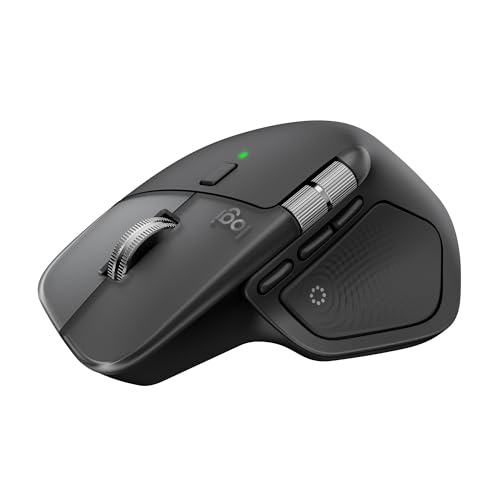
This mouse leans into comfort and control rather than pure CAD specialization, which suits long desktop sessions very well. Bluetooth pairing, USB-C charging, and ultra-fast scrolling make it feel built for a Mac-heavy desk, though Windows and iPadOS support widens the picture.
The haptic feedback feature gives your hand a more tactile sense of control, like a small click of confirmation without adding physical clutter. The trade-off is simple: you’re paying for a polished general-purpose workflow tool, not the kind of dedicated 3D navigation hardware that 3Dconnexion focuses on.
What We Like
- The ergonomic shape suits long editing sessions and busy desktop days.
- Ultra-fast scrolling helps you move through drawings, timelines, and long documents.
- USB-C charging fits modern laptop and dock setups with less fuss.
- MacOS, iPadOS, and Windows support make it easier to move between devices.
- Haptic feedback can make navigation feel more deliberate in daily use.
Minor Gripes
- The design is more about comfort than CAD-specific shortcut depth.
- Mac-focused positioning may be less appealing for mixed Windows-first studios.
- Advanced features can feel like extra layers for users who just want a plain pointer.
Core Details
Made For
You’ll get the most from this mouse if your day includes long desktop sessions, a Mac setup, and plenty of document or reference scrolling alongside CAD work.
Another Choice May Suit
3Dconnexion SpaceMouse Pro 3D Mouse is the better match for you if the main goal is direct 3D model navigation rather than a premium all-purpose mouse.
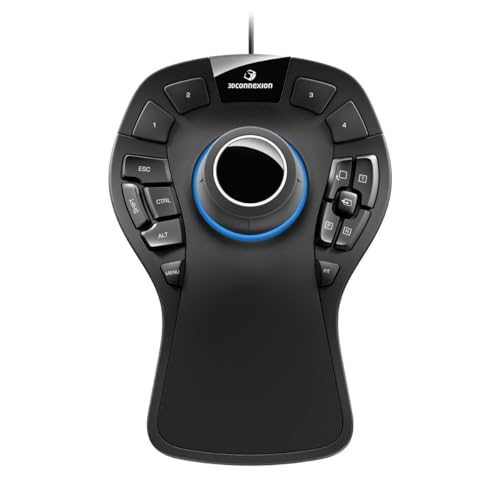
This is the first true 3D navigation tool in the lineup, and that changes the conversation fast. The six-degrees-of-freedom sensor means you can push, pull, tilt, and pan in supported software with one hand, while the other stays on a regular mouse or keyboard.
The soft-coated palm rest, 15 programmable keys, and quick-view controls make it feel built for sustained design sessions. The corded setup keeps power simple, though the short 3-foot cable means desk layout matters more than it does with the wireless 3Dconnexion options.
Highlights
- The 6DoF sensor is built for moving through 3D scenes more naturally than a standard mouse.
- Fifteen programmable keys can trim repeated command hunting in busy projects.
- Quick-view and rotation controls help you reorient models without breaking your flow.
- The soft-coated hand rest should feel steady during long sessions at a desk.
- Windows, macOS, and Linux support makes it broad enough for mixed software teams.
Room For Improvement
- The cord limits placement more than the wireless 3Dconnexion models do.
- It takes some software familiarity before the control layout feels fully natural.
- The size is substantial, so cramped desks may feel tight around it.
Details At A Glance
Best Suited To
You’re the right match for this pick if your work lives inside 3D CAD, modeling, or animation software and you want dedicated navigation hardware.
Skip It When
3Dconnexion CadMouse Compact Wireless makes more sense for you if you need a lighter everyday mouse for travel and less specialized desk use.
Compared with the corded SpaceMouse Pro, this version gives you a cleaner desk and a lot more placement freedom. That matters in a laptop dock setup, a shared studio, or any workspace where cables tend to collect like dust.
The wireless Bluetooth design keeps the same basic focus on 3D movement, so you still get a dedicated control surface for model navigation. The trade-off is battery management, and that’s the sort of small upkeep you’ll notice most during long project stretches.
Upsides
- Bluetooth operation helps keep the work area uncluttered.
- The wireless design suits desks that change often or share space.
- It keeps the core SpaceMouse navigation idea intact for 3D workflows.
- Moving it between stations is easier than with a tethered desktop tool.
Areas To Watch
- Battery upkeep becomes part of the routine, unlike the corded model.
- Wireless pairing can be one more step in a multi-device setup.
- Dedicated 3D control still requires compatible software to matter.
Feature Rundown
Who Will Love This
You fit this model well if you want 3Dconnexion navigation without tying yourself to a fixed cable route.
Look Elsewhere When
3Dconnexion 3DX-700040 SpaceMouse Pro is the stronger fit for you if you want more keys and a palm rest for full-time desk use.
This one is the most travel-friendly CAD mouse in the group, and its smaller body keeps packing simple. For commuters who split time between office desks, client sites, and home setups, that compact shape is the kind of detail you appreciate after a few weeks.
It stays more mouse-like than the SpaceMouse line, so the learning curve should feel easier for general work. The trade-off is obvious, though: you get a compact pointer rather than the specialized 3D navigation controls that make the Pro models stand out.
Bright Spots
- The compact shell makes it easy to carry in a laptop bag.
- Wireless use keeps a travel desk or small studio less crowded.
- Its shape should suit standard pointer work better than novelty layouts.
- CAD-friendly branding hints at a more work-focused feel than a gaming mouse.
Small Caveats
- Smaller mice can feel less supportive during very long hand-heavy sessions.
- It does not bring the dedicated 3D control surface found on SpaceMouse models.
- Compact shells can be easier to misplace in a bag or drawer.
Quick Facts
Built With In Mind
You’ll like this most if you move between locations and want a tidy, portable mouse that still feels aimed at design work.
Where A Sibling Pick Shines
3Dconnexion SpaceMouse Pro Wireless BT makes more sense for you if you spend your day inside complex 3D models and want a richer navigation setup.
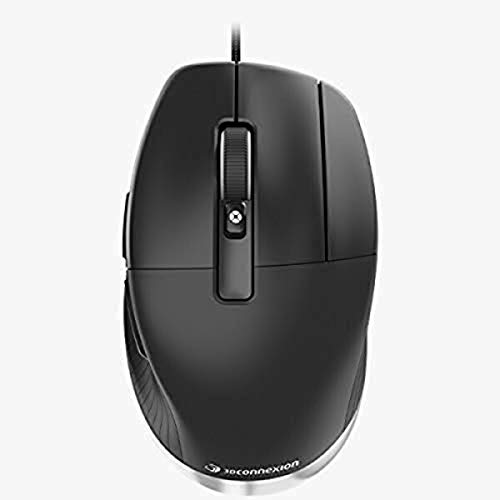
This wired CadMouse Pro is the plainest workhorse in the list, and that’s exactly why some CAD desks like it. Seven buttons, an optical sensor, and a cable connection make it a straightforward fit for people who want stable pointer control without extra wireless management.
Compared with the compact wireless CadMouse, this one should feel more anchored on a desk and a bit more deliberate in use. The honest read is that it suits serious workstation users best, especially anyone who values button access more than portability.
Reasons To Buy
- Seven-button control gives you more room for shortcut mapping.
- The wired design avoids battery upkeep and pairing steps.
- Optical tracking suits steady pointer work on a dedicated desk.
- The black finish keeps the look simple and professional.
Worth Noting
- The cable makes it less flexible than the wireless CadMouse options.
- Seven buttons help, but they still won’t replace a full 3D navigation controller.
- Desk users may want a mouse bungee or a tidy cable route.
Technical Sheet
Right Fit For
This is a good match for you if your CAD station stays in one place and you want a wired mouse with more than the usual button count.
A Better Fit Elsewhere
3Dconnexion CadMouse Compact Wireless works better for you if you split time between desks and need something easier to carry.
This is the most polished SpaceMouse in the group, and the wireless layout gives you premium-level flexibility without the desk tether. For heavy CAD sessions, that matters more than it sounds, because the control surface sits where you want it instead of where a cable allows.
The Pro styling suggests a model aimed squarely at committed 3D work, especially in a studio that values smoother desk management. The trade-off is cost positioning and the need to learn a dedicated control scheme, but that’s normal for this class of hardware.
Best Bits
- Wireless freedom makes desk placement much easier than with a corded controller.
- The SpaceMouse layout is built for model movement rather than general pointing.
- Pro-level positioning should suit a workstation that handles CAD all day.
- You avoid cable drag while keeping the benefits of dedicated 3D control.
Softer Spots
- The learning curve can feel steep for anyone new to 3D controllers.
- Battery upkeep still needs attention in a busy studio.
- It makes the most sense inside software that supports the SpaceMouse workflow.
Core Details
The Right Fit
You’re in the sweet spot for this one if your day revolves around CAD, 3D modeling, or other software that benefits from a dedicated navigation hand.
Where Shoppers Go Wrong
Logitech MX Master 4 for Mac Space Black is the safer choice for you if you want a premium mouse first and a 3D controller second.
The WL300 is the most general-use option here, and that makes it useful for people who want a quiet mouse that can hop between devices. Tri-mode connectivity means wired, 2.4 GHz wireless, and dual Bluetooth support, so a laptop, tablet, and desktop can all stay in the mix.
For CAD it’s less specialized than the 3Dconnexion line, but the sculpted grip, six buttons, and adjustable DPI give it enough control for routine design tasks. The 18-month battery claim stands out for work travel, though the real value comes from convenience rather than deep creative shortcuts.
Positives
- Silent clicking helps keep a shared office or late-night setup quieter.
- Tri-mode connectivity gives you more ways to stay connected across devices.
- The sculpted grip should feel comfortable during long laptop sessions.
- Six buttons give you a bit more control than a bare-bones mouse.
Points To Note
- It is more of a flexible everyday mouse than a dedicated CAD controller.
- Some users may want more specialist shortcut access for complex design software.
- Multiple connection modes are handy, but setup still needs a little attention.
Feature Card
Whose Shelf It Belongs On
You’ll get the most from this mouse if you move between home, office, and travel setups and want one device that can follow along.
Where Another Pick Suits Better
3Dconnexion 3DX-700040 SpaceMouse Pro is the better fit for you if your main goal is hands-on 3D model navigation rather than quiet general work.
How To Choose The Right 3d Mouses For Cad
Match The Control Style To Your Work
CAD control falls into two broad camps, a standard mouse for pointer work and a 3D controller for model movement. The 3Dconnexion SpaceMouse models sit in the second camp, where six-degrees-of-freedom control helps with rotate, pan, and zoom actions in supported software. A standard mouse still matters for menus, commands, and detail work, so the cleanest setup often uses both together.
That split matters most in busy production sessions, because the wrong control style slows you down in small but constant ways. A drafting-heavy user usually wants shortcut buttons and steady precision, while a model reviewer may care more about smooth scene navigation. You can keep the workflow simple by deciding which side of that split your day spends the most time on.
Think About Connection And Desk Layout
Corded models remove battery upkeep and pairing, which suits a fixed workstation with little movement. Wireless and Bluetooth options feel better on a clean desk or in a laptop dock setup, especially where the cable would snag on a drawing tablet or keyboard tray. The trade-off is straightforward, because wireless convenience adds one more thing to manage.
Desk size matters too. The 3DX-700040 SpaceMouse Pro has a larger footprint, while the CadMouse Compact Wireless is easier to carry and store. For a cramped studio, a smaller shell can feel like the practical choice, even before you think about features.
Look Past Buttons And Toward Workflow
Extra buttons only help when they map cleanly to the software you use every day. Remapping support, like the Redragon M690 PRO offers, can be useful for frequent actions, but a CAD-focused device usually gives you a more deliberate layout. That difference shows up most during long sessions, where reaching the right command becomes muscle memory instead of a hunt.
Ergonomics matter in the same way. A sculpted grip, soft-coated palm rest, or lower travel weight can reduce hand fatigue during long design days, yet the benefit depends on the shape of your hand and the style of your tasks. Comfort is personal, so it pays to match the mouse to the hours you actually spend at the desk.
What To Weigh Before You Click
Mistakes Worth Dodging
A common slip is treating every CAD mouse like a regular office mouse. That misses the point of the SpaceMouse line, which is built for 3D navigation rather than simple pointing. Another mistake is overlooking software support, because advanced controls only help inside programs that can read them well.
Size gets ignored too often. A large controller can feel excellent on a dedicated desk, then awkward in a travel bag or a crowded shared space. The safer move is to match the shape to the places you actually work.
What Separates Premium From Basic
Higher-tier models cost more because they usually bring specialized controls, better ergonomics, and a more deliberate fit for long sessions. The SpaceMouse Pro and SpaceMouse Pro Wireless BT are good examples, since they add dedicated 3D motion control instead of just more pointer buttons. That extra layer of control is useful when your day lives inside modeling software.
Spending up makes sense for you when the mouse is part of your core production toolchain. It matters less for occasional CAD work or mixed office use, where a comfortable general mouse may be enough. In plain terms, you pay for time saved across repeated tasks, not for flash.
Final Thoughts
Your best choice depends on whether CAD is the main event or just one part of a broader desk setup. The 3Dconnexion models make the strongest case for serious model navigation, while the MX Master 4 and WL300 are easier to live with for mixed daily work. Redragon adds a budget-friendly wireless lane, and the CadMouse options sit neatly between portability and workstation focus. Pick the tool that fits your software, your desk, and the way your hand actually works.
