
A 27-inch display sits in a sweet spot for desks that need detail without crowding the room. In 4K, text sharpens, windows breathe, and photo work stops feeling cramped, while curved options add a little wraparound comfort for long sessions. You get the most value here by matching the panel, refresh rate, and stand to the way you actually work or play.
The Shortlist At A Glance

Dell 27 Monitor S2725QS 4K UHD IPS 120Hz

Dell 27 Monitor S2725QC 4K UHD IPS 120Hz

LG 27US500-W Ultrafine Monitor 27-Inch 4K UHD White

LG 27UP650K-W 27-inch Ultrafine 4K UHD IPS White
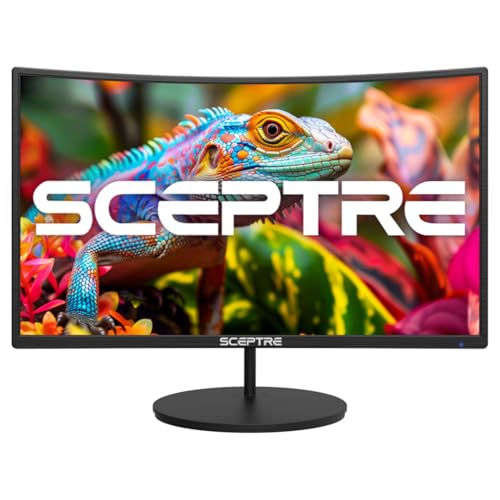
Sceptre Curved 27-inch Gaming Monitor 100Hz 1080p

Sceptre 27-Inch Curved Gaming Monitor FHD 1080p 240Hz

Acer Nitro 27in 4K 3840×2160 IPS 160Hz VG270K V4
More Details On Our Top Picks
That 120Hz panel gives this Dell a broader lane than most plain office 4K screens, so scrolling and casual gaming feel smoother than the usual 60Hz baseline. The IPS panel, anti-glare finish, and 99% sRGB coverage point toward a desk setup that needs sharp text and dependable color more than theater-style punch.
The stand adds height, swivel, and pivot adjustment, which matters more than it sounds during long workdays or shared desks. USB-C also keeps cable clutter down for laptops, though the trade-off is that this model reads more like a flexible desktop display than a full gaming-first screen.
What We Like
- 4K resolution keeps spreadsheets, web pages, and timelines crisp on a 27-inch frame.
- 120Hz refresh rate helps motion feel calmer than standard office panels.
- USB-C simplifies laptop hookups and reduces desk clutter.
- Height, swivel, and pivot adjustment make shared workstations easier to live with.
- 99% sRGB is useful for color-aware home and studio tasks.
Things To Consider
- It leans more toward mixed use than pure gaming ambition.
- 5ms response time is fine for general play, but fast esports users usually want quicker motion handling.
- The finish is practical, though you will still want to keep fingerprints off the stand and panel edges.
Feature Snapshot
Who It Suits Best
Busy home offices and hybrid setups benefit most, especially when you split time between laptop work and occasional gaming.
Where A Sibling Pick Shines
Dell 27 Monitor S2725QC suits you better if USB-C simplicity matters more than extra stand movement and the slightly more versatile S2725QS layout.
This Dell keeps the same 27-inch 4K polish as the first model, but the 163 PPI figure gives you a sharper text grid on the desk. USB-C, HDMI, and DisplayPort cover the usual laptop and desktop paths, so the setup feels straightforward rather than fussy.
Eye Comfort Technology and the LED edgelight system make it a sensible all-day panel for office work, school, or a shared room. The honest trade-off is that 120Hz helps smooth motion, yet the rest of the spec sheet still points to a display built more for clean productivity than flashy gaming.
Highlights
- 163 PPI gives text and UI elements a very fine, dense look.
- USB-C keeps modern laptop setups tidy and simple.
- Anti-glare coating helps in bright rooms with overhead light.
- 120Hz refresh supports smoother everyday motion than 60Hz panels.
- 99% sRGB keeps color handling practical for most non-cinema work.
Worth Noting
- The panel shape is flat, so it does not give you the wraparound feel that curved screens offer.
- 4ms response time is fine for common use, though fast-paced gaming still favors quicker panels.
- The clean whiteboard-for-the-desk feel is nice, but the finish still needs routine wiping.
Core Details
Made For
Office users, students, and laptop dock setups fit this model best, especially on a desk that sees long daily sessions.
A Better Fit Elsewhere
Dell 27 Monitor S2725QS suits you better if you want the added stand movement and a touch more physical flexibility at the desk.
The LG 27US500-W shifts the mood from desk utility to image quality, with HDR10 and up to 90% DCI-P3 giving colors more range than the Dell office-first models. That matters for photo sorting, creative layout work, or just living with richer on-screen color day after day.
The borderless design keeps the frame tidy, and the Onscreen Control feature lets you adjust layout and monitor settings with mouse clicks. The stand only offers tilt adjustment, so the trade-off is obvious: cleaner visual focus, less physical flexibility.
Reasons To Buy
- 4K resolution gives you sharp detail for content and office work.
- HDR10 and 90% DCI-P3 support a broader color range than basic productivity panels.
- Borderless styling helps the screen feel less bulky on a compact desk.
- Onscreen Control makes split-screen and settings changes more convenient.
Small Caveats
- The stand is tilt-only, so height matching depends on desk height and chair setup.
- It lacks the extra stand movement you get from the Dell S2725QS and LG 27UP650K-W.
- White surfaces can show dust more quickly, so routine cleaning keeps it looking neat.
Quick Facts
Who Will Love This
Creative hobbyists and general office users who care about color richness more than full stand articulation will fit this LG well.
Swap It Out When
LG 27UP650K-W suits you better if you want height, pivot, and a more adjustable stand for a shared workstation.
This LG feels built for people who want the 4K basics done cleanly, without the more stylized lean of the curved Sceptre models. DisplayHDR 400 gives it a little more headroom for supported content, and the IPS panel keeps the image steady across wider seating positions.
The stand is the real practical win here, because tilt, height, and pivot help the screen fit different desks and posture needs. Reader Mode and Flicker Safe speak to long session comfort, though the trade-off is a 60Hz ceiling that puts it squarely in work-first territory.
Best Bits
- 4K IPS output looks sharp and steady for daily desk work.
- Height, tilt, and pivot adjustment make it easier to dial in posture.
- DisplayHDR 400 can help supported content feel less flat.
- Reader Mode suits long document sessions and web-heavy days.
- White finish gives the desk a lighter visual footprint.
Areas To Watch
- 60Hz is fine for office use, but it trails the faster Dell and Acer options.
- The bright finish may need more frequent dusting than darker models.
- It is a flat screen, so curve fans should look elsewhere.
Core Details
Right Fit For
Home office setups, document-heavy work, and mixed desktop use benefit most from this model.
Not Your Match When
Dell 27 Monitor S2725QS fits better for you if a faster refresh rate matters more than the cleaner office focus here.
This Sceptre moves away from 4K and leans into the curved 1080p gaming lane, which is why it feels more focused than the office-first LG and Dell screens above. The 100Hz refresh rate, 1500R curve, and built-in speakers make it a straightforward starter display for bedrooms, dorms, or a secondary gaming desk.
Two HDMI ports, VGA, and VESA wall-mount support give you flexible hookup and placement options. The trade-off is obvious: you give up the fine desktop detail of 4K in exchange for simpler hardware and a friendlier entry point.
Upsides
- Curved 27-inch shape feels immersive for casual gaming and video.
- 100Hz refresh is a step up from basic 60Hz monitors.
- Built-in speakers reduce the need for extra desk hardware.
- Two HDMI inputs help with console and PC switching.
- VESA support makes wall or arm mounting possible.
Points To Note
- 1080p at 27 inches is softer than the 4K models in this list.
- The R1500 curve suits relaxed play more than color-critical work.
- Built-in speakers are handy, though separate audio usually sounds fuller.
Feature Rundown
Whose Shelf It Belongs On
Budget-conscious gaming setups, dorm rooms, and secondary media stations fit this Sceptre best.
Another Choice May Suit
Sceptre 27-Inch Curved Gaming Monitor FHD 1080p 240Hz fits competitive play better, especially for fast-paced motion and sharper timing demands.
Where the previous Sceptre leans into value, this one pushes hard on motion with a 240Hz panel and 1500R curve. That combination is aimed squarely at fast games, where smooth tracking matters more than desktop sharpness and a crisp 4K grid.
DisplayPort and two HDMI inputs keep it easy to pair with a PC and console, while built-in speakers cover basic sound without extra gear. The trade-off is simple and honest: you get speed, but you stay in 1080p territory, so it is not the right call for detailed design work.
Bright Spots
- 240Hz refresh rate is well suited to rapid on-screen motion.
- 1500R curve helps the image feel more enveloping on a 27-inch panel.
- DisplayPort and dual HDMI inputs keep device switching easy.
- Built-in speakers are convenient for a spare-room or desk setup.
Room For Improvement
- 1080p resolution is the clear compromise versus the 4K options above.
- The panel is built for speed, not fine text work.
- Black finishes tend to show dust and fingerprints, so upkeep stays visible.
At A Glance
Best Suited To
Fast-action gaming setups and desk spaces that prioritize motion smoothness over image density fit this Sceptre well.
Look Elsewhere When
LG 27UP650K-W suits you better if your day mixes work documents and casual play, because the 4K panel carries more desktop detail.
The Acer Nitro sits at the sharp end of this group, because it pairs 4K detail with a 160Hz ceiling and DFR support that can reach 320Hz in a different operating mode. That makes it stand apart from the Dell and LG office-first screens, especially for you if gaming speed matters and desktop detail still needs to stay intact.
Two HDMI 2.1 ports, DisplayPort, built-in speakers, and VESA mounting give it the kind of hardware flexibility that makes a high-end desk easier to organize. The trade-off is predictably premium: this is the most feature-dense path in the set, so it suits a focused gaming rig more than a simple everyday workstation.
Standout Traits
- 4K resolution preserves desktop detail while still serving gaming needs.
- 160Hz refresh rate gives you a fast baseline for motion.
- DFR support adds another performance tier for compatible use cases.
- HDMI 2.1 ports are useful for current-generation consoles and PCs.
- Flickerless technology and a bluelight filter support longer screen sessions.
- VESA mounting makes it easier to free up desk space.
Minor Gripes
- The feature set is richer than the Dell or LG office models, so setup choices matter more.
- Gaming-first tuning can be more than you need for plain productivity.
- The built-in speakers are convenient, though serious desk audio usually calls for separate gear.
Technical Sheet
Built With In Mind
Gamers who want 4K detail without giving up high refresh rates fit this Acer best, especially in a dedicated desktop setup.
Where Another Pick Suits Better
Dell 27 Monitor S2725QC suits you better if your day centers on office work first and only occasional gaming second.
How To Choose The Right 4k 27 Inch Curved Monitors
Panel Type And Surface Finish
IPS panels keep color and contrast steadier from side angles, which matters on shared desks and wider workstations. A curved screen can feel more enveloping, but the curve itself does not replace panel quality, so look at the panel first and the shape second. Anti-glare or low-reflection coatings help in bright rooms, especially near windows or overhead lighting.
Refresh Rate Versus Everyday Work
A 60Hz screen works cleanly for office tasks, yet 120Hz, 160Hz, or 240Hz changes how scrolling and motion feel. That matters most for gaming, fast mouse movement, and heavy multitasking, where the screen seems less sticky. Higher refresh usually costs more, so the real question is whether your day includes play or mostly documents and browser tabs.
Ports, Power, And Desk Fit
USB-C is a strong convenience feature for laptop users because one cable can handle video on compatible systems and keep the desk simpler. HDMI and DisplayPort still matter, since desktop towers, consoles, and docks often rely on them for stable connections. Stand movement also matters more than many shoppers expect, because height, tilt, pivot, and swivel determine whether the monitor fits your posture or forces a compromise.
Color And Resolution In Real Use
4K at 27 inches gives you dense text and a lot of on-screen space without pushing the panel into oversized territory. sRGB coverage helps with web and general creative work, while broader ranges like DCI-P3 matter more for color-rich content. Curved 27-inch screens can feel natural for games and movies, but flat 4K models still make the strongest case for mixed office use.
What To Weigh Before You Click
Common Shopping Slip Ups
A common miss is chasing curve shape while ignoring the resolution, which can leave you with a softer 1080p picture on a 27-inch screen. Another mistake is overlooking stand movement, then ending up with a monitor that sits too high or too low for the chair. The cleaner move is to match panel detail, port layout, and desk ergonomics before worrying about the styling.
The Upgrade Payoff
Higher-tier models usually cost more because they combine sharper panels, faster refresh, broader color support, and better connectivity in one chassis. That matters most for gaming rigs, design work, or a main desk that stays in use for long stretches. Paying up makes sense when you need both motion quality and desktop detail, not just a curved shape for looks.
Frequently Asked Questions
Are 27-inch 4K monitors too small?
No, 27 inches is a common sweet spot for 4K because the picture stays dense and clear at normal desk distance. You also get enough workspace for side-by-side windows without the monitor feeling oversized.
Does a curved monitor help for work?
A curve can feel comfortable on a long desk because the edges sit a bit more naturally in your field of view. For text-heavy office use, though, flat 4K screens still make the strongest case.
Is 120Hz worth it on a 4K monitor?
Yes, for you if your routine includes gaming or a lot of fast scrolling. For basic office work, 60Hz still gets the job done.
What ports matter most on these monitors?
USB-C matters most for laptop docking, while HDMI and DisplayPort cover desktops and consoles. The best setup is the one that matches your main device without extra adapters.
Which spec should you prioritize first?
Start with resolution and panel type, then check refresh rate and stand movement. Those four tell you far more about daily comfort than cosmetic extras.
Closing Thoughts
You get the best results from this category by matching the screen to the way you actually sit, work, and play. Dell’s two 27-inch models make the strongest case for mixed-use desks, LG owns the cleaner productivity lane, and Acer pushes hardest on high-end gaming speed. Sceptre’s curved options stay appealing when budget and motion matter more than 4K detail. Choose the panel that fits your day, and the rest gets easier from there.
