
4k Computer Displays can make daily work feel less cramped, especially on long spreadsheets, side-by-side documents, photo timelines, and late-night streaming. You get more room to keep windows open without juggling tabs, and the difference is obvious on both 27-inch and 32-inch screens. Some picks lean fast for gaming, others lean calm for office use, and a few sit neatly in the middle. The right match comes down to size, panel type, ports, and how much motion smoothness your setup actually needs.
Quick Shortlist For 4k Computer Displays

Dell 27 Monitor S2725QS 4K UHD IPS 120Hz

Samsung 32 Flat Computer Monitor 75Hz Borderless Display
ViewSonic VX3276-4K-MHD 32 Inch 4K UHD Monitor

Dell 27 Monitor S2725QC 4K UHD IPS 120Hz

Gawfolk 27 Inch 4K Monitor IPS 60Hz
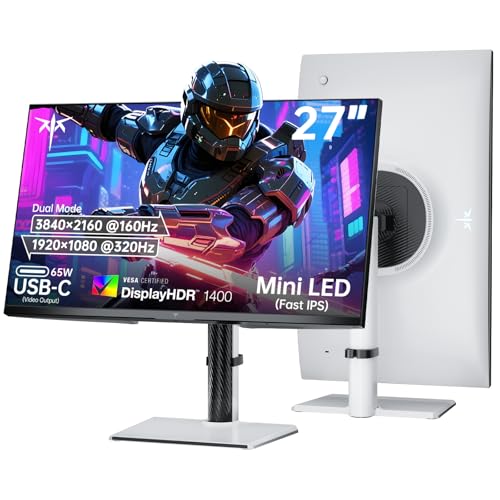
KTC 27 Inch Dual Mode Mini LED Monitor 4K UHD

Dell 32 Monitor S3225QS 4K UHD VA 120Hz
More Details On Our Top Picks
The S2725QS makes sense for desk setups that move between documents, streaming, and a little gaming. Its 27-inch size keeps pixels tight without feeling oversized, and the height, swivel, and pivot adjustments help you match the panel to your chair and desk.
Compared with the 32-inch picks below, this Dell feels more compact and easier to fit in tighter workspaces. The honest read is that 27 inches suits people who want sharp text and a cleaner desk layout more than a giant panel that dominates the room.
What We Like
- 4K resolution on 27 inches keeps text and UI elements crisp for office work.
- 120Hz refresh rate gives motion a smoother feel than basic 60Hz office models.
- IPS panel technology helps maintain color and contrast from off-center seating.
- USB-C support simplifies modern laptop docking on a busy desk.
- Height, swivel, and pivot adjustments make posture changes easier during long sessions.
Things To Consider
- The 27-inch frame suits focus work more than sprawling split-screen layouts.
- Five milliseconds of response time is fine for general use, but fast players may want more speed.
- Gloss control matters on bright desks, so anti-glare placement still deserves attention.
Feature Snapshot
Who It Suits Best
Office-focused shoppers, laptop dock users, and mixed-use desks benefit most from this size and port mix.
A Better Fit Elsewhere
Dell 32 Monitor S3225QS suits you better if you want more screen space for side-by-side windows and a larger viewing canvas.
A 32-inch flat screen changes the feel of a desk immediately, and this Samsung leans into that roomy layout without piling on gamer-first extras. The borderless look keeps the front view tidy, which helps in a home office or a living-room workspace where the screen stays visible all day.
Unlike the Dell S2725QS, this one trades higher refresh speed for a calmer, larger canvas. You may find that trade worthwhile for documents, browsing, and general household use, especially on desks where physical space is already limited.
Highlights
- 32-inch size gives you more room for side-by-side windows and larger text.
- 75Hz refresh rate adds a little extra smoothness over basic office panels.
- AMD FreeSync helps reduce visible tearing during compatible graphics output.
- Game Mode gives the display a second lane beyond plain office work.
- Borderless styling keeps the front profile clean and less distracting.
Worth Noting
- The 75Hz ceiling sits below the faster Dell and KTC options.
- Advanced eye-care wording is useful, but it does not replace sensible brightness settings.
- A 32-inch panel can feel large on shallow desks, so depth matters.
Core Details
Who Will Love This
Household computers, document-heavy desks, and casual use in a shared room suit this screen well.
Another Choice May Suit
Dell 27 Monitor S2725QC fits you better if you want USB-C convenience and a sharper 27-inch desktop footprint.
The ViewSonic leans into a cleaner, more media-friendly style with its frameless look and 32-inch panel. That makes it easy to live with in a home office that doubles as a streaming space, where you want the screen to disappear into the content instead of calling attention to itself.
Compared with Samsung’s 32-inch option, this model adds HDR10 and built-in dual speakers, so the desk can stay a little less cluttered. The speakers are handy for casual use, though serious music or movie setups still usually benefit from separate audio.
Best Bits
- HDR10 support helps compatible video content carry more contrast range.
- Dual 2W speakers keep simple setups from needing extra desk speakers.
- Frameless styling suits multi-monitor rows and cleaner desktop layouts.
- Wide sRGB color support gives you a more useful color base for everyday work.
- VESA mounting opens the door to arm mounts and wall setups.
Areas To Watch
- Built-in speakers are convenient, though they suit casual listening more than rich audio.
- The focus here is balance, not high-refresh gaming speed.
- A 32-inch screen can dominate smaller desks, so placement still matters.
Details At A Glance
Made For
Work-from-home desks, light media use, and tidy setups with a monitor arm fit this ViewSonic well.
Swap It Out When
KTC 27 Inch Dual Mode Mini LED Monitor fits you better if gaming speed and dual-mode refresh rates matter more than built-in speakers.
This Dell sits in a sweet spot for people who want a sharp 27-inch monitor with more desktop polish than the plain office tier. The 163 PPI figure points to dense text and crisp edges, which matters a lot in code editors, photo catalogs, and day-long spreadsheets.
Compared with the S2725QS, this version adds a stronger emphasis on connectivity and image density. You may notice the difference most on a laptop dock, where USB-C and the 4K panel work together to keep a desk neat and the view detailed.
Upsides
- 163 pixels per inch gives text a very fine, compact look on a 27-inch panel.
- USB-C makes laptop pairing simpler and reduces cable clutter.
- 120Hz refresh rate supports smoother scrolling and more fluid motion.
- 99% sRGB coverage is useful for color-sensitive everyday content work.
- Anti-glare treatment helps cut reflections in bright rooms.
Softer Spots
- The 27-inch size still favors clarity over sheer workspace width.
- Four milliseconds is fine for mixed use, though esports-first users often chase faster panels.
- Eye comfort features help, but good monitor placement still matters during long sessions.
Feature Card
Right Fit For
Professional desks, docked laptops, and people who want a sharper 27-inch screen will get the most from this model.
Where A Sibling Pick Shines
Dell 32 Monitor S3225QS makes more sense for side-by-side work, since the larger panel gives windows extra breathing room.
Gawfolk keeps the formula plain: 27 inches, IPS panel, 4K resolution, and a 60Hz ceiling. That makes it a straightforward fit for basic home office work, school tasks, and anyone who wants a sharper screen without stepping into faster, pricier territory.
Compared with the two Dells and the KTC model, this one is the most stripped-back option in the group. The trade-off shows up in motion smoothness, but for static work and casual browsing, many desks won’t miss the extra speed.
Reasons To Buy
- 4K resolution on 27 inches gives you a crisp text baseline for daily tasks.
- IPS panel technology keeps the image more consistent from side angles.
- HDMI and DisplayPort cover the common wired connections you already use.
- Wall-mount support opens up desk space in compact rooms.
Small Caveats
- 60Hz is enough for office work, though it feels modest beside the 120Hz models.
- The listing has a basic, no-frills profile, so accessory extras stay limited.
- Wall mounting requires planning for cable routing and bracket placement.
Quick Facts
Whose Shelf It Belongs On
Students, budget-conscious home office setups, and casual desktop users fit this monitor best.
Look Elsewhere When
Dell 27 Monitor S2725QS suits you better if smoother motion and more ergonomic stand adjustment matter more.
The KTC stands apart because it is built for speed first, then flexes into 4K at 160Hz or 1080p at 320Hz. That dual-mode setup makes sense for gaming desks where crisp detail matters in one moment and faster frame pacing matters the next.
Compared with every other display here, this is the most aggressive spec sheet in the bunch. The honest read is that it suits players who care about refresh behavior, brightness control, and modern input support more than a quiet office look.
Standout Traits
- Dual-mode operation lets you switch between sharp 4K and faster 1080p play.
- 160Hz at 4K gives the screen serious motion headroom for gaming.
- Mini LED backlighting and HDR1400 point toward stronger contrast handling.
- 65W USB-C helps a compatible laptop handle both video and charging.
- HDMI 2.1 and DP 1.4 give modern consoles and PCs solid bandwidth options.
Points To Note
- The gaming focus means this is more specialized than the office-first picks.
- Mini LED and HDR hardware can make setup choices more important for best results.
- The feature set is rich, so desk cable management takes a bit more care.
Technical Sheet
Built With In Mind
Competitive gaming setups, enthusiast desks, and users who want a high-speed panel with modern connectivity suit this KTC best.
Reach For A Different Pick When
Dell 27 Monitor S2725QC fits you better for quieter office use, since it keeps the focus on sharp text and simpler daily work.
The S3225QS is the comfort-first option in this lineup, with a 32-inch VA panel and a 3000:1 contrast ratio that should give dark scenes more depth than the flatter office-style choices. In a long workday, that larger surface can feel like a wider desk for your apps, especially when you keep several windows open at once.
Compared with Dell’s 27-inch models, this one gives up some compactness in exchange for space and contrast. For most desks, that trade feels sensible, though you still need enough room to avoid sitting too close to a very large screen.
Bright Spots
- 32-inch size gives documents and browsers more breathing room.
- VA panel construction pairs well with the stronger contrast figure.
- 120Hz refresh rate helps movement feel smoother than standard office panels.
- 99% sRGB coverage supports everyday color work and clean visual output.
- Eye comfort branding and anti-glare finish suit long desk sessions.
Minor Gripes
- A 31.5-inch class screen needs enough depth to sit comfortably.
- Four milliseconds is respectable, yet not aimed at elite competitive play.
- Without USB-C in the listed features, laptop docking stays more cable-focused.
Core Details
The Right Fit
People who want a large desktop screen for work, browsing, and relaxed evening use will get the most from this Dell.
Not Your Match When
Gawfolk 27 Inch 4K Monitor IPS 60Hz suits you better if your desk is smaller and your use stays mostly basic.
How To Choose The Right 4k Computer Displays
Screen Size And Desk Distance
Size changes the whole feel of a 4K panel. A 27-inch screen usually gives sharper-looking text and takes up less room, while a 32-inch model gives more space for split windows, spreadsheets, and browser tabs.
Desk depth matters just as much. A large display can feel natural on a deep desk, but cramped furniture makes the same panel feel too close and too dominant.
Motion Speed Versus Office Comfort
Refresh rate tells you how often the screen updates each second, and higher numbers usually make scrolling and motion look smoother. That matters most for gaming, fast editing timelines, and general fluidity on the desktop.
Office users can live comfortably at 60Hz or 75Hz, but 120Hz and above add polish you can feel during daily use. The trade-off is that speed-first panels often cost more and may bring extra settings you never touch.
Ports, Ergonomics, And Daily Setup
USB-C can simplify a laptop desk because it often carries video through one cable, while HDMI and DisplayPort stay the safer standard for most desktops. A monitor stand with height, swivel, tilt, or pivot adjustment also helps you line up the screen without stacking books under it.
Anti-glare surfaces, eye comfort tuning, and VESA mounting support matter in real rooms, not just on spec sheets. Bright windows, shared desks, and long sessions all make those details feel more valuable than a flashy headline number.
Things Worth Knowing First
Common Shopping Slip Ups
Many people focus only on resolution and miss the size. A 4K 27-inch screen and a 4K 32-inch screen solve different problems, so the wrong size can make a good panel feel awkward on your desk.
Another miss is ignoring the ports you actually need. A display without USB-C is still useful, but a laptop-heavy setup usually feels cleaner with the right connection mix.
What The Higher Tier Buys
More expensive models usually pay for faster refresh rates, stronger contrast systems, wider color coverage, and sturdier adjustment hardware. Mini LED backlighting, HDR support, and higher-bandwidth inputs are part of that price climb too.
The upgrade makes sense for gaming desks, media-heavy spaces, and work setups where color, speed, or cable simplicity matters every day. For basic office tasks, a simpler 60Hz or 75Hz screen often covers the need without extra complexity.
Frequently Asked Questions
Is 27 Inches Or 32 Inches Better For 4K?
27 inches usually looks denser and sharper at arm’s length. 32 inches gives you more room for side-by-side work and bigger interface elements.
Do You Need 120Hz On A 4K Monitor?
You do not need it for basic office work. It helps most when you want smoother scrolling, gaming motion, or a more fluid desktop feel.
Does USB-C Matter On A 4K Display?
USB-C matters most for laptops and dock-like setups. It can reduce cable clutter and simplify desk layout.
What Is The Advantage Of IPS Versus VA?
IPS usually gives wider viewing angles and a more even look from the side. VA often brings stronger contrast, which can help darker scenes feel deeper.
Should A 4K Monitor Be Used For Gaming And Work?
Yes, a mixed-use monitor can handle both well when the refresh rate and port setup match your hardware. Faster models suit gaming more, while simpler ones stay easier for office-first routines.
Closing Thoughts
The right 4K screen depends on how you spend your day, not on a single headline spec. A 27-inch Dell makes sense for sharper, tighter work, the 32-inch models bring breathing room, and the KTC stands apart for speed-focused desks. Choose the size and feature set that matches your space, your computer, and how much motion smoothness you actually want.
