
Choosing a 4K mini-LED monitor gets easier once you sort out how you actually use the screen. Fast-paced games, mixed work and play, and color-sensitive creative jobs each push you toward a different balance of resolution, refresh rate, and panel behavior.
This roundup keeps that trade-off clear. You’ll see which models lean into speed, which ones favor image depth, and which ones make more sense for a desk that handles both long work sessions and evening gaming.
The Shortlist At A Glance

INNOCN 32″ Mini LED 4K 160Hz HDR1000 Monitor

Dell 27 240Hz Gaming Monitor SE2726HG
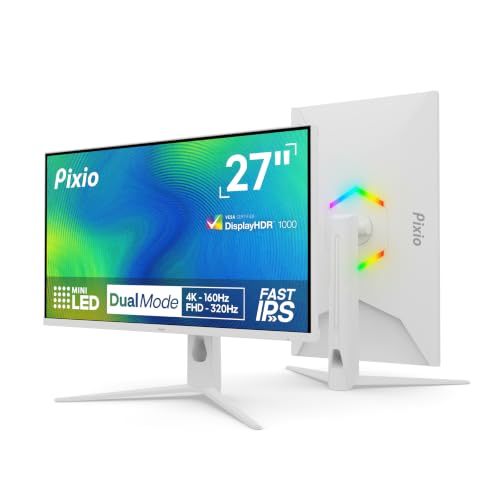
Pixio PX27UM Mini LED White 27 Inch Dual Mode UHD 4K 160Hz
INNOCN 27″ 2K 1440P 320Hz Mini LED Gaming Monitor GA27T1M
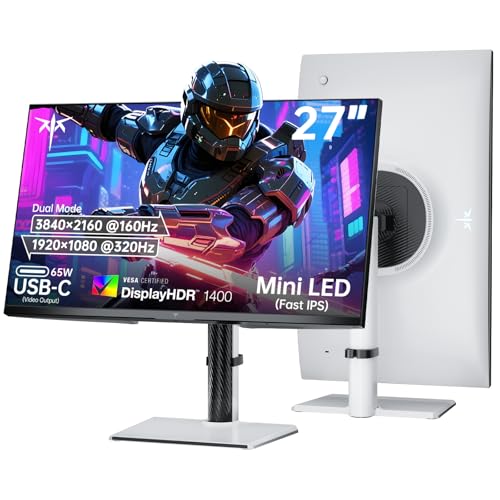
KTC 27 Inch Dual Mode Mini LED Monitor 4K UHD 160Hz

LG 32GX850A-B 32″ UltraGear 4K UHD Glossy OLED Gaming Monitor

LG 27G810A-B 27-inch Ultragear 4K UHD IPS Gaming Monitor
More Details On Our Top Picks
The 32-inch size gives you room to keep game visuals, editing tools, and a browser window open without feeling cramped. That matters on a busy desk, and the 160Hz refresh rate helps the screen stay smooth even when the workday turns into an evening session.
The mini-LED backlight points to stronger control over bright and dark areas than a plain edge-lit panel, while USB Type-C can simplify a laptop setup. The trade-off is that a display this large asks for more desk depth, so it suits you best when the stand space is already generous.
What We Like
- 4K resolution on 32 inches gives text and game detail plenty of room to breathe.
- 160Hz refresh rate supports smoother motion for fast movement and camera pans.
- USB Type-C can keep a modern laptop desk cleaner with fewer separate cables.
- Height adjustment helps you line up the screen without stacking books or stands.
- Wide color claims, including 99% DCI-P3, make it a sensible fit for color-aware work and rich media.
Points To Note
- The 32-inch footprint needs more room than the 27-inch models in this list.
- Mini-LED screens can still show some backlight quirks in edge cases, especially in mixed dark scenes.
- The spec mix leans hard toward gaming and media, so pure office use may feel like overkill.
Feature Card
Who It Suits Best
It suits you best if you want a large 4K display that can handle both immersive gaming and broad desktop work without constant menu changes.
A Better Fit Elsewhere
LG 27G810A-B suits a smaller desk better, especially for someone who wants a more compact 27-inch panel with similar gaming flexibility.
Speed is the clear reason to look at this Dell, and the 240Hz panel targets that clean, quick feel competitive games need. The 27-inch size also keeps the layout straightforward, so your mouse, keyboard, and screen stay in easy reach on a smaller desk.
ComfortView Plus, with its low blue light design, makes long stretches at the screen easier to live with, especially for workday use that turns into evening play. The trade-off is resolution, because 1920 x 1080 does not deliver the same fine detail as the 4K models above it.
Strong Points
- 240Hz refresh rate supports very fluid motion in fast-moving games.
- 27-inch footprint fits tighter desks better than the larger 32-inch options.
- IPS technology helps keep color and viewing angles steady for shared use.
- ComfortView Plus is useful for long sessions at the screen.
Small Caveats
- 1080p on 27 inches looks less dense than the 4K choices in this roundup.
- The tilt-only stand keeps setup simple, but it gives you fewer positioning options.
- It feels more game-first than all-purpose, so content work may feel less spacious.
Quick Facts
Made For
It suits you best if you care more about speed and desk comfort than ultra-sharp 4K detail.
Another Choice May Suit
INNOCN 32″ Mini LED 4K 160Hz HDR1000 Monitor makes more sense for mixed work and play, especially if you want a larger screen with higher detail.
The dual-mode setup gives this Pixio a very practical split personality. You can stay in 4K at 160Hz for sharper detail, then switch to 1080p at 320Hz when faster motion matters more, which is handy for players who move between story games and competitive sessions.
The white finish makes it stand out from the darker monitors around it, and the fully adjustable stand is useful on desks where posture and spacing need a little more fine-tuning. The honest read is that dual-mode monitors ask you to accept a slight compromise in simplicity, because not every use case needs two display personalities.
Highlights
- Dual-mode operation gives you two distinct gaming modes in one panel.
- Mini-LED backlighting should help brightness control feel more precise than basic LCD designs.
- The 27-inch size stays manageable on desks that cannot spare room for 32 inches.
- Fully adjustable stand helps you dial in height and angle more comfortably.
- White styling fits cleaner setups and lighter desk themes.
Room For Improvement
- Switching between modes adds a layer of setup choice that casual use may not need.
- White finishes can show smudges and dust more readily than darker shells.
- The feature set leans toward gaming, so office-first shoppers may not use everything here.
Feature Rundown
Best Suited To
It suits you best if you want one monitor that can serve both detailed 4K gaming and speed-focused play without a second screen.
Where A Sibling Pick Shines
Dell 27 240Hz Gaming Monitor SE2726HG is simpler for someone who wants a straightforward 1080p setup and does not care about dual-mode switching.
This INNOCN leans hard into motion speed, and the 320Hz refresh rate puts it squarely in the fast-paced camp. That makes sense for FPS play, where quicker frame delivery matters more than 4K detail, and the 1440p resolution keeps the image sharper than a plain 1080p panel.
FreeSync and G-SYNC compatibility help it sit well in mixed PC setups, which is useful when your graphics hardware changes over time. The compromise is familiar, though, because you give up 4K sharpness in exchange for a much quicker feel.
Reasons To Buy
- 320Hz refresh rate is built for very fast motion handling.
- 1440p hits a nice middle ground between clarity and speed.
- Mini-LED backlighting points to stronger contrast control than standard LCD models.
- Compatibility with both FreeSync and G-SYNC broadens setup flexibility.
Areas To Watch
- 1440p does not match the fine detail of the 4K picks in this article.
- Speed-first monitors can feel like more screen than you need outside gaming.
- The listed feature mix is focused, so you are paying for performance more than extras.
Details At A Glance
Who Should Grab It
It suits you best if you play fast shooters or reaction-heavy games and want a 27-inch screen that stays sharp without moving all the way to 4K.
Look Elsewhere When
KTC 27 Inch Dual Mode Mini LED Monitor 4K UHD 160Hz fits better for someone who wants both 4K detail and a second high-speed mode in the same screen.
This KTC brings together several features that matter on a mixed-use desk, starting with dual-mode operation and a 65W USB Type-C port. That port can reduce adapter clutter for laptops, while the monitor’s height, tilt, swivel, and pivot adjustments make it easier to set the screen the way your chair and desk actually need.
The 1400-level HDR claim and Mini LED backlight suggest a more ambitious picture than a plain entry-level gaming screen. The catch is that a monitor this feature-dense asks more from your setup budget, so it makes the most sense for a desk where one screen has to do a lot.
Best Bits
- Dual-mode layout gives you 4K clarity or 1080p speed in one panel.
- 65W Type-C can simplify laptop charging and connection on a single cable.
- Height, swivel, pivot, and tilt adjustments help with long-session comfort.
- HDMI 2.1 and DP 1.4 keep input options flexible for modern gear.
- VESA mount support helps when you want a tighter desk arrangement.
Honest Caveats
- The feature list is broad, so setup choices may take a little more time than simpler displays.
- Dual-mode switching is useful, but not every desk setup needs that much flexibility.
- VESA and adjustment features are helpful, yet they matter less on very minimal workspaces.
Core Details
Whose Shelf It Belongs On
It suits you best if you want one monitor that covers work, console play, and fast PC sessions without skimping on stand adjustments.
Swap It Out When
Pixio PX27UM Mini LED White 27 Inch Dual Mode UHD 4K 160Hz makes more sense if you want a lighter visual style and a simpler dual-mode layout.
This LG stands apart because it swaps mini-LED for glossy OLED, and that usually means a very different look on the desk. OLED, or organic light-emitting diode, gives each pixel its own light, which is why dark scenes tend to look especially deep and controlled on screens like this.
The dual-mode design gives you 4K at 165Hz or a much faster 330Hz in lower resolution, so the monitor can stretch from cinematic single-player games to speedy competitive play. The trade-off is simple: this sits at the premium end of the list, and glossy screens can reflect more room light than matte ones in bright spaces.
Upsides
- OLED panel technology is a strong fit for contrast-heavy games and films.
- 32-inch 4K format gives you generous workspace and a large visual field.
- 165Hz in 4K offers a very smooth desktop and gaming experience.
- 330Hz mode is there for players who want far more speed at lower resolution.
- Height, swivel, pivot, and tilt adjustment helps with ergonomic setup.
Minor Gripes
- Glossy finish may catch room reflections in brighter offices or sunlit rooms.
- The premium positioning makes it easiest to justify for image-focused use.
- A 32-inch footprint needs a sturdier desk and more depth than smaller panels.
Feature Snapshot
Perfect Match For
It suits you best if you care most about display quality, use a larger desk, and want a gaming screen that feels more cinema-like than utility-first.
Where Another Pick Suits Better
INNOCN 32″ Mini LED 4K 160Hz HDR1000 Monitor is the more practical route for someone who wants a large 4K screen without moving into OLED territory.
This LG hits a very practical middle ground for you if you want 4K clarity without moving up to the larger 32-inch class. The dual-mode setup is the smart part here, since 180Hz in 4K suits detailed games while 360Hz in Full HD gives you the speed bump fast-action titles like to have.
The IPS panel should keep color and viewing angles stable, and the 27-inch size is a cleaner match for desks that already hold a keyboard, mic, or laptop. The main trade-off is the familiar one, because the lower-resolution speed mode is useful, but it will not match 4K for fine detail.
Standout Traits
- 27-inch 4K format keeps detail sharp without a huge footprint.
- Dual-mode switching gives you two very different use styles in one screen.
- IPS technology is useful for color stability across normal desk viewing angles.
- HDMI 2.1 broadens support for newer consoles and gaming PCs.
- VESA DisplayHDR 400 support suggests a more vivid picture than a basic SDR panel.
Worth Noting
- The jump from 4K 180Hz to FHD 360Hz asks you to accept different looks for different jobs.
- It is better suited to compact or mid-size desks than large-room setups.
- For content work, the 32-inch LG above gives you more room to spread out.
Core Details
The Right Fit
It suits you best if you want a practical 27-inch 4K monitor that still has a speed mode for games that reward quick response.
Not Your Match When
LG 32GX850A-B 32″ UltraGear 4K UHD Glossy OLED Gaming Monitor makes more sense for someone who wants deeper contrast and does not mind a larger premium screen.
How To Choose The Right 4k Mini-Led Monitors
Start With Resolution, Then Match The Room
A 4K panel gives you the sharpest desktop text and the cleanest game detail, but the size of the screen changes how that sharpness feels. A 27-inch monitor makes 4K look dense and tidy, while a 32-inch panel gives you more room for multitasking and a more open gaming view.
Desk depth matters too. A larger mini-LED display can feel like the right call in a spacious room, yet it can crowd a shallow desk fast, especially once a keyboard, speakers, and a laptop join the layout.
Refresh Rate Should Match Your Main Use
Mini-LED helps with contrast control and brightness handling, but refresh rate shapes motion feel. A 160Hz or 180Hz screen works well for mixed use, while 240Hz and higher suit fast shooters, racing games, and anyone who values quick frame response over extra desktop sharpness.
The compromise is simple. Faster modes often come with lower resolution or more focused game-first tuning, so you need to decide whether your everyday use leans toward image detail or motion speed.
Panel Type Changes The Whole Experience
IPS panels usually offer steadier viewing angles and dependable color consistency, which helps for shared desks, content browsing, and work that stretches across the afternoon. OLED, as seen on the LG 32GX850A-B, can deliver deeper dark areas and a more dramatic picture, but glossy finishes may reflect more room light.
Mini-LED sits in the middle with a different strength set. You get local dimming, which means grouped backlight zones can better control bright and dark regions, though the exact look still depends on the monitor’s tuning and the room around it.
Check Ports, Stand Adjustments, And Laptop Use
USB Type-C with enough power delivery can simplify a laptop desk, while HDMI 2.1 and DisplayPort help with console and PC hookups. Height, tilt, swivel, and pivot adjustments are more than comfort extras, they affect whether the monitor sits naturally for work and gaming over a full day.
For most setups, those small fit details matter more than a flashy spec on paper. A monitor that connects cleanly and places the panel at the right height tends to feel better long after the first unboxing is over.
Things Worth Knowing First
Mistakes Worth Dodging
A common slip is chasing 4K and ignoring size, stand flexibility, or desk depth. Another is paying for a high-speed mode you won’t actually use, which can leave you with extra complexity and no real benefit.
It also helps to separate gaming priorities from color priorities. A screen built for fast motion can be great for shooters, but a mixed-use desk often benefits more from a balanced refresh rate and stronger ergonomics.
The Upgrade Payoff
Higher-tier models cost more because they usually combine more than one premium trait, such as mini-LED backlighting, dual-mode refresh rates, stronger stands, or OLED panels. Those extras matter most when your screen has to cover both work and play, or when visual depth is worth more to you than keeping the budget lean.
That said, not every setup needs the top tier. If you mainly browse, stream, and play casually, a simpler 27-inch option can still feel satisfying without paying for features you rarely touch.
Frequently Asked Questions
What makes a 4k mini-LED monitor different from a regular 4K screen?
Mini-LED uses many small backlight zones instead of a simpler backlight layout, so it can handle bright and dark areas with more control. That usually helps the picture feel richer in games and movies.
Is 27 inches or 32 inches better for 4K?
Both can work well, but they feel different on the desk. Twenty-seven inches suits sharper text and a smaller footprint, while 32 inches gives you a larger view and more room for multitasking.
Do high refresh rates matter on a 4K monitor?
They matter a lot for fast games, because smoother motion can make the screen feel more responsive. For slower single-player use or office work, the jump from 120Hz to 160Hz or higher matters less.
Should you choose IPS or OLED?
IPS is a safer all-around choice for stable viewing angles and broad daily use. OLED can look more striking in dark scenes, but it usually asks more of your room lighting and budget.
Which ports matter most for a mixed PC and console setup?
HDMI 2.1 and DisplayPort are the key ones to look for, since they cover modern gaming gear well. USB Type-C helps too, especially when you want a cleaner laptop desk with fewer cables.
