
For graphic work, a monitor needs more than a crisp panel. You want accurate color, sensible ergonomics, and a screen size that fits your desk without crowding your tools. These seven picks cover everything from creator-focused panels to versatile all-rounders, so you can match the display to your workflow instead of forcing your workflow to fit the display.
The Shortlist At A Glance

Dell 27 Monitor S2725QS 4K UHD IPS

ASUS ROG XG27UCG 27 Inch 4K 160Hz USB-C Gaming Monitor

ASUS ProArt PA279CRV 27 Inch 4K UHD USB-C HDR Monitor

LG 27US500-W Ultrafine Monitor 27-Inch 4K UHD HDR10 IPS
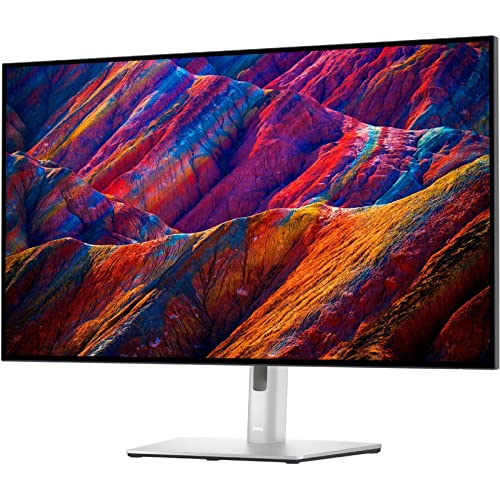
Dell UltraSharp U3223QE 31.5 4K UHD WLED LCD Monitor

ViewSonic VP3256-4K 32 Inch 4K ColorPro Monitor

LG 27UP650K-W 27-inch Ultrafine 4K UHD IPS Monitor
More Details On Our Top Picks
Dell’s 27-inch 4K panel feels like the easy starting point for a design desk that also handles everyday work. The 99% sRGB coverage matters because it keeps common digital color work on steadier ground, and the anti-glare finish helps in bright rooms or near windows.
Unlike the ProArt and ViewSonic picks later in the list, this one leans more toward versatile use than studio-first calibration extras. The height, swivel, and pivot adjustments help you line up sketches, layouts, and text-heavy work without stacking books under the stand, which is a small thing until you spend hours at the desk.
What We Like
- 4K resolution gives you room for toolbars, palettes, and detailed artwork without feeling cramped.
- 99% sRGB coverage suits web graphics, presentation work, and general digital content.
- 120Hz refresh can make scrolling and cursor movement feel smoother than a basic 60Hz screen.
- USB-C, HDMI, and DisplayPort give you flexible hookup options for mixed desk setups.
- Height, swivel, and pivot control help you dial in a comfortable viewing angle.
Things To Consider
- It does not lean as hard into creator calibration as the ASUS ProArt PA279CRV or ViewSonic VP3256-4K.
- 27 inches keeps the footprint manageable, but some motion-heavy editors may want a larger canvas.
- The ownership experience still depends on clean cable routing, since multiple ports often invite desk clutter.
Feature Rundown
Who Will Love This
Graphic designers who want a flexible, everyday 4K screen with good desk ergonomics will get the most from it.
Where A Sibling Pick Shines
ASUS ProArt PA279CRV 27 Inch 4K UHD USB-C HDR Monitor fits color-critical editors better, since its calibration and wide-gamut focus run deeper.
This ASUS ROG model makes sense for a desk that switches between design work and games after hours. The 160Hz 4K mode gives you a brisk desktop feel, while the dual-mode setup can shift to a much faster Full HD profile for motion-first use.
The trade-off is straightforward, because gaming-first tuning rarely puts pure creator needs ahead of all else. Still, the 99% DCI-P3 coverage helps with richer color work than a plain office panel, and the USB-C input keeps a modern laptop setup tidy.
Highlights
- 4K plus 160Hz offers a rare mix of sharp detail and fast motion handling.
- Dual-mode operation gives you a second display behavior for competitive play or lighter desktop use.
- USB-C helps cut down on dock clutter for laptop-based workflows.
- 99% DCI-P3 supports broader color work than a basic sRGB-only screen.
- Tripod socket adds a useful mount option for content setup or camera work.
Points To Note
- The gaming focus means you are paying for speed features that some design-only setups will never need.
- Fast IPS panels usually look clean, but serious print work still calls for a more studio-centered display like the ProArt PA279CRV.
- Dual-mode convenience can be tempting, yet it also adds another setting to manage in a busy workflow.
Quick Facts
Made For
Hybrid users who edit during the day and game at night will get the most from this screen.
Look Elsewhere When
Dell 27 Monitor S2725QS 4K UHD IPS fits steadier everyday design work better, especially when you do not need the extra gaming speed.
Color-sensitive work is where this ASUS model earns its place. The Calman Verified label, low Delta E target, and wide-gamut coverage across DCI-P3 and Adobe RGB point to a display that is built for editing decisions, not just casual viewing.
Compared with the Dell S2725QS, this pick is less about general-purpose smoothness and more about controlled color handling. The USB-C port with 96W power delivery also keeps a laptop workstation neat, which matters in a real editing bay where chargers and adapters tend to multiply.
Reasons To Buy
- Factory calibration and Delta E under 2 are strong signals for color-sensitive work.
- 99% DCI-P3 and 99% Adobe RGB give you broad space for creative file handling.
- USB-C with 96W power delivery supports a clean single-cable laptop setup.
- Daisy-chain support helps multi-monitor desks stay less cluttered.
- Height adjustment makes long editing sessions easier to set up comfortably.
Small Caveats
- Some shoppers will pay for creator features they barely use outside photo or video work.
- Desktop organization still matters, because a color workstation gets messy quickly without good cable routing.
- Its strengths are specialized, so it can feel more serious than necessary for casual office chores.
Core Details
Best Suited To
Photo editors, colorists, and Mac-based creatives who want a serious 4K workspace will appreciate this screen.
Swap It Out When
LG 27UP650K-W 27-inch Ultrafine 4K UHD IPS Monitor makes more sense for lighter design work where you want solid basics without the calibration emphasis.
LG keeps this one focused on the basics that matter most for design desks, and that restraint is part of the appeal. The 4K IPS panel, borderless styling, and 90% DCI-P3 support make it a sensible choice for creators who want a clean display without a lot of extra baggage.
The onscreen control software and tilt adjustment add everyday convenience, especially in a shared home office or a compact studio. You may find it less ambitious than the ProArt or ViewSonic picks, but the honest read is that plenty of people need a reliable screen more than a feature parade.
Bright Spots
- 4K clarity gives you a practical amount of room for editing panels and detailed artwork.
- HDR10 support and 90% DCI-P3 help color-rich content look livelier.
- Borderless styling keeps the screen visually light on a desk with limited space.
- Onscreen Control makes layout changes and basic settings easier to handle with a mouse.
Areas To Watch
- Its feature set stays simple, so power users may want more advanced calibration tools.
- Tilt-only adjustment is practical, but it gives you less posture flexibility than the taller stands on other picks.
- The software side adds one more thing to manage during setup.
Feature Snapshot
Right Fit For
Freelancers and home-office designers who want a straightforward 4K display with useful day-to-day controls will feel at home here.
Another Choice May Suit
ASUS ProArt PA279CRV 27 Inch 4K UHD USB-C HDR Monitor fits you better if you need stronger calibration for print or client-facing color work.
A 31.5-inch 4K display changes the feel of the desk, because the extra space makes side-by-side layouts less cramped. For multitaskers moving between design files, browser tabs, and reference imagery, the Dell UltraSharp format feels more like a roomy work surface than a standard monitor.
Compared with the 27-inch picks, this one gives you a larger canvas without changing the 16:9 aspect ratio, so familiar software layouts still behave as expected. The 400-nit brightness also helps in brighter offices, though the larger size can dominate smaller desks more than some people expect.
Upsides
- 31.5-inch size gives you more room for palettes, layers, and reference windows.
- 4K resolution across that larger panel keeps text and detail sharp.
- 400-nit brightness supports use in well-lit rooms.
- HDMI connectivity keeps it easy to pair with common laptops and desktop systems.
- Works well for office and creative tasks that need constant window juggling.
Room For Improvement
- The larger footprint may feel heavy on compact desks.
- Some graphic designers will prefer a more color-targeted monitor like the ProArt PA279CRV.
- Its broad fit makes it less specialized than the creator-first options in this list.
Details At A Glance
Whose Shelf It Belongs On
Designers who want a larger, more desktop-heavy workspace will get the most out of this monitor.
Where A Sibling Pick Shines
LG 27US500-W Ultrafine Monitor 27-Inch 4K UHD HDR10 IPS makes more sense for smaller desks where you still want 4K clarity without the bulk.
ViewSonic aims squarely at professional content creation, and the panel credentials back that up. Pantone validation, 100% sRGB coverage, and a frameless three-sided design make it feel tuned for people who spend long stretches judging color and layout on screen.
The 60W USB-C connection is a useful studio convenience, especially for laptop users who want video and power through one cable. It sits closer to the ProArt PA279CRV than the Dell S2725QS in intent, though the 32-inch size gives you a broader work area for timelines and layered visuals.
Best Bits
- Pantone validation and 100% sRGB speak directly to professional color workflows.
- 32-inch size creates generous room for editing panels and source material.
- USB-C with 60W power delivery keeps laptop desks cleaner.
- Three-sided frameless styling works well in multi-monitor setups.
- Advanced ergonomics help you set a more comfortable viewing position.
Softer Spots
- Creators focused on Adobe RGB or DCI-P3 breadth may prefer the ASUS ProArt PA279CRV.
- The larger shell asks for more desk depth than a 27-inch screen.
- Professional focus means you are paying for precision rather than casual entertainment extras.
Core Details
Built With In Mind
Content creators who want a large, color-conscious desktop screen will appreciate this model most.
Reach For A Different Pick When
ASUS ProArt PA279CRV 27 Inch 4K UHD USB-C HDR Monitor fits better for narrower desks and broader-gamut color work.
This LG lands in a useful middle ground for designers who want a dependable 27-inch 4K monitor without a lot of fuss. The IPS panel, DisplayHDR 400 support, and wide adjustment range give it the kind of practical flexibility that helps in mixed-use desks and modest home studios.
Compared with the more specialist ASUS and ViewSonic options, it feels easier to slot into ordinary workspaces. Reader Mode and Flicker Safe are welcome touches for long sessions, though the real appeal here is that it stays straightforward while still covering the essentials well.
Standout Traits
- 4K resolution on a 27-inch panel keeps detail crisp without taking over the desk.
- DisplayHDR 400 adds a bit more range for supported content.
- Reader Mode can make long document-heavy sessions feel less harsh.
- Tilt, height, and pivot adjustment give you more control over posture and screen orientation.
- HDMI and DisplayPort make it easy to connect common systems.
Minor Gripes
- It is more modest than the creator-first ProArt and ColorPro displays.
- 60Hz is fine for design work, though faster panels feel snappier during daily navigation.
- White finishes can show dust more quickly, so a little upkeep helps the desk look tidy.
Feature Card
The Right Fit
Designers who want a straightforward 4K monitor with comfortable ergonomics and low drama will be happy with this choice.
Where Another Pick Fits Better
ViewSonic VP3256-4K 32 Inch 4K ColorPro Monitor suits more demanding color workflows, especially when you need the larger canvas and Pantone-focused setup.
How To Choose The Right 4k Monitors For Graphic Design
Color Accuracy Comes First
A 4K panel gives you detail, but color handling decides whether your work looks dependable across devices. Look for IPS, wide-gamut coverage such as sRGB, DCI-P3, or Adobe RGB, and factory calibration when your work leans toward branding, photo editing, or client-facing visuals. A monitor that only looks bright can still miss the mark on subtle skin tones, gradients, and logo colors.
Size And Desk Space Matter More Than People Expect
A 27-inch screen fits most desks and keeps your posture manageable, while 31.5-inch and 32-inch models give you more room for tools, timelines, and side-by-side windows. Larger panels feel generous, but they also ask for more depth, better cable planning, and a chair-to-screen distance that feels natural. For small studios, a compact 27-inch monitor often works better than a bigger panel that dominates the workspace.
Connectivity Can Simplify Daily Work
USB-C matters because it can carry video and, on some models, laptop power through one cable. That keeps a sketchbook-style desk from turning into a tangle of adapters, especially for hybrid workers who move between laptop and desktop setups. HDMI and DisplayPort still matter too, since they make it easier to connect older gear, secondary systems, or reference machines.
Refresh Rate And Ergonomics Still Count
Graphic design does not need a gaming display, but a smoother refresh can make scrolling, panning, and motion review feel cleaner. Ergonomic stands matter just as much, because tilt, height, swivel, and pivot help you stay comfortable during long sessions and keep the screen aligned with your line of sight. In real use, a well-adjusted stand can matter more than one extra spec on the box.
What To Weigh Before You Decide
Common Shopping Slip Ups
Many shoppers chase resolution alone and forget that a sharp but poorly tuned panel can still miss the colors you need. Another common miss is buying a large screen without checking desk depth, which can leave you sitting too close for comfortable work. A third trap is ignoring the stand, then ending up with a monitor that looks good only after you stack books under it.
The Upgrade Payoff
Higher-tier models cost more because you are paying for tighter factory calibration, wider color coverage, better stands, and cleaner connectivity. That extra spend makes sense for print work, brand design, color correction, and any job where a small shift in tone can create a lot of rework. For casual layout work, the simpler picks already cover most needs without pushing you into specialist territory.
Frequently Asked Questions
Do you need 4K for graphic design?
You do not need it for every task, but 4K makes detailed work and multitasking easier. The extra pixel density helps text, mockups, and layout previews look cleaner.
Is 27 inches enough for design work?
Yes, 27 inches works well for many desks and keeps the monitor easy to place. You may want 31.5 inches or 32 inches if you keep many palettes open at once.
Which color space matters most?
sRGB covers a lot of web and digital design work, while DCI-P3 and Adobe RGB matter more for broader creative needs. Your software and output format should guide the choice.
Is USB-C worth paying for?
USB-C is worth it when you use a laptop often and want a tidier desk. It can reduce cable clutter and, on some monitors, carry power as well as video.
Do refresh rates matter for design monitors?
They matter less than color accuracy, but smoother refresh can make daily movement across large files feel nicer. A faster panel is helpful, though it should not replace good color performance.
