
For your PS5 setup, the right screen changes more than the picture. It shapes how much of the console’s speed, color, and detail you actually notice in a living room, desk setup, or travel station.
Some of these picks lean toward fast gaming, others toward desk comfort or portability. You’ll see where each one fits, what it gives up, and which type of setup it suits best.
Quick Look At Our Shortlist

Dell 27 Monitor S2725QS 4K UHD IPS 120Hz
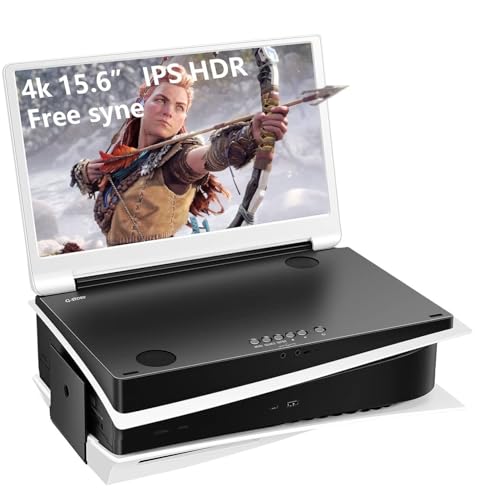
G-STORY 15.6 IPS 4K 60Hz Portable Gaming Monitor

ZZA 27 Inch 4K Gaming Monitor UHD 4K 144Hz

Samsung Odyssey G5 G51F 27 QHD Gaming Monitor

32 4K UHD IPS Monitor 60Hz HDMI DP Ergo

CUNPU 27 4K 160Hz Ultimate Gaming Monitor

ASUS TUF Gaming 27 4K HDR Monitor VG27UQ1A
More Details On Our Top Picks
That 27-inch 4K panel lands in a very practical sweet spot. You get a sharper PS5 image without jumping to a huge desk footprint, and the 120Hz ceiling helps the screen feel less stiff in games that support it.
USB-C, HDMI, DisplayPort, height adjustment, swivel, and pivot make this a tidy fit for a desk that does double duty. The trade-off is simple, this is more of a balanced all-rounder than a flashy gaming-first display, so you’ll appreciate it most in mixed work-and-play spaces.
Strong Points
- 4K resolution brings clean text and sharper game detail than a basic 1080p screen.
- 120Hz support gives you room for smoother motion in compatible console and PC titles.
- USB-C, HDMI, and DisplayPort keep cable options flexible for a desk with several devices.
- Height, swivel, and pivot adjustments make it easier to settle the screen at a comfortable angle.
- Anti-glare treatment helps in bright rooms where reflections usually become distracting.
Things To Consider
- Its stronger appeal is versatility, not aggressive gaming styling, so it looks restrained next to some rivals.
- The 27-inch size feels compact for users who want a large cinematic panel from close range.
- Owners who stack several devices may still want a separate input switcher, depending on desk layout.
Feature Card
Who It Suits Best
Desk-focused console players and hybrid work setups get the most out of this one.
A Better Fit Elsewhere
ZZA 27 Inch 4K Gaming Monitor UHD 4K 144Hz makes more sense for you if faster motion matters more than the Dell 27 Monitor S2725QS 4K UHD IPS 120Hz.
Portable PS5 screens are a very different game, and this 15.6-inch model leans hard into that role. It folds in close like a small laptop-style display, so travel setups, temporary desks, and tight rooms stay manageable.
The 4K panel and built-in speakers make it feel more self-contained than a plain monitor panel. The honest read is that you give up screen size and the desk presence that the Dell and ZZA models offer, so it suits mobility more than immersion.
What We Like
- Small footprint makes packing and storing the screen far easier than a full-size desk monitor.
- Two HDMI inputs give you more flexibility when you move between a console and another source.
- Built-in stereo speakers reduce the need for extra audio gear in a travel setup.
- IPS viewing angles help the image stay usable from a side seat or a shared table.
Room For Improvement
- 15.6 inches is convenient, but it can feel tight for couch distance gaming.
- The 60Hz ceiling keeps it behind the faster 120Hz and 160Hz options in this roundup.
- Portable gear often means more cable handling, so storage discipline matters if you move it often.
Core Details
Who Will Love This
Travelers, dorm setups, and gamers who need a screen they can pack away easily will benefit most.
Another Choice May Suit
Samsung Odyssey G5 G51F 27 QHD Gaming Monitor fits better for a fixed desk where you want a larger, faster-feeling display.
This ZZA model shifts the focus from plain 4K clarity to faster motion, and that matters for twitchy games. With HDMI 2.1 and DisplayPort 1.4, it also feels better prepared for a PS5 plus PC setup than the more basic portable pick above.
The flat 27-inch format is easy to live with on a desk, especially if you care about a straightforward layout and tilt adjustment. A practical caveat, 144Hz is more than a console can use in many titles, so the extra headroom helps more on a capable PC than on the PS5 alone.
Upsides
- 144Hz refresh rate gives you extra motion headroom for fast-paced PC play.
- HDMI 2.1 and DP 1.4 support make it easier to match newer source devices.
- 27-inch sizing stays compact enough for a normal desk while still giving a roomy 4K canvas.
- Adaptive Sync can help smooth out visible stutter in supported setups.
- Tilt adjustment keeps the screen easier to line up at eye level.
Points To Note
- PS5 use will not always need the full 144Hz ceiling, so part of the spec story is more relevant to PC gaming.
- The source details point to a straightforward monitor, not a heavily adjustable stand.
- Moving a higher-refresh display around a room usually means a little more care with cable management.
Details At A Glance
Made For
PC-first gamers and PS5 owners who also want room for a faster desktop setup will get the best fit here.
Where A Sibling Pick Shines
For a more polished desk with stronger ergonomic flexibility, the Dell 27 Monitor S2725QS 4K UHD IPS 120Hz is the calmer choice.
The Samsung takes a different route from the 4K screens above, leaning on QHD rather than full UHD. That trade-off often makes sense for fast gaming, because 1440p can feel easier to drive at high refresh and still look crisp on a 27-inch panel.
Its height-adjustable stand, HDR10, and helpful gaming extras make it practical for desk use, especially for someone who wants a more focused motion-first setup. A small caveat, it is less about raw pixel density than the 4K models in this list, so detail hunters may prefer the sharper options.
Highlights
- 180Hz refresh rate gives you more headroom for fast, fluid motion.
- 1ms response time keeps fast action from feeling muddy.
- HDR10 adds more range to bright highlights and dark scenes.
- Height adjustment makes long desk sessions easier to set up comfortably.
- Gaming aids like black equalizer and virtual aim point can help in competitive play.
Areas To Watch
- QHD is a step down from 4K, so you give up fine image detail for speed.
- It makes more sense for gaming performance than for pixel-dense desktop work.
- Gamers with a strict 4K target may prefer the ZZA or ASUS options instead.
Feature Rundown
Best Suited To
Competitive gamers who care more about motion smoothness than 4K sharpness will get the most from this pick.
Skip It When
ASUS TUF Gaming 27 4K HDR Monitor VG27UQ1A is the better route for a console-first setup that still wants 4K output.
A 32-inch 4K screen changes the feel of a desk right away. You get more room for side-by-side windows and a larger PS5 image, which helps the screen feel less cramped from a normal sitting distance.
This one leans toward calm, everyday use rather than fast-motion bragging rights. FreeSync, HDR10, 100% sRGB, blue light filtering, flicker-free support, and an ergo VESA setup make it a sensible fit for home office hours that roll into evening gaming.
Best Bits
- The 32-inch panel gives you generous space for work, browsing, and game menus.
- 4K resolution helps text and UI elements stay clean on a larger display.
- FreeSync can help supported content feel smoother when frame pacing varies.
- Blue light filter and flicker-free support suit longer screen sessions at a desk.
- VESA compatibility makes mounting easier for a cleaner setup.
Softer Spots
- 60Hz keeps it out of the high-refresh conversation.
- The larger panel needs more desk depth to feel comfortable at close range.
- Its appeal is comfort and space, not quick competitive motion.
Quick Facts
Whose Shelf It Belongs On
Home office users who also spend time on PS5 games will benefit most from this larger, calmer layout.
Look Elsewhere When
CUNPU 27 4K 160Hz Ultimate Gaming Monitor suits you better if your main goal is faster gaming rather than a big work-first panel.
This CUNPU model piles on the gaming features in a way that makes sense for a more serious setup. You get 4K detail, 160Hz refresh, Fast IPS, G-Sync compatibility, FreeSync, HDR400, and HDMI 2.1, so the screen speaks both to console use and a capable gaming PC.
The trade-off is that a long feature list can matter more to enthusiasts than to casual PS5 owners. Still, for someone who wants strong motion handling plus wide color coverage and an ergonomic stand, this is a very complete package.
Reasons To Buy
- 160Hz refresh gives the panel room to feel very fluid on strong hardware.
- Fast IPS is a useful fit for people who care about both speed and image clarity.
- 99% DCI-P3 coverage points to wide color range for games and creative work.
- HDR400 adds another layer of contrast handling for supported content.
- The ergonomic stand helps a shared desk or long session feel less awkward.
- HDMI 2.1 makes it better aligned with modern console connections.
Small Caveats
- Its feature depth may be more than a casual couch setup really needs.
- Higher refresh value pays off most on systems that can send enough frames.
- More advanced displays often reward careful setup, especially with color and motion settings.
Feature Snapshot
Right Fit
Enthusiasts who want a highly spec’d 27-inch display for both PS5 and PC use will get the most from this pick.
Where Shoppers Go Wrong
Samsung Odyssey G5 G51F 27 QHD Gaming Monitor makes more sense if you want a simpler motion-first screen without paying for the extra 4K feature stack.
The ASUS TUF lands as the most balanced of the high-refresh 4K crowd here. It combines 160Hz, 1ms response, ELMB Sync, G-SYNC compatibility, FreeSync Premium, and HDMI 2.1, so it gives you a lot of room to build a strong console or PC gaming desk.
That mix also makes sense for someone who wants one display that can stay useful as gear changes. The catch is that a screen this featureful tends to feel more serious than casual, so it fits best in a setup where gaming is a regular part of the day.
Positives
- 160Hz refresh and 1ms response give it a very quick feel for supported games.
- ELMB Sync aims to keep motion looking cleaner during fast scenes.
- HDMI 2.1 supports 4K 120Hz output from compatible consoles.
- G-SYNC compatibility and FreeSync Premium help widen its range across different systems.
- 95% DCI-P3 coverage points to strong color breadth for games and media.
- DisplayWidget makes on-screen control easier than digging through a clumsy menu stack.
Trade Offs
- Its higher-end feature mix makes more sense for committed gaming than for a simple living room screen.
- Advanced settings are useful, but they can take a little time to tune to your taste.
- Shoppers who only want a basic 4K panel may not need this much hardware depth.
Core Details
The Right Fit
Console and PC gamers who want a strong all-round 4K screen with high refresh capability should feel right at home here.
Swap It Out When
The Dell 27 Monitor S2725QS 4K UHD IPS 120Hz suits you better if your desk time leans more toward productivity than high-intensity play.
How To Choose The Right 4k Monitors For Ps5
Start With Resolution, Then Match The Refresh Rate
4K gives you the fine detail that makes menus, textures, and UI elements look cleaner on a PS5. Refresh rate matters next, because 120Hz or 144Hz panels can feel smoother in supported games, even though not every title will reach those levels.
That means you should separate visual sharpness from motion smoothness. A 60Hz 4K screen can still look excellent for single-player use, while a higher-refresh panel makes more sense for fast action or a desk that also handles PC gaming.
Pick The Screen Size For Your Seating Distance
Twenty-seven inches is the comfortable middle ground for many desks. It keeps 4K detail easy to see without forcing you to scan a huge panel up close.
Thirty-two inches changes the experience, especially for multitasking and relaxed couch play. Portable 15.6-inch models solve a different problem entirely, because they prioritize mobility over immersion.
Check The Inputs Before You Commit
HDMI 2.1 is the connection that matters most for modern console use. It gives you the best chance of matching higher frame-rate output on compatible gear, while older or simpler ports can narrow your options.
DisplayPort helps on PC, and USB-C is handy for some desk setups, docks, and laptops. The right mix depends on how many devices share the screen, so look past the headline specs and think about your actual wiring.
Think About Stand Design And Daily Comfort
A monitor can have strong picture quality and still feel awkward on your desk. Height adjustment, tilt, swivel, and pivot help you place the screen at a natural angle, which matters more than people expect during long sessions.
Blue light filters, flicker-free backlighting, and anti-glare finishes also shape daily comfort. They don’t change the game itself, but they can make late-night play or work feel less tiring.
Things Worth Knowing First
Mistakes Worth Dodging
One common slip is chasing 4K without checking whether the screen size matches your space. A huge panel on a shallow desk can feel awkward fast, while a tiny portable display can leave you wishing for more immersion.
Another is paying for a very high refresh rate when your setup rarely uses it. That extra speed only earns its keep if your console or PC can feed it, and the rest of your gear is wired to take advantage of it.
The Upgrade Payoff
Higher-tier monitors usually cost more because they combine better motion handling, wider color coverage, more flexible stands, and stronger connection options. You’re paying for the parts you feel every day, not just the headline resolution.
That upgrade makes sense for a desk that handles both work and gaming, or for a console setup where you notice color, motion, and ergonomics all at once. For a simple secondary screen, a leaner model can still be the smarter call.
Frequently Asked Questions
Do You Need 4K For PS5?
4K gives you the clearest image and the most detailed UI on a supported display. A lower-resolution screen still works, but you lose some of the sharpness the console can deliver.
Is 120Hz Enough For PS5?
Yes, 120Hz is plenty for many console games and gives you a noticeably smoother feel than 60Hz. Faster panels can help, but only when the game and system both support the higher rate.
Should You Choose 27 Inches Or 32 Inches?
27 inches suits most desks because it keeps 4K crisp without taking over the room. 32 inches makes more sense for wider viewing distance or a setup that pulls double duty for work.
Does HDMI 2.1 Matter?
Yes, HDMI 2.1 is the connection that lines up best with newer PS5 output features. It matters most when you want the screen and console to work together without bottlenecks from the port.
Is A Portable Monitor A Good PS5 Option?
Portable models fit travel, dorms, and temporary desks very well. They trade away size and immersion, so they make the most sense when portability matters more than a theater-like view.
