
You want a monitor that stays calm, sharp, and easy to live with, whether your day is spreadsheets, study notes, streaming, or a little light gaming. A 60Hz screen still makes sense for plenty of desks, especially when you care more about panel quality, comfort features, and screen size than chasing fast refresh rates.
The seven picks below lean into different priorities, from compact office screens to larger 4K panels. You’ll see where each one fits, where it asks for a trade-off, and which setup it suits best.
Quick Look At The Shortlist

Gawfolk 27 Inch 4K Monitor IPS 60Hz

AOC 22 Inch Computer Monitor FHD 120Hz Overclocked VA HDR 22B35HM23

LG 27UP650K-W 27-inch Ultrafine 4K UHD IPS Monitor

Dell 24 Plus Monitor S2425HSM 23.8-inch FHD

Dell 24 Monitor SE2426H 23.8-inch FHD

Dell P2217H 22-inch IPS Monitor Renewed
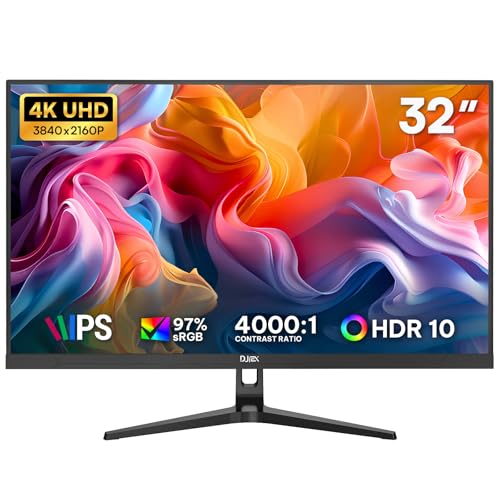
32 Inch 4K Computer Monitor UHD 3840x 2160p IPS
More Details On Our Top Picks
A 27-inch 4K panel gives you room to breathe, and that matters most on a desk where you keep documents, browser tabs, and a few windows open at once. The IPS screen should also help with wider viewing angles, so the image stays more consistent when you lean back or share the screen beside a colleague.
The trade-off is simple, 4K at 60Hz is about clarity and workspace, not fast motion. For home office use, school projects, or media viewing, that balance makes a lot of sense, though someone chasing smoother scrolling in fast-paced games may prefer a higher-refresh option like the Dell models below.
What We Like
- 4K resolution gives you extra room for split-screen work and sharper text.
- IPS panel support usually helps color hold up across a wider seat position.
- 27 inches is a comfortable middle ground for desks that are not oversized.
- HDMI and DisplayPort inputs make common laptop and desktop hookups straightforward.
Worth Noting
- 60Hz is fine for office life, but it does not target fast gaming motion.
- Wall-mount support helps flexibility, though it also means thinking about installation up front.
- The listing is clearly built for utility, not flashy extras.
Feature Snapshot
Who It Suits Best
You get the most from this model in a home office, study corner, or mixed-use desk where sharp text and a roomy workspace matter more than speed.
A Better Fit Elsewhere
The LG 27UP650K-W suits you better if you want a similar 27-inch 4K size with extra comfort features like Reader Mode, Flicker Safe, and a stand that moves through more positions.
This AOC keeps things small, which is handy on a dorm desk, a secondary workstation, or any setup where space feels tight. The VA panel, or vertical alignment panel, usually leans toward stronger contrast than a basic office screen, so dark text blocks and movie scenes tend to look a little fuller.
The 120Hz overclocked mode is the twist here, while the native 60Hz side keeps it squarely in the 60Hz monitor conversation. That mix gives you a bit more motion headroom than a plain office panel, though the 22-inch size will feel modest beside the 27-inch LG and Gawfolk options.
Strong Points
- Small footprint works well on compact desks and shared rooms.
- VA panel contrast can help darker scenes look deeper.
- HDMI, VGA, and VESA support widen the setup options.
- Adaptive Sync is useful for reducing visible stutter in supported setups.
Softer Spots
- 22 inches feels tight for heavy multitasking.
- Overclocked 120Hz mode is not the same as a native high-refresh panel.
- VGA remains handy for older gear, though newer devices usually lean on HDMI.
Core Details
Who Will Love This
You’ll appreciate this most on a small desk, in a bedroom setup, or as a second display where footprint matters more than screen size.
Look Elsewhere When
The Dell 24 Plus S2425HSM fits you better if you want a larger 23.8-inch display with built-in speakers and full stand adjustment.
The LG takes the same 27-inch 4K size as the Gawfolk, but the comfort-first extras give it a more polished feel for long desk sessions. Reader Mode and Flicker Safe matter most when you spend hours looking at text, because they aim to make the screen feel easier on the eyes in ordinary office use.
The stand also moves through height, tilt, and pivot adjustments, which is a real advantage on shared desks or in home offices where posture changes through the day. The honest read is that this is less about raw speed and more about a careful, well-balanced workspace screen.
Highlights
- 27-inch 4K panel gives you generous room for multitasking.
- Height, tilt, and pivot adjustment make it easier to tune the screen position.
- Reader Mode is useful for long document sessions and late-night use.
- DisplayHDR 400 adds another layer for supported media and content.
- IPS technology helps preserve consistent color from the side.
Trade Offs
- 60Hz keeps motion ordinary, so this is not aimed at fast gameplay.
- Advanced comfort features are helpful, but they also point to a desk-first setup rather than a minimal one.
- The stand adjustment is useful, though it takes more physical space than a simple fixed base.
Details At A Glance
Built With In Mind
You get the most from this model in a home office, study space, or creative desk where posture, text clarity, and screen comfort all matter.
Where A Sibling Pick Shines
The Gawfolk 27 Inch 4K Monitor IPS 60Hz suits you better if you want a simpler 27-inch 4K option and do not need the extra stand movement.
This Dell sits in a sweet spot for a mixed desk, because you get built-in audio, flexible stand movement, and a 23.8-inch size that still feels manageable on a standard work surface. The 144Hz refresh rate and 1ms MPRT, or moving picture response time, are aimed at smoother motion, which helps when you split time between work, streaming, and some casual gaming.
Compared with the 60Hz office-first screens above, it feels more animated without giving up everyday practicality. The downside is that all those extras make it a little busier as a product, so someone who wants a plain display may find the additional features more than they need.
Upsides
- Built-in 2 x 3W speakers simplify a desk that does not need separate audio gear.
- Height, tilt, pivot, and swivel adjustment make positioning flexible.
- 144Hz motion and 1ms MPRT suit smoother scrolling and light gaming.
- HDMI connectivity keeps setup straightforward for common devices.
- AMD FreeSync helps reduce visible tearing in supported games.
Points To Note
- The feature set is broad, which can be more than a basic office user needs.
- Built-in speakers are handy, though desk audio fans may still prefer separate speakers or headphones.
- Ash white styling looks clean, but it can show dust more readily than darker finishes.
Core Details
Whose Shelf It Belongs On
You’ll like this most if your desk needs one screen for work, entertainment, and occasional gaming without moving up to a larger ultrawide.
Another Choice May Suit
The Dell 24 Monitor SE2426H makes more sense if you want a cleaner look with IPS technology and fewer built-in extras.
This Dell keeps the formula simple: 23.8 inches, IPS tech for stable viewing angles, and a 144Hz panel that gives everyday motion a cleaner feel than a standard office display. For home work, casual gaming, and long browsing sessions, that mix is easy to live with.
The single-tilt stand keeps the design tidy, although it gives you less fine-tuning than the Dell 24 Plus above. That trade-off is fine for a lot of desks, especially when you prefer a monitor that stays out of the way and still feels smooth during scrolling or streaming.
Best Bits
- IPS panel helps maintain more even color and contrast from side angles.
- 144Hz refresh rate is a nice step up from basic 60Hz screens.
- AMD FreeSync is useful for compatible gaming setups.
- 2 HDMI inputs make it easier to keep multiple devices connected.
- TÜV 3-star eye comfort rating is a plus for long desk sessions.
Areas To Watch
- Tilt-only adjustment keeps the stand simple, but not especially flexible.
- It leaves out the extra audio and stand features found on the Dell 24 Plus S2425HSM.
- Those who want a very adjustable setup may want a different model.
Technical Sheet
Best Suited To
You fit this model best if you want a straightforward everyday monitor that can also handle light gaming without crowding a small desk.
Swap It Out When
The Dell 24 Plus S2425HSM is the smarter move if you want speakers and a fuller stand adjustment package.
A renewed office monitor can be a smart path for a secondary desk, a home lab, or a plain work setup that does not need much flair. The Dell P2217H sits in that lane with a 22-inch IPS screen, 1080p resolution, and 60Hz refresh, so it stays focused on everyday tasks rather than display drama.
Because it is renewed, the value story depends on your comfort with pre-owned gear that has been prepared for reuse. That makes it appealing for budget-minded setups, though the smaller size and older spec sheet place it behind the larger and newer Dell options if you want more room or faster motion.
Positives
- Compact 22-inch size works well for secondary desks and tight corners.
- IPS panel helps the picture stay readable from a slight angle.
- 1080p resolution is easy to run from common office hardware.
- Renewed status can make sense for simple, cost-aware setups.
Minor Gripes
- 6ms response time and 60Hz keep it in basic office territory.
- 22 inches feels modest for split-screen multitasking.
- As a renewed unit, condition details matter more than they would on a new purchase.
At A Glance
Who Should Grab It
This fits you best as a secondary monitor, a simple office screen, or a starter setup where price discipline matters more than extras.
Reach For A Different Pick When
The AOC 22 Inch Computer Monitor FHD 120Hz Overclocked VA HDR 22B35HM23 suits you better if you want a similar footprint but more motion flexibility.
A 32-inch 4K screen changes the feel of a desk in a hurry, because you get a much larger canvas for spreadsheets, reference windows, and side-by-side work. The DJiEX model also adds HDR10 and 97% sRGB, so it aims for color depth and broad workspace rather than chasing speed.
That larger size is the story here, and it comes with the usual trade-off of needing more desk depth and a little more attention to placement. For business use, home office projects, and multi-window work, it is a strong fit, while someone with a small desk may find the scale too imposing.
Reasons To Buy
- 32-inch size gives you serious room for multitasking.
- 4K resolution keeps documents and interface elements crisp.
- IPS panel supports consistent color across wider viewing angles.
- DisplayPort and HDMI give you common hookup choices.
- VESA 75 x 75 mm support helps with arm or wall mounting.
- FreeSync and low blue light features round out a practical desk package.
Points To Watch
- 32 inches needs more desk depth than a 22-inch or 24-inch monitor.
- 60Hz keeps this focused on work and media rather than fast motion.
- The larger footprint can make cable routing and placement a little more involved.
Feature Rundown
Perfect Match For
You get the best use from this screen in a home office, study setup, or business desk where a large layout matters more than compact size.
Not Your Match When
The Dell P2217H fits better if you need a smaller, more modest screen for a secondary workspace or tight room.
How To Choose The Right 60hz Computer Monitors
Start With Screen Size And Desk Depth
Screen size changes how a monitor feels day to day. A 22-inch panel, like the AOC or Dell P2217H, fits tight desks and secondary setups, while 27-inch and 32-inch screens give you more room for side-by-side windows and larger text.
Desk depth matters just as much. A big 32-inch display can feel excellent for spreadsheets, but it needs enough space to sit at a comfortable distance without crowding your keyboard or pushing you too close to the panel.
Match Panel Type To The Way You Work
IPS panels are a solid choice for mixed work, because they usually keep color and contrast steadier from the side. VA panels often lean toward deeper contrast, which can feel nicer for movies or darker content on a small desk.
For plain office work, both can serve you well. The real question is whether you spend more time reading documents, editing visuals, or watching media in a shared space where viewing angle matters.
Think Beyond Refresh Rate
60Hz still covers a lot of daily use, and a good 60Hz monitor can feel perfectly comfortable for browsing, writing, and office work. Higher refresh rates, like the 144Hz Dell models, matter more when you want smoother motion for scrolling or gaming, even if the rest of your day is spent on ordinary tasks.
That means the panel, stand, and port selection deserve real attention. HDMI and DisplayPort are the most useful everyday connections, and adjustable stands can make a bigger difference to comfort than a flashy spec line.
Look At Comfort And Setup Details
Flicker-reduction features, low blue light modes, Reader Mode, and height or pivot adjustment can all help a monitor feel easier to live with over a long workday. None of these replace good habits, but they do shape how settled the screen feels on a desk.
Built-in speakers can also save space, though separate audio usually sounds fuller. For many home offices, the best monitor is the one that matches your desk, your posture, and the devices already on hand.
What To Weigh Before You Buy
Mistakes Worth Dodging
A common slip-up is focusing only on refresh rate and ignoring size, stand movement, and panel type. A 144Hz screen can still feel awkward if the stand barely moves or the panel size does not fit your desk.
Another one is buying a large 4K monitor without checking your workspace depth. That can leave you with a screen that feels impressive on paper but cramped in daily use.
What The Higher Tier Buys
More expensive models usually spend money on panel quality, wider adjustment, extra inputs, or better comfort features. That is why you see a clearer step up in the LG 27UP650K-W and Dell 24 Plus S2425HSM, both of which add practical touches that make daily use smoother.
The upgrade makes sense when you sit at the monitor for long stretches, switch between tasks often, or want the display to double as a work and media screen. If your use is simple and occasional, a more basic panel can still do the job with less fuss.
Frequently Asked Questions
Are 60Hz computer monitors still good for work?
Yes, they fit everyday office tasks, schoolwork, and general browsing very well. A good panel often matters more than raw refresh rate for that kind of use.
Do 4K monitors need a bigger desk?
Usually, yes, especially at 27 inches and above. A deeper desk makes it easier to sit at a comfortable distance and keep the setup feeling open.
Is IPS better than VA for a home office?
IPS usually works better for shared desks and wider angles, while VA often leans toward deeper contrast. Either can work well, depending on whether you value color consistency or a stronger-looking image.
Do built-in speakers matter on a monitor?
They help when you want a cleaner desk with fewer extras. Separate speakers or headphones still tend to make more sense if sound quality matters a lot to you.
Is a renewed monitor a risky choice?
It can be a sensible value move for a secondary desk or basic office setup. The key is to be comfortable with a pre-owned unit and the condition details tied to that listing.
